
Nero Video is a versatile video editing software designed for both novice and experienced users. It offers a wide range of features, from basic video editing tasks to advanced functionalities like disc authoring and Hollywood-style menu creation. This comprehensive review explores the software’s strengths, weaknesses, and overall usability, helping you determine if it’s the right choice for your video editing needs.
Key Features and Functionality of Nero Video
Nero Video excels in its all-in-one approach to video editing and management. It’s more than just an editor; it’s a complete multimedia suite that streamlines the entire video creation process, from importing footage to burning finished projects onto discs. Let’s delve into the key features that make Nero Video stand out:
1. Comprehensive Media Management: The software boasts a robust media library capable of organizing large volumes of video, audio, and image files. This library integrates seamlessly with your computer’s existing files and allows for easy searching, tagging, and sorting, making finding specific assets for your projects simple and efficient. The ability to import from various internal and external sources, including external hard drives and discs, adds to its versatility.
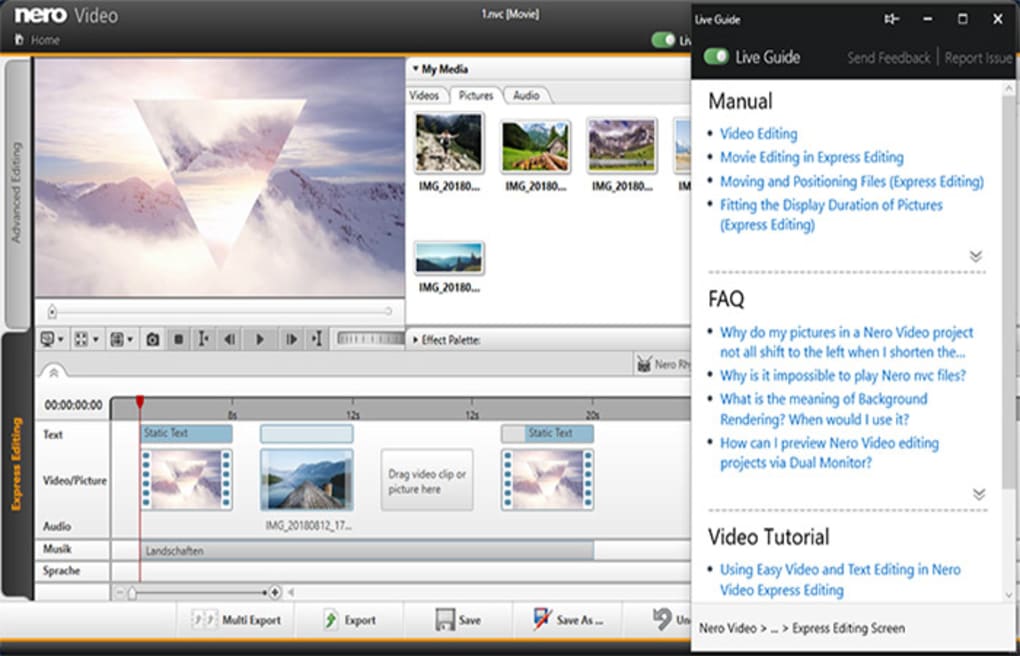
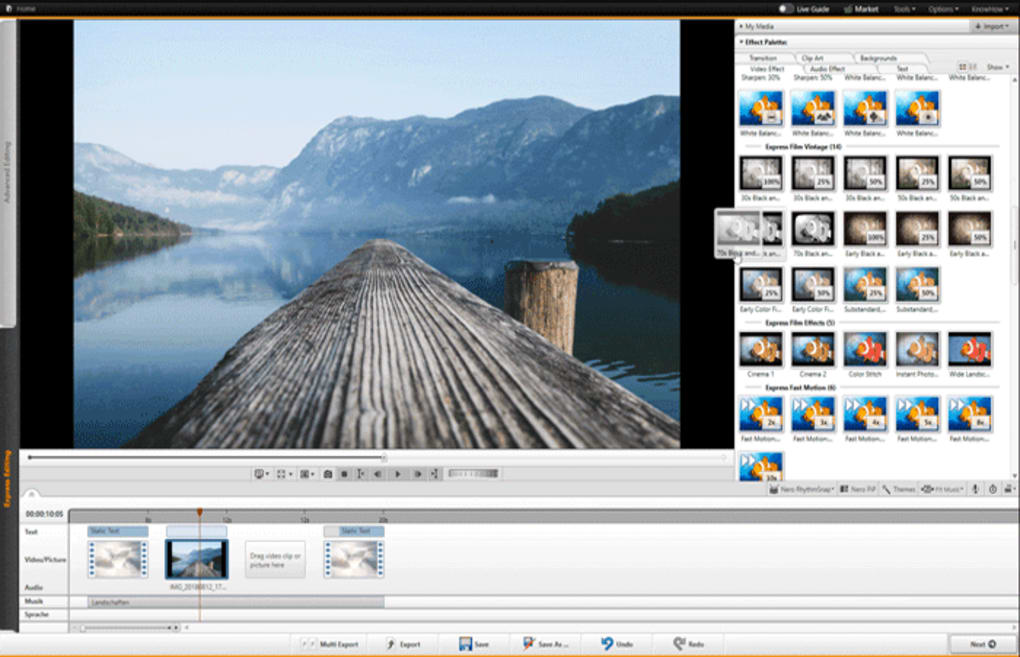
2. Intuitive and Powerful Video Editing: Nero Video offers a dual approach to video editing, catering to both quick edits and advanced, professional-grade projects. The Express editing mode simplifies the process, allowing users to quickly create professional-looking videos with minimal effort. Drag-and-drop functionality for video clips, transitions, text, and picture-in-picture (PIP) effects accelerates the workflow. For those seeking more control, the advanced editing mode provides multi-track editing with full control over keyframes, enabling precise adjustments to video effects and animations.
3. High-Quality Video Export and Disc Authoring: Nero Video allows for exporting your finished videos in high quality to various file formats, making them suitable for various platforms and devices. This includes the ability to export to file formats suitable for online sharing, ensuring compatibility across different web browsers and devices. Beyond digital exports, Nero Video offers robust disc authoring capabilities. Create professional-looking DVDs and Blu-ray discs with customizable, Hollywood-style 2D and 3D menus, giving your projects a polished and finished feel. The process is surprisingly straightforward, even for users with little experience in disc authoring.
4. Seamless Playback and Streaming Capabilities: The software facilitates seamless playback of videos, both from local files and from discs. It provides a user-friendly interface for playing videos from external sources, offering a convenient all-in-one solution for managing and enjoying your video content. The “Play to TV” feature enhances the user experience by enabling direct streaming of videos and slideshows to larger screens through network streaming, ideal for sharing your creations with others or presenting work on a larger screen.
5. Cross-Device Synchronization (potential): While not explicitly detailed in all promotional material, the suggestion that Nero Video can be synced across devices hints at the potential for starting a project on a smartphone and finishing it on a desktop. This would be a significant advantage for users who value mobility and flexibility in their workflow. However, concrete details regarding this functionality and its limitations should be verified directly through official Nero documentation.
Advantages of Using Nero Video
Nero Video’s strength lies in its accessibility and comprehensive feature set. It bridges the gap between simple video editing and advanced professional tools, making it suitable for a broad range of users.
-
Democratization of Video Editing: Nero has made video editing more accessible, allowing individuals with limited technical expertise to produce high-quality videos. This ease of use empowers everyday users to create professional-looking videos without the need for extensive training or expensive software.
-
Intuitive User Interface: The software’s user-friendly interface simplifies navigation and learning. Both beginners and experienced users will find it easy to navigate and access the tools they need. This ease of use drastically reduces the learning curve, allowing users to focus on their creative projects rather than wrestling with complicated software.
-
Cost-Effectiveness: Compared to other professional-grade video editing software, Nero Video offers a compelling cost-effective solution. While not free (it operates on a trial-and-subscription model), it provides significant value for its price, delivering a comprehensive feature set that surpasses what many free video editors offer.
-
End-to-End Video Solutions: The software offers a complete workflow, from video capture and organization to editing, disc authoring, and playback. This streamlined process eliminates the need to switch between multiple applications, simplifying the entire video production pipeline and increasing efficiency.
-
Mobile Accessibility (potential): If the cross-device syncing features are fully realized, this mobile accessibility adds a significant layer to its functionality, allowing users unparalleled flexibility in their video editing workflows.
Disadvantages and Limitations of Nero Video
While Nero Video offers many advantages, it also has some drawbacks to consider:
-
Paid Software with Limitations During Trial: The software is not free, offering only a limited 14-day trial. This trial period has restrictions, such as export limitations to only 30-second videos, which significantly restricts the potential of the software until the full version is purchased.
-
Subtitles and Captions Support: A notable omission is the lack of built-in support for adding subtitles and captions to videos, a crucial feature for accessibility and multilingual audiences. This limitation is a significant drawback compared to competing software options.
-
Compatibility Issues with Disc Players: The export file format (MP4) may not be universally compatible with all disc players. This compatibility issue requires users to ensure their target disc players support the MP4 file format to avoid playback problems.
-
Not the Most Advanced Editor: While Nero Video is powerful, it doesn’t reach the same level of advanced features and precision offered by industry-leading software like Adobe Premiere Pro or Final Cut Pro. Users seeking highly specialized effects or demanding professional-grade precision might find some limitations.
Nero Video Alternatives
Several comparable video editing software packages compete with Nero Video, each with its own strengths and weaknesses. Consider these alternatives based on your specific needs and budget:
- Adobe Premiere Pro: A professional-grade video editing software offering extensive features and capabilities, but it comes with a higher price point and steeper learning curve.
-
Final Cut Pro: A popular choice for macOS users, Final Cut Pro offers powerful features similar to Premiere Pro.
-
Filmora: A user-friendly video editor with a wide range of effects and features, ideal for both beginners and intermediate users.
-
Movavi Video Editor: Another user-friendly option with a good balance of features and ease of use.
-
VLC Media Player & Windows Media Player: While not video editors, these players provide excellent playback capabilities, excelling at what Nero Video does less efficiently.
Should You Use Nero Video?
Whether Nero Video is the right choice depends on your individual needs and priorities. If you need a versatile, relatively easy-to-use video editor with disc authoring capabilities and a user-friendly interface, then Nero Video could be a good fit. However, if you need advanced features like subtitle support, professional-grade precision, or extensive compatibility with various disc players, you may want to explore the alternative options mentioned above. The 14-day trial allows for a hands-on evaluation to determine if it meets your specific requirements. Careful consideration of the pros and cons, as highlighted in this review, will inform your decision-making process. Ultimately, the best video editing software depends on individual workflow preferences and the complexity of the video projects you’re planning to undertake.
File Information
- License: “Trial version”
- Latest update: “May 24, 2023”
- Platform: “Windows”
- OS: “Windows 10”
- Language: “English”
- Downloads: “336.2K”
- Size: “155.27 MB”


