
In the vast landscape of digital audio, where complex and often costly professional-grade software dominates, there exists a persistent need for tools that are both effective and accessible. Nero Wave Editor steps into this niche, offering a straightforward yet robust solution for recording and editing audio files. Born from Nero AG, a company synonymous with CD burning and multimedia utilities, Nero Wave Editor distills decades of audio expertise into a focused application designed for everyday users and aspiring audio enthusiasts. It’s presented as a free, simple, but powerful audio recorder and editor, primarily tailored for Windows users who need to perform fundamental audio manipulation without the steep learning curve or extensive feature bloat of its more complex counterparts.
At its heart, Nero Wave Editor is an application built for efficiency. It empowers users to capture sound, refine existing audio tracks, and prepare them for various applications, from personal projects to online content creation. While it might not boast the multi-track capabilities of a digital audio workstation (DAW) like Pro Tools or even the extensive open-source features of Audacity, its strength lies in its specialized approach to single-track wave editing. This article will delve into the functionalities, benefits, and considerations of Nero Wave Editor, exploring why it remains a relevant choice for many in the pursuit of clear, optimized audio.
Unveiling the Core Functionality of Nero Wave Editor
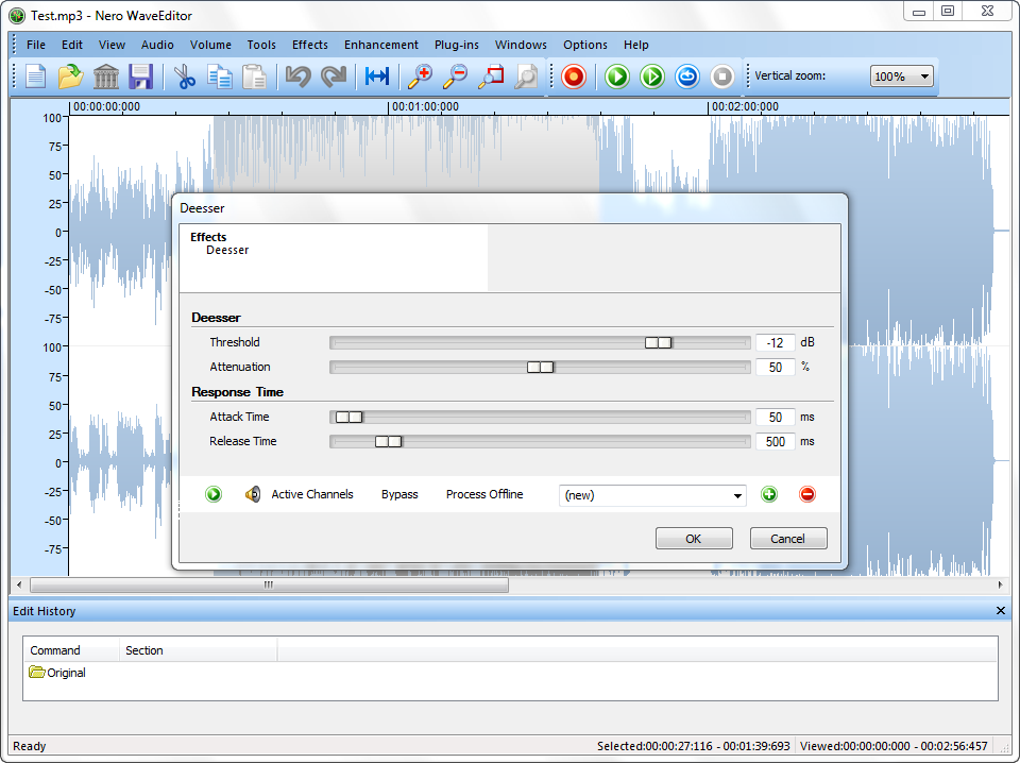
Nero Wave Editor is more than just a basic sound recorder; it’s a comprehensive tool for single-track audio manipulation. Its suite of features is carefully curated to provide both foundational and advanced processing capabilities, making it suitable for a wide array of audio-related tasks.
Recording and Basic Editing Capabilities
The primary gateway into audio editing is often through recording, and Nero Wave Editor excels in this regard. Users can easily record audio directly into the application, making it a convenient solution for capturing voiceovers, music, or any other sound input from a connected microphone or line-in source. This immediate recording functionality streamlines the workflow, allowing for instant capture and subsequent editing without needing to import files from external recorders.
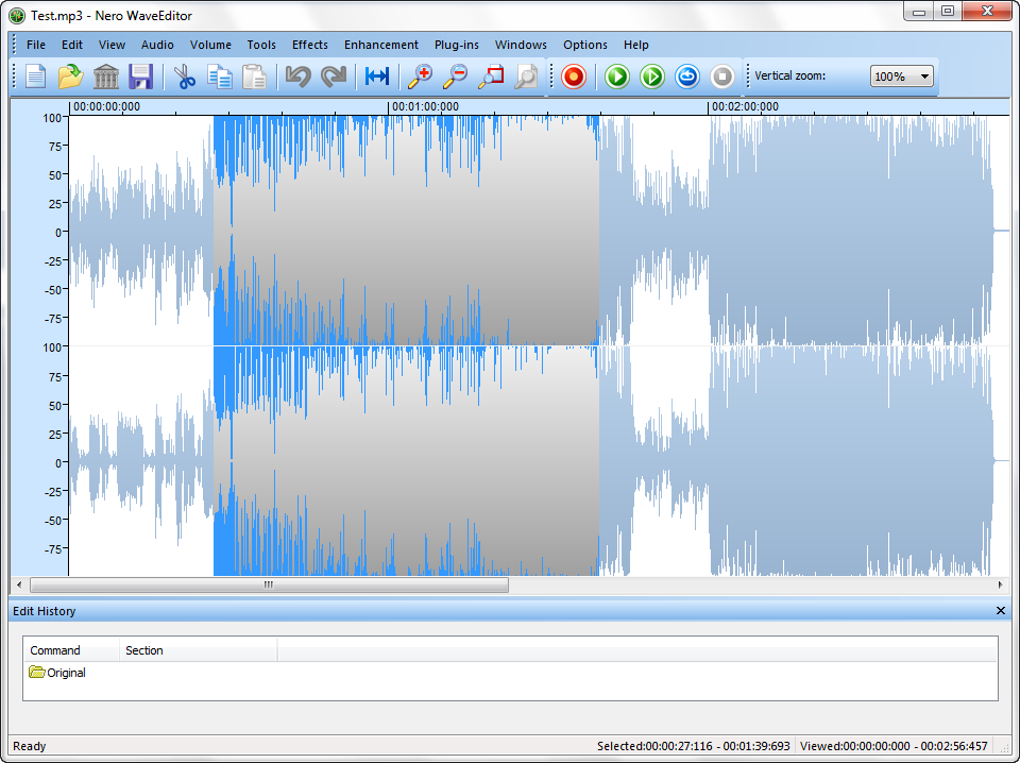
Once audio is captured or an existing file is loaded, the software provides a suite of essential editing tools. These foundational features are crucial for cleaning up and structuring audio tracks.
- Trimming: This allows users to cut off unwanted sections from the beginning or end of an audio file, such as silences, false starts, or extraneous noise. Precision trimming ensures that only the desired audio content remains, making the file concise and to the point.
- Splicing: Splicing involves combining different audio segments. Users can cut a section from one part of a track and insert it elsewhere, or merge multiple distinct audio files into a single, continuous track. This is invaluable for creating composite recordings, assembling spoken word segments, or combining musical phrases.
- Cutting, Copying, and Pasting: Standard clipboard operations are fully supported, allowing users to isolate specific segments, duplicate them, or move them around within the waveform. This provides granular control over the arrangement and content of the audio file.
- Deleting: Unwanted audio segments can be easily removed, helping to eliminate errors, background noise, or sections that do not contribute to the final product.
Beyond these fundamental actions, Nero Wave Editor is compatible with all major audio file formats, including the ubiquitous WAV and MP3. This broad compatibility ensures that users can work with almost any audio file they encounter, whether it’s an uncompressed studio recording or a highly compressed web-ready track. The ability to import and export in these common formats makes Nero Wave Editor a versatile tool for integration into various multimedia projects.
Advanced Audio Enhancement and Optimization
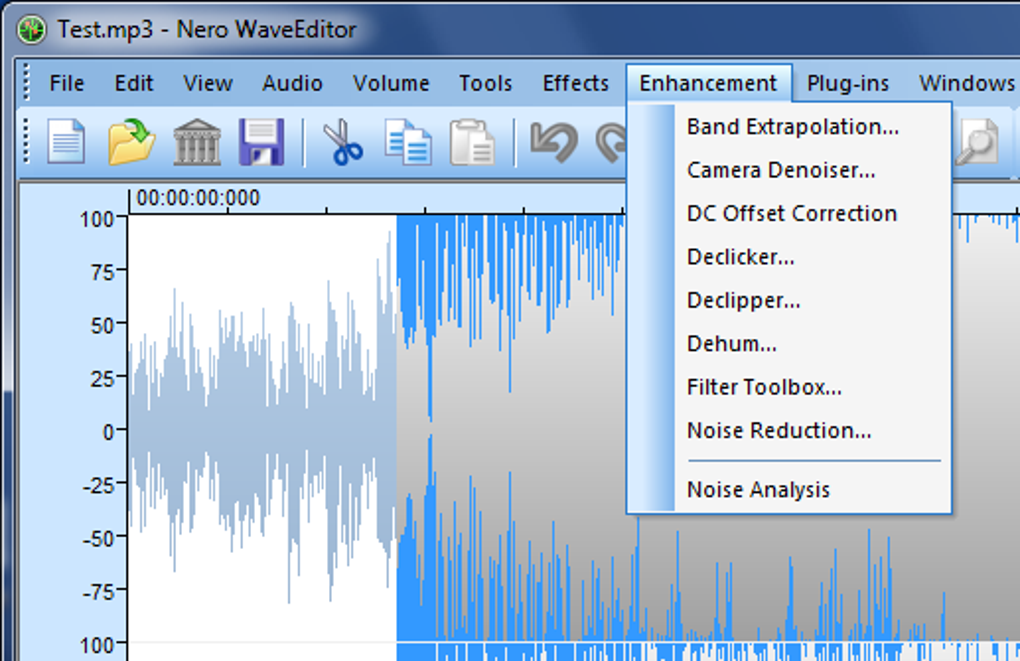
Where Nero Wave Editor truly distinguishes itself from rudimentary editors is in its array of advanced enhancement and optimization functions. These features are designed to improve the quality of audio, particularly recordings made from lower-quality sources or those that suffer from common audio issues.
- Normalization: This is a critical process for achieving consistent volume levels across an entire audio file or between different files. Nero Wave Editor’s normalization function boosts the overall file volume to a target level without introducing clipping or distortion, ensuring that the loudest parts of the audio are brought up to an optimal level, thereby improving listenability. This is especially useful for podcasts, voice recordings, or music tracks that might have been recorded at varying volumes.
- Various Enhancement Functions: The software includes tools specifically designed to improve audio recorded from sources like old cassette tapes or vinyl records. These functions can address common issues such as hiss, crackle, and hum, effectively cleaning up historical recordings and giving them new life. These filters and optimization methods allow users to create individual audio files quickly and easily, transforming raw, imperfect recordings into polished, professional-sounding tracks.
- Filtering and Sound Optimization: Beyond simple noise reduction, Nero Wave Editor provides a range of filtering options. These can include equalization (EQ) to adjust specific frequency ranges, noise gates to eliminate background noise below a certain threshold, and other effects that sculpt the sound. The goal is to optimize the audio for clarity, presence, and overall acoustic appeal, ensuring that the final output meets desired quality standards. These methods give users precise control over the tonal characteristics and sonic integrity of their audio.
Non-Destructive Editing and Real-time Audition
Two features that significantly elevate the user experience in Nero Wave Editor are its non-destructive editing capabilities and real-time ‘audition’ function. These elements combine to create a flexible and forgiving editing environment, particularly beneficial for those who are still learning or want to experiment without commitment.
- Non-Destructive Editing: This is a cornerstone of professional audio editing. Instead of permanently altering the original audio file with each edit, Nero Wave Editor applies changes as metadata or instructions. This means that users can try out countless options, apply various effects, and make extensive modifications, all while retaining the ability to undo every single change. If an effect doesn’t sound right, or a cut was misplaced, it can be reverted instantly without any loss to the original source material. This freedom to experiment and correct mistakes without permanent consequences fosters creativity and reduces the anxiety associated with complex editing tasks. The ability to ‘undo all changes’ is a powerful safety net, allowing users to explore different artistic directions.
- Real-time ‘Audition’: This feature allows users to select and hear effects in real-time as their sound file plays. Before committing to an effect, users can preview how it will alter the audio instantly. This immediate feedback loop is invaluable for fine-tuning parameters, comparing different settings, and ensuring that the chosen effect achieves the desired sonic outcome. It eliminates the tedious process of applying an effect, rendering it, listening, undoing, and re-applying with different settings, thereby significantly speeding up the editing workflow.
- Preset Manager: For frequently used settings and effect chains, Nero Wave Editor includes a Preset Manager. This allows users to save their customized configurations, streamlining repetitive tasks and ensuring consistency across different projects. Whether it’s a specific EQ setting for a voiceover or a particular noise reduction profile for vinyl recordings, these presets can be recalled instantly, saving time and effort.
- Advanced Processing Options: The software also delves into more technical audio processing, including sample format conversion, anti-aliasing filters, dithering, and noise shaping. These tools are crucial for maintaining audio fidelity when converting between different sample rates or bit depths, ensuring that digital artifacts are minimized and the sound remains as clear as possible. These features demonstrate a level of sophistication that goes beyond mere basic editing, offering complete control over the intricate details of audio files.
The Ideal User: Who Benefits Most from Nero Wave Editor?
Nero Wave Editor isn’t trying to be an all-encompassing digital audio workstation designed for professional music producers or sound engineers. Its clear objective is to serve a specific demographic, making it an excellent choice for individuals and small operations with particular needs.
This software doesn’t pretend to offer the wealth of features that more advanced audio software such as Pro Tools, Logic Pro, or even the highly capable open-source Audacity provide. Instead, it carved out a niche for basic recording and editing tasks, fulfilling its brief perfectly well.
A Focus on Accessibility and Simplicity
The primary beneficiaries of Nero Wave Editor are beginners and intermediate users who might find the sheer complexity of professional DAWs overwhelming. These individuals often seek a tool that allows them to perform essential audio tasks without a steep learning curve or the need to navigate a bewildering array of menus and plugins. For them, Nero Wave Editor offers a welcoming interface that gets straight to the point. Its design prioritizes ease of use, ensuring that even someone with minimal prior experience in audio editing can quickly grasp its functionalities and start producing results.
Consider a hobbyist creating a simple podcast, a student editing an interview for a class project, or a small business owner recording narration for a promotional video. In these scenarios, the need is often for a lightweight, stable, and intuitive tool that can record, clean up, and export audio files efficiently. Nero Wave Editor fits this description perfectly. It provides the necessary functions to achieve high-quality results for these common tasks without requiring an extensive investment in time or money for training and software licenses.
Beyond the Basics: Practical Applications
While “basic” is a term often used to describe its core offerings, Nero Wave Editor’s capabilities extend to a variety of practical applications:
- Podcasting and Voiceovers: For creators who need to record clear speech, remove background noise, normalize volume levels, and trim segments, Nero Wave Editor offers all the necessary tools. Its focus on single-track editing is ideal for spoken word content, ensuring that voices are crisp and consistent.
- Digitizing Analog Media: The enhancement functions specifically designed for recordings from tape or vinyl records make it an excellent choice for those looking to preserve and digitize older audio collections. Users can record from analog sources, then use the software’s filters to remove hiss, crackle, and other imperfections, bringing old recordings back to life with improved clarity.
- Sound Design for Simple Projects: For game developers working on indie projects, animators needing simple sound effects, or video editors requiring quick audio adjustments, Nero Wave Editor can serve as a handy utility. Its ability to quickly apply effects, trim, and adjust volume makes it suitable for creating or modifying sound assets efficiently.
- Educational Settings: In educational environments, where students need to learn fundamental audio editing principles without being overwhelmed by complex software, Nero Wave Editor provides an accessible platform. It allows them to understand concepts like normalization, filtering, and non-destructive editing in a practical, hands-on manner.
The non-destructive editing and pre-defined processing tools further reinforce its suitability for this audience. Users can experiment freely, confident that they can always revert to a previous state. This fosters a sense of exploration and learning without the fear of irreversible mistakes. In essence, Nero Wave Editor is for anyone who values a lightweight, simple tool with minimum overheads, offering a perfect balance between functionality and user-friendliness for everyday audio editing demands.
A Closer Look at Pros and Cons
Like any software, Nero Wave Editor comes with its own set of strengths and weaknesses. Understanding these can help potential users determine if it’s the right fit for their specific audio editing needs.
Advantages that Stand Out
Nero Wave Editor has several compelling advantages that make it an attractive option, particularly for its target audience:
- Simple but Powerful Audio Recording and Editing: This is perhaps its most significant selling point. The interface is intuitive, uncluttered, and easy to navigate, which drastically reduces the learning curve. Despite this simplicity, it doesn’t skimp on essential functionalities. Users can record audio directly, and then apply a range of powerful editing and enhancement tools like trimming, splicing, normalization, and various filters. This balance allows users to achieve high-quality results without getting bogged down in overly complex features or confusing menus. For many, the efficiency gained from its straightforward design outweighs the need for more specialized, albeit rarely used, functions found in advanced DAWs.
- Non-Destructive Editing with Full Preview and Undo Features: This is a crucial professional-grade feature integrated into a beginner-friendly tool. Non-destructive editing means that every change made to the audio file is non-permanent until the user decides to save the final output. This allows for endless experimentation. Users can apply filters, adjust volumes, and try different effects, confident that if the results aren’t satisfactory, they can instantly undo the changes without any degradation to the original audio quality. The full preview feature further enhances this by allowing real-time auditioning of effects, enabling users to hear how changes will sound before committing, thereby saving considerable time and effort in the editing process.
- Compatible with All Major Audio File Formats: In today’s diverse digital landscape, interoperability is key. Nero Wave Editor supports widely used formats such as WAV and MP3, ensuring that users can easily import audio from various sources and export their finished projects for different platforms or applications. This flexibility means less time spent on format conversions using external tools and more time focused on the actual editing. The ability to handle both uncompressed (WAV) and compressed (MP3) formats caters to different quality requirements and file size considerations.
- Free to Use: As a free application, Nero Wave Editor offers incredible value. It provides robust audio editing capabilities without any financial investment, making it accessible to a much broader audience, including students, hobbyists, and those with limited budgets. This significantly lowers the barrier to entry for anyone looking to get into audio recording and editing.
- Optimized for Windows: Being developed by Nero AG, a company with deep roots in Windows multimedia, ensures that Nero Wave Editor is well-integrated and optimized for the Windows operating system. This often translates to stable performance, efficient resource usage, and a seamless user experience for Windows users.
Limitations and Considerations
While Nero Wave Editor offers many benefits, it’s also important to acknowledge its limitations:
- Limited Feature Set Compared to Some Competitors: This is a direct trade-off for its simplicity. While it excels at single-track editing and basic enhancements, it lacks advanced features found in professional DAWs or even more comprehensive free alternatives like Audacity. Users looking for multi-track editing, VST plugin support for a vast array of effects, advanced mixing consoles, MIDI capabilities, or sophisticated mastering tools will find Nero Wave Editor insufficient. It’s not designed for complex music production or intricate sound design that requires layering multiple audio tracks. This limitation means users might outgrow it if their audio editing needs become more sophisticated.
- Software Details Hard to Find on the Developer’s Site Raising Doubts About Future Development and Support: This is a significant concern highlighted by user reviews on platforms like PhanMemFree. The lack of readily available, up-to-date information regarding Nero Wave Editor on the official developer’s website can lead to uncertainty about the software’s longevity. Users might wonder if the program is actively maintained, if new features will be added, or if technical support will be available for future compatibility issues or bugs. This can be a deterrent for users seeking a long-term solution or those who rely on frequent updates and community support. In the fast-evolving world of software, a perceived lack of developer engagement can indicate a program might become outdated or unsupported, potentially leaving users in a difficult position if they encounter problems.
- Focus on Single-Track Editing: While a strength for simplicity, this is also a limitation. Any project requiring simultaneous manipulation of multiple audio streams (e.g., music production with vocals, instruments, and drums; podcasting with multiple speakers and background music) would necessitate a different tool.
In summary, Nero Wave Editor presents a compelling option for those who prioritize ease of use and essential audio editing functions. Its non-destructive capabilities and format compatibility are strong assets. However, users with more advanced requirements or those concerned about long-term development might need to consider alternatives that offer a broader feature set and clearer developer communication.
Installation, Compatibility, and the User Experience
Getting started with Nero Wave Editor is designed to be as straightforward as the software itself. Its compatibility and user reviews paint a picture of an accessible and efficient tool for Windows users.
System Requirements and Installation
Nero Wave Editor is primarily a Windows-based application. The reference content indicates compatibility across various Windows versions, including Windows 7 and presumably newer versions like Windows 10 and 11, though specific explicit mentions for the latest OS versions are sometimes less common for older applications. The current version, 26.5.1020.0, suggests ongoing maintenance, though the PhanMemFree review’s concern about developer information remains.
The download size, around 365.89 MB for the latest version, is moderate, indicating a self-contained application that doesn’t require extensive additional downloads. Installation typically follows a standard Windows procedure, which is generally user-friendly and guided.
Once installed, the program supports multiple languages, including English, Czech, Danish, German, Greek, Spanish, Finnish, French, Italian, Japanese, Dutch, Norwegian, Polish, Portuguese, Russian, Swedish, Turkish, and Chinese, making it accessible to a global user base.
The User Experience: Simplicity in Action
The user interface of Nero Wave Editor is renowned for its simplicity. Unlike professional DAWs that often feature dozens of complex buttons, sliders, and meters, Nero Wave Editor presents a clean, intuitive layout. This design philosophy directly supports its goal of being easy for beginners and intermediate users.
One user, Krishna Vardhi, reviewed the software on April 14, 2017, stating, “easy & high quality wave editor in ever. the nero wave editor is very easy to edit wave files and there is no other easy source except this thankyou.” This glowing review highlights the core strength of the software: its exceptional ease of use combined with the ability to produce quality results. The user specifically praised its “very simple operation for editing” and “very good improvement” capabilities, with no significant cons noted at the time. This echoes the broader sentiment that for straightforward tasks, Nero Wave Editor provides an unmatched user-friendly experience.
Positioning Against Alternatives
While Nero Wave Editor holds its own in its specific niche, it’s useful to understand its place among other audio editing software. The PhanMemFree platform lists several alternatives, which helps contextualize Nero Wave Editor’s offering:
- Wave Editor (4Free): Described as “A beginner-friendly audio editor for non-professionals,” it directly competes with Nero Wave Editor in terms of target audience and ease of use.
- Nero SoundTrax: Another offering from Nero, suggesting a broader suite of audio tools from the same developer.
- Audacity: Often cited as the leading free and open-source audio editor, Audacity offers a significantly more expansive feature set, including multi-track editing, VST plugin support, and a vibrant community. While more powerful, it can also present a steeper learning curve for absolute beginners compared to Nero Wave Editor.
- WavePad Audio Editing Software: This is a “Professional Sound Editing Made Easy” tool, available for download on Windows. It often positions itself as a more feature-rich but still accessible option.
- Wavosaur: Another free audio program for Windows, often praised for its lightweight nature and essential features.
- Ocenaudio: A free audio editor known for its clean interface and cross-platform compatibility, offering a good balance of features and ease of use.
Against these alternatives, Nero Wave Editor maintains its unique selling proposition by focusing intently on streamlined, single-track wave editing with a strong emphasis on user accessibility and powerful core enhancements. It doesn’t try to outcompete Audacity on features, but rather to offer a more focused, arguably simpler, path for specific audio tasks. Its continued availability and updates (as indicated by recent version numbers) suggest it retains a loyal user base who appreciate its specific blend of functions.
Conclusion
Nero Wave Editor stands as a testament to the idea that powerful tools don’t always need to be complex or expensive. It serves as an excellent entry point for anyone venturing into the world of digital audio editing, offering a balanced combination of simplicity, effectiveness, and essential features. For Windows users, it provides a free and intuitive platform to record, clean up, and refine audio files with remarkable ease.
Its non-destructive editing paradigm, coupled with real-time preview and a comprehensive suite of enhancement functions (from normalization to noise reduction for vintage recordings), equips users with significant control over their sound. Whether you’re a budding podcaster, a student working on an audio project, or simply someone looking to digitize and restore old recordings, Nero Wave Editor delivers on its promise of making quality audio accessible.
While it’s important to acknowledge its limitations in comparison to full-fledged digital audio workstations – particularly its single-track focus and the lingering questions about long-term developer support as noted by reviews on PhanMemFree – these are deliberate choices that underscore its design philosophy. Nero Wave Editor isn’t built to be everything for everyone; rather, it aims to be an excellent, specialized tool for specific needs.
Ultimately, for those seeking a reliable, user-friendly, and free solution for fundamental audio recording and editing tasks on Windows, Nero Wave Editor remains a highly commendable choice. It empowers users to achieve clear, optimized audio without the financial burden or steep learning curve associated with more professional alternatives, proving that sometimes, less truly is more.
File Information
- License: “Free”
- Latest update: “January 15, 2025”
- Platform: “Windows”
- OS: “Windows 7”
- Language: “English”
- Downloads: “251.1K”
- Size: “365.89 MB”


