
In an era defined by ubiquitous digital connectivity, understanding and managing one’s internet usage is paramount. From individual users striving to optimize their home network performance to small businesses needing to keep tabs on their bandwidth consumption, a clear insight into network traffic is indispensable. While many modern operating systems offer rudimentary network activity displays, dedicated tools provide a deeper, more actionable level of detail. Enter NET Traffic Meter, a venerable and effective free software solution designed for Windows that empowers users to gain granular control and visibility over their network connection’s velocity, traffic, and output.
First introduced to the digital landscape in 2004, NET Traffic Meter quickly established itself as a reliable utility within the networking software category, specifically excelling in bandwidth monitoring and analysis. Over its long tenure, it has garnered significant attention, accumulating tens of thousands of downloads and maintaining a steady user base, particularly in regions like India, Bangladesh, and Germany, where efficient and free network management tools are highly valued. Despite its last reported update dating back to 2007, its foundational stability and clear-cut functionality continue to make it a relevant choice for those seeking a straightforward and robust solution without the overhead of more complex, feature-bloated alternatives.
The program’s enduring appeal lies in its simplicity and effectiveness. It doesn’t promise cutting-edge graphical interfaces or cloud integration, but rather delivers on its core promise: to provide clear, concise, and real-time data on your network or modem interface. For anyone who has ever experienced slowdowns, wondered where their data allowance went, or needed to troubleshoot connection issues, NET Traffic Meter offers an accessible window into the often-mysterious world of network data flow. It’s a testament to the idea that sometimes, the most useful tools are those that focus on doing one thing exceptionally well, without unnecessary frills.
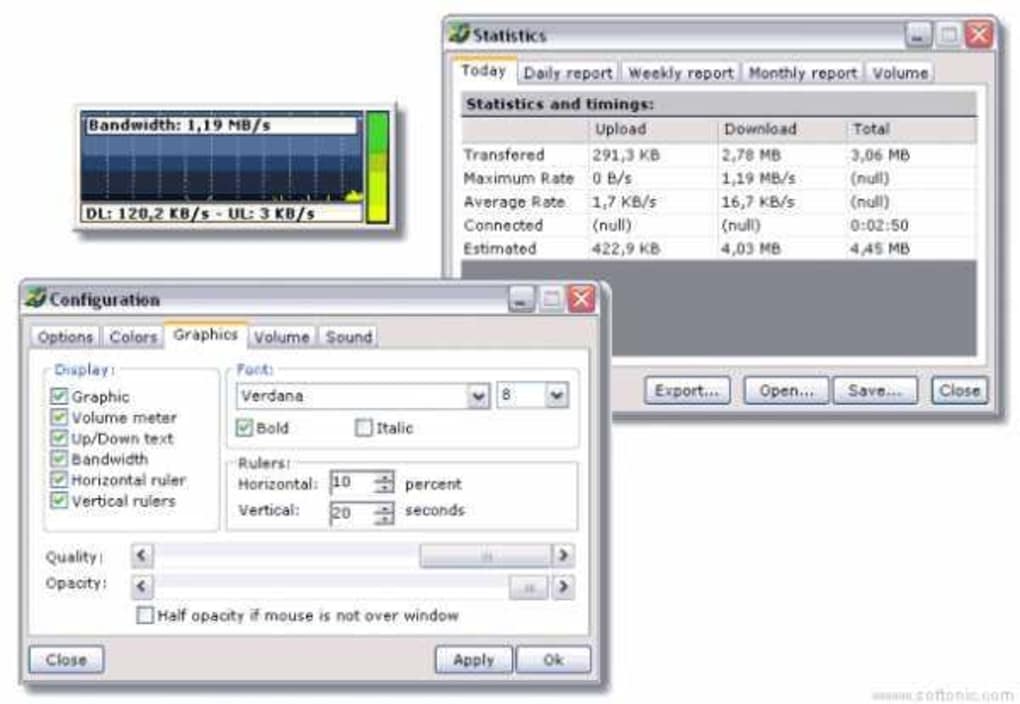
This article will delve into the multifaceted capabilities of NET Traffic Meter, exploring its essential features, discussing its technical footprint, and contextualizing its place within the broader ecosystem of network monitoring tools. We will uncover why this seemingly modest application has continued to resonate with users for well over a decade, and how its no-cost, no-fuss approach to network oversight remains a compelling proposition in an increasingly complex digital world.
A Deep Dive into NET Traffic Meter’s Core Functionality
At its heart, NET Traffic Meter is a powerful yet intuitive utility crafted to provide users with an unparalleled view of their network’s vital signs. The software is meticulously designed to monitor the traffic across any network or modem interface, offering a comprehensive suite of features that transform abstract data flows into tangible, actionable information. Understanding these core functionalities is key to appreciating the profound value NET Traffic Meter brings to network management.
One of its primary functions is the ability to track volume, download, and upload rates in real-time. This is not just a simplistic display of current speed; it provides a continuous stream of data that allows users to observe fluctuations, identify peak usage times, and understand the impact of various online activities on their connection. Whether you’re streaming high-definition video, engaging in online gaming, downloading large files, or simply browsing the web, NET Traffic Meter renders these activities quantifiable. Users can instantly see how much data is being transferred, at what speed, and in which direction, empowering them to make informed decisions about their online behavior and bandwidth allocation.
Beyond real-time rates, the software excels in presenting general statistics. This feature aggregates data over periods, allowing users to review their usage patterns over days, weeks, or even months. Such historical data is invaluable for several reasons: it helps in budgeting data allowances, particularly for those on capped internet plans; it aids in diagnosing persistent network issues by showing long-term trends; and it provides a basis for optimizing network performance by highlighting times of congestion or underutilization. These statistics can often reveal hidden bandwidth hogs or unexpected data transfers, serving as a first line of defense against unwanted background processes or even malicious activity.
Furthermore, NET Traffic Meter provides the capability to measure specifications of your interface. This includes crucial details about the network adapter itself, such as its connection speed, MAC address, and other technical parameters. For advanced users or IT professionals, this information can be instrumental in configuring networks, troubleshooting hardware issues, or ensuring that network components are operating at their optimal capacity. It bridges the gap between software-level monitoring and hardware-level understanding, offering a more holistic view of the network’s health.
One of the more practical tools integrated within NET Traffic Meter is the connection speed stopwatch. This feature allows users to precisely measure the duration and data transferred during specific activities. For example, if you’re downloading a specific file, you can start the stopwatch to gauge exactly how long the download takes and the average speed achieved. This is incredibly useful for benchmarking internet service provider (ISP) performance, comparing speeds at different times of the day, or verifying that advertised speeds are being delivered. It transforms anecdotal observations into concrete metrics, providing users with empirical evidence regarding their connection quality.
Perhaps one of the most innovative and user-centric features is the alert system. This functionality enables users to set specific conditions for upload and download thresholds. For instance, you can configure an alert to trigger if your download speed drops below a certain Mbps, or if your total data usage exceeds a predefined limit within a given timeframe. When these conditions are met, the user is notified, allowing for immediate intervention or awareness. This proactive monitoring is invaluable for avoiding data overage charges, detecting unauthorized network activity, or simply being informed when performance degrades. It transforms passive observation into active management, putting the user firmly in control.
Adding a unique layer of interaction, NET Traffic Meter also boasts an audio ticker. This distinctive feature plays a short notification sound—such as a beep—whenever a specified amount of data has been transferred. Imagine a subtle “beep” for every 1 MB downloaded or uploaded. While seemingly minor, this auditory feedback can be surprisingly effective. It provides a non-intrusive, ambient awareness of network activity, particularly useful for users engaged in other tasks who still want a subtle indication of ongoing transfers without constantly checking a visual display. It’s a clever touch that enhances the overall user experience by providing an additional sensory cue to network events.
In essence, NET Traffic Meter is more than just a speed indicator; it’s a comprehensive dashboard for understanding, managing, and optimizing network connectivity. Its array of features, from real-time statistics to proactive alerts and unique audio feedback, are all geared towards empowering users with the knowledge and tools needed to navigate the complexities of their digital lifeline.
Technical Specifications, System Compatibility, and Resource Efficiency
Understanding the technical underpinnings of NET Traffic Meter is crucial for appreciating its long-standing utility, especially in an evolving technological landscape. As a software developed in the early 2000s, its design philosophy prioritized efficiency and broad compatibility, characteristics that continue to define its appeal.
NET Traffic Meter is specifically designed for the Windows operating system. Its initial release targeted Windows 2000 and previous versions, indicating its robust foundation on older Windows architectures. This broad compatibility also extended to subsequent popular iterations like Windows XP, which was prevalent during its active development period. While the software’s last update was noted on February 12, 2007, its core functionality, being related to fundamental network interface monitoring, means it can still operate effectively on many newer Windows environments through compatibility modes, although official support for modern Windows versions (like Windows 10 or 11) is not guaranteed. Users often find that such legacy applications, due to their simple architecture, can run surprisingly well on contemporary systems, particularly if they do not rely on deeply integrated OS-specific features introduced in later Windows releases.
A significant advantage highlighted in its description is its minimal resource footprint. NET Traffic Meter is described as “a not that heavy program that will not require as much storage than the average program in the section Networking software.” This attribute is a cornerstone of its design. In an era where many applications are becoming increasingly demanding on system resources, NET Traffic Meter stands out as a lightweight alternative.
- Storage: With a reported size of just 852.49 KB (less than 1 MB), the program requires negligible disk space. This makes it ideal for older machines with limited storage capacity, or for users who simply prefer to keep their system lean and uncluttered. It can be downloaded and installed in moments, without impacting precious drive space.
- Memory and CPU: While specific figures aren’t provided, its small size and focused functionality imply very low memory and CPU usage. This is critical for a background monitoring application, as it ensures that NET Traffic Meter itself does not contribute to network slowdowns or system sluggishness. Users can run it continuously without fear of it hogging system resources, allowing their primary tasks to proceed uninterrupted.
The ease of installation is another indirect benefit of its lightweight nature. Typically, such small programs involve a straightforward setup process, often a simple executable that installs quickly, requiring minimal user intervention. This ‘install-and-forget’ approach contributes to its user-friendliness, making network monitoring accessible even to those who are not particularly tech-savvy.
The fact that NET Traffic Meter has continued to accumulate downloads and installations more than a decade after its last update speaks volumes about its legacy relevance and stability. Its targeted functionality means that even as operating systems evolve, the core principles of network traffic remain consistent. For many users, particularly those with older hardware or those who prioritize simplicity and efficiency over bleeding-edge features, NET Traffic Meter offers a robust, stable, and incredibly resource-efficient solution that performs its designated task without fail. This reliability, coupled with its completely free license, cements its status as a timeless utility for network observation.
User Experience, Community Reception, and Global Footprint
The true measure of any software’s success lies not just in its feature set, but in how users interact with it and how it is received by the community. NET Traffic Meter, despite its age, boasts a compelling story of user satisfaction and a notable global footprint, underscoring its enduring appeal.
From a user experience perspective, NET Traffic Meter is praised for its straightforwardness. While the reference material doesn’t detail its graphical interface, applications of this type and era generally offer a clean, functional layout. Users would typically expect to see real-time graphs or numerical displays for upload and download speeds, along with cumulative data statistics accessible through simple tabs or menu options. The program’s design ethos seems to prioritize functionality over aesthetics, ensuring that the critical data is presented clearly and without distraction. This ease of use is a significant factor in its sustained popularity, as it lowers the barrier to entry for effective network monitoring. There’s no steep learning curve; users can install it and immediately begin to glean insights from their network activity.
The community reception for NET Traffic Meter has been overwhelmingly positive, particularly concerning its accessibility and effectiveness. A user review from July 15, 2007, perfectly encapsulates this sentiment: “NET Traffic Meter 2.1.2567. awesome !!!! excellent !!! wonderful !!! amazing !!! best is its free !!!” This enthusiastic feedback highlights several key aspects:
- Effectiveness: The repeated exclamations (“awesome”, “excellent”, “wonderful”, “amazing”) speak to the program’s ability to reliably deliver on its promises. Users find it genuinely helpful in monitoring their network.
- Value Proposition: The concluding “best is its free !!!” underscores the immense value derived from a no-cost solution that performs so well. In a market where many monitoring tools come with price tags or trial limitations, NET Traffic Meter’s freeware status is a powerful differentiator and a major draw for individuals and small organizations alike.
This positive reception has translated into a significant global footprint. The program has been “very heavily used in some countries such as India, Bangladesh, and Germany.” This geographical distribution is noteworthy. In regions where internet infrastructure might be developing, or where users are particularly conscious of data costs and connection stability, a reliable, free, and lightweight tool like NET Traffic Meter becomes an indispensable asset. It provides the means for users to diagnose issues, manage their consumption, and ensure they are getting the most out of their internet service, all without adding to their financial burden. The robust download numbers – 50,526 downloads since 2004 and 68 installations in a single recent week – further attest to its continuous relevance and global reach, demonstrating that its utility transcends geographical and temporal boundaries.
The enduring popularity of NET Traffic Meter, even without recent updates, is a testament to its foundational quality. It’s a tool that does precisely what it claims, does it well, and does it for free. This combination of effective functionality, user-friendly design, and a strong value proposition has cemented its place in the hearts of users worldwide, ensuring its continued download and use years after its initial release.
Navigating the Landscape of Network Monitoring Tools: NET Traffic Meter and its Alternatives
The need for network monitoring tools is as old as the internet itself. Whether for troubleshooting, optimizing performance, managing data caps, or simply satisfying curiosity, users have always sought ways to visualize their digital lifeline. While NET Traffic Meter provides a robust, no-frills solution, it operates within a broader ecosystem of network monitoring applications, each with its own strengths and target audience. Understanding this landscape helps contextualize NET Traffic Meter’s unique position and value.
The general purpose of bandwidth monitors is to track the flow of data packets in and out of a computer or network interface. This information is critical for various reasons. For home users, it helps identify bandwidth hogs (like background updates or applications), monitor data consumption against ISP caps, and diagnose slow internet speeds. For small businesses, it can aid in network resource allocation, identify potential security breaches, and ensure critical business applications have sufficient bandwidth.
While NET Traffic Meter excels at providing real-time data, alerts, and historical statistics in a lightweight package, the market has seen the emergence of numerous alternatives over the years. These alternatives often cater to different preferences or offer more advanced features that have become standard in modern software. For instance, some users might prefer tools with:
- Modern User Interfaces: Many newer applications feature sleek, graphical interfaces, sometimes with customizable dashboards, themes, and more interactive visualization options.
- Cloud Integration and Remote Monitoring: Some advanced tools allow users to monitor multiple devices from a centralized cloud platform or access monitoring data remotely.
- Advanced Analytics and Reporting: Beyond basic statistics, some tools offer in-depth analytical capabilities, detailed reports, and even AI-powered insights into network behavior.
- Firewall Integration and Security Features: Certain monitors integrate with firewalls or offer features to identify and block suspicious network activity, providing a security layer.
- Application-Specific Monitoring: More sophisticated tools can break down bandwidth usage by individual applications, giving users precise control over which programs are consuming the most data.
PhanMemFree.org, like many software portals, lists several alternatives that offer varying levels of functionality. Let’s briefly look at some of them mentioned in the reference and how they compare in general terms to NET Traffic Meter:
- Net Meter (Trial version): This suggests a more feature-rich offering, likely with a modern interface and advanced options, but comes with a cost after a trial period. It would appeal to users willing to pay for enhanced capabilities.
- NetMeter Evo (Free): Positioned as a “Free bandwidth checker,” NetMeter Evo likely offers a similar core functionality to NET Traffic Meter but might feature a more contemporary design or slightly different set of features, appealing to users who want a free tool with potentially a newer look and feel.
- Jc Net Meter (Free): Also a free option focused on “keeping an eye on your internet connection,” Jc Net Meter probably offers straightforward monitoring, possibly with its own unique take on presentation or minor features.
- ShaPlus Bandwidth Meter (Free): This tool, focused on “controlling your bandwidth usage,” suggests a focus on managing and potentially limiting or allocating bandwidth, which could be a step beyond simple monitoring.
- NetSpeedMonitor (Free): This tool is known for its simplicity and direct display in the Windows taskbar, offering quick access to current speeds. It’s often favored for its minimalist approach.
- DU Meter (Trial version): A well-known and graphically rich option, DU Meter provides extensive statistics and reporting, often preferred by users who want a highly detailed and visually appealing monitoring solution, again for a price.
- NetWorx (Free): A comprehensive bandwidth and traffic monitoring tool, NetWorx is highly regarded for its detailed reports, customizable graphs, and flexible features, making it a strong free alternative for users needing more depth than NET Traffic Meter.
In this varied landscape, NET Traffic Meter holds its own as a classic, reliable, and completely free solution. Its strength lies in its simplicity, minimal resource consumption, and stable performance on a range of Windows systems. It doesn’t aim to be the most feature-rich or graphically advanced tool; instead, it focuses on delivering essential network monitoring capabilities without any overhead. For users who value stability, low system impact, and a clear, functional approach, especially those with older hardware or who are on strict budgets, NET Traffic Meter remains an exceptionally compelling choice. It represents the enduring appeal of well-crafted, focused software that prioritizes utility and accessibility. While newer tools may offer more bells and whistles, NET Traffic Meter consistently delivers on its core promise, proving that sometimes, less is indeed more.
Conclusion: The Enduring Value of NET Traffic Meter
In the dynamic world of software, longevity is a rare and powerful testament to a program’s inherent value. NET Traffic Meter, first surfacing in 2004 and remaining relevant well over a decade later, embodies this principle. Throughout this exploration, we’ve dissected its robust features, from real-time speed and volume tracking to its insightful statistical analysis, connection speed stopwatch, proactive alert system, and even its unique audio ticker. Each element is meticulously designed to offer users comprehensive visibility and control over their internet connection.
Its technical specifications further underscore its enduring appeal: a remarkably lightweight footprint of under 1 MB, ensuring minimal impact on system resources, and broad compatibility across various Windows operating systems, including older versions for which modern alternatives might be scarce or too demanding. This efficiency, combined with its absolute free availability, has fostered a fervent user base and a significant global presence, particularly in regions where practical, no-cost solutions are highly prized.
While the ecosystem of network monitoring tools has evolved, introducing myriad options with advanced interfaces and cloud integration, NET Traffic Meter retains its distinct niche. It stands as a reliable, no-nonsense classic, perfectly suited for users who prioritize stability, resource efficiency, and straightforward functionality over complex features or graphical extravagance. For troubleshooting connection issues, managing data allowances, or simply gaining a deeper understanding of one’s network activity, NET Traffic Meter continues to deliver on its promise.
In an age of ever-increasing digital demands, NET Traffic Meter serves as a poignant reminder that foundational utility, delivered with precision and accessibility, can outlast fleeting trends. It remains an excellent choice for anyone seeking a dependable, free, and highly effective tool to keep a vigilant eye on their network traffic.
File Information
- License: “Free”
- Version: “2.1.2567”
- Latest update: “February 12, 2007”
- Platform: “Windows”
- OS: “Windows XP”
- Language: “English”
- Downloads: “28.8K”
- Size: “852.49 KB”


