
NetLimiter is a powerful application designed for Windows operating systems, providing comprehensive control and monitoring of internet traffic. Initially designed for older Windows versions like Win98, WinME, Win2000, and XP, NetLimiter has evolved to support newer systems while maintaining its core functionality: precise management and detailed statistical analysis of network activity. This in-depth review explores NetLimiter’s features, strengths, weaknesses, and overall effectiveness as a network management solution.
Core Functionality: Control and Monitoring of Internet Traffic
At its heart, NetLimiter offers unparalleled control over internet traffic. Users can set precise download and upload speed limits for individual applications or even specific connections. This granular control allows for resource allocation based on priority, ensuring critical applications receive sufficient bandwidth while limiting less important ones. This feature is exceptionally valuable in environments where multiple users share a single internet connection or where bandwidth is a constrained resource. Imagine a household where several members are streaming videos simultaneously; NetLimiter can prevent one user from hogging all the bandwidth, ensuring a smoother online experience for everyone. Similarly, in a business setting, NetLimiter can prioritize mission-critical applications, ensuring uninterrupted operation even during peak network activity.
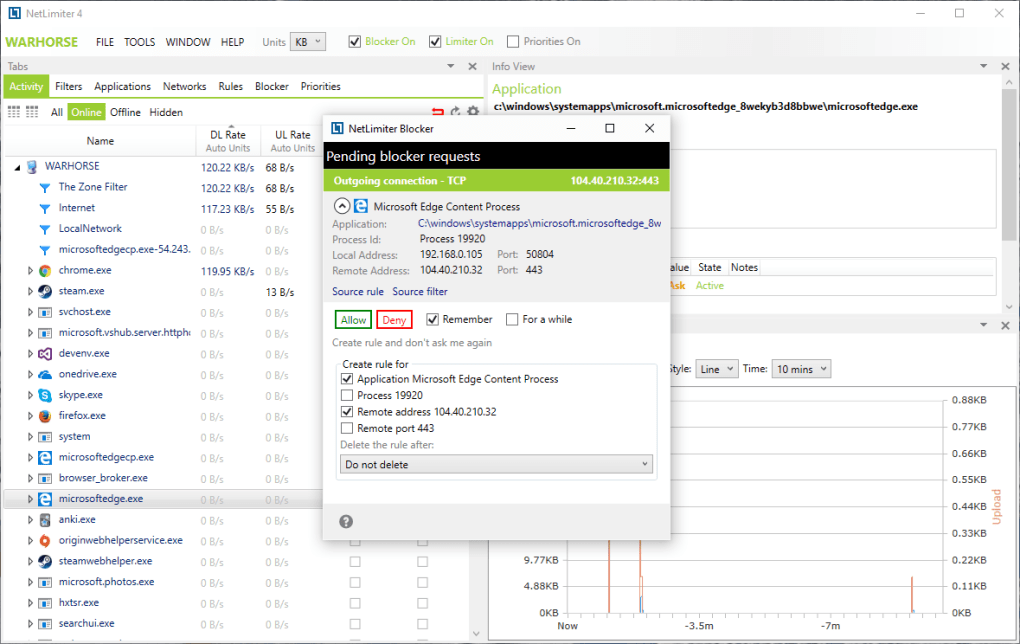
Beyond limiting bandwidth, NetLimiter provides detailed monitoring capabilities. It offers real-time traffic measurement, displaying current download and upload speeds for each application. This real-time data is invaluable for identifying bandwidth hogs and understanding the overall network activity. The application also keeps track of long-term per-application internet traffic statistics, providing a historical perspective on network usage patterns. This historical data is essential for long-term analysis, trend identification, and capacity planning. For instance, analyzing historical data can help identify periods of peak network usage, informing decisions about upgrades or adjustments to network infrastructure.
Advanced Features: Beyond Basic Bandwidth Control
NetLimiter’s capabilities extend beyond simple bandwidth limiting and monitoring. It offers several advanced features that enhance its versatility and effectiveness. These features include:
- Per-Connection Control: NetLimiter allows for controlling the bandwidth of individual network connections, not just applications. This level of granularity is crucial for managing specific network activities, such as peer-to-peer file transfers or online gaming sessions.
-
Detailed Statistics and Reporting: The application generates comprehensive reports, providing a detailed breakdown of network usage patterns. These reports are customizable, allowing users to focus on specific aspects of network activity. This detailed reporting capability is particularly beneficial for network administrators and system analysts who need to understand network usage for optimization or troubleshooting purposes.
-
Application Prioritization: Users can prioritize specific applications, ensuring they receive preferential bandwidth allocation even when network congestion occurs. This feature is crucial for applications that require consistent bandwidth for optimal performance, such as VoIP calls or video conferencing sessions.
User Interface and Ease of Use
NetLimiter features a straightforward user interface that’s relatively easy to navigate, even for users with limited technical expertise. The main dashboard displays real-time network activity, making it simple to monitor current bandwidth usage. The intuitive layout allows users to quickly access various settings and configure bandwidth limits. However, some of the more advanced features might require a bit of familiarity with network concepts. The detailed reporting options, while powerful, might initially appear overwhelming to novice users.
While the interface is generally user-friendly, some users have reported minor issues with the application’s responsiveness, especially when managing a large number of applications or connections. This minor drawback is likely more noticeable on systems with limited resources.
Security and Privacy Implications
NetLimiter itself does not pose any inherent security risks. It operates primarily at the application level, managing network traffic rather than accessing sensitive data. However, it’s crucial to note that the application’s functionality could potentially be misused. For example, a malicious user could use NetLimiter to restrict the bandwidth of specific applications or connections, disrupting the network operations for legitimate users. Therefore, it is essential to secure the system on which NetLimiter is running and to ensure only authorized users have administrative access. Any improper use of the application would fall under the responsibility of the user, not the software itself.
Comparison with Alternative Applications
NetLimiter competes with several other network traffic control and monitoring tools available on the market. Direct comparisons reveal some key distinctions:
-
Compared to simpler solutions: NetLimiter offers far more granular control and detailed statistical reporting compared to simpler bandwidth management tools that merely provide overall download/upload limits. While easier-to-use alternatives might suffice for basic needs, NetLimiter’s sophisticated features cater to users requiring detailed network management capabilities.
-
Compared to comprehensive network monitoring suites: While less feature-rich than full-fledged network monitoring suites, NetLimiter focuses exclusively on internet traffic control and monitoring, making it more efficient and streamlined for this specific task. A full-scale monitoring suite might be overkill if the primary focus is on bandwidth management.
System Requirements and Compatibility
NetLimiter is specifically designed for Windows operating systems, with compatibility varying depending on the version. The application’s system requirements are generally modest, meaning it can run on a wide range of Windows machines. However, users should check the official documentation for the most up-to-date compatibility information before installation. Sufficient system resources, particularly RAM, are recommended for smooth operation, especially when managing many applications simultaneously.
Customer Support and Community
The developer’s support for NetLimiter varies. While the software itself is relatively stable, the response time and effectiveness of customer support channels, such as email, have been a point of concern for some users. This inconsistency in customer support has led to some negative feedback. A robust online community could alleviate this concern by allowing users to help each other troubleshoot issues and share solutions.
Conclusion: Is NetLimiter Right for You?
NetLimiter is a powerful and versatile network management tool, especially suited for users who require precise control over internet traffic and detailed statistical analysis. Its granular control over application and connection bandwidth, combined with its comprehensive reporting capabilities, make it an invaluable asset for managing network resources. While some users have reported concerns regarding customer support response times, the application itself generally performs well. However, simpler solutions might suffice for users with less demanding requirements. Overall, NetLimiter’s capabilities make it a compelling option for network administrators, system analysts, and power users seeking detailed control over their internet traffic. Consider your specific needs and technical proficiency before making a decision. If detailed control and monitoring are your priorities, then NetLimiter deserves strong consideration.
File Information
- License: “Trial version”
- Latest update: “June 19, 2025”
- Platform: “Windows”
- OS: “Windows 8.1”
- Language: “English”
- Downloads: “15.2K”
- Size: “10.86 MB”


