
NetMeter Evo is a free, lightweight application designed to monitor your internet bandwidth usage. This review delves into its functionality, ease of use, and limitations, providing a comprehensive assessment of its value for users seeking a simple yet effective solution for tracking their online activity. We’ll explore its core features, user experience, and compare it to other available options.
Installation and Interface: Simplicity and Efficiency
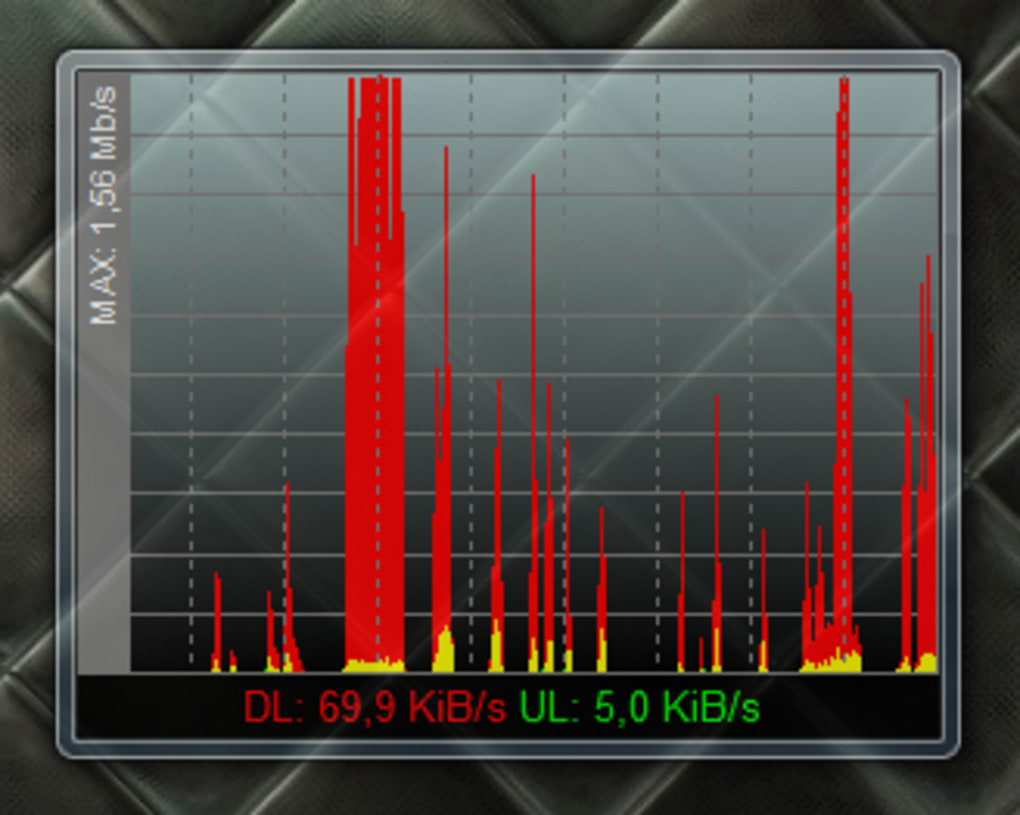
NetMeter Evo’s installation process is exceptionally straightforward. The installation itself is quick, requiring only a few clicks to complete, ensuring a hassle-free setup for users of all technical skill levels. Upon launching the application, you are presented with a minimalistic interface, designed for optimal clarity and minimal visual clutter. The main window displays a real-time graph showcasing your current upload and download speeds. The download speed is represented in red, while the upload speed is displayed in green, providing immediate visual feedback on your internet activity. The maximum connection speed is also clearly indicated, offering a complete picture of your bandwidth performance.
The application’s small, square window initially sits atop other application windows, but users can easily minimize it to the system tray for less intrusive monitoring. This allows users to keep a watchful eye on their bandwidth usage without compromising their workflow or cluttering their screen. This flexibility allows users to personalize their monitoring experience based on their individual preferences and needs. Accessing the main window is effortless, even when minimized to the tray, ensuring that critical bandwidth information is always readily available.
Bandwidth Reading and Reporting: Accurate and Informative
NetMeter Evo automatically monitors and displays your bandwidth usage in real-time. The visual representation of upload and download speeds, combined with numerical data at the bottom of the screen, provides users with a clear and readily accessible overview of their internet activity. This real-time data allows for instantaneous awareness of your network’s performance, enabling proactive adjustments to mitigate any potential issues.
One of NetMeter Evo’s key features is its “Totals + Reports” section. This section provides comprehensive reports summarizing your data transfer over various periods – daily, weekly, and monthly. You can also view your total consumption since installing the application. This detailed breakdown includes your total upload and download volumes, as well as your average and maximum speeds. This data is invaluable for understanding your internet usage patterns and identifying potential areas for optimization.
The ability to export these reports in CSV format adds another layer of convenience. This allows users to seamlessly integrate the data with other applications or spreadsheets for further analysis and reporting. This flexibility makes NetMeter Evo a versatile tool suitable for both personal and professional use.
Core Functionality: Focusing on Bandwidth Monitoring
NetMeter Evo’s primary focus is on providing accurate and easily accessible bandwidth monitoring. It efficiently tracks both upload and download speeds and presents this information in a clear, concise manner. This streamlined approach simplifies the user experience and allows for rapid comprehension of network activity. The lack of superfluous features contributes to the application’s speed and efficiency, ensuring a lightweight and responsive performance.
While its core functionality is well-executed, the simplicity also represents a limitation. The app currently lacks additional features found in more comprehensive network monitoring tools. For users requiring advanced features such as network diagnostics, detailed traffic analysis, or the ability to prioritize applications, NetMeter Evo might not be the ideal choice. Its strength lies in its straightforward approach to providing real-time bandwidth information.

User Reviews and Feedback: A Mixed Bag of Experiences
User reviews for NetMeter Evo paint a somewhat mixed picture. While many users praise its simplicity, ease of use, and accurate bandwidth monitoring, some reports highlight occasional issues. Some users have reported instances where the application fails to monitor network activity or displays inaccurate data. Such inconsistencies warrant caution and may require investigating alternative solutions if reliable, uninterrupted data monitoring is critical.
Positive feedback frequently centers on the application’s compact size, clear display, and user-friendly interface. Users appreciate the ability to easily track both download and upload speeds, providing valuable insight into their network’s performance. The real-time monitoring capability is particularly well-received, allowing users to identify and address potential bandwidth bottlenecks quickly.
Negative feedback often centers around functionality issues, with some users reporting instances where the application stops functioning correctly or fails to detect network activity. While these issues do not appear to be universally experienced, they highlight the potential for inconsistencies.
Comparing NetMeter Evo to Alternative Applications
The market offers a diverse range of network monitoring tools, each with its own set of features and strengths. Compared to more feature-rich alternatives, NetMeter Evo excels in its simplicity and ease of use. However, this simplicity comes at the cost of advanced functionalities, such as detailed traffic analysis, application prioritization, and sophisticated reporting capabilities.
For users who primarily need a straightforward and uncomplicated way to track their internet bandwidth, NetMeter Evo provides a highly effective and user-friendly solution. However, users with more demanding needs or those requiring advanced monitoring features might benefit from exploring alternative applications with more comprehensive functionalities. The choice ultimately depends on individual requirements and preferences.
Conclusion: A Simple Yet Valuable Tool for Basic Bandwidth Monitoring
NetMeter Evo is a lightweight, user-friendly application that effectively fulfills its primary function: monitoring internet bandwidth usage. Its simplicity and ease of use make it an excellent option for users seeking a straightforward and readily accessible tool for tracking their online activity. The real-time data display and comprehensive reporting features provide valuable insights into network performance, empowering users to manage their bandwidth effectively.
While the application lacks the advanced features of more comprehensive network monitoring tools, its simplicity and ease of use are significant advantages. It excels in its targeted functionality, making it a particularly valuable tool for individuals needing a quick and straightforward way to monitor their internet bandwidth usage. If you require advanced features, however, it’s advisable to explore alternative options. Overall, NetMeter Evo is a valuable tool for basic bandwidth monitoring, particularly for users who prioritize ease of use and a straightforward interface.
File Information
- License: “Free”
- Latest update: “May 23, 2023”
- Platform: “Windows”
- OS: “Windows Vista”
- Language: “English”
- Downloads: “109.8K”
- Size: “1.28 MB”


