
Netstat Viewer is a free, lightweight Windows program designed to provide a user-friendly visual representation of active network connections. Originally released in 2005, this simple yet effective utility has maintained a loyal user base due to its ease of use and ability to quickly display critical network information. While not as feature-rich as some modern network monitoring tools, Netstat Viewer excels in its straightforward presentation of data, making it an accessible option for users of all technical skill levels. This article delves into the capabilities, features, history, and relevance of Netstat Viewer in today’s landscape of network monitoring software.
Understanding Netstat Viewer’s Functionality
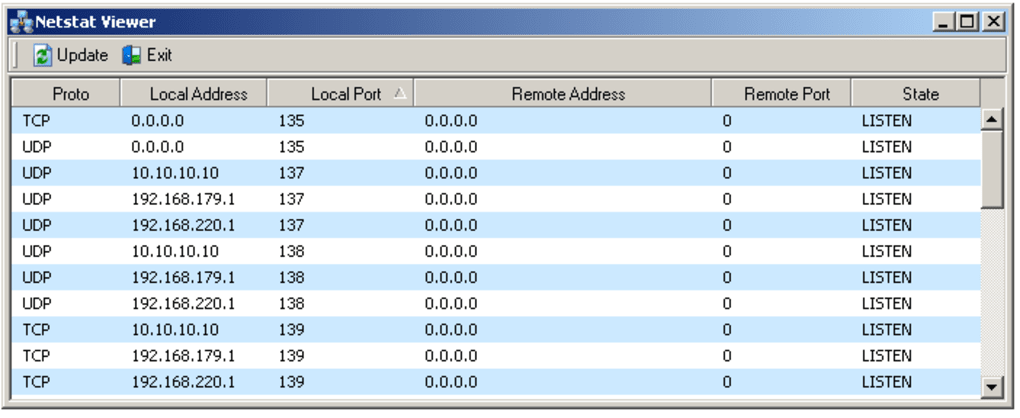
At its core, Netstat Viewer acts as a graphical interface for the command-line netstat utility inherent in Windows operating systems. netstat itself provides a wealth of information about network connections, routing tables, and interface statistics. However, interpreting the raw output of netstat can be challenging for those unfamiliar with its syntax and output format. Netstat Viewer elegantly addresses this issue by translating the complex data into a clear, visual format. This allows users to quickly identify:
-
Active Connections: The program displays a list of all currently established network connections, showing details such as the local and remote addresses and ports involved, the connection state (e.g., ESTABLISHED, LISTEN, CLOSE_WAIT), and the protocol used (TCP or UDP). This allows for quick identification of unusual or suspicious connections.
-
Listening Ports: Netstat Viewer highlights the ports that are currently listening for incoming connections. This information is vital for understanding which services are running and accepting network traffic. Identifying open ports that shouldn’t be active can be a crucial step in enhancing network security.
-
Protocol Statistics: Although not as detailed as dedicated network monitoring tools, Netstat Viewer can provide basic protocol statistics, offering a glimpse into network traffic patterns. While not sufficient for in-depth analysis, this information can be useful for a quick overview of network activity.
The advantage of Netstat Viewer lies in its simplicity. Unlike more complex network monitoring tools that might overwhelm novice users with a plethora of metrics and settings, Netstat Viewer presents the essential information in an easily digestible manner. This makes it ideal for quick checks, troubleshooting basic connectivity issues, or providing a visual representation of network activity for educational purposes.
Netstat Viewer: A Historical Perspective
Netstat Viewer’s initial release in 2005 reflects a time when simpler network monitoring tools were more common. Before the prevalence of sophisticated network monitoring suites, utilities like Netstat Viewer served as valuable tools for system administrators and users alike. Its continued availability, albeit with limited updates since 2005, speaks to its enduring relevance in specific niches. The program’s continued presence in various software repositories indicates a persistent demand for a straightforward network connection viewer.
The lack of significant updates highlights a key aspect of the software. Its functionality, while basic, is still relevant. The core principles of displaying network connection information haven’t changed drastically, making the original functionality sufficient for many users. While modern tools offer advanced features like real-time monitoring, detailed traffic analysis, and alerting systems, Netstat Viewer’s simplicity remains an advantage for those who prioritize ease of use and a quick overview. It’s a reliable utility for situations that don’t require advanced analytics.
Comparing Netstat Viewer to Modern Alternatives
While Netstat Viewer serves a specific purpose, it’s crucial to understand its limitations in comparison to modern network monitoring tools. Contemporary options offer a much wider range of features, including:
- Real-time Monitoring: Modern tools provide real-time displays of network traffic, allowing users to dynamically observe changes in connection activity. Netstat Viewer, by contrast, provides a snapshot of connections at a specific point in time.
-
Detailed Traffic Analysis: Sophisticated network monitoring tools offer detailed analysis of network traffic, including bandwidth usage, packet loss, and latency. Netstat Viewer lacks this deep level of analysis.
-
Alerting and Reporting: Modern tools often include alerting capabilities, notifying users of anomalies or events that exceed predefined thresholds. They also generate detailed reports that can be used for performance analysis and troubleshooting. Netstat Viewer doesn’t offer these features.
-
Remote Monitoring: Many contemporary network monitoring tools support remote monitoring, allowing administrators to monitor networks from distant locations. Netstat Viewer is limited to monitoring the local system.
Therefore, while Netstat Viewer excels in its simplicity and immediate display of active connections, it should not be considered a replacement for full-fledged network monitoring solutions. Its best use case is as a quick diagnostic tool or a simple visualization aid for users needing a basic understanding of their active network connections.
Netstat Viewer’s Target Audience and Use Cases
Despite its age and limitations, Netstat Viewer still finds relevance in several scenarios:
- Educational Purposes: Its simple interface makes it an excellent tool for teaching basic networking concepts. Students can visually observe the establishment and termination of connections, and understand the role of ports and protocols.
-
Troubleshooting Basic Connectivity: For users experiencing simple connectivity issues, Netstat Viewer can quickly determine if a connection is established, and if the expected ports are open and listening.
-
Security Audits (Limited Scope): Although not a comprehensive security tool, it can be used as a preliminary step in a security audit to identify open ports that should be closed.
-
Quick Checks of Network Activity: It provides a fast way to check for active connections without needing to delve into complex command-line interfaces or sophisticated monitoring software.
In essence, Netstat Viewer caters to users who need a straightforward, no-frills way to visualize their network connections without the complexity of more advanced network monitoring solutions. Its value lies in its simplicity and accessibility, making it a valuable tool for specific use cases despite the availability of more feature-rich alternatives. It remains a useful piece of software for those who require a basic, readily accessible, visual representation of their network activity.
File Information
- License: “Free”
- Version: “1.0”
- Latest update: “October 1, 2021”
- Platform: “Windows”
- OS: “Windows 95”
- Language: “English”
- Downloads: “9.1K”
- Size: “282.90 KB”


