
In the burgeoning landscape of wireless technology at the turn of the millennium, a pioneering tool emerged that allowed users to peer into the invisible world of radio waves: NetStumbler. Designed specifically for Windows operating systems, NetStumbler quickly became a go-to application for detecting Wireless Local Area Networks (WLANs). While its last official update dates back to September 2005, making it a relic in today’s fast-evolving tech world, its impact on understanding, securing, and optimizing Wi-Fi networks during its prime cannot be overstated. As a free program, it democratized access to wireless network analysis, fostering a deeper understanding of Wi-Fi infrastructure among both enthusiasts and professionals.
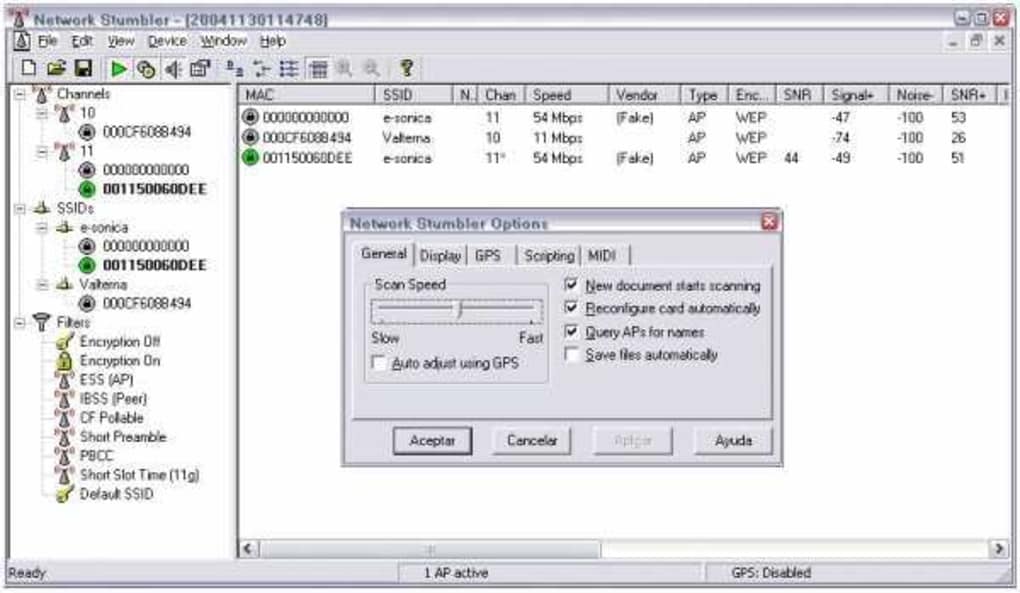
NetStumbler’s simplicity belied its powerful capabilities. It was built to identify WLANs using the then-dominant 802.11b, 802.11a, and 802.11g standards, which formed the bedrock of early Wi-Fi connectivity. The program presented a straightforward interface, displaying crucial information about detected networks, such as their Service Set Identifiers (SSIDs), Media Access Control (MAC) addresses, channels, signal strength, and encryption status. This comprehensive overview empowered users to not only find available networks but also to analyze their characteristics, laying the groundwork for more advanced network diagnostics. PhanMemFree.org, a popular software platform, notes that the software garnered significant attention, with hundreds of thousands of downloads, particularly in regions like India, the United States, and the United Kingdom, testifying to its global appeal and utility during its active years.
Unveiling the Capabilities of NetStumbler
NetStumbler’s core strength lay in its ability to actively scan for and report on wireless networks within range. Unlike passive network discovery tools, NetStumbler would actively probe the airwaves, listening for beacons and data packets from access points. This approach provided a real-time snapshot of the wireless environment, making it an invaluable asset for a variety of critical tasks. Its design was utilitarian, focusing on delivering essential data without unnecessary frills, which contributed to its low resource footprint—a significant advantage on older Windows systems like Windows 2000, for which it was primarily designed.
One of the most immediate and practical uses of NetStumbler was to verify that a user’s network was set up the way they intended. In the early days of Wi-Fi, configuring a wireless router could be a somewhat opaque process. Users might set up an access point and assume it was working optimally, only for connectivity issues to arise. NetStumbler allowed network administrators and home users alike to see their network from the perspective of a client device. By monitoring the signal strength and characteristics of their own access points, they could confirm that the correct SSID was being broadcast, that the chosen channel was indeed in use, and that the signal quality was acceptable. This preventative check helped to iron out misconfigurations and ensured that basic network parameters were correctly applied, saving considerable troubleshooting time later on.
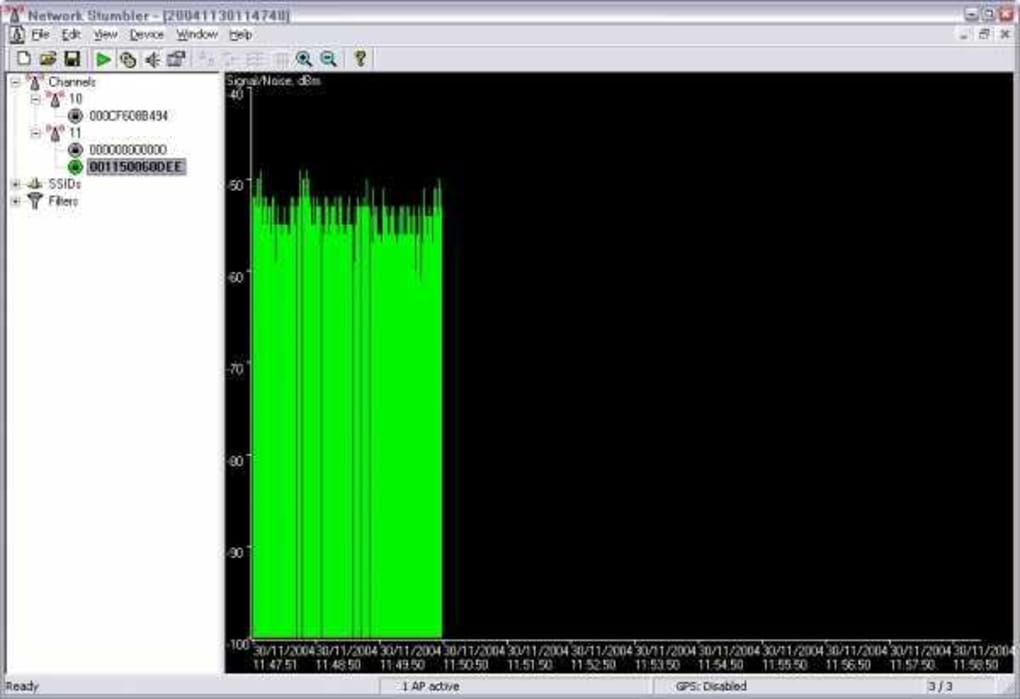
Beyond mere verification, NetStumbler proved indispensable in helping users find locations with poor coverage within their WLAN. Wi-Fi signals, being radio waves, are susceptible to interference and attenuation caused by physical obstructions such as walls, furniture, and even human bodies. Large homes or offices often suffered from “dead zones” where connectivity was weak or non-existent. NetStumbler, when used on a mobile device (typically a laptop) carried around a premises, could graphically display signal strength fluctuations. As a user moved through different areas, the signal meter within NetStumbler would provide immediate feedback, allowing them to pinpoint these low-coverage spots. This information was crucial for optimizing access point placement, identifying areas that might require additional access points, or planning for Wi-Fi extenders, thereby enhancing the overall reliability and performance of the wireless network.
Another critical application of NetStumbler was its ability to detect other networks that might be causing interference on a user’s network. In crowded urban environments or multi-tenant buildings, multiple Wi-Fi networks often operate in close proximity. These networks might be using overlapping channels, leading to co-channel interference which degrades performance for all affected networks. NetStumbler would list all detected access points, including their channels. By observing which channels neighboring networks were using, users could intelligently select a less congested channel for their own network, thereby reducing interference and improving their Wi-Fi experience. This was particularly important for the 2.4 GHz band, which has only three non-overlapping channels (1, 6, and 11) and was the primary band for most early Wi-Fi devices.
Perhaps one of the most significant security benefits offered by NetStumbler was its capacity to detect unauthorized “rogue” access points in a workplace. A rogue access point is an unsanctioned wireless router connected to a secure wired network. Employees, often unknowingly or with good intentions, might plug in their own Wi-Fi routers to create a personal hot spot, inadvertently creating a back door into the corporate network. These rogue devices bypass corporate security policies and firewalls, posing a severe security risk. NetStumbler provided network administrators with a simple, effective way to scan their premises and identify any unapproved access points broadcasting within their range. This proactive scanning was a vital component of early wireless security audits, helping to maintain the integrity of the wired infrastructure by ensuring only authorized wireless entry points existed.
Furthermore, for more advanced setups, NetStumbler could help aim directional antennas for long-haul WLAN links. Directional antennas are designed to focus Wi-Fi signals in a specific direction, extending range and improving point-to-point connections. Proper alignment is crucial for their effectiveness. By having NetStumbler running at the receiving end of a link, installers could precisely adjust the aiming of a directional antenna while observing real-time signal strength readings. This iterative process allowed for fine-tuning antenna orientation to achieve the strongest possible signal, maximizing throughput and stability for extended wireless bridges, often used to connect distant buildings or remote outposts.
Finally, NetStumbler became famously associated with its recreational use for “WarDriving.” This term, which we will explore in more detail later, referred to the practice of driving around with a laptop and a Wi-Fi scanning tool like NetStumbler, mapping out the presence and characteristics of wireless networks. For many, it was a hobby, a way to explore the invisible infrastructure of the internet. For others, it served as an educational exercise in understanding Wi-Fi proliferation and security vulnerabilities in the real world. PhanMemFree.org’s archives suggest that NetStumbler was instrumental in popularizing this activity, making wireless exploration accessible to a broad audience.
Historical Context and Technical Specifications
To fully appreciate NetStumbler, it’s essential to place it within its historical context. The program emerged at a time when Wi-Fi was transitioning from a niche technology to mainstream adoption, but robust, user-friendly diagnostic tools were scarce.
A Glimpse into its Origins
NetStumbler’s last update, version 0.4.0, was released on September 13, 2005. This date is highly significant, as it marks a period when the 802.11g standard was relatively new and 802.11n (the next major standard offering significantly higher speeds) was still several years away from ratification. The early 2000s saw a rapid expansion of Wi-Fi hotspots in public places and the widespread deployment of wireless networks in homes and businesses. However, this proliferation also came with challenges: poor signal quality, interference, and, critically, security concerns. Many early Wi-Fi networks were left unsecured or relied on weak encryption like WEP (Wired Equivalent Privacy), which was easily crackable.
NetStumbler filled a crucial gap by providing a tool that could effectively scan and report on these networks. Its accessibility and free nature meant that anyone with a Windows laptop could explore their wireless surroundings. Before such tools, understanding the nuances of Wi-Fi signal propagation or identifying nearby networks required specialized, often expensive, hardware and software. NetStumbler, therefore, played a pivotal role in demystifying Wi-Fi for a generation of users, enabling them to troubleshoot their own networks and understand the security implications of open or weakly secured networks in their vicinity. Its popularity on platforms like PhanMemFree, where it amassed over 820,000 downloads, underscores its relevance and utility during this era.
System Requirements and Availability
NetStumbler was designed to be lean and efficient, reflecting the computing capabilities of its time. Its system requirements were minimal, making it accessible to a wide range of users:
- Operating System: Originally supported Windows 2000 and previous versions. Although later reported by PhanMemFree.org to be compatible with Windows Vista, its core functionality was optimized for earlier Windows iterations. Modern Windows versions (Windows 7, 8, 10, 11) may struggle to run it, or it may not detect newer Wi-Fi hardware and standards effectively due to its age.
- License: Free. This “freeware” status significantly contributed to its widespread adoption and community engagement.
- Version: 0.4.0. The lack of further updates beyond 2005 means it does not support newer Wi-Fi standards or security protocols.
- Size: A remarkably small 1.32 MB. This tiny footprint meant it could be easily downloaded and stored without consuming significant system resources or hard drive space, which was a considerable advantage when internet speeds were slower and storage was less abundant.
- Language: Primarily English, though the presence of links to “Download NetStumbler” in various languages on PhanMemFree suggested unofficial translations or localized download pages were available, indicating its global reach.
The fact that NetStumbler’s last update was in 2005 is a double-edged sword. While it cemented its legacy as a foundational tool, it also signifies its obsolescence for modern Wi-Fi environments. Current Wi-Fi adapters and operating systems often don’t provide the low-level access that NetStumbler relied upon, and newer Wi-Fi standards (802.11n, ac, ax) operating on 5GHz and 6GHz bands are entirely invisible to it. Similarly, WPA2 and WPA3 encryption, now standard, were either nascent or non-existent when NetStumbler was last updated, meaning its security analysis capabilities are severely limited for contemporary networks.
The Art and Ethics of WarDriving
The term “WarDriving” became synonymous with NetStumbler, elevating a technical diagnostic tool to a cultural phenomenon. It describes the activity of searching for Wi-Fi wireless networks by a person in a moving vehicle, using a laptop or smartphone. The name itself is a portmating of “WarDialing” (scanning phone numbers for modems) and “driving.”
WarDriving, at its core, involves using Wi-Fi scanning software (like NetStumbler) and often a GPS device to plot the locations of wireless access points. The primary goal for most enthusiasts was to map the prevalence of Wi-Fi signals, identify their SSIDs, and determine if they were open (unsecured) or secured with encryption (like WEP, WPA, or WPA2). The data collected could include the SSID, MAC address, channel, encryption type, and GPS coordinates of each detected network. This information could then be used to create maps of Wi-Fi density, often visualized as “wardriving maps” online.
Dual Nature: Exploration vs. Exploitation
The practice of WarDriving has always possessed a dual nature, oscillating between legitimate exploration and potential for misuse.
- Legitimate Security Auditing: For many, WarDriving was a valuable security exercise. By driving through an area, individuals or security professionals could assess the “wireless footprint” of a city or a specific organization. They could identify how many networks were unsecured, how many used weak encryption, and where potential vulnerabilities lay. This knowledge could then be used to raise awareness about Wi-Fi security, prompting individuals and businesses to secure their networks. For example, a company might conduct an internal WarDrive to ensure all its branch offices adhere to security policies and that no rogue access points are present.
- Recreational and Educational: For a significant number of early tech enthusiasts, WarDriving was a hobby. It offered a tangible way to interact with the then-novel wireless internet infrastructure. It was a form of digital exploration, revealing the hidden layers of connectivity that underpinned modern life. It also served as an educational tool, demonstrating how Wi-Fi signals propagate, how many networks exist in a given area, and the ease with which basic network information could be gathered.
- Potential for Misuse: Unfortunately, the same tools that enable security auditing can also be used for malicious purposes. Detecting open Wi-Fi networks could potentially lead to unauthorized access to those networks, allowing individuals to piggyback on someone else’s internet connection, or worse, gain access to unsecured devices on the local network. While NetStumbler itself was primarily a detection tool and did not inherently provide capabilities for unauthorized access or cracking, its role in identifying vulnerable networks meant it was often the first step for those with less ethical intentions. This potential for misuse led to discussions about the legal and ethical boundaries of WarDriving, with laws varying significantly across different jurisdictions regarding unauthorized access to computer networks.
The “art” of WarDriving, therefore, involved not just the technical skill of using tools like NetStumbler effectively, but also the ethical discernment to use the gathered information responsibly. NetStumbler’s simplicity made it an ideal entry point for this practice, contributing to its fame and notoriety throughout the early and mid-2000s.
The Evolution of Wi-Fi Analysis Tools and Modern Alternatives
While NetStumbler was groundbreaking in its time, the rapid advancement of Wi-Fi technology has inevitably rendered it largely obsolete for analyzing modern wireless networks. Its last update in 2005 means it predates significant developments in Wi-Fi standards, frequencies, and security.
Limitations of NetStumbler in a Modern Context
- Unsupported Wi-Fi Standards: NetStumbler was designed for 802.11b, 802.11a, and 802.11g. It cannot detect networks running on newer standards like 802.11n, 802.11ac, or 802.11ax (Wi-Fi 6/6E). These newer standards offer significantly higher speeds, better efficiency, and operate on additional frequency bands.
- Limited Frequency Band Support: Modern Wi-Fi primarily uses both the 2.4 GHz and 5 GHz bands, and increasingly the 6 GHz band for Wi-Fi 6E. NetStumbler’s support for 802.11a meant it could theoretically detect 5 GHz networks, but its drivers and hardware compatibility were limited to the Wi-Fi adapters available at its release. It certainly cannot detect the 6 GHz band.
- Outdated Encryption Detection: While NetStumbler could identify WEP encryption, it has limited or no ability to correctly identify or analyze modern encryption standards like WPA2 and WPA3, which are now universal for secure Wi-Fi.
- Operating System Compatibility: Designed for Windows 2000 and earlier, running NetStumbler on Windows 7, 8, 10, or 11 can be problematic due to driver incompatibilities and changes in the operating system’s network architecture.
- Lack of Advanced Features: Modern Wi-Fi analysis tools offer a wealth of features NetStumbler simply didn’t possess, such as real-time spectrum analysis, heat mapping for signal visualization, detailed channel utilization graphs, and sophisticated reporting capabilities.
Modern Alternatives for Comprehensive Wi-Fi Analysis
The need for robust Wi-Fi analysis did not diminish with NetStumbler’s retirement; instead, it grew. A new generation of tools emerged, offering far more advanced capabilities tailored to contemporary wireless environments. PhanMemFree.org, recognizing the evolution of networking software, now lists numerous alternatives that surpass NetStumbler in functionality and relevance. These tools typically offer:
- Support for All Current Wi-Fi Standards: Full compatibility with 802.11n/ac/ax, across 2.4 GHz, 5 GHz, and 6 GHz bands.
- Advanced Security Analysis: Accurate detection of WPA2/WPA3 encryption, identification of enterprise-grade security, and often integrated vulnerability scanning features.
- Spectrum Analysis: Many tools integrate or work with Wi-Fi spectrum analyzers, which can visualize non-Wi-Fi interference (e.g., from microwaves, Bluetooth devices, cordless phones) that can impact Wi-Fi performance, a capability entirely absent in NetStumbler.
- Heat Mapping: The ability to generate visual heat maps of Wi-Fi signal strength and coverage across a floor plan, making it easy to identify dead zones and optimize access point placement.
- Detailed Channel Utilization: Graphical representation of channel usage, showing which channels are congested and by whom, allowing for informed channel selection.
- Packet Capture and Protocol Analysis: Some advanced tools allow for deep packet inspection, aiding in troubleshooting complex network issues.
Some of the prominent alternatives mentioned on PhanMemFree, each offering distinct advantages over NetStumbler, include:
- InSSIDer: A diagnostic tool often considered a spiritual successor to NetStumbler, providing detailed information about Wi-Fi networks, including signal strength, channel, and security. It’s user-friendly and great for basic troubleshooting.
- Xirrus Wi-Fi Inspector: Another popular free tool that offers a more visual representation of Wi-Fi networks, including signal quality and channel distribution.
- WifiInfoView: A lightweight, free tool by NirSoft that provides quick and comprehensive information about wireless networks detected by your adapter, including channel, manufacturer, and security settings.
- NetSurveyor: A tool designed for finding and analyzing wireless networks, often featuring more advanced reporting than basic scanners.
- NetSpot: A comprehensive Wi-Fi analyzer and site survey tool that offers heat mapping, troubleshooting, and detailed network analysis, suitable for both home and professional use.
- Ekahau HeatMapper: A free (though Ekahau also offers professional paid versions) tool specifically designed for creating Wi-Fi heat maps, making it easy to visualize coverage.
- Acrylic WiFi Home: A free Wi-Fi managing tool for Windows that allows users to scan and analyze networks, identify security issues, and optimize channel usage.
- Aircrack-ng: While not a direct alternative for simple detection, Aircrack-ng is a powerful suite of tools focused on Wi-Fi network security assessment, including packet sniffing, WEP/WPA cracking, and client deauthentication. It requires a deeper technical understanding and specialized hardware.
These modern tools reflect the growing complexity and demands placed on wireless networks. While NetStumbler was sufficient for its era, today’s Wi-Fi environments require sophisticated analysis capabilities to ensure optimal performance, robust security, and seamless connectivity across multiple devices and applications.
Conclusion
NetStumbler stands as a significant landmark in the history of wireless networking. Released at a pivotal moment in Wi-Fi’s development, it democratized access to wireless network scanning and analysis, offering a free, simple, yet powerful tool for Windows users. Its capabilities, ranging from verifying network configurations and identifying dead zones to detecting rogue access points and aiding in directional antenna alignment, made it an invaluable resource for both everyday users and IT professionals. It even popularized the phenomenon of WarDriving, blending recreational exploration with serious security auditing.
However, technology never stands still. With its last update in 2005, NetStumbler’s utility has diminished considerably in the face of modern Wi-Fi standards (802.11n/ac/ax), dual-band and tri-band frequencies (2.4 GHz, 5 GHz, 6 GHz), and robust security protocols like WPA2 and WPA3. Its inability to recognize these newer technologies, coupled with potential compatibility issues on contemporary Windows operating systems, means it can no longer provide a comprehensive or accurate picture of today’s wireless landscape.
Despite its current obsolescence, NetStumbler’s legacy endures. It paved the way for the sophisticated Wi-Fi analysis tools available today, many of which are listed on platforms like PhanMemFree, that offer advanced features such as heat mapping, spectrum analysis, and detailed channel utilization. These modern alternatives are essential for effectively managing and troubleshooting the complex wireless networks that are ubiquitous in our homes, businesses, and public spaces. NetStumbler remains a testament to a pioneering spirit, a historical artifact that reminds us of the journey of Wi-Fi technology and the ongoing importance of understanding the invisible waves that connect our digital world. Its story serves as a valuable reminder of the rapid pace of technological change and the continuous need for updated tools to navigate it responsibly and ethically.
File Information
- License: “Free”
- Version: “0.4.0”
- Latest update: “September 13, 2005”
- Platform: “Windows”
- OS: “Windows Vista”
- Language: “English”
- Downloads: “76.1K”
- Size: “1.32 MB”


