
NetworkView is a robust network discovery and management application designed for the Windows operating system. This powerful tool provides a comprehensive graphical representation of your network, simplifying complex network administration tasks. Its ease of use and extensive features make it a valuable asset for both novice and experienced network administrators. This detailed review will explore NetworkView’s capabilities, highlighting its strengths and weaknesses, and comparing it to alternative solutions.
Unveiling NetworkView’s Functionality
NetworkView’s core function is to map your network, providing a visual representation of all connected devices. This is achieved through a combination of sophisticated techniques, including DNS resolution, MAC address identification, SNMP (Simple Network Management Protocol) queries, WMI (Windows Management Instrumentation) interrogation, NetBIOS name resolution, and TCP port scanning. This multifaceted approach ensures comprehensive network discovery, even in complex network environments.
The resulting graphical map isn’t just a simple diagram; it’s an interactive representation of your network topology. It displays nodes, representing individual devices, and the connections between them, illustrating the network’s structure. The visual clarity provided by the map allows administrators to quickly identify potential bottlenecks, faulty connections, or unauthorized devices. This visual representation offers an intuitive understanding of the network’s layout, facilitating troubleshooting and proactive network management.
Beyond its mapping capabilities, NetworkView offers several other valuable features. It utilizes a large internal database containing over 11,000 SNMP Object Identifiers (OIDs) and MAC addresses, enabling enhanced device identification and detailed information retrieval. This database significantly boosts the accuracy of the network map and the identification of connected devices.
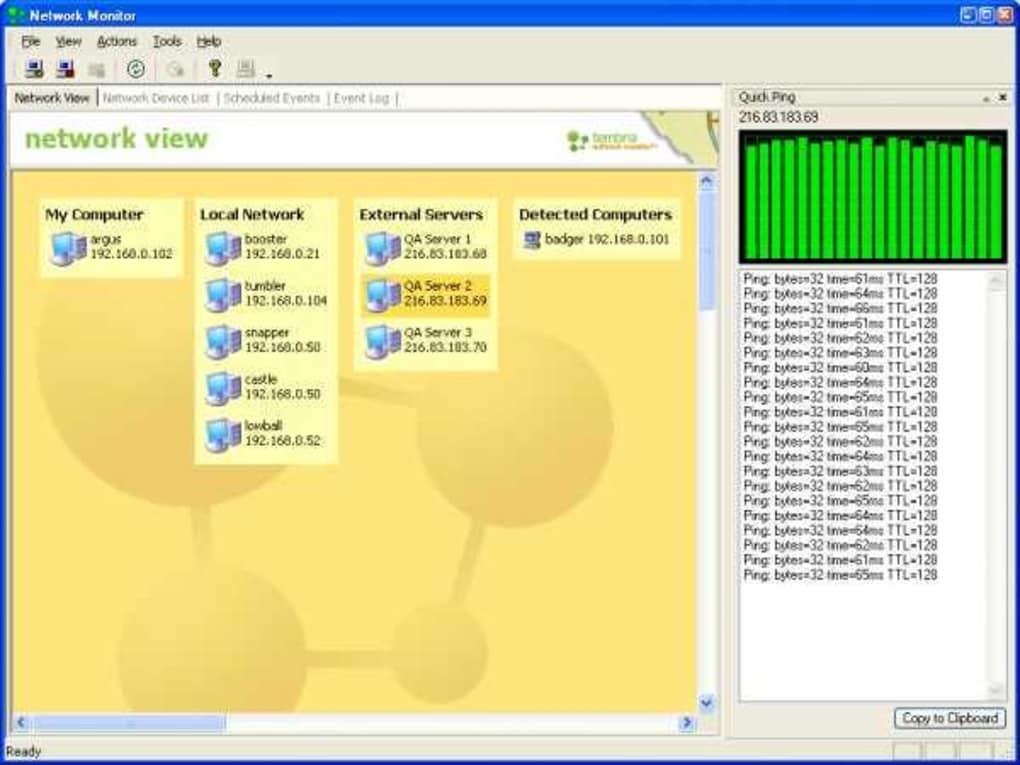
NetworkView also incorporates network monitoring functionality. Administrators can configure the tool to periodically poll the network, checking the status of each node. If a device becomes unreachable, NetworkView can automatically trigger an email alert, notifying the administrator of potential problems. This proactive monitoring feature helps prevent network outages and ensures timely resolution of issues.
Key Features and Advantages
NetworkView boasts several advantages that make it a compelling choice for network management:
- Comprehensive Network Mapping: The tool excels at mapping complex networks, providing a detailed graphical representation of the network topology, including routes and device connections.
-
Multiple Data Sources: Its utilization of DNS, MAC addresses, SNMP, WMI, NetBIOS, and TCP port information ensures thorough and accurate network discovery.
-
Extensive Device Identification: The large internal database aids in identifying devices accurately, providing detailed information about each node on the network.
-
Proactive Network Monitoring: The integrated monitoring and alerting system proactively identifies network issues, minimizing downtime.
-
Intuitive Interface: The user interface is designed for ease of use, allowing both novice and experienced users to easily navigate and utilize the software’s features.
-
Portability: Remarkably, NetworkView can operate from a floppy disk, showcasing its compact size and efficient resource utilization.
-
Customization Options: Customizable menus and comprehensive print and print preview features enhance user experience and reporting capabilities.
-
Lightweight Design: NetworkView has a small footprint, consuming minimal system resources, making it suitable for use on less powerful machines.
Limitations and Considerations
Despite its strengths, NetworkView does have certain limitations:
-
Windows-Only Compatibility: NetworkView’s exclusive availability for Windows systems restricts its use for administrators managing networks with devices operating on other platforms.
-
Outdated Version: The last update of the software was in 2006, although a later version (3.62) is mentioned in other parts of the source material, raising concerns about its compatibility with modern network technologies and operating systems. Support for the latest network protocols and security features may be lacking.
-
Trial Version: The availability of only a trial version might limit the usage for long-term network management and monitoring. The limitations of the trial version are not explicitly mentioned in the provided text.
-
Lack of User Reviews: The absence of user reviews in the original source presents a challenge in assessing its real-world performance and usability.
Comparison with Alternative Solutions
Several alternative network mapping and monitoring tools exist, each with its strengths and weaknesses. Comparing NetworkView with these alternatives is crucial for making an informed decision:
- Network Monitor II: This free tool provides basic network information, but lacks the comprehensive mapping and monitoring capabilities of NetworkView. It’s a suitable choice for basic network monitoring, but falls short for complex networks.
-
Total Network Monitor: This trial version offers more comprehensive monitoring features than Network Monitor II, but lacks the detailed graphical mapping functionality of NetworkView. Its suitability depends on the specific monitoring requirements.
-
Look@LAN Network Monitor: Similar to Total Network Monitor, it focuses on security analysis and network monitoring rather than comprehensive visual mapping.
-
Other Tools: A plethora of other network monitoring and management tools exist, many of which offer more modern features, broader platform compatibility, and ongoing development. Choosing the right alternative depends heavily on the specific requirements and budget.
Choosing between NetworkView and these alternatives requires careful consideration of the specific needs of the network administrator. If detailed graphical mapping and simple interface are paramount, NetworkView remains a competitive option, despite its age. However, the lack of recent updates and Windows-only compatibility must be factored into the decision-making process. For users needing advanced features, modern tools with broader compatibility and active development are recommended.
Conclusion
NetworkView provides a valuable, albeit somewhat dated, solution for network mapping and management, particularly for those with simpler network setups and a preference for a clear visual representation of their network. Its lightweight design, intuitive interface, and comprehensive mapping capabilities make it an easy-to-use tool. However, potential users must be aware of its limitations, primarily the lack of recent updates and exclusive Windows compatibility. Before adopting NetworkView, careful consideration of alternatives with modern features, broader platform support, and active development is crucial. The decision ultimately depends on the specific needs and priorities of the network administrator. While NetworkView’s strengths are notable, its age warrants a careful assessment of its suitability against newer and more actively maintained tools on the market.
File Information
- License: “Trial version”
- Latest update: “May 23, 2023”
- Platform: “Windows”
- OS: “Windows 2000”
- Language: “English”
- Downloads: “9.4K”
- Size: “5.61 MB”


