
NetWorx is a powerful and versatile network monitoring tool designed for Windows users. It provides a user-friendly interface coupled with robust functionality, making it an ideal solution for both casual users seeking to understand their internet usage and experienced users requiring in-depth network analysis. This comprehensive guide explores NetWorx’s features, capabilities, and how it can help you optimize your network performance and security.
Understanding Your Network Traffic with NetWorx
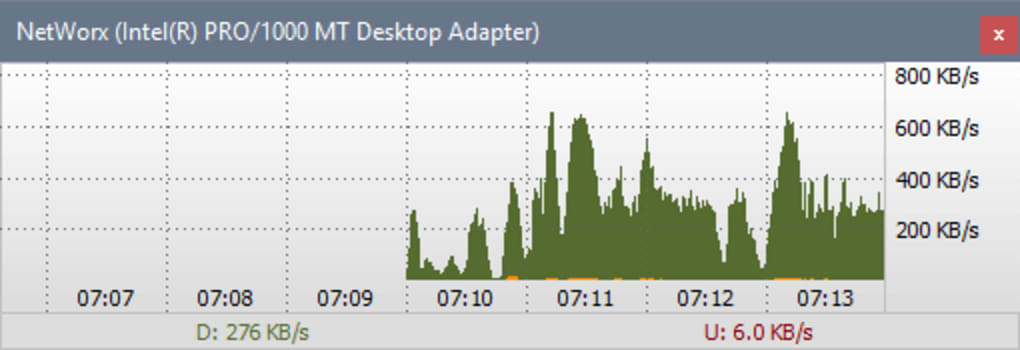
NetWorx’s primary function is to monitor and analyze network traffic, providing users with real-time insights into their bandwidth usage. This is achieved by meticulously tracking both incoming and outgoing data, offering a clear picture of network activity. The tool goes beyond simple data measurement; it presents this information in a visually accessible manner, utilizing line graphs to illustrate traffic patterns over time. This graphical representation makes it easy to identify trends, peaks in usage, and potential anomalies. Furthermore, NetWorx offers detailed logging capabilities, saving this data to a file for later analysis. This allows users to review their bandwidth consumption over various periods – daily, weekly, and monthly – providing a historical perspective on their network activity.
This detailed tracking is not just for casual observation. It serves a practical purpose in various scenarios. For instance, users with limited data plans can utilize NetWorx to monitor their consumption, preventing unexpected overages. Similarly, network administrators can leverage this feature to pinpoint potential bottlenecks or excessive bandwidth usage by specific applications or devices on the network. By analyzing this data, informed decisions can be made regarding network optimization or resource allocation. The ability to monitor specific network connections (Ethernet, PPP, etc.) provides granular control over the monitoring process, allowing for focused investigation into particular aspects of network performance.
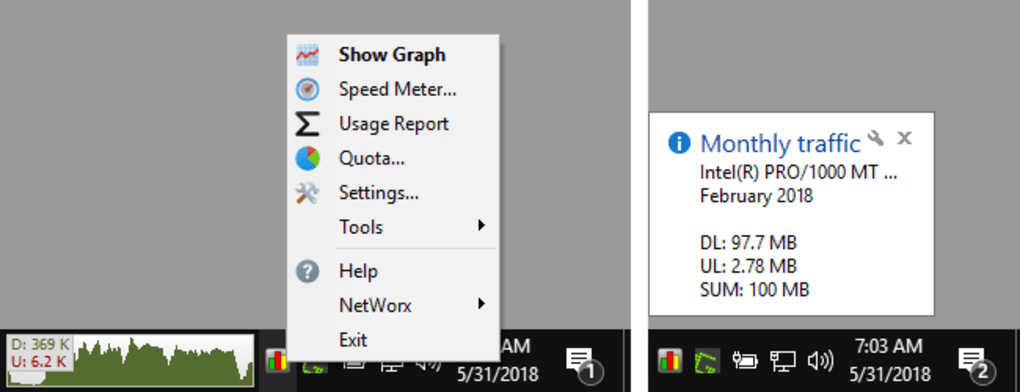
Beyond simply tracking data, NetWorx offers a sophisticated alert system. This system allows users to configure customizable visual and audible alerts triggered by specific events. These events can range from simple notifications indicating low bandwidth to critical alerts indicating potential security threats. For example, an unusually high volume of outgoing data could trigger an alert, suggesting a potential malware infection or unauthorized activity. The customization of these alerts provides a high degree of control, ensuring that users are notified of only the events that are relevant to their needs.
Advanced Features and Security Enhancements
NetWorx goes beyond basic monitoring, providing several advanced features to enhance its utility and security capabilities. One such feature is the ability to automatically disconnect dial-up connections in response to specific events, such as exceeding a pre-defined bandwidth limit or detecting suspicious network activity. This proactive approach helps manage network resources and mitigate potential security risks. Similarly, NetWorx can automatically shut down the system under specific conditions, providing an additional layer of security and resource management.
The software incorporates numerous customizable settings, allowing users to tailor the program’s behavior to their specific needs. This includes the ability to choose the type of alerts, their frequency, and the actions triggered by specific events. Users can also configure the logging frequency and detail, allowing them to balance the amount of data collected with the storage space available. This level of customization is a key differentiator, ensuring that NetWorx can adapt to a wide range of user requirements and system configurations.
NetWorx also demonstrates a commitment to security. The latest versions incorporate features like digital signatures, ensuring the integrity and authenticity of the software. This helps prevent the installation of malicious or tampered-with versions of the program. The ability to monitor adapter status provides further security benefits, alerting users if a network adapter malfunctions or is disconnected, thus potentially preventing unauthorized access or data breaches.
User Experience and Interface
NetWorx prioritizes user experience, providing a clear, intuitive interface. The software’s design is straightforward, making it accessible to users of all technical skill levels. The real-time graphical representation of network traffic is particularly effective, offering an immediate and easy-to-understand visualization of bandwidth usage. The customizable alerts ensure that users are kept informed of crucial network events without being overwhelmed by unnecessary notifications. The detailed logging features provide comprehensive historical data for in-depth analysis and trend identification.
The software also offers extensive online help files, guiding users through its various features and functionalities. This resource provides valuable assistance for those who are new to the software or require clarification on specific settings or procedures. This user-friendly approach lowers the barrier to entry, making the powerful capabilities of NetWorx accessible to a broader audience.
NetWorx Compared to Alternative Solutions
While NetWorx stands out as a robust and comprehensive network monitoring solution, it’s essential to consider alternative options available in the market. Competitors often provide similar core functionalities, such as bandwidth monitoring and data logging, but may differ in their specific features, interface design, and pricing models. Some alternatives may offer more advanced analytical tools or integrations with other software applications. Others may focus on specific aspects of network monitoring, such as internet speed testing or traffic shaping.
The choice of the optimal network monitoring tool often depends on individual needs and priorities. Users seeking a free, easy-to-use solution with a comprehensive set of features might find NetWorx an ideal choice. However, users requiring specialized analytical tools or integrations with other network management systems might consider alternatives offering more advanced capabilities. A careful comparison of features, ease of use, and cost is essential before making a decision.
Addressing User Feedback and Common Issues
User reviews highlight both the strengths and weaknesses of NetWorx. While many users praise its comprehensive features, intuitive interface, and customizable alerts, some concerns have been raised. Some users have reported issues with download speeds or internet connectivity when NetWorx is running. These issues highlight the importance of careful configuration and troubleshooting. It’s crucial to ensure that NetWorx is configured correctly to avoid conflicts with other applications or network settings. Understanding the program’s impact on the system’s resources is equally vital to avoid performance issues.
The developers of NetWorx actively address user feedback and resolve reported issues through updates and bug fixes. Consistent monitoring of updates and the application of patches are crucial for ensuring optimal performance and addressing any compatibility concerns. The digital signatures included in the latest versions provide an additional layer of security, ensuring the integrity of the software and minimizing the risk of malware infection. Regularly checking for updated versions and proactively installing them mitigates potential issues and ensures that users benefit from the latest improvements and bug fixes.
In conclusion, NetWorx provides a compelling solution for monitoring and managing network traffic. Its comprehensive features, user-friendly interface, and active development make it a valuable tool for both casual users and network administrators. By understanding its capabilities and addressing potential issues proactively, users can leverage NetWorx to optimize their network performance and enhance their online security.
File Information
- License: “Free”
- Latest update: “April 11, 2025”
- Platform: “Windows”
- OS: “Windows 8”
- Language: “English”
- Downloads: “104.8K”
- Size: “13.18 MB”


