
NewFileTime is a free, lightweight, and user-friendly Windows application designed to modify the timestamps of files and folders. Its straightforward interface and efficient functionality make it a valuable tool for anyone needing to adjust the creation, modification, or access times associated with their digital assets. Whether you’re dealing with mismatched metadata from a digital camera, correcting incorrectly recorded timestamps, or simply reorganizing your file system based on time, NewFileTime offers a simple solution. This comprehensive guide will explore the application’s features, benefits, and potential use cases, providing a clear understanding of its capabilities and limitations.
Understanding File Timestamps and Their Importance
Before delving into the specifics of NewFileTime, it’s crucial to understand the significance of file timestamps. Every file stored on a computer system possesses three key timestamps:
- Creation Time: This indicates the precise moment the file was initially created.
- Modification Time: This timestamp reflects the last time the file’s content was altered or saved.
- Access Time: This records the last time the file was accessed or opened, regardless of whether its content was modified.
These timestamps play a critical role in various aspects of file management and system operations:
- File Organization: Operating systems often leverage timestamps for organizing files chronologically, simplifying the process of locating and managing large collections of data.
- Data Recovery: In the event of data loss, timestamps can provide valuable insights into the last known access or modification times, aiding in recovery efforts.
- Forensic Analysis: In digital forensics, timestamps are essential evidence for determining the sequence of events and identifying potentially suspicious activity.
- Data Integrity: Inconsistent or corrupted timestamps can raise concerns about the integrity and authenticity of data, leading to potential issues with accuracy and reliability.
NewFileTime allows for precise control over these timestamps, providing users with the ability to correct errors, improve organization, or tailor metadata to specific needs.
Key Features and Functionality of NewFileTime
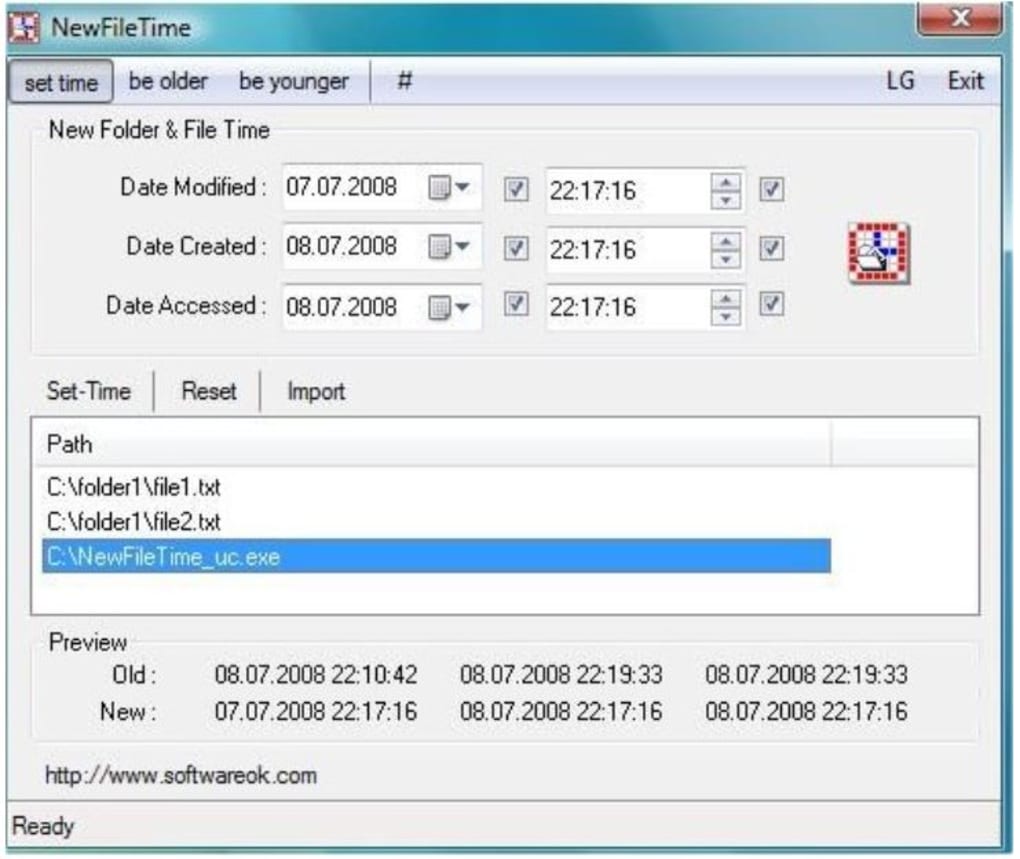
NewFileTime’s core functionality revolves around the modification of file and folder timestamps. Its user-friendly design simplifies the process, enabling efficient management of even large numbers of files. Key features include:
- Intuitive Interface: The program boasts a clean and straightforward interface, making it accessible to users of all technical skill levels. The absence of complex settings or configurations ensures immediate usability.
- Drag-and-Drop Functionality: Files and folders can be easily added to the processing queue by simply dragging and dropping them onto the application window. This streamlined approach significantly reduces the time required to process multiple files.
- Batch Processing: NewFileTime supports batch processing, allowing for the simultaneous modification of numerous files and folders. This feature is particularly valuable when dealing with large collections of data.
- Subfolder Inclusion: The software offers the option of recursively processing subfolders, ensuring that all nested files within a directory are included in the timestamp modification process. This functionality further enhances efficiency for managing complex directory structures.
- Precise Timestamp Control: Users have complete control over the new timestamps, specifying the exact date and time for creation, modification, and access. This granular control is crucial for maintaining data accuracy and consistency.
- Preview Functionality: Before applying changes, NewFileTime provides a preview of both the original and new timestamps. This preview feature allows for verification and ensures that the desired modifications are accurate before implementation.
- Import/Export Functionality: The ability to import and export timestamp information from and to text files offers further flexibility and allows for easier management of large numbers of files or bulk modifications.
- No Registry Modification: A key benefit of NewFileTime is its non-invasive nature. It doesn’t modify Windows registry entries, ensuring system stability and avoiding potential conflicts with other applications.
- Portable Application: The application is portable, requiring no installation. The archive can be extracted to any location, offering flexibility and convenience.
These features combine to create a powerful yet simple tool for managing file timestamps, addressing the needs of both novice and expert users.
Use Cases for NewFileTime
NewFileTime’s versatility makes it suitable for a wide range of applications, including:
- Correcting Inconsistent Timestamps: When dealing with files that have incorrect or inconsistent timestamps due to software glitches, data transfer issues, or other unforeseen circumstances, NewFileTime can be used to correct these inconsistencies and ensure accurate file metadata.
- Organizing Digital Photos: Digital cameras and smartphones occasionally record incorrect timestamps on photographs, leading to disorganized photo libraries. NewFileTime enables users to easily correct these errors and properly organize their photo collections chronologically.
- Managing Audio Files: Similar to digital photographs, audio files can suffer from timestamp inaccuracies. NewFileTime helps maintain consistent timestamps for audio collections, ensuring proper chronological ordering.
- Forensic Analysis: While not a primary forensic tool, it can be used to assist in specific scenarios where accurate timestamps are crucial for investigation. However, caution must be exercised as modifying timestamps can potentially compromise the integrity of digital evidence.
- Data Archiving: When archiving large datasets, consistent and accurate timestamps are essential. NewFileTime helps ensure the accuracy of these timestamps during the archiving process, enhancing the organization and accessibility of archived data.
- Software Development: During the software development lifecycle, maintaining accurate timestamps is beneficial. It facilitates debugging and provides clarity regarding the sequence of code modifications.
Advantages and Disadvantages of NewFileTime
While NewFileTime offers numerous advantages, it’s important to acknowledge its limitations:
Advantages:
- Free and Easy to Use: Its free availability and user-friendly interface make it accessible to a broad user base.
- Efficient Batch Processing: The ability to modify timestamps for numerous files simultaneously saves significant time and effort.
- Portable and Lightweight: The program’s portability and minimal system requirements enhance its convenience and usability.
- No Registry Modifications: The lack of registry changes ensures system stability and prevents conflicts with other software.
Disadvantages:
- Potential for Data Misrepresentation: Altering timestamps can potentially misrepresent the true history of a file, which could be problematic in specific situations requiring verifiable timestamps.
- Limited Advanced Features: NewFileTime lacks some advanced features found in more complex file management utilities.
- No Undo Feature: Once changes are applied, they cannot be undone directly within the application. Maintaining backups before modifying timestamps is essential.
Conclusion
NewFileTime is a valuable and practical tool for anyone needing to modify file and folder timestamps on a Windows system. Its intuitive design, batch processing capabilities, and non-invasive nature make it a convenient and efficient solution for correcting errors, organizing files, and managing metadata. However, users should be mindful of the potential implications of altering timestamps and utilize this tool responsibly, ensuring that modifications align with the intended purpose and don’t compromise data integrity or legal requirements. Always back up your data before making any significant changes to file metadata. Despite its limitations, NewFileTime remains a highly effective and accessible tool for a wide range of file management tasks.
File Information
- License: “Free”
- Version: “5.33”
- Latest update: “July 15, 2022”
- Platform: “Windows”
- OS: “Windows 8.1”
- Language: “English”
- Downloads: “6.5K”
- Size: “91.87 KB”


