
NexusFont is a powerful and user-friendly font management application designed specifically for Windows users. It addresses the common problem of overwhelming numbers of font files, providing a streamlined solution for organizing, previewing, and managing your extensive font collection. Unlike the default Windows font manager, NexusFont offers a rich set of features and a clean interface that makes font management a simple and enjoyable experience, even for users with hundreds or thousands of fonts installed.
Streamlining Font Management: Organization and Efficiency
For those who frequently work with fonts – graphic designers, writers, web developers, or anyone with a passion for typography – managing a large font library can quickly become a daunting task. The default Windows font manager often leaves much to be desired, lacking the organizational tools and intuitive interface needed to efficiently navigate and utilize a diverse collection. NexusFont steps in to fill this gap, offering a robust and efficient solution for managing even the most extensive font libraries.
One of NexusFont’s core strengths lies in its organizational capabilities. The program allows users to group fonts into custom sets and categories, making it easy to locate specific fonts for different projects or styles. This feature goes beyond simple alphabetical sorting; it allows for a highly personalized organization system, mirroring the user’s own workflow and preferences. This level of organization greatly improves efficiency, reducing the time spent searching for the right font and allowing users to focus on their creative work.
The ability to create these custom groups and sets within NexusFont is highly flexible. Users can create categories based on font type (serif, sans-serif, script), style (bold, italic, condensed), or any other criteria that suits their needs. This personalized approach ensures that the software adapts to the user’s unique workflow, maximizing efficiency and productivity. This powerful organizational feature transforms the often chaotic process of font management into a structured and manageable system.
Furthermore, NexusFont excels in its ability to quickly identify duplicate fonts. The built-in duplicate font detector scans the user’s font collection and highlights any identical fonts, saving users time and storage space by identifying and eliminating redundant files. This feature is particularly useful for users who have accumulated fonts from various sources over time, as it helps to maintain a clean and organized font library, preventing unnecessary duplication and potential conflicts.
Intuitive Interface and Enhanced Preview Capabilities
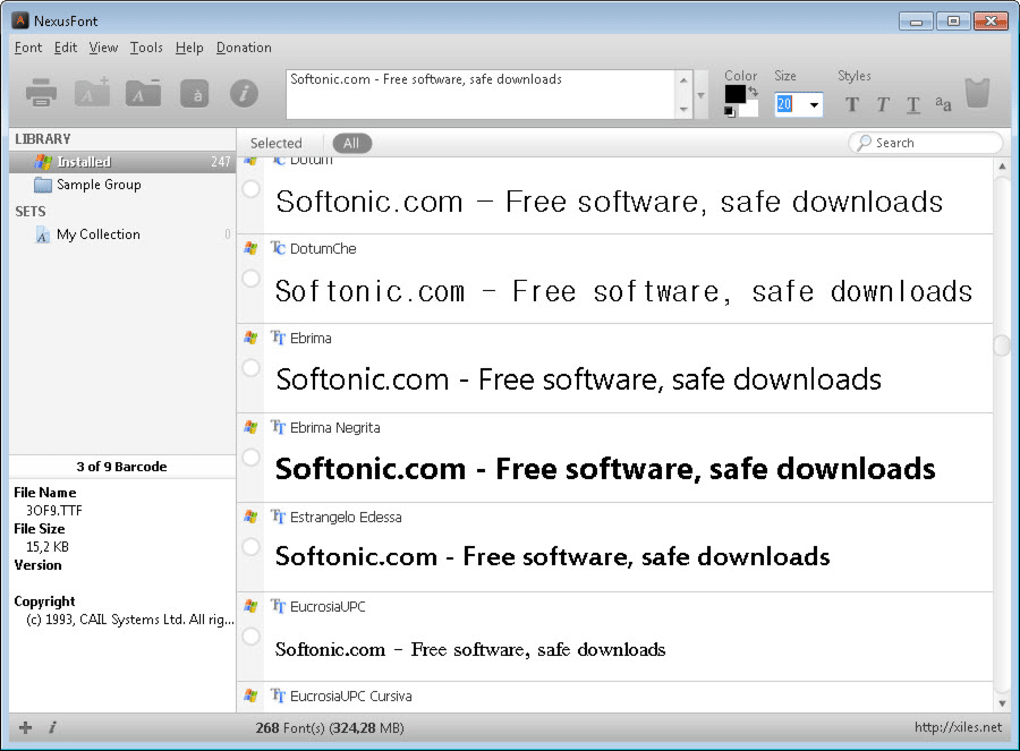
NexusFont’s intuitive interface is designed for ease of use. The clean and modern design makes it simple to navigate and utilize the application’s various features. The program’s layout is straightforward and uncluttered, preventing the feeling of overwhelm that often accompanies complex font management applications. Users can quickly access the functions they need without navigating through a maze of confusing menus or options.
Beyond its organizational capabilities, NexusFont enhances the font preview experience. Instead of relying on small, often unhelpful thumbnails, NexusFont provides a customizable preview window that allows users to see exactly how a font looks with their own sample text. This allows for a more accurate assessment of the font’s characteristics before using it in a project. The ability to input custom text samples ensures that users can preview fonts in the context of their own work, providing a more realistic representation of how the font will appear in their projects.
This enhanced preview functionality allows for a more informed decision-making process when selecting fonts. Users can experiment with different fonts and sample texts, quickly comparing the aesthetics and readability of various options. This reduces the risk of selecting an unsuitable font for a project and saves time that might otherwise be spent trial-and-error testing within a design or writing program.
Advanced Features: Beyond Basic Font Management
NexusFont extends its functionality beyond simple organization and preview. It offers several additional features that contribute to a comprehensive font management experience. The inclusion of a character map, for example, allows users to easily browse and select specific characters from a given font. This feature is invaluable for graphic designers, web developers, or anyone working with specialized characters or symbols. This detailed character map provides a comprehensive visual representation of each font’s glyph set, aiding in accurate selection and ensuring the right characters are available for a project.
Another noteworthy feature is NexusFont’s ability to save fonts as images. This allows users to create visual representations of their fonts for presentations, portfolios, or online use. This innovative function provides a flexible option for showcasing fonts in various contexts, enhancing the overall usability of the program.
Furthermore, NexusFont provides the ability to easily copy and move fonts between folders. This simple yet essential function streamlines the process of reorganizing and transferring font files, making it easy to manage font collections across multiple storage locations. This capability is especially helpful in maintaining an organized and efficient workflow for users with large collections or those who regularly need to transfer fonts to different machines or projects.
User Experience and Community Feedback
The user reviews for NexusFont consistently praise its intuitive interface and efficient functionality. Many users highlight the ease with which they can organize and manage their extensive font libraries, significantly improving their workflow. The ability to customize the preview with personal sample texts is frequently cited as a major benefit, allowing for more informed font selection. The inclusion of a duplicate font detector is also lauded as a time-saving and practical feature.
While some users have inquired about Mac compatibility (currently, NexusFont is Windows-only), the overall feedback is extremely positive. The application consistently receives high ratings for its performance, ease of use, and helpful features.
NexusFont: A Complete Solution for Font Management
In conclusion, NexusFont delivers a complete and efficient solution for managing font collections on Windows. Its intuitive interface, powerful organizational tools, customizable preview capabilities, and additional advanced features make it a superior alternative to the default Windows font manager. Whether you have a modest collection or an extensive library of fonts, NexusFont provides the tools you need to efficiently manage, organize, and utilize your fonts for a more streamlined and productive workflow. The program’s focus on user-friendliness, combined with its powerful features, makes it an essential tool for anyone who regularly works with fonts.
File Information
- License: “Free”
- Latest update: “May 22, 2024”
- Platform: “Windows”
- OS: “Windows XP”
- Language: “English”
- Downloads: “105.9K”
- Size: “3.78 MB”


