
Nighttime Imaging and Astronomy (NINA) is a free, open-source software application designed specifically for astrophotography. It’s rapidly gaining popularity among amateur and professional astronomers alike for its powerful features, intuitive interface, and comprehensive suite of tools that streamline the entire astrophotography process, from planning and aligning to capturing and processing images. This detailed exploration dives into NINA’s functionalities, benefits, and its impact on the modern astrophotographer’s workflow.
NINA’s Core Functionalities: A Comprehensive Overview
NINA excels as an all-in-one astrophotography solution, integrating numerous crucial functions into a single, user-friendly platform. This eliminates the need for juggling multiple software applications, significantly simplifying the often complex process of capturing celestial images. Key functionalities include:
-
Telescope Control: NINA seamlessly integrates with various telescope mounts, allowing for precise pointing, tracking, and guiding. It supports ASCOM, INDI, and native drivers for a wide range of popular mounts, ensuring compatibility with a diverse range of equipment setups. This control extends to features like slewing, plate solving, and meridian flipping, automating many of the manual tasks typically involved in astrophotography.
-
Camera Control: Similar to its telescope control capabilities, NINA offers robust camera control for both DSLR and CCD cameras. Users can adjust exposure time, gain, offset, binning, and other crucial settings directly within the interface. The software supports various camera protocols and drivers, ensuring broad compatibility across different camera models. Batch sequencing capabilities allows users to automate complex imaging routines, capturing numerous frames with varying exposure times and filters.
-
Focusing and Guiding: Sharp focus is critical for high-quality astrophotography. NINA facilitates precise focusing through various methods, including manual adjustments, automated routines using a focus motor, and the use of a Bahtinov mask. Furthermore, the integrated guiding feature ensures that the telescope remains accurately pointed at the target throughout long exposure imaging runs, compensating for atmospheric drift and other factors that can blur images. This functionality typically involves the use of a guide camera and guiding algorithm, which NINA expertly handles.
-
Plate Solving and Alignment: Plate solving is a crucial component of astrophotography, allowing NINA to determine the precise location of the telescope’s field of view by analyzing an image. This capability is essential for accurate alignment, go-to pointing, and precise centering of targets. NINA seamlessly integrates with several plate-solving engines, offering reliable and fast solutions.
-
Image Capture and Sequencing: NINA’s image capture capabilities extend beyond simple single exposures. It supports various imaging routines, including automated sequences for capturing multiple exposures, dithering (slightly shifting the telescope between exposures to reduce noise), and filter wheel control. This automation significantly speeds up the imaging process and improves the final image quality.
-
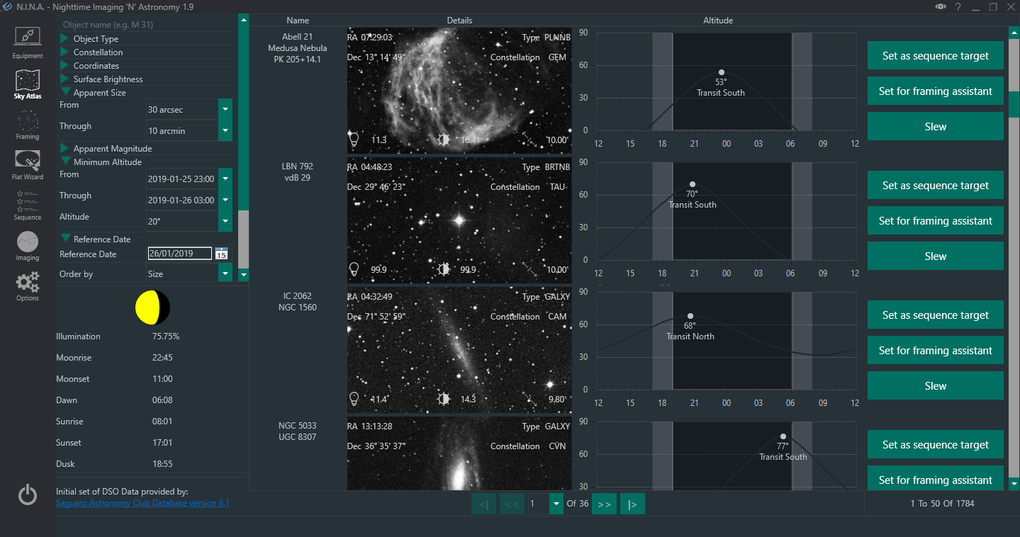
Sequence Planning: Before embarking on an imaging session, careful planning is essential. NINA assists in this planning phase by allowing users to create and edit sequences, specifying the target object, exposure settings, filter choices, and other parameters. This allows for meticulously planned observing sessions, maximizing efficiency and optimizing data acquisition.
-
Reporting and Logging: NINA meticulously logs all activity during an observing session. This data provides valuable insights into the imaging process, aiding in troubleshooting and refining techniques. The detailed logs can include information on focus, guiding, exposures, and other relevant parameters, assisting in identifying issues or areas for improvement.
NINA’s Advantages over Other Astrophotography Software
NINA distinguishes itself from other astrophotography software through several key advantages:
-
Comprehensive Integration: Unlike many software packages that require users to switch between various applications for different functions, NINA integrates virtually all necessary functions into a single platform. This streamlined workflow enhances efficiency and reduces the learning curve.
-
User-Friendly Interface: Despite its powerful capabilities, NINA boasts a remarkably intuitive and user-friendly interface. This makes it accessible to both novice and experienced astrophotographers. The well-organized layout and clear iconography allow users to quickly locate and access the tools they need.
-
Open Source and Free: NINA is a completely free and open-source software. This means there are no licensing fees, providing accessibility to a wider range of users. The open-source nature also allows for community contributions and continuous development, ensuring ongoing improvements and enhancements.
-
Active Community Support: A large and active community of users contributes to the software’s development and provides extensive support. This means that users can readily find answers to questions, troubleshoot problems, and learn from the experiences of others through forums, online groups, and tutorials.
-
Extensibility and Customization: NINA’s plugin architecture allows for extensibility and customization. Users can extend its functionality by integrating additional plugins, expanding its capabilities beyond the built-in features. This allows users to tailor the software to their specific needs and workflows.
Mastering NINA: A Step-by-Step Guide for Beginners
While NINA’s interface is intuitive, mastering its full potential requires some learning. Here’s a simplified overview of the initial steps involved:
-
Installation and Configuration: Download and install the latest version of NINA. Next, configure the software by specifying the connection settings for your telescope mount, camera, and other equipment. This involves selecting the appropriate drivers and entering the necessary communication parameters.
-
Setting up the Equipment Profile: Create a equipment profile in NINA which will store all of your equipment’s settings, saving time in the long run.
-
Plate Solving Setup: Configure plate solving by selecting a suitable plate-solving engine and providing the required information. Accurate plate solving is crucial for accurate pointing and alignment.
-
Creating and Running Imaging Sequences: Using NINA’s sequence editor, create sequences for your imaging runs. Specify your target, exposure settings, filter changes (if applicable), dithering parameters, and other relevant parameters. Execute the sequence to start capturing images.
-
Monitoring and Adjustment: During the imaging session, carefully monitor the progress. Adjust settings as needed based on real-time feedback. Pay close attention to guiding and focus to ensure optimal image quality.
-
Post-Processing: Once the images are captured, import them into your preferred post-processing software for further processing and refinement.
The Future of NINA and its Impact on Astrophotography
NINA’s ongoing development and growing community ensure its continued evolution as a leading astrophotography software. The introduction of new features, improvements to existing functionalities, and the integration of advanced technologies will further enhance its capabilities and simplify the astrophotography workflow. The open-source nature promotes community involvement, leading to rapid innovation and improvement. NINA is expected to play a pivotal role in advancing astrophotography, making it more accessible and efficient for both beginners and experts. Its continued development and user-friendly approach ensures its enduring popularity within the astrophotography community, promising a future where capturing stunning celestial images is both easier and more accessible than ever before.
File Information
- License: “Free”
- Latest update: “December 11, 2024”
- Platform: “Windows”
- OS: “Windows 11”
- Language: “English”
- Downloads: “87”


