
Nimbus Screenshot & Screen Video Recorder is a free browser extension designed for capturing screenshots and recording screen videos of web pages. Developed by nimbusweb.me, this utility offers a streamlined approach to screen capture and recording, complemented by built-in editing and annotation tools. While not without its limitations, Nimbus provides a compelling alternative to popular tools like Loom and Scrnli, offering a user-friendly experience and a focus on boosting productivity. This review will delve into its features, performance, pros, cons, and overall suitability for various users.
Feature Overview: A Three-in-One Solution
Nimbus Screenshot & Screen Video Recorder distinguishes itself by seamlessly integrating three key functions: screen capturing, screen recording, and integrated editing. This all-in-one approach eliminates the need for multiple applications, streamlining the workflow for users needing to create and share visual content.
Screen Capture: The screenshot functionality allows users to capture either a portion of a webpage or the entire page, including scrollable content. This feature is particularly useful for capturing lengthy articles, web forms, or comprehensive online resources. The process is intuitive and straightforward, making it easy for users of all technical skill levels to utilize.
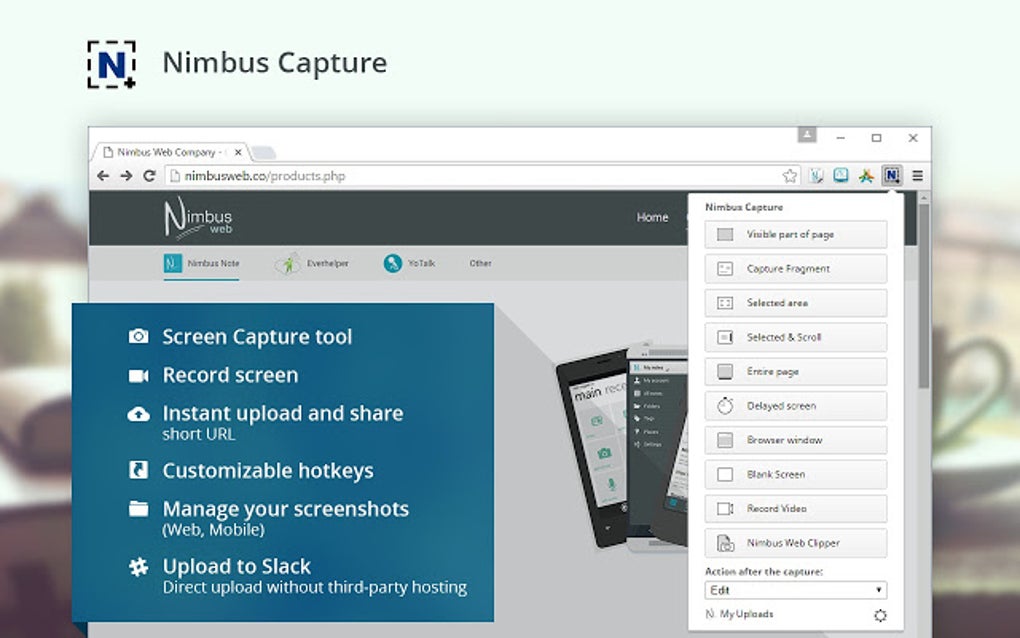
Screen Recording: Nimbus’s screen recording capabilities are equally impressive. With just a few clicks, users can initiate screencasts, recording their actions and on-screen activity. This is invaluable for creating tutorials, presentations, or demonstrations of software functionalities. The simplicity of the recording process is a significant advantage, allowing for quick and efficient content creation.
Integrated Editor and Annotation Tools: A key differentiator of Nimbus is its built-in editor and annotation tools. After capturing a screenshot or recording a video, users can directly access and utilize these features to enhance their creations. This eliminates the need for additional editing software, offering a seamless and efficient post-processing workflow. Users can add text, highlight areas, draw shapes, and generally refine their captures to precisely communicate their message.
The combination of these three core functions – capture, record, and edit – makes Nimbus a versatile tool for both personal and professional use. Its integrated approach minimizes the need for switching between different applications, contributing to a more efficient and less cumbersome user experience.
Ease of Use and User Interface: Intuitive and Streamlined
One of the most compelling aspects of Nimbus Screenshot & Screen Video Recorder is its user-friendly interface. The extension is designed with simplicity and intuitiveness in mind, making it accessible to users with minimal technical expertise. The controls are clearly laid out, and the navigation is straightforward.
The process of capturing screenshots and recording videos is remarkably simple. Users can quickly select the desired capture area, initiate the recording, and subsequently utilize the built-in editor to refine their output. The user interface is visually uncluttered, ensuring that users can focus on their task without being overwhelmed by complex menus or options. This streamlined design caters to users seeking a quick and efficient solution for screen capture and recording. It’s a testament to the developers’ focus on providing a straightforward and intuitive experience.
Performance and Reliability: A Consistent Performer
Nimbus Screenshot & Screen Video Recorder has consistently demonstrated reliability in performance. The extension is efficient and responsive, ensuring that users experience minimal lag or disruptions during the capture or recording process. It handles both screenshots and screen recordings flawlessly, providing high-quality output without significant performance overhead.
The reliability of Nimbus is a key factor in its appeal. Users can depend on the extension to perform consistently, without experiencing unexpected crashes or errors. This reliability is crucial for users who depend on the tool for professional or academic purposes, ensuring that they can consistently create and share high-quality visual content. The smooth performance contributes to a positive user experience, allowing users to focus on the content rather than troubleshooting technical issues.
Strengths and Weaknesses: A Balanced Perspective
While Nimbus Screenshot & Screen Video Recorder offers a robust set of features and a user-friendly interface, it’s not without its limitations. A balanced assessment requires acknowledging both the strengths and weaknesses:
Pros:
- All-in-one Solution: Combines screen capture, screen recording, and editing into a single extension.
- Ease of Use: Intuitive and user-friendly interface, accessible to users of all technical skill levels.
- Reliable Performance: Consistent and efficient performance, with minimal lag or disruptions.
- High-Quality Output: Produces high-quality screenshots and screen recordings.
- Built-in Editor: Offers comprehensive editing and annotation tools, minimizing the need for additional software.
- Free to Use: Available at no cost, making it accessible to a wider audience.
Cons:
- Lack of Timer: The screen recorder lacks a built-in timer, which can make it difficult to precisely time recordings. This is a significant drawback for users requiring precisely timed screencasts.
- Browser Extension Only: Currently functions solely as a browser extension, limiting its capabilities for capturing content outside the browser environment. Desktop-wide capture functionality would greatly enhance its usability.
- Limited Advanced Features: Compared to professional-grade screen recording software, Nimbus lacks advanced features such as customizable hotkeys, advanced editing options, or the ability to record system audio selectively.
Conclusion: A Valuable Tool with Room for Improvement
Nimbus Screenshot & Screen Video Recorder is a valuable addition to any user’s toolkit for screen capture and recording needs. Its ease of use, reliable performance, and integrated editing capabilities make it an attractive option for individuals and businesses alike. The all-in-one approach simplifies the workflow, eliminating the need for multiple applications and streamlining the content creation process.
However, the absence of a timer in the screen recorder and the limitation to browser-based capture are notable drawbacks. The lack of advanced features may also be a deterrent for users requiring more sophisticated editing capabilities. Despite these limitations, Nimbus provides a strong foundation for a highly useful tool. Future development incorporating a timer, expanding capture capabilities beyond the browser, and adding more advanced editing features would significantly enhance its already impressive capabilities, cementing its position as a leading contender in the screen capture and recording software market. For users seeking a simple, reliable, and free solution for capturing and editing web-based content, Nimbus Screenshot & Screen Video Recorder is a strong recommendation.
File Information
- License: “Free”
- Version: “varies-with-device”
- Latest update: “May 25, 2023”
- Platform: “Windows”
- OS: “Windows 7”
- Language: “English”
- Downloads: “9.4K”


