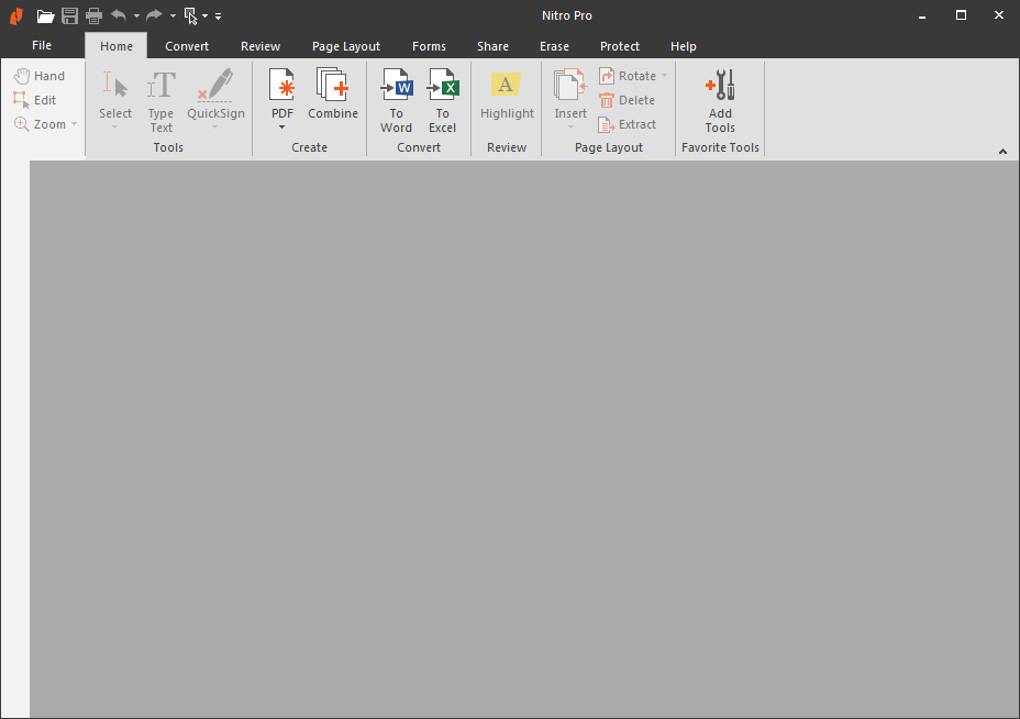
Nitro Pro is a professional-grade PDF editing software developed by Nitro Software. It’s a powerful tool designed to streamline workflows and boost efficiency for businesses and individuals alike, offering a comprehensive suite of features for creating, editing, converting, and securing PDF documents. While it competes with established players like Adobe Acrobat Pro, Nitro Pro presents a compelling alternative, particularly for users seeking a balance between functionality and affordability. This article delves deep into the capabilities of Nitro Pro, exploring its features, benefits, and limitations.
Understanding Nitro Pro’s Functionality
At its core, Nitro Pro is a PDF editor. This means it allows users to perform a wide range of actions on PDF files, going far beyond simple viewing. But what specifically can Nitro Pro do? Its capabilities extend to:
-
PDF Editing: This is the primary function of Nitro Pro. Users can add, edit, and delete text and images within existing PDF documents. This allows for corrections, updates, and the overall manipulation of PDF content without the need to recreate the document from scratch. The editing experience is designed to mimic the familiarity of working with standard word processing software, making the transition intuitive for most users.
-
PDF Conversion: Nitro Pro facilitates seamless conversion between PDF and other popular file formats. Users can convert PDF files to various formats, including .docx (Microsoft Word), .txt (plain text), and .xlsx (Microsoft Excel). This interoperability is critical for businesses that need to share documents across different platforms and applications. The reverse conversion is also possible, allowing users to create PDFs from other file types.
-
PDF Merging and Splitting: Managing multiple PDF documents can be cumbersome. Nitro Pro streamlines this process by offering tools to merge several PDFs into a single file, ideal for consolidating related documents or reports. Conversely, it also allows users to split a large PDF into smaller, more manageable files, facilitating organization and sharing.
-
Digital Signatures: For legally binding documents and contracts, Nitro Pro provides secure digital signature capabilities. This feature ensures authenticity and prevents unauthorized modifications, adding a crucial layer of security to sensitive information. The digital signatures comply with industry standards, making them legally acceptable in various contexts.
Key Features and Tools of Nitro Pro
Nitro Pro’s user interface is designed for ease of use, minimizing the learning curve for even novice users. The software’s intuitive layout allows users to quickly access its various features and tools, maximizing productivity. Some noteworthy features include:
-
Microsoft Office Integration: Nitro Pro integrates seamlessly with the Microsoft Office suite, including Word, Excel, and PowerPoint. This integration streamlines the process of converting between PDF and Office formats, ensuring data integrity and minimizing formatting issues during the conversion process.
-
Form Creation: The software includes tools to create and manage interactive forms. This feature is particularly useful for surveys, official templates, and data collection processes. Users can design sophisticated forms with various input fields, validation rules, and automated calculations.
-
Nitro Mobile Connectivity: Nitro Pro extends its functionality beyond the desktop by offering mobile connectivity through the Nitro Mobile app. This allows users to work on their PDFs from various devices such as Macs, iPads, and iPhones, increasing flexibility and access to their documents from anywhere with an internet connection.
-
Advanced Editing Tools: Beyond basic text and image editing, Nitro Pro offers more advanced tools such as OCR (Optical Character Recognition) for converting scanned documents into editable text, batch processing for handling multiple files simultaneously, and redaction tools for securely removing sensitive information from documents.
Nitro Pro: High-Quality PDF Editing for Professionals
Nitro Pro is positioned as a complete solution for professional PDF editing and management. Its comprehensive feature set allows users to create a wide range of documents, from simple reports and presentations to complex, interactive contracts and sophisticated infographics. The software’s strength lies in its ability to combine powerful editing tools with an intuitive interface, making it a valuable asset for organizations and individuals who rely heavily on PDF documents. The software is frequently cited as an effective tool in streamlining workflows and reducing time spent on manual tasks associated with PDF handling.
Advantages and Disadvantages of Nitro Pro
Like any software, Nitro Pro presents both advantages and disadvantages.
Pros:
- Intuitive Interface: The software’s user-friendly design makes it easy to learn and use, even for users with limited experience in PDF editing.
- Extensive Feature Set: Nitro Pro offers a wide range of features catering to various PDF editing needs, from simple edits to complex form creation and digital signing.
- Seamless Integration: The software integrates well with Microsoft Office and offers mobile connectivity for increased flexibility.
- Cost-Effectiveness: Compared to Adobe Acrobat Pro, Nitro Pro offers a more affordable alternative without sacrificing significant functionality.
- Strong Performance: Generally, Nitro Pro handles large PDF files and complex editing tasks efficiently, minimizing downtime and ensuring smooth workflow.
Cons:
- Resource Intensive: Nitro Pro can be resource-intensive, requiring a relatively powerful system to run smoothly. Users with older or lower-spec computers may experience performance issues.
- Limited Advanced Features (compared to Acrobat Pro): While Nitro Pro offers a comprehensive set of features, some advanced functionalities found in Adobe Acrobat Pro might be absent or less sophisticated.
- Occasional Bugs: Like most software, Nitro Pro may experience occasional bugs or glitches, although Nitro Software consistently releases updates to address reported issues.
- Customer Support: While support is generally available, some users have reported varying levels of responsiveness and effectiveness in resolving issues.
User Reviews and Feedback
User reviews on Nitro Pro are largely positive, with many users praising its intuitive interface and comprehensive feature set. However, some criticism focuses on occasional performance issues, particularly with large or complex PDF files. Certain users have reported difficulties with specific conversion tasks, particularly concerning Excel files, with some expressing frustration related to inaccuracies during the conversion process. These issues highlight the need to assess individual requirements and the specific types of PDF documents frequently handled before choosing Nitro Pro. Positive reviews emphasize the software’s effectiveness in editing PDF documents, creating forms, and managing workflows, underscoring its strengths in these areas. Nevertheless, potential users should carefully weigh the pros and cons based on their specific needs and technical environment.
Conclusion
Nitro Pro stands as a robust and versatile PDF editing solution, offering a compelling alternative to more expensive options on the market. Its user-friendly interface, comprehensive feature set, and relatively affordable price make it an attractive choice for businesses and individuals alike. While some limitations exist, such as potential resource intensiveness and occasional performance issues, the overall positive user feedback and strong functionality make Nitro Pro a worthwhile consideration for anyone needing a reliable and feature-rich PDF editing tool. Its effectiveness in streamlining workflows and simplifying PDF management makes it a powerful asset for increased productivity. Potential users are encouraged to explore the free trial to determine if Nitro Pro aligns with their specific needs and workflow preferences.