
NK2Edit is a free, lightweight Windows application designed to manage NK2 files, the address book files used by Microsoft Outlook. These files store contact information, enabling Outlook to auto-populate email addresses when composing new messages. While Outlook automatically generates and uses NK2 files, it lacks built-in editing capabilities. This is where NK2Edit steps in, offering a simple yet effective solution for manipulating and maintaining your Outlook address book data.
Understanding NK2 Files and Their Importance
Before delving into the specifics of NK2Edit, it’s crucial to understand the role and significance of NK2 files within the Microsoft Outlook ecosystem. These files are not directly visible to the user; they’re generated and managed behind the scenes by Outlook. They contain a crucial piece of data – the list of frequently used email addresses and associated contact details. This data is what facilitates Outlook’s auto-completion feature for email addresses, dramatically improving the efficiency of email composition. The NK2 file acts as a quick-reference cache, saving time and effort by instantly suggesting the appropriate email address based on your previous interactions and saved contacts.
The structure of an NK2 file is relatively straightforward. It essentially stores a list of entries, each representing a contact. Each entry typically contains the email address and potentially other associated information, such as the full name or nickname of the contact. This information is stored in a proprietary format, readable only by Outlook (or specialized tools like NK2Edit).
NK2Edit: Key Features and Functionality
NK2Edit shines as a practical tool for situations where Outlook’s inherent limitations become apparent. While Outlook automatically updates the NK2 file, it provides no direct means to edit or modify its contents. NK2Edit offers precisely these capabilities. Its core functionality revolves around allowing users to:
-
Edit Existing NK2 Files: This is the primary function of the application. Users can open their existing NK2 file (typically located in the user’s profile directory), view the stored entries, and make changes as needed. This includes modifying email addresses, correcting typos, or adding new contact entries.
-
Create New NK2 Files: While less common, NK2Edit also enables the creation of brand new NK2 files. This could be useful for various reasons, such as testing purposes or starting with a fresh address book in a new Outlook profile.
-
Back Up and Restore NK2 Files: A critical feature, especially given the lack of built-in backup mechanisms in Outlook. NK2Edit allows users to create backups of their current NK2 file, providing a safety net against accidental data loss or corruption. It can also assist in restoring corrupted NK2 files that Outlook might otherwise fail to read.
-
Address Book Management: NK2Edit effectively provides a means of managing your Outlook address book outside the confines of the Outlook application itself. This offers a level of flexibility not available through Outlook’s standard interface.
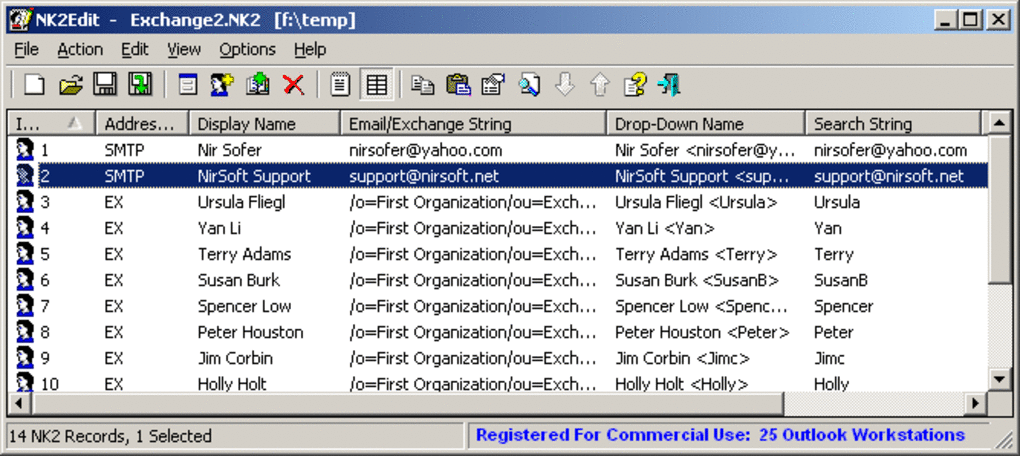
The simple text-based interface facilitates easy navigation and editing of the NK2 file’s contents. This direct interaction with the file’s data avoids the complexities often associated with attempting to modify internal Outlook data structures.
Using NK2Edit: A Step-by-Step Guide
Using NK2Edit is straightforward, even for users with limited technical expertise. The process typically involves the following steps:
-
Download and Installation: First, download the NK2Edit executable from a trusted source. The installation process is simple; typically, just running the executable is sufficient.
-
Locate the NK2 File: The NK2 file is usually found in the user’s profile directory, specifically within the Outlook configuration folder. The exact location varies depending on the Windows version and Outlook configuration. NK2Edit doesn’t require any complex configuration settings, simplifying its use.
-
Open the NK2 File with NK2Edit: Once located, simply open the NK2 file with the NK2Edit application. The interface will display the contents of the file in a readily editable format.
-
Edit the NK2 File: The user can now make the necessary changes. This might include adding new email addresses, removing old ones, correcting errors, or altering other associated details.
-
Save Changes: After making all the necessary changes, the user saves the modified NK2 file, ensuring the changes are reflected when Outlook next accesses the file.
-
Backup (Optional): For added data safety, it is recommended to create a backup of your NK2 file before making any significant edits. NK2Edit’s backup feature facilitates this process efficiently.
-
Restart Outlook: After saving the changes, restarting Outlook usually ensures that the changes are fully integrated into the application.
Advantages and Disadvantages of NK2Edit
Like any software, NK2Edit presents both advantages and disadvantages. Understanding these aspects is crucial for determining if it’s the right tool for your needs.
Advantages:
-
Free and Open Source: NK2Edit is freely available and often comes with an open-source license, promoting transparency and community support.
-
Lightweight and Easy to Use: The application is lightweight and boasts a simple, intuitive interface, suitable even for novice users. No specialized technical skills are necessary.
-
Direct Control Over NK2 File: The tool offers direct control over the NK2 file, bypassing the complexities of directly modifying Outlook’s internal data.
-
Backup and Restore Capability: NK2Edit’s backup and restore features provide a crucial layer of protection against accidental data loss or corruption.
-
Efficient Address Book Management: It efficiently addresses the lack of editing capabilities within Outlook’s default interface.
Disadvantages:
-
Outdated Interface: A common criticism is that NK2Edit’s interface might appear outdated compared to modern software. While functional, it may not have the polished look and feel of newer applications.
-
Limited Functionality: NK2Edit primarily focuses on editing NK2 files. It doesn’t offer advanced features like contact merging or advanced data manipulation capabilities.
-
Potential Compatibility Issues: While generally compatible with various Outlook versions, minor compatibility issues might occasionally arise with newer Outlook iterations.
-
Reliance on Manual File Management: The process involves manually locating and managing the NK2 file, which may not be ideal for all users.
Alternatives to NK2Edit
While NK2Edit fulfills a specific need, several alternative approaches exist for managing Outlook contacts. These include:
-
Using Outlook’s Built-in Contact Management: For basic contact management, Outlook’s built-in features, while not providing direct NK2 editing, allow modification and organization of contact data within the application itself. This is the most standard and generally recommended approach for basic needs.
-
Third-Party Contact Management Software: Various third-party contact management applications offer advanced features like synchronization with multiple devices, data backup, and more.
-
Manual Editing of the NK2 File (Advanced Users): For tech-savvy users, direct manual editing of the NK2 file (using a text editor) is possible, though this approach requires a thorough understanding of the NK2 file format and carries a higher risk of data corruption. This is not recommended for users without significant technical expertise.
In conclusion, NK2Edit provides a valuable solution for those needing to directly edit their Outlook address book data. Its simplicity, free availability, and crucial backup features make it a worthy tool for many users. However, users should weigh its limitations, specifically the outdated interface and limited functionality, against their specific needs and consider alternative solutions based on their technical skills and desired level of control.
File Information
- License: “Free”
- Latest update: “July 11, 2023”
- Platform: “Windows”
- OS: “Windows 8”
- Language: “English”
- Downloads: “1.2K”
- Size: “373.96 KB”


