
In the vast landscape of digital tools designed to streamline workflows and enhance user interaction with computers, a category of software stands out for its elegant simplicity and profound impact on efficiency: macro recorders. Among these, the nMacro Recorder offers a foundational, free-of-charge solution for Windows users seeking to automate repetitive mouse and keyboard actions. This article delves into the capabilities, applications, and significance of nMacro Recorder, positioning it within the broader ecosystem of software utilities and productivity tools available on platforms like PhanMemFree.org.
At its core, nMacro Recorder is an application designed to capture a sequence of user inputs – specifically mouse movements, clicks, and keyboard presses – and then play them back on demand. This seemingly straightforward functionality unlocks a powerful potential for automation, transforming tedious, repetitive tasks into one-click operations. While the software itself might appear modest in its features and presentation, its utility for a specific segment of users remains undiminished, particularly for those who prioritize ease of use and a lightweight footprint over an exhaustive feature set.
Originally cataloged by PhanMemFree in 2006, nMacro Recorder quickly garnered attention for its effectiveness. Despite its version number remaining at 1.1 since its last significant update, likely around October 2006, its core function remains relevant. It has consistently demonstrated popularity in regions like the United States, Portugal, and India, reflecting a global need for simple automation solutions. With a remarkably small installation size of just 376.70 KB, it requires minimal storage, making it an ideal choice for systems with limited disk space or for users who prefer their utilities to be as unobtrusive as possible. Compatible with legacy Windows operating systems, including Windows 98 and earlier versions, nMacro Recorder serves as a testament to enduring software design that fulfills a specific need without demanding excessive system resources or complex configurations.
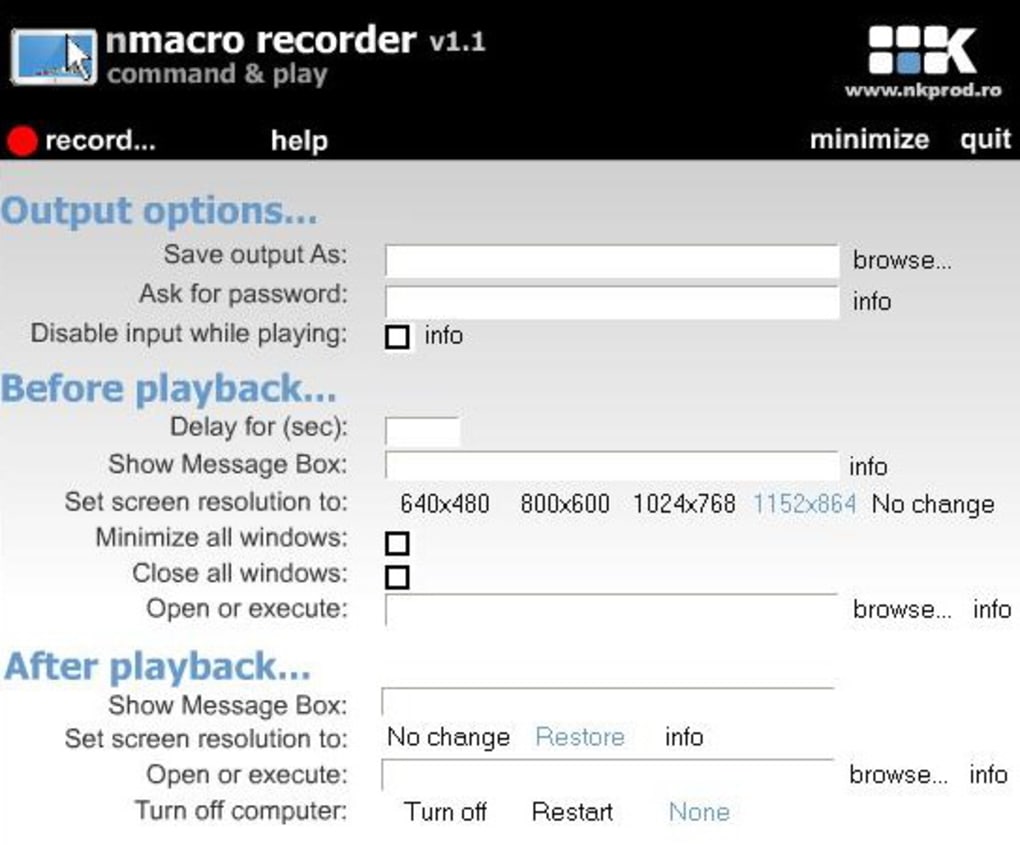
The Essence of Automation: NMacro Recorder’s Role in Utilities & Tools
The category of “Utilities & Tools” on any software repository, including PhanMemFree.org, represents the backbone of personal computing. These applications are designed to extend the functionality of an operating system, providing users with capabilities ranging from system maintenance to advanced file management. Within this diverse landscape, automation tools like nMacro Recorder occupy a crucial niche. They are not merely conveniences; they are instruments of efficiency, designed to free users from the drudgery of repetitive digital labor.
A macro recorder, by its very definition, is an automation tool. It acts as a digital scribe, meticulously recording every interaction a user has with their computer’s interface – the path of the mouse cursor, the precise coordinates of a click, the timing and sequence of keystrokes. This recording, or “macro,” can then be executed at any time, reproducing the exact sequence of actions as if the user were performing them manually. This capability is invaluable in numerous scenarios. Consider, for instance, a user who frequently needs to open a specific application, navigate through several menus, and input a standard set of data. Without a macro recorder, this sequence would have to be performed step-by-step every single time. With nMacro Recorder, the entire process can be encapsulated into a single macro, triggered by a hotkey or a simple command, saving minutes, if not hours, over a day or week.
What distinguishes nMacro Recorder within this category is its straightforward approach. There are no convoluted scripting languages to learn, no complex settings to configure. The user simply initiates the recording process, performs the desired actions, and then stops the recording. The resulting macro is immediately ready for playback. This “record-and-replay” paradigm makes it incredibly accessible to users of all technical proficiencies, from casual computer users to those with more advanced needs who might not wish to delve into scripting for simple automation tasks.
However, the simplicity also means a focus on the fundamental. More advanced macro recorders might offer features like conditional logic (if X happens, then do Y), variable support, or the ability to edit macros in a more granular, code-like fashion. NMacro Recorder, adhering to its core design, keeps things basic but reliable for its intended purpose. It records what you do, and it plays it back exactly as you did it. This makes it an excellent entry point for anyone exploring automation for the first time or for those who have very specific, unchanging sequences of tasks they wish to automate.
Within the “Utilities & Tools” category, one can find a variety of related applications. For example, “GS Auto Clicker” is listed among the top downloads, serving a similar but more specialized purpose: automating mouse clicks. While GS Auto Clicker excels at rapid, repetitive clicking at a fixed location, nMacro Recorder offers a more comprehensive solution by integrating mouse movements and keyboard inputs, thus handling more complex sequences of interactions. Other tools like “File Managers” or “Data Recovery” serve different utility functions, but all share the common goal of enhancing the user’s control and efficiency over their computer system. NMacro Recorder, specifically for Windows, remains a compelling option for those seeking a free, lightweight, and effective solution for automating a wide array of routine digital tasks.
Boosting Efficiency: NMacro Recorder as a Productivity Enhancer
In the contemporary digital workspace, productivity is paramount. Every second saved, every repetitive task eliminated, contributes to a more efficient and less frustrating work environment. This is where tools like nMacro Recorder shine, acting as silent partners in the quest for optimized workflows. Falling squarely within the “Productivity” category, which encompasses everything from “Accounting” software to “Project Management” suites, macro recorders provide a foundational layer of automation that can significantly impact daily tasks across various professions.
Consider the daily grind in an office setting. Many roles involve data entry, report generation, or routine communication that requires performing the same sequence of actions multiple times a day. For example, a finance professional might frequently need to log into a banking portal, navigate to a specific report, download it, open it in a spreadsheet application, and then copy certain data points to another document. Each step, while simple individually, adds up. With nMacro Recorder, this entire sequence can be recorded once. Subsequently, a single click or hotkey combination can execute the macro, flawlessly performing all these steps automatically. This not only saves time but also drastically reduces the potential for human error, a common pitfall in repetitive manual processes.
Beyond finance, almost every subcategory under “Productivity” can benefit from macro automation.
- Document Management: Imagine repeatedly opening a specific folder, selecting a set of files, and moving them to an archive, or renaming files according to a consistent pattern. NMacro Recorder can automate these actions.
- E-Mail Clients: While modern email clients offer some automation, macro recorders can fill gaps. For instance, generating a standard email, inserting specific attachments from a known location, or moving emails to designated folders based on certain manual checks can be streamlined.
- Office Suites: Within applications like word processors or spreadsheets, complex formatting tasks, repetitive data manipulation, or the creation of boilerplate content can be easily automated. For instance, applying a specific set of paragraph styles, inserting standard headers and footers, or performing a series of cell formatting operations in Excel could be a single macro.
- Project Management: While dedicated project management software handles much of the heavy lifting, smaller, repetitive administrative tasks associated with updating statuses, generating simple reports, or synchronizing data between local files and web interfaces can be automated.
The beauty of nMacro Recorder in this context is its universality. Unlike macros built into specific applications (like VBA macros in Microsoft Office), nMacro Recorder operates at the operating system level, meaning it can interact with any application that accepts mouse and keyboard input. This cross-application compatibility is a significant advantage, allowing users to automate processes that span multiple programs – opening a web browser, logging into a web application, downloading data, then opening a desktop application to process that data.
Furthermore, for small businesses or individual entrepreneurs managing their “Accounting” or “Personal Finance Management,” nMacro Recorder can simplify routine tasks like recording expenses, generating invoices, or updating financial ledgers. While it won’t replace specialized software, it can automate the bridge between manual data input and the software itself. The ability to automate mundane tasks allows individuals to focus on higher-value activities that require critical thinking and creativity, ultimately leading to a more productive and fulfilling work experience.
Beyond Repetition: NMacro Recorder in Development & Testing Workflows
The realm of “Development & IT” is often perceived as highly technical and code-driven, yet even here, repetitive tasks are abundant. Software developers, quality assurance testers, and IT administrators frequently encounter scenarios where they perform the same sequences of actions, whether for testing new features, configuring systems, or preparing development environments. NMacro Recorder, with its simple yet effective automation capabilities, finds a practical role in these professional contexts, particularly in areas like “IDEs/Source Editors,” “Manual & Tutorials,” and “Networking” setup.
For Quality Assurance (QA) testers, nMacro Recorder can be an indispensable tool. A significant portion of QA involves regression testing, where previously tested features are re-tested after new code changes to ensure nothing has broken. This often entails repeatedly navigating through an application, inputting specific data, and observing outputs. Manually executing hundreds of these test cases can be time-consuming and prone to human error. With nMacro Recorder, testers can record the steps for a particular test case once. Then, they can play back this macro repeatedly, freeing them to focus on analyzing results or developing new test scenarios. While enterprise-level testing suites offer more sophisticated automation frameworks, nMacro Recorder provides a quick, free, and accessible solution for smaller projects or ad-hoc testing needs, especially when dealing with graphical user interfaces (GUIs) that are difficult to script programmatically.
In software development, developers might use nMacro Recorder for mundane tasks within their “IDEs/Source Editors.” For instance, setting up a new project often involves creating several standard files, adding boilerplate code, configuring build settings, or navigating to specific project directories. A macro can automate these initialization steps, ensuring consistency and saving valuable setup time. While modern IDEs offer templates and snippets, nMacro Recorder covers interactions that go beyond simple text insertion, such as navigating complex menus or interacting with external tools that the IDE doesn’t directly control. It can also be used for repetitive refactoring tasks, applying a sequence of edits across multiple files that might not be easily achieved with a simple “find and replace” function.
For IT professionals and system administrators, nMacro Recorder can assist in configuring new machines or performing routine maintenance. Imagine the task of setting up a dozen new workstations, each requiring the same sequence of software installations, network configurations, and security settings. Recording this sequence once can drastically speed up the deployment process. Similarly, for creating “Manual & Tutorials,” recording screen actions with nMacro Recorder and then documenting each step manually can be made more precise by ensuring the exact mouse clicks and keystrokes are consistently replicated for screenshots or animated GIFs illustrating the process.
While nMacro Recorder is not a replacement for full-fledged “Programming Languages” or sophisticated “Development Kits,” it serves as a pragmatic bridge for automating GUI interactions that are otherwise tedious. It allows professionals to offload low-level, repetitive tasks, enabling them to concentrate on the more complex, intellectually stimulating aspects of development, testing, and IT management. Its simplicity means a low barrier to entry for any team member to create and share useful automation scripts without needing specialized coding skills, thereby fostering a more efficient and collaborative work environment.
Game On: Automating Actions for Enhanced Gaming Experiences
The application of macro recorders extends far beyond professional productivity into the realm of leisure and entertainment, particularly within “Games.” While often overlooked in this context, nMacro Recorder can be utilized by gamers to automate repetitive in-game actions, streamline complex command sequences, or even aid in accessibility for players with physical limitations. From “Action” games to “Role Playing” and “Simulation” titles, the ability to record and replay inputs can offer a unique dimension to the gaming experience.
In many modern Role Playing Games (RPGs) or Massively Multiplayer Online Role-Playing Games (MMORPGs), players often engage in activities that require repeated clicking or specific sequences of hotkey presses. This could involve “grinding” for resources, crafting items, or performing repetitive combat rotations to maximize damage output. For instance, collecting herbs in an MMORPG might involve moving to a spot, clicking on the herb, waiting for the animation, and then moving to the next. NMacro Recorder can automate the clicking part, allowing the player to focus on movement or other strategic decisions. Similarly, complex spell rotations or combat abilities that require precise timing and sequencing can be pre-recorded, ensuring optimal execution without manual dexterity being a limiting factor.
Simulation games and Strategy games often involve managing numerous resources and units, which can lead to frequent clicking and menu navigation. Building a city in a simulation game or managing an army in a strategy game might entail repeatedly issuing similar commands or constructing similar structures. A macro could automate the process of building a specific type of building or training a specific unit, provided the interface interaction remains consistent. This can accelerate the early game phases or simplify the management of large-scale operations.
In Action games, while real-time reflexes are paramount, some preparatory actions or repetitive menu navigations can be automated. For example, loading into a specific training mode, selecting a character, or equipping a standard loadout could be macro-driven, saving a few seconds each time a player wants to practice. For games that involve Quick Time Events (QTEs) or specific button combinations, nMacro Recorder could potentially record these sequences, though this often blurs the line into what might be considered an unfair advantage or botting, which is usually against game terms of service. Users should exercise caution and adhere to game rules when using automation tools.
Beyond direct gameplay, macros can also assist with meta-game tasks. For instance, repeatedly logging into a game, checking daily rewards, or initiating specific in-game events might be automated. For content creators who record gameplay, setting up OBS or other recording software with specific settings can be a multi-step process, which a macro could streamline before starting a recording session.
It’s important to note the ethical considerations and potential drawbacks. Many online multiplayer games explicitly prohibit the use of automation tools to gain an unfair advantage, and doing so can lead to account bans. NMacro Recorder is best used for single-player games, for personal quality-of-life improvements that don’t impact other players, or for aiding accessibility. For players with conditions that make repetitive mouse or keyboard actions difficult or painful, nMacro Recorder offers a means to enjoy games that might otherwise be inaccessible, by offloading the physical strain of certain inputs to the software. In this capacity, it transcends mere convenience and becomes an important accessibility tool.
Technical Specifications and Accessibility
Delving into the technical details, nMacro Recorder version 1.1, released with its catalog entry updated on October 6, 2006 (though its last developer update might have been earlier, with a PhanMemFree listing update on March 9, 2017), is a product of its time. It was designed for Windows 98 and former versions, implying its compatibility with a range of older Windows operating systems up to Windows XP or Vista. While modern systems like Windows 10 or 11 might require compatibility mode to run perfectly, many legacy applications, especially those that interact directly with input devices, can still function. Its diminutive size of 376.70 KB is a stark contrast to today’s multi-gigabyte applications, reflecting efficient coding practices typical of the era.
The software is available in English, making it accessible to a wide global audience. However, the presence of alternative download links for “nMacro Recorder indir” (Turkish), “Télécharger nMacro Recorder” (French), “Скачать nMacro Recorder” (Russian), “下载 nMacro Recorder” (Chinese), “nMacro Recorder herunterladen” (German), “Unduh nMacro Recorder” (Indonesian), “Pobierz nMacro Recorder” (Polish), “Tải nMacro Recorder về” (Vietnamese), “Descargar nMacro Recorder” (Spanish), “nMacro Recorder をダウンロードする” (Japanese), “Baixar nMacro Recorder” (Portuguese), “nMacro Recorder 다운로드” (Korean), and “Scaricare nMacro Recorder” (Italian) signifies PhanMemFree’s commitment to providing software in various languages, even if the application itself is English-only. This multi-language availability of the download page ensures that users from diverse linguistic backgrounds can easily find and access the software.
The security status of nMacro Recorder, as listed on PhanMemFree.org, is typically an important consideration for users. For free software, especially older versions, it’s crucial that it comes from a reputable source and has been vetted. PhanMemFree maintains stringent checks to ensure that downloads are free from malware or other harmful components, offering peace of mind to users downloading tools like nMacro Recorder. While the application itself is simple, its interaction with system inputs means trust in its integrity is paramount.
Downloading nMacro Recorder from PhanMemFree.org is a straightforward process. Users simply navigate to the product page, click the “Free Download” button for Windows, and the installer (or executable) is delivered. Given its small size, the download is almost instantaneous, even on slower internet connections. Installation is typically minimal, often involving just extracting an executable file or running a simple setup wizard, embodying the “install and go” philosophy.
Despite its age, the fact that nMacro Recorder still sees downloads (4 last week, 10 last month, and a total of 1,686 since its inclusion in the catalog) underscores the enduring demand for simple, effective, and free automation tools. Its minimal system requirements also make it an ideal choice for older computers or virtual machines where resources are constrained, providing a viable automation solution without necessitating hardware upgrades or complex software investments.
Conclusion
The nMacro Recorder stands as a prime example of a utility that, despite its simplicity and age, continues to serve a valuable purpose in the digital world. As a free, lightweight, and user-friendly macro recorder for Windows, it empowers users to automate repetitive mouse and keyboard actions, thereby enhancing productivity across a multitude of tasks, from routine office work to specialized development processes and even recreational gaming.
PhanMemFree.org proudly hosts nMacro Recorder, facilitating its accessibility to a global audience. Through its fundamental “record-and-replay” functionality, this software demystifies automation, making it achievable for anyone, regardless of technical expertise. Whether it’s to streamline data entry, accelerate testing workflows, or simply make gaming more accessible, nMacro Recorder offers a no-frills solution that embodies the core principles of efficiency and ease of use.
While the software landscape has evolved dramatically since nMacro Recorder’s inception, with more complex and feature-rich automation tools now available, its enduring presence and continued usage highlight the timeless appeal of a tool that does one thing well. For those seeking a dependable, free, and straightforward way to automate common computer interactions, nMacro Recorder remains a relevant and highly recommended utility found on PhanMemFree.org, a testament to the power of targeted, efficient software design.
File Information
- License: “Free”
- Version: “1.1”
- Latest update: “March 9, 2017”
- Platform: “Windows”
- OS: “Windows 98 SE”
- Language: “English”
- Downloads: “4.9K”
- Size: “376.70 KB”


