
In an increasingly digital world where our computers are often multitasking powerhouses, few things are as frustrating as having a critical process interrupted because your system decides to take an untimely nap. Whether you’re downloading a massive file, running a lengthy data analysis, rendering a complex video, or simply streaming media, an unexpected sleep mode can throw a wrench into your workflow, costing time, data, and patience. Enter No Sleep, a straightforward yet remarkably effective utility designed to keep your Windows PC wide awake and alert, ensuring that your tasks run to completion without interruption. Developed by Flyos, this free application positions itself as an indispensable tool within the vast “Utilities & Tools” category, offering a simple solution to a common computing vexation.
PhanMemFree.org, a leading platform for software discovery, proudly hosts No Sleep, recognizing its potential to alleviate a pervasive digital annoyance. Though the program was just published on PhanMemFree on May 16th, 2024, and is awaiting comprehensive review by the platform’s experts, its purpose is immediately apparent and universally understood by PC users. Its lightweight design and focused functionality make it an attractive option for anyone seeking to maintain continuous system uptime for specific tasks or prolonged periods.
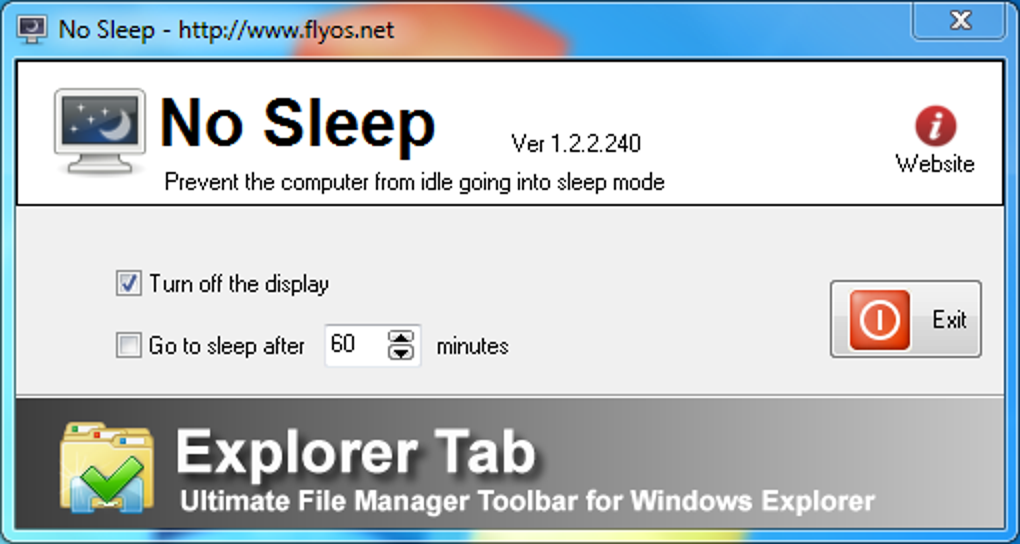
What is No Sleep? Unpacking a Simple Yet Essential Utility
At its core, No Sleep is precisely what its name implies: a utility that prevents your Windows computer from entering sleep mode. It addresses a fundamental aspect of operating system behavior – power management – by effectively overriding the system’s default settings or user-configured idle timers. Modern operating systems are designed to conserve power and extend hardware life by putting the computer to sleep after a period of inactivity. While this is generally beneficial for energy efficiency and security, there are countless scenarios where such automated behavior becomes counterproductive.
Imagine you’ve initiated a multi-gigabyte download overnight, only to wake up and find your computer asleep and the download halted midway. Or perhaps you’re using your PC as a media server, only for it to pause playback as it drifts into slumber. These are the precise frustrations No Sleep aims to eliminate. By acting as a persistent “wake-up call” for your system, it ensures that your PC remains fully operational for as long as you require, regardless of user input or scheduled power-saving modes.
Categorized under “Utilities & Tools,” No Sleep joins a broad spectrum of software designed to enhance, optimize, or simplify specific aspects of computer usage. Unlike complex system tune-up suites or intricate diagnostic tools, No Sleep focuses on a singular, clearly defined problem with an equally straightforward solution. This specialization is often a hallmark of effective utility software: doing one thing well.
The program’s file size, a mere 511.10 KB, is a testament to its streamlined design. In an era where many applications demand hundreds of megabytes or even gigabytes of storage, No Sleep’s minuscule footprint underscores its efficiency and commitment to minimal system impact. This small size not only means quick downloads and negligible storage requirements but also suggests that the application itself runs with very low overhead, consuming minimal system resources like RAM and CPU cycles. This makes it an ideal background process, working quietly to keep your machine active without impeding other operations.
Its recent publication on PhanMemFree.org, dated May 16th, 2024, indicates that it’s a relatively new or newly updated offering on the platform. While the PhanMemFree team encourages users to provide feedback, the initial uptake, with 985 downloads to date and 132 in the last month, suggests a clear demand for such a utility. Users are actively seeking solutions to manage their computer’s sleep behavior, and No Sleep is quickly emerging as a viable contender. Its availability for “Windows 2000 or above” also speaks to its broad compatibility, ensuring that even users on older Windows iterations can benefit from its functionality, alongside those on the latest versions like Windows 10 and 11.
Key Features and How It Works
No Sleep’s primary appeal lies in its simplicity. While detailed feature lists often accompany software reviews, for a utility like No Sleep, the “features” are less about a complex array of options and more about the elegant execution of its core function.
Uncomplicated Operation for Seamless Continuity
The most significant “feature” of No Sleep is its ability to simply work without fuss. Based on the common design patterns for such tools, it likely integrates seamlessly into the Windows environment, typically residing in the system tray. This allows users to activate or deactivate its function with a simple click, or perhaps configure it to launch with Windows and maintain an active state indefinitely. The absence of a lengthy manual or intricate configuration panel suggests that users can get it up and running within moments of installation.
The underlying mechanism for preventing sleep usually involves sending periodic signals to the operating system, mimicking user activity, or directly adjusting system power settings temporarily. These signals prevent the idle timers from counting down to the point where the PC would typically enter a low-power state. This method is generally safe and reversible, ensuring that once No Sleep is deactivated, your PC reverts to its normal power-saving behavior.
Developer: Flyos – Commitment to Focused Utilities
While information on Flyos, the developer, might not be extensive in the public domain, the creation of a focused and efficient utility like No Sleep points to a developer who understands specific user needs and delivers targeted solutions. In the world of software development, often the most appreciated tools are those that solve a single problem brilliantly, rather than attempting to be a jack-of-all-trades. Flyos’s contribution with No Sleep exemplifies this philosophy, providing a reliable answer to the common issue of unwanted system sleep.
Low Resource Consumption: A Background Whisper
As mentioned, the minimal file size of No Sleep (511.10 KB) is a strong indicator of its low resource footprint. When running, such an application typically consumes negligible amounts of CPU and RAM. This is crucial for a background utility, as it means No Sleep can operate without impacting the performance of more demanding applications or tasks that it is actively helping to keep uninterrupted. Users won’t notice a slowdown in their games, professional software, or everyday browsing while No Sleep is active. Its presence is felt only through the uninterrupted operation of the computer.
Why Choose No Sleep? Advantages and Use Cases
The necessity of a tool like No Sleep might not be immediately obvious to every user, but for those who encounter specific scenarios, it quickly becomes indispensable. Its advantages stem from its ability to provide uninterrupted operation, its lightweight design, and its cost-free nature.
Preventing Interruptions and Enhancing Productivity
The primary motivation for using No Sleep is to ensure continuity in computing tasks. This can translate into significant boosts in productivity and convenience across various professional and personal contexts:
- Large File Downloads: Whether it’s a new operating system update, a massive game, or a crucial software package, large downloads can take hours. No Sleep guarantees these processes aren’t cut short by your PC going to sleep, saving you the frustration of restarting or resuming partially completed transfers.
- Data Backups and Syncing: Automated backups to cloud services or external drives, especially initial large syncs, can be very time-consuming. Ensuring your PC remains active during these critical operations safeguards your data and workflow.
- Video Rendering and Encoding: Content creators often leave their machines to render high-resolution videos for extended periods. A sleeping PC means wasted time and potentially corrupted output. No Sleep ensures the rendering farm (your PC) keeps churning.
- Software Installations and Updates: Some software installations, particularly complex suites or large operating system updates, require the PC to remain active throughout. No Sleep prevents premature sleep from interfering with these vital processes.
- Remote Connections and Server Operations: If your PC acts as a host for remote desktop sessions, a media server, or a small local server for development, it must remain awake. No Sleep is vital for maintaining constant availability.
- Presentations and Displays: During presentations or when using your PC to display information on a large screen (e.g., in a retail environment or an exhibition), the last thing you want is the screen to blank or the system to sleep due to inactivity. No Sleep maintains a continuous display.
- Media Streaming and Playback: For uninterrupted movie marathons, music playback, or live streams, No Sleep can prevent your system from pausing the entertainment at critical moments.
- Long-running Scripts or Computations: Developers, data scientists, or researchers often run scripts or complex computations that can take hours. No Sleep ensures these processes are not interrupted, preserving valuable computation time.
By preventing these unwanted interruptions, No Sleep effectively eliminates the need for users to constantly jiggle the mouse or tap a key to keep their computer awake, allowing them to focus on other tasks or simply step away without worry.
Lightweight and User-Friendly Design
No Sleep’s minimal system footprint is a significant advantage. At just over half a megabyte, it’s one of the leanest utilities you’ll install. This translates to:
- Fast Download and Installation: Getting No Sleep onto your system is a matter of seconds.
- No Storage Burden: It occupies virtually no disk space.
- Unnoticeable Performance Impact: It runs silently in the background, consuming negligible CPU and RAM, leaving your system’s resources free for other applications.
This lightweight nature ensures that No Sleep is accessible and beneficial even for users with older hardware or limited system resources, making it a universal solution rather than one exclusive to high-end machines. Its implied simplicity of operation means anyone, regardless of their technical proficiency, can utilize it effectively.
Cost-Effectiveness: A Free Solution
One of No Sleep’s most compelling advantages is its status as a “free app for Windows.” In an ecosystem where premium software often comes with subscription fees or one-time purchase costs, a reliable, free utility that solves a common problem is highly valued. The cost of a paid solution might deter some users from addressing the issue of unwanted sleep, but No Sleep removes this barrier entirely. It offers a practical and effective solution without any financial commitment, making it an excellent choice for individuals and small businesses operating on a budget.
Installation, Compatibility, and System Requirements
Getting started with No Sleep is designed to be as straightforward as its functionality. Its broad compatibility further enhances its appeal to a wide user base.
Getting Started with No Sleep
The process of acquiring and installing No Sleep mirrors that of many other Windows utilities:
- Download from PhanMemFree.org: As indicated on the product page, No Sleep is readily available for download from PhanMemFree.org. Users can simply navigate to the application’s page and initiate the download.
- Simple Installation: Typically, applications of this nature come as a standard Windows executable (.exe) file. Running this file will likely guide the user through a quick and uncomplicated installation wizard, requiring minimal input.
- First Run and Configuration: Upon first launch, No Sleep will likely reside in the system tray, providing easy access to its on/off functionality. Depending on its design, it might offer basic configuration options, such as starting with Windows or activating automatically under certain conditions, though its core appeal is often its ‘set and forget’ nature.
Compatibility Across Windows Versions
The PhanMemFree.org listing specifies that No Sleep is “available for Windows 2000 or above.” This is a significant detail, indicating an exceptionally broad range of compatibility. This means that whether you are running:
- Legacy Systems: Windows 2000, Windows XP, Windows Vista
- Mid-Range Systems: Windows 7, Windows 8/8.1
- Modern Systems: Windows 10, Windows 11
No Sleep should function correctly. This wide compatibility ensures that a vast majority of Windows users, irrespective of their operating system version, can leverage this utility. It speaks to the fundamental nature of the problem it solves and the robustness of its implementation, which does not rely on features exclusive to only the latest OS iterations.
Minimal System Impact
Reiterating its physical characteristics, the program’s compact size (511.10 KB) is directly linked to its minimal system requirements. Beyond requiring a compatible Windows operating system, No Sleep demands virtually no specific hardware specifications. It will run efficiently on systems with limited RAM, older processors, and minimal free disk space, making it a universal solution that doesn’t add to system strain. This makes it an ideal choice for users who are already pushing their system’s limits with demanding applications, as No Sleep will not contribute to performance bottlenecks.
No Sleep in the Broader Utility Landscape: Comparisons and Alternatives
While No Sleep offers a focused solution, it operates within a category of utilities designed to manage computer sleep behavior. The PhanMemFree.org page itself points to several related programs under “You may also like,” offering a glimpse into this landscape:
- Don’t Sleep: Described as “No more unexpected computer shutdowns,” this tool, also free, serves a very similar purpose. Such alternatives often differentiate themselves through slightly different feature sets (e.g., more granular control over triggers, scheduled activation/deactivation, or specific modes for different activities).
- Insomnia: With the tagline “Keep your computer wide awake,” Insomnia is another direct competitor or alternative, highlighting the common need for such functionality.
- KM Wakeup: Positioned as “An alarm clock for your computer,” this suggests a slightly different emphasis, possibly on waking up the computer at specific times, rather than solely preventing sleep.
- Sleep Timer: This free program “for music lovers” implies a specific use case – putting the computer to sleep after a set time, perhaps after a playlist finishes. This is the inverse of No Sleep’s function but falls under the broader umbrella of sleep management.
The existence of multiple applications addressing similar needs underscores the pervasive nature of the problem No Sleep aims to solve. For many users, the choice between these utilities will come down to personal preference, specific feature requirements (if any beyond the core function), or simply the interface and ease of use. No Sleep’s appeal likely lies in its stark simplicity and efficiency – a truly “no-frills” approach that just gets the job done.
Compared to more complex solutions, such as manually adjusting power plans in Windows settings or using command-line tools, No Sleep offers a user-friendly graphical interface (even if minimal) and a quick toggle for activation. While Windows itself allows for extensive power management configuration, these settings can sometimes be buried deep within menus or might not offer the immediate, on-demand override that a utility like No Sleep provides. For instance, temporarily preventing sleep for a single, long download without changing your permanent power plan is much easier with No Sleep than by diving into system settings.
Community Reception and Future Outlook
As a relatively new listing on PhanMemFree.org, No Sleep is still in the early stages of gathering community feedback. The note “This program has been published on PhanMemFree on May 16th, 2024 and we have not been able to try it yet. We encourage you to try it and leave us a comment or rate it on our website. Our user community will really appreciate it!” highlights the platform’s commitment to user-driven reviews. This approach is invaluable for new software, as real-world experiences from a diverse user base provide insights that even expert reviews might miss.
The initial download statistics – 985 total downloads, with 132 occurring in the last month – indicate a healthy level of interest. This shows that a significant number of users have already discovered No Sleep and deemed it worthy of installation, even without extensive third-party reviews. As more users try the application, the “User reviews about No Sleep” section on PhanMemFree.org will hopefully populate with valuable opinions, helping others make informed decisions.
Looking ahead, the future outlook for a utility like No Sleep is often tied to its continued stability, compatibility with future Windows updates, and responsiveness to user feedback. For a simple utility, frequent updates might not be necessary unless critical bugs emerge or significant changes to the Windows power management system occur. However, minor enhancements such as:
- Scheduled Activation: The ability to prevent sleep only during certain hours.
- Application-Specific Prevention: Keeping the PC awake only when a particular application is running.
- User Interface Options: Different visual styles or more detailed status indicators.
Could further enhance its utility without compromising its core simplicity. As long as Flyos maintains its commitment to a free, functional, and efficient tool, No Sleep is poised to remain a valuable asset for the Windows user community.
Conclusion
No Sleep by Flyos stands out as a pragmatic and highly effective solution to a common computing challenge: unwanted system sleep. Its direct approach, lightweight design, broad Windows compatibility, and entirely free nature make it an appealing choice for a wide array of users. From ensuring large downloads complete without interruption to keeping vital server processes online, No Sleep provides the peace of mind that your computer will remain active precisely when you need it most.
As it continues to garner attention on platforms like PhanMemFree.org, No Sleep is set to become a go-to utility for those seeking to maintain uninterrupted workflow and maximize their PC’s uptime. Its simple promise – to keep your computer awake – is delivered with efficiency and minimal fuss, proving that sometimes, the most valuable tools are those that solve a single problem brilliantly. We encourage you to try No Sleep, explore its benefits, and contribute your feedback on PhanMemFree.org to help its growing community. Embrace uninterrupted computing with No Sleep, your reliable partner against untimely system slumber.
File Information
- License: “Free”
- Version: “1.2.2”
- Latest update: “May 16, 2024”
- Platform: “Windows”
- OS: “Windows XP”
- Downloads: “1.1K”
- Size: “511.10 KB”


