
Digital photography has revolutionized how we capture memories, offering unprecedented ease and quality. However, even the most advanced cameras can struggle in low-light conditions, resulting in images marred by noise or grain. This unwanted artifact detracts from the overall image quality, leaving photos looking less sharp and more grainy. Fortunately, software solutions like NoiseWare Community Edition offer a practical and accessible way to combat this issue, restoring clarity and detail to your images. This review delves into the capabilities, strengths, and limitations of this free noise reduction tool.
Understanding Noise in Digital Images
Before exploring the intricacies of NoiseWare Community Edition, it’s crucial to understand the nature of digital noise. Noise manifests as random variations in pixel color, creating a grainy or speckled appearance. This phenomenon is particularly prevalent in low-light scenarios where the camera’s sensor struggles to gather sufficient light. The longer the exposure time, or the higher the ISO setting (which boosts sensitivity), the more pronounced the noise becomes. This noise can significantly degrade the quality of the image, making details appear blurry or indistinct. Different types of noise exist, including luminance noise (affecting brightness) and chrominance noise (affecting color). Effective noise reduction software needs to intelligently target and mitigate these variations without sacrificing important image detail.
NoiseWare Community Edition: Features and Functionality
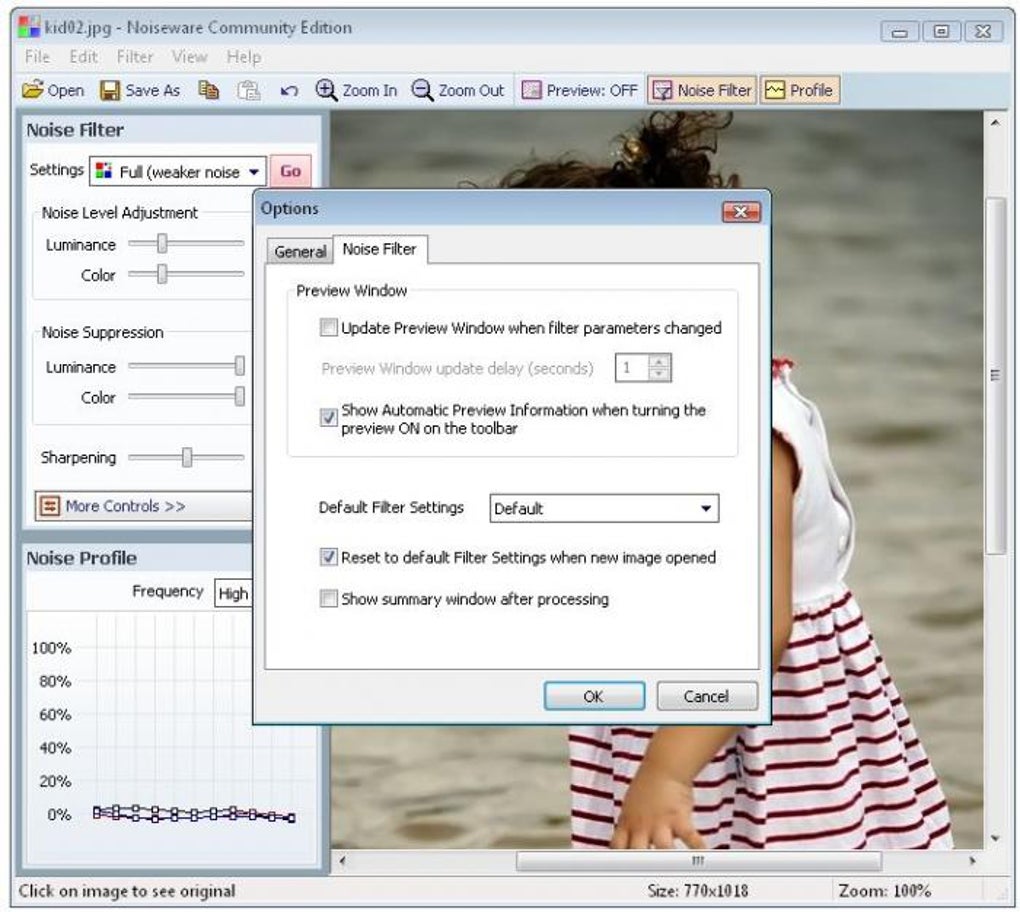
NoiseWare Community Edition is a free, user-friendly application specifically designed to address the problem of digital noise. Its core function is to analyze an image, identify noisy areas, and apply a sophisticated algorithm to reduce or eliminate the grain without compromising image sharpness. The software doesn’t employ simplistic filtering techniques that might blur details. Instead, it utilizes a more advanced approach, preserving the essential elements of the photograph while effectively reducing noise.
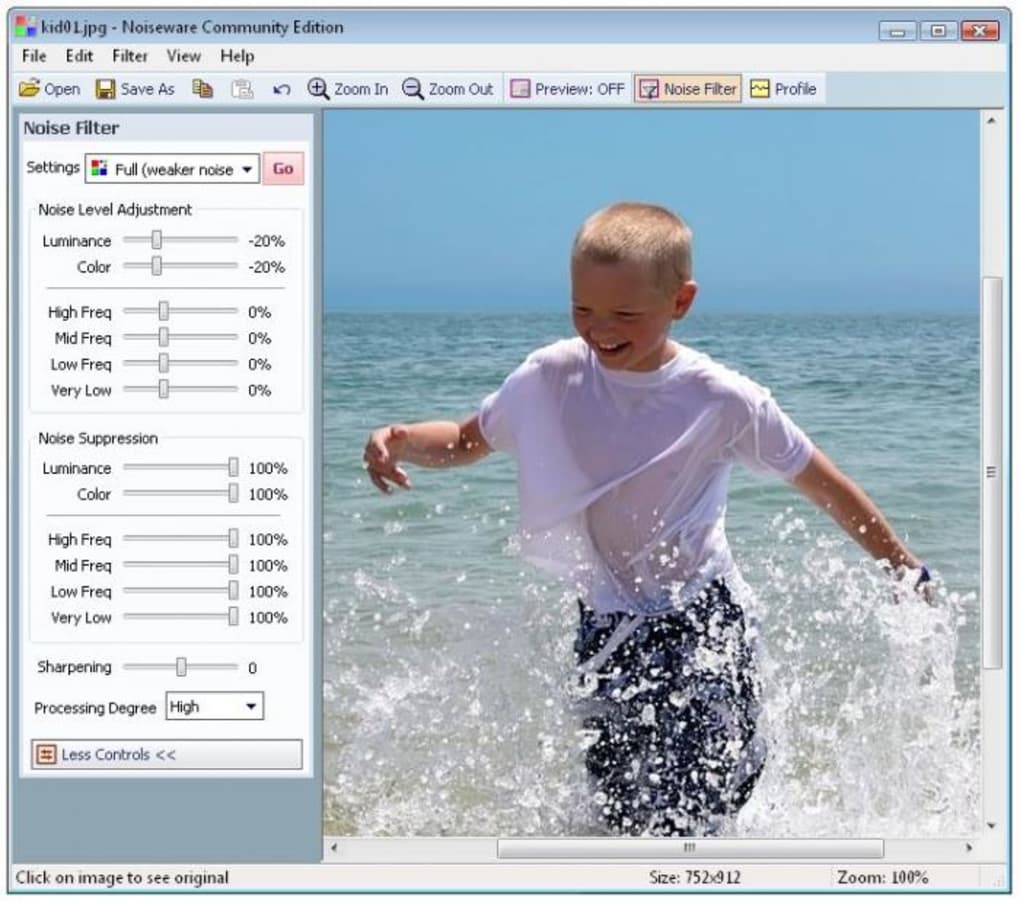
One of the key features of NoiseWare Community Edition is its intuitive interface. Even users with limited photo editing experience will find it easy to navigate and use. The main window presents a straightforward workflow: load an image, select a preset, adjust settings (within the limitations of the community edition), and process the image. The before-and-after comparison feature facilitates easy evaluation of the noise reduction effect, allowing users to fine-tune the settings to achieve their desired results.
The software includes a selection of ten pre-defined noise filtering presets, each tailored to different levels and types of noise. These presets offer a convenient starting point for users unfamiliar with the technical aspects of noise reduction. While the presets provide a good foundation, the Community Edition limits the level of customization compared to its professional counterpart. Some advanced parameters and sliders are locked, offering less granular control over the noise reduction process.
Pros and Cons of NoiseWare Community Edition
While NoiseWare Community Edition proves effective for noise reduction, it’s essential to acknowledge both its advantages and disadvantages.
Pros:
- Ease of Use: The software boasts a remarkably intuitive interface, making it accessible even to novice users. The straightforward workflow requires minimal technical expertise.
- Effective Noise Reduction: NoiseWare Community Edition delivers noticeable noise reduction, significantly improving image quality, particularly for images suffering from moderate noise levels.
- Free of Charge: The community edition is available entirely free of charge, making it a highly accessible option for users who don’t want to invest in professional software.
- Before-and-After Comparison: The ability to compare the original image with the processed image is a valuable feature, facilitating iterative adjustments and optimization of the noise reduction settings.
- Preset Options: The inclusion of multiple presets simplifies the process for users who prefer a quick and easy solution without delving into complex settings.
Cons:
- Limited Customization: The Community Edition places restrictions on the level of customization available. Compared to the professional version, users have less control over fine-tuning the noise reduction process. This might be a limitation for those requiring highly specific adjustments.
- Batch Processing Limitation: The absence of batch processing capabilities restricts efficiency when dealing with a large number of images. Each image requires individual processing, extending the overall workflow.
- JPEG Quality Restriction: The maximum JPEG quality setting is capped at 90%, potentially limiting the quality of the saved images, especially for those aiming for high-resolution prints. Saving in lossless formats like TIFF is not supported.
- Limited Advanced Features: The community edition lacks some advanced features present in the professional version, such as more sophisticated algorithms or noise-specific adjustments.
Comparison with Alternative Noise Reduction Software
Several alternative noise reduction software options exist, both free and commercial. Some popular alternatives include:
- Noiseware Professional: The commercial counterpart of the Community Edition offers significantly expanded capabilities, including more comprehensive customization options, advanced algorithms, and batch processing.
- Topaz DeNoise AI: A powerful AI-powered noise reduction tool known for its exceptional results and advanced algorithms. This is a commercial option.
- DxO PhotoLab: A comprehensive photo editing suite incorporating powerful noise reduction capabilities, alongside a wide range of other editing features. This is a commercial option.
- Free Photo Noise Reduction: Another free option, often compared to NoiseWare Community Edition. Direct comparison highlights differences in algorithm efficiency and user interface design.
The choice of software depends largely on individual needs and budget constraints. While NoiseWare Community Edition offers a free and user-friendly approach, professional solutions may provide superior results and more control for advanced users.
User Reviews and Feedback
User reviews highlight the effectiveness of NoiseWare Community Edition in reducing noise and improving image quality. Many users praise its ease of use and the noticeable improvement in their photos. However, some comments also reflect the limitations of the community edition, emphasizing the lack of customization options and batch processing as key drawbacks. The absence of TIFF saving is also a recurring concern among users who need lossless image formats for professional-quality printing.
Conclusion
NoiseWare Community Edition is a valuable free tool for reducing noise in digital photographs. Its user-friendly interface and effective noise reduction capabilities make it an excellent choice for casual users and those needing a simple, straightforward solution. However, the limitations in customization, batch processing, and JPEG quality should be considered. Users with extensive editing needs or those dealing with a large volume of images might benefit from exploring the professional version or alternative noise reduction software. Overall, NoiseWare Community Edition provides a capable and accessible approach to improving image quality, effectively tackling the common problem of digital noise in photographs. Its simplicity and efficacy make it a worthy addition to any digital photographer’s toolkit, particularly for those seeking a free and easy-to-use solution.
File Information
- License: “Free”
- Version: “2.6.0.1-xp”
- Latest update: “August 10, 2011”
- Platform: “Windows”
- OS: “Windows XP”
- Language: “English”
- Downloads: “66.9K”
- Size: “2.01 MB”


