
Note-It is a free, Windows-based sticky note application developed by Veign. Designed as a straightforward productivity tool, it allows users to quickly jot down reminders, ideas, and important information directly on their desktop. While offering a simple interface reminiscent of the native sticky note functionality found in most operating systems, Note-It incorporates several additional features, setting it apart from more basic alternatives. This review delves into the functionalities, strengths, weaknesses, and overall user experience of Note-It, helping potential users determine if it aligns with their needs.
Functionality and Features: A Simple Yet Versatile Sticky Note Experience
At its core, Note-It functions as a classic sticky note application. Upon launching, users are presented with a readily usable note interface where text can be freely entered and edited. The size of the note is easily adjustable, accommodating short memos or longer entries as needed. The simplicity of this core functionality is a major strength, ensuring that even novice users can immediately grasp how to utilize the application.
Beyond the basic note creation, Note-It offers a range of customization options accessible through a right-click context menu. This menu allows users to alter the appearance of their notes, selecting from various colors, font styles, and sizes. This level of personalization enables users to create visually distinct notes, improving organization and readability depending on the context of the information.
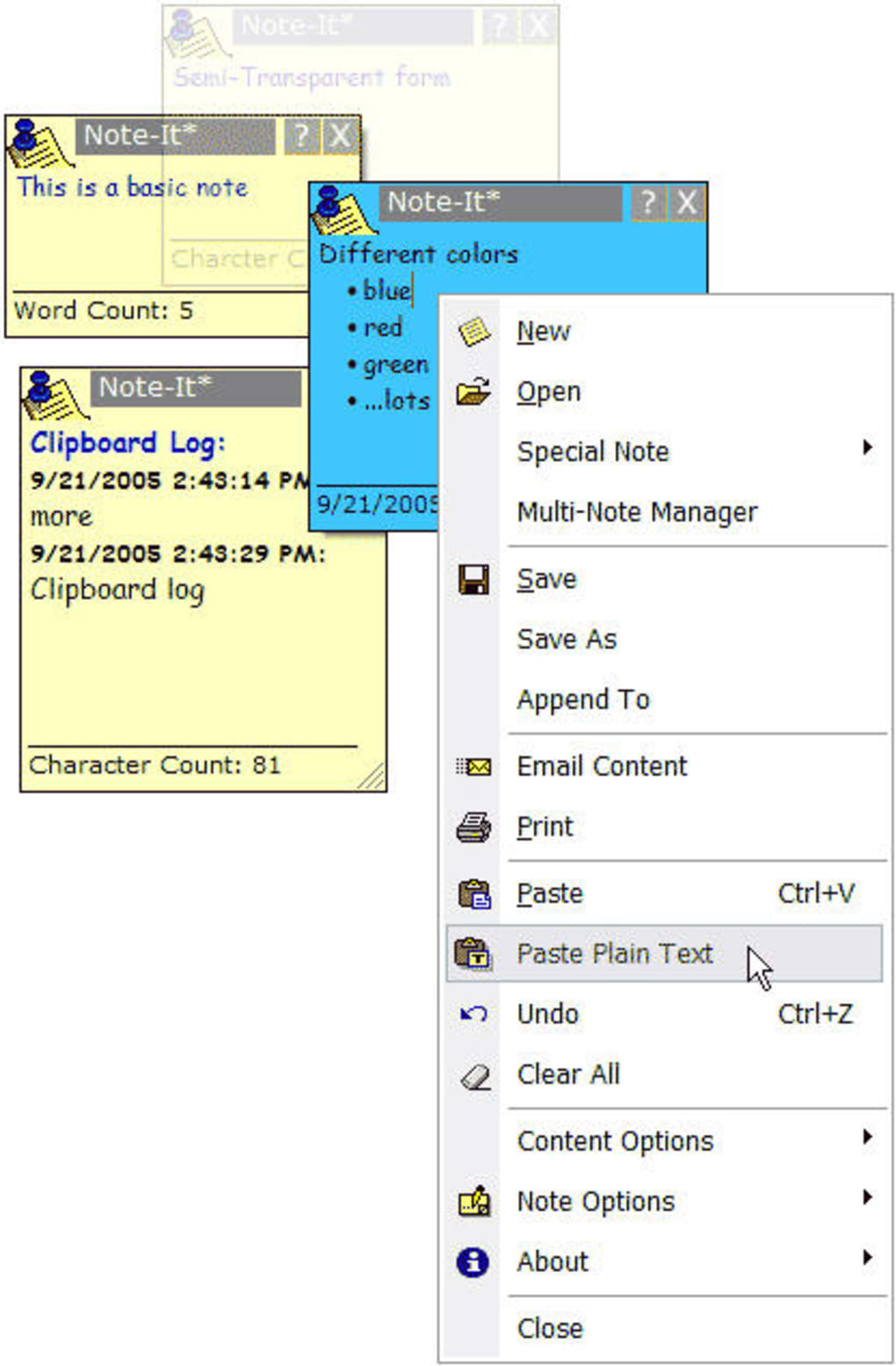
One of Note-It’s more unique features lies within its “Special Notes” option. This functionality transcends the basic sticky note functionality by enabling users to add time-sensitive reminders to their notes, setting alarms for specific dates and times. This feature is particularly useful for task management, appointment scheduling, or any situation requiring timely reminders. The “Time” option transforms the sticky note into a digital clock, displaying the current time directly within the note, useful for quick time checks or time-tracking purposes. Further, users can incorporate RSS feeds into their notes by simply inputting a URL, providing a dynamic update of information directly within the note. This integrated RSS feature allows for convenient access to news or specific information feeds without needing to open a separate application. Finally, the application also offers the ability to display system information, such as computer memory and drive space, directly within a note.
User Interface and Experience: A Blend of Simplicity and Outdated Aesthetics
Note-It’s interface is undeniably straightforward. This simplicity, while advantageous for ease of use, also presents a significant drawback: its outdated aesthetic. Compared to the more modern and polished interfaces of contemporary sticky note applications or even the integrated note features found in recent versions of Windows, Note-It appears visually dated. This is particularly noticeable in the context menu, which, while functional, lacks the visual refinement and intuitive design of more modern applications.
The application’s single most significant usability limitation is its inability to be minimized. The sticky note remains persistently visible on the desktop, overlaying other open windows and potentially causing visual clutter. While this persistent visibility ensures that reminders and information remain constantly visible, it can quickly become obstructive, especially for users who work with multiple applications simultaneously. This lack of minimization functionality is a major area for improvement that significantly impacts user experience.
Data Management and Storage: Local Storage and the Absence of Cloud Integration
Unlike many modern note-taking applications, Note-It does not offer any form of cloud storage or synchronization. All notes are saved locally as individual files. This requires users to manually save their notes to their preferred storage location. While this approach ensures data remains readily accessible without reliance on internet connectivity, it also presents limitations. The lack of cloud syncing prevents users from accessing their notes across multiple devices, and the potential loss of saved files to system failure or data corruption makes it essential to maintain regular backups. In the contemporary digital landscape, the absence of cloud integration represents a significant functional limitation.
Strengths and Weaknesses: A Balanced Assessment of Note-It’s Capabilities
Note-It presents a compelling case for users seeking a lightweight, readily accessible sticky note application with additional time-sensitive capabilities. The inclusion of features like alarms, RSS feed integration, and system information display sets it apart from many more basic sticky note applications. The ease of use and intuitive core functionality are undeniable strengths, making it accessible to a wide range of users, regardless of their technical proficiency.
However, Note-It’s limitations are also notable. The outdated interface, lack of minimization, and the absence of cloud integration represent significant drawbacks for many users. The reliance on manual saving and the lack of backup functionalities add considerable risk of data loss. The visual design, while simple, feels less polished than many contemporary competitors, potentially affecting user experience.
Conclusion: A Niche Application with Potential But Significant Limitations
Note-It offers a unique blend of functionality and simplicity, targeting users who need a straightforward and readily accessible sticky note application with time-sensitive reminder capabilities. Its additional features like RSS feed integration and the ability to display system information are notable advantages. However, the outdated interface, the lack of minimization, the absence of cloud integration, and its reliance on manual saving significantly limit its appeal for many users. Ultimately, whether Note-It is a suitable application depends entirely on the individual user’s needs and priorities. Users prioritizing simplicity and core functionality who don’t require cloud syncing might find it useful. However, users who value modern aesthetics, robust data management, and cloud integration will likely find Note-It’s limitations outweigh its advantages. The choice comes down to carefully weighing the strengths and weaknesses in light of one’s specific workflow and expectations.
File Information
- License: “Free”
- Latest update: “March 11, 2022”
- Platform: “Windows”
- OS: “Windows 2000”
- Language: “English”
- Downloads: “5K”
- Size: “3.22 MB”


