
NoteBurner Spotify Music Converter is a Windows-based audio software application developed by NoteBurner Inc. Its primary function is to circumvent the Digital Rights Management (DRM) restrictions imposed by Spotify, allowing users to download and convert their favorite music and podcasts for offline playback on various devices. This review delves into the software’s capabilities, strengths, weaknesses, and overall user experience, comparing it to other similar applications on the market.
What is NoteBurner Spotify Music Converter?
At its core, NoteBurner Spotify Music Converter serves as a bridge between the Spotify streaming service and local audio file management. It allows users to bypass Spotify’s DRM protection, enabling them to download and save their playlists, albums, and individual tracks as local files. This functionality is particularly attractive to users who want to listen to their Spotify content offline, without relying on an internet connection or a Spotify Premium subscription. Furthermore, the software offers conversion capabilities, enabling users to transform downloaded tracks into various audio formats, including MP3, AAC, FLAC, and WAV. This flexibility allows for optimal compatibility across different devices and audio players.
A key advantage often touted by NoteBurner is its ability to preserve ID3 tags during the conversion process. ID3 tags contain metadata about the audio file, including song titles, artist names, album art, and other relevant information. Preserving these tags ensures that your downloaded music remains properly organized and labeled, enhancing the overall user experience.
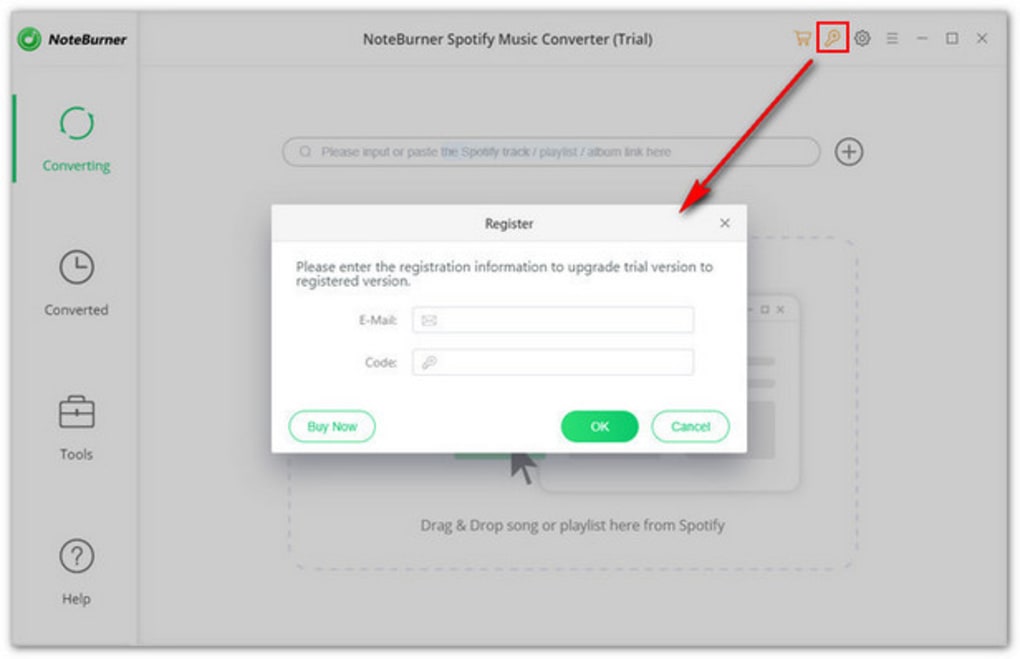
The software’s workflow is relatively straightforward. Users typically begin by pasting the URL of a Spotify playlist, album, or individual track into the application’s search bar. The software then analyzes the provided link, imports the track information, and initiates the download and conversion process. A dedicated conversion section allows users to specify their desired output format and other parameters. Additionally, the software provides options for burning the downloaded music to a CD or uploading it to cloud storage services like Google Drive or Dropbox.
Performance and Reliability: A Mixed Bag
While NoteBurner Spotify Music Converter offers a comprehensive set of features, its performance and reliability have been reported as inconsistent. Several user reviews highlight difficulties in reliably recognizing and downloading music from Spotify. These inconsistencies can range from occasional failures to download specific tracks to complete inability to process certain playlists. The frequency of these issues is not clearly documented and may vary depending on factors such as the size of the playlist, the quality of the internet connection, and even the specific version of Spotify being used.
The software’s customer support also appears to be a significant drawback. Users have reported slow response times, unhelpful responses, and difficulty in receiving assistance when encountering problems. This lack of reliable customer support can be particularly frustrating for users who encounter download or conversion errors.
User Interface and Ease of Use
The user interface is generally considered user-friendly, even for individuals with limited technical expertise. The software employs a clean and intuitive layout, making it relatively easy to navigate and perform basic tasks like pasting URLs, selecting output formats, and initiating downloads. The options for burning CDs and uploading files to cloud storage are also easily accessible and well-integrated into the main workflow. However, the lack of detailed documentation or tutorials might present a challenge to users unfamiliar with the intricacies of DRM removal or audio conversion.
Pros and Cons: Weighing the Benefits and Drawbacks
Pros:
- Multiple Output Formats: The software supports a variety of popular audio formats, offering flexibility in how the downloaded music is used.
- ID3 Tag Preservation: Retention of ID3 tags ensures that downloaded music is properly organized and labeled.
- CD Burning and Cloud Upload: Integration with CD burning and cloud services provides convenience in managing downloaded music.
- Intuitive Interface: The user interface is generally considered easy to use, even for beginners.
- DRM Bypass: Its core functionality – the ability to circumvent Spotify’s DRM – is a major selling point for many users.
Cons:
- Inconsistent Performance: The program’s ability to download and convert music has been reported as unreliable.
- Unresponsive Customer Support: Users have reported difficulties in obtaining timely and helpful support.
- Lack of Detailed Documentation: The absence of comprehensive documentation may make it challenging for some users to fully understand the software’s capabilities.
- Potential Legal Concerns: Downloading and converting copyrighted music without permission from the copyright holder may infringe on copyright laws. Users are advised to ensure that their usage remains within legal boundaries.
Alternatives to NoteBurner Spotify Music Converter
The market offers several alternative programs designed to download and convert music from Spotify and other streaming services. Some popular alternatives include:
- All To MP3 Converter: This software offers a similar functionality to NoteBurner, focusing on converting audio files to MP3 format.
- DumpMedia Spotify Music Converter: Another well-known option, this software also focuses on downloading and converting Spotify music.
- Sidify: This program is known for its ability to handle DRM protected files from multiple platforms, including Apple Music and Spotify.
- TuneFab Spotify Music Converter: This software provides an alternative method for converting Spotify music into various audio formats.
Each of these alternatives has its own strengths and weaknesses, with varying levels of performance, reliability, and user experience. Users are encouraged to compare features, reviews, and pricing before making a decision.
Conclusion: Should You Use NoteBurner Spotify Music Converter?
NoteBurner Spotify Music Converter presents a mixed bag. While its core functionality—downloading and converting Spotify music—is appealing, the reported inconsistencies in performance and the lackluster customer support raise significant concerns. The ease of use and the availability of multiple output formats are positive aspects, but these benefits are somewhat overshadowed by the potential for frustrating technical issues and the lack of reliable support.
Considering these factors, potential users should carefully weigh the pros and cons. If reliable performance and dependable customer service are priorities, exploring alternative programs might be a wiser choice. Users should also be fully aware of the legal implications of downloading and converting copyrighted material and should only do so within the confines of applicable copyright law. Ultimately, the decision of whether to use NoteBurner Spotify Music Converter rests on individual needs and tolerance for potential technical challenges.
File Information
- License: “Trial version”
- Version: “2.2.6”
- Latest update: “July 15, 2022”
- Platform: “Windows”
- OS: “Windows 8”
- Language: “English”
- Downloads: “11.5K”
- Size: “89.46 MB”


