
In an era where our mobile devices have become extensions of our personal and professional lives, the ability to create and express ourselves artistically, anytime and anywhere, has become an invaluable asset. For musicians, composers, and aspiring creators, this sentiment resonates deeply, leading to a constant search for tools that bridge the gap between inspiration and tangible output. Enter Notion Mobile – a groundbreaking, award-winning audio tool that has redefined mobile music composition. Far more than just an app, Notion Mobile transforms your smartphone or tablet into a portable studio, empowering you to craft dynamic sheet music, whether you prefer traditional musical notation or the contemporary accessibility of guitar tablature.
Developed by PreSonus Audio Electronics Inc., a name synonymous with professional audio solutions, Notion Mobile brings the power of sophisticated music production to the palm of your hand. Its brilliance lies in its intuitive, touch-based interface, meticulously designed to make the often-complex process of music composition effortless and genuinely enjoyable. This article delves deep into what makes Notion Mobile a standout application, exploring its features, usability, cross-platform prowess, and how it caters to musicians of all skill levels, from the casual enthusiast to the seasoned professional. We’ll uncover how this free application provides an unparalleled gateway into the world of digital music creation, making the dream of composing your own masterpieces a readily achievable reality.
A Comprehensive Toolkit for Modern Composers
Notion Mobile isn’t just about making music; it’s about making music accessible and seamless. It stands as an industry-leading tool in the realm of digital music composition, distinguished by its comprehensive features and remarkable accessibility across diverse operating systems and devices. Its design philosophy centers around empowering users with the freedom to create, edit, and refine their musical ideas without being tethered to a traditional desktop setup. The app’s architecture supports both traditional musical notation and guitar tablature, recognizing the varied preferences of today’s musical community. This dual capability ensures that whether you’re trained in classical theory or a self-taught guitarist, Notion Mobile speaks your musical language.
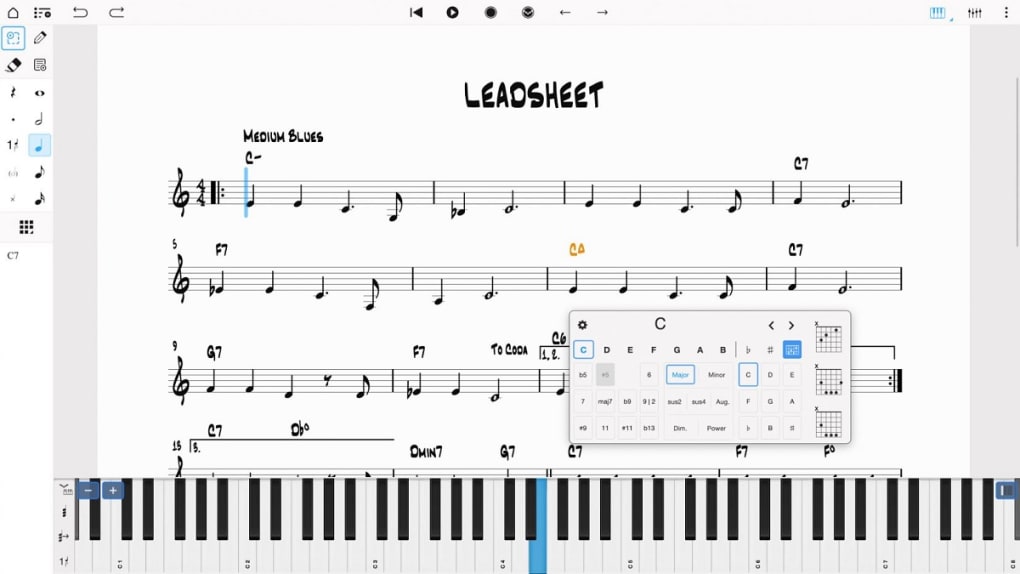
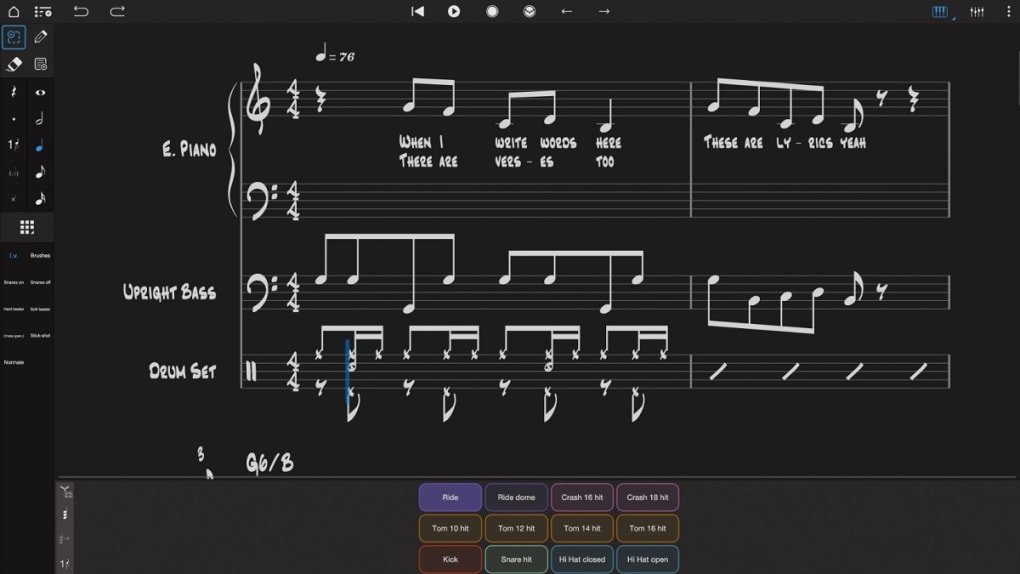
The foundation of Notion Mobile’s user experience is its intuitive, touch-based interface. This isn’t merely a translation of desktop software to a smaller screen; it’s a thoughtful re-imagining tailored for touch interaction. From the interactive piano keyboard that allows you to input notes with precision, to the virtual fretboard for guitarists, and the responsive drum pad for rhythm creation, every element is designed for immediate and tactile engagement. Furthermore, an optional handwriting recognition feature adds another layer of intuitive input, letting you scribble notes as naturally as you would on paper, and watching them instantly transform into digital notation. These combined elements create an environment where musical ideas can flow directly from your mind to the digital page, with minimal friction.
Intuitive Interface and Core Composition Features
At the heart of Notion Mobile’s appeal is its brilliantly designed user interface, which cleverly balances simplicity with powerful functionality. Upon launching the app, users are greeted with a clean, uncluttered workspace that is immediately inviting, even for those new to music composition software. The interactive piano keyboard is a cornerstone feature, providing a visual and tactile way to input melodies, harmonies, and basslines. It’s fully responsive, allowing for dynamic input that captures the nuances of your performance. Whether you’re a seasoned pianist or someone just exploring musical scales, the keyboard makes note entry straightforward and enjoyable. You can tap notes, hold them for duration, and even adjust velocity for expressive playback.
For guitarists and bassists, the virtual fretboard offers an equally engaging experience. This feature allows users to input notes by tapping on virtual strings and frets, much like playing a real instrument. It automatically translates these inputs into standard notation or, more uniquely, into guitar tablature, a highly practical feature for those who primarily read tabs. This dual support for notation types is a significant advantage, eliminating the need for guitarists to learn traditional staff notation if they prefer not to, while still providing the option for broader musical communication. The integration of a drum pad further expands the app’s utility, enabling composers to lay down intricate rhythmic patterns with ease. Users can select different drum kit elements and tap out beats, building up complex grooves layer by layer. The visual feedback and responsive nature of the drum pad make rhythm creation an engaging and intuitive process.
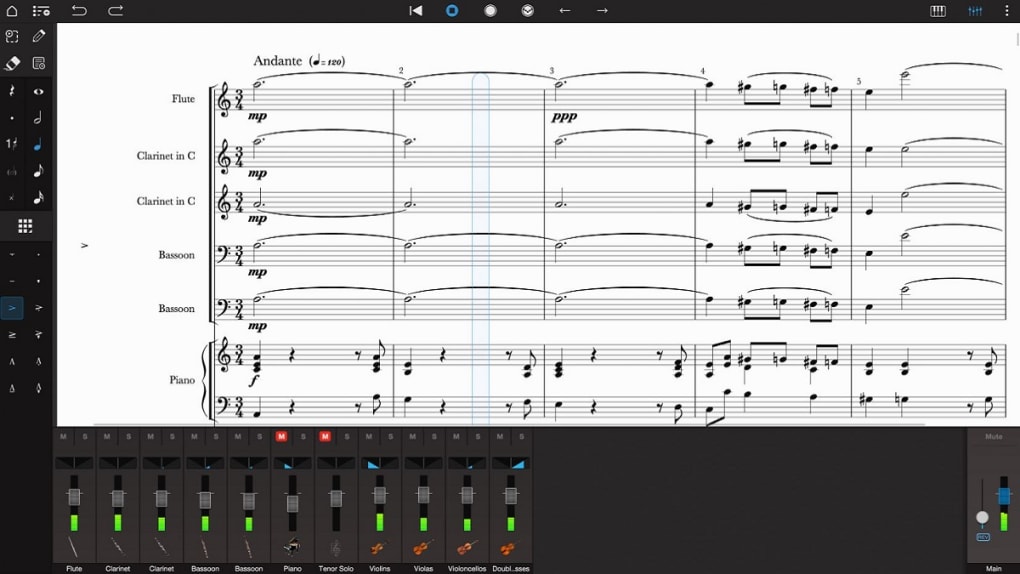
Beyond these input methods, Notion Mobile boasts extensive editing capabilities that empower users to refine their compositions with precision. Once notes are entered, they can be easily manipulated – moved, deleted, copied, pasted, and transposed. Users can adjust note durations, add dynamics, articulations, and various musical symbols to fully express their creative vision. The ability to zoom in and out, navigate through measures, and undo/redo actions ensures that the editing process is flexible and forgiving. These features collectively contribute to an environment where composing music isn’t just about putting notes on a page, but about truly crafting and shaping a musical piece, offering a level of control that rivals many desktop applications, all within the confines of a mobile device.
Cross-Platform Synergy and Seamless Workflow
One of Notion Mobile’s most impressive feats is its robust cross-platform compatibility, making it a truly versatile tool for the modern musician. Whether you’re working on a Windows PC, an iPhone, an Android tablet, or another device, Notion Mobile offers a consistent experience. This means you can seamlessly transition between devices, starting a composition on your phone during your commute, refining it on a tablet at home, and perhaps giving it a final polish on a PC. This fluid interchangeability is critical for artists who work in various environments and require their creative tools to adapt to their lifestyle, rather than the other way around.
The application ensures a seamless workflow regardless of whether you’re online or offline. This crucial capability addresses a common challenge for mobile users: unreliable internet access. Notion Mobile enables continuous work even without a connection, storing your progress locally. When an internet connection becomes available, the app facilitates effortless synchronization across all your devices. This synchronization can occur via cloud services, ensuring your latest version is always accessible, or directly through PreSonus applications on any device. This dual syncing mechanism guarantees that your compositions are always up-to-date and available wherever you need them, preventing data loss and fostering an uninterrupted creative flow.
The inherent portability and accessibility of Notion Mobile fundamentally transform the way music is composed. Imagine being able to capture a musical idea the moment it strikes, whether you’re on a bus, sitting in a park, or waiting for an appointment. The app liberates composers from the confines of a dedicated studio space, turning any location into a potential creative hub. This instant access to a powerful composition tool means fewer ideas are lost, and more inspirations are nurtured into complete pieces. The ability to carry a comprehensive music studio in your pocket or bag fosters a more spontaneous and organic approach to composition, making music creation an integral, natural part of daily life rather than a scheduled chore. This unprecedented freedom not only makes composing easier but also makes it more personal and immediate, truly democratizing the art of music creation.
Diverse Instrumentation and Export Capabilities
A significant aspect of any robust music composition software is its ability to simulate and incorporate a wide array of instruments, giving composers the tools to orchestrate rich and complex pieces. Notion Mobile excels in this domain, providing a virtual orchestra and rhythm section that caters to a broad spectrum of musical styles and arrangements. This extensive support for various instruments is complemented by its versatile export options, allowing users to share their creations in formats suitable for further production, collaboration, or simple enjoyment.
A Symphony of Sounds at Your Fingertips
Notion Mobile supports an impressive and expansive array of instruments, effectively putting a full orchestra, a rock band, and a jazz ensemble right at your fingertips. From the resonant tones of a grand piano and the vibrant strumming of a guitar to the deep thrum of a bass and the dynamic power of a drum kit, the app covers the fundamental building blocks of most musical genres. Beyond these core instruments, Notion Mobile extends its capabilities to include a rich selection of strings – violins, cellos, violas, and double basses – allowing for lush orchestral arrangements. It also features a comprehensive range of horns, including trumpets, trombones, French horns, and tubas, alongside woodwinds like flutes, clarinets, oboes, and bassoons. This vast instrumental palette means composers can craft anything from solo piano pieces to intricate symphonies, jazz numbers, or contemporary pop songs, all within the same application. The quality of these virtual instruments is surprisingly high, offering realistic playback that aids in the composition process and helps composers visualize their final sound.
However, to optimize space and ensure a manageable initial download size, the core app download of Notion Mobile initially includes only piano sounds. While the piano is a versatile starting point, composers will naturally want to expand their sonic palette. This is where Notion Add-on Soundsets come into play. These additional instrument sound libraries are available for purchase, often bundled as part of a “Feature Bundle,” offering a cost-effective way to unlock a wider range of high-quality sounds. This modular approach allows users to customize their app experience, investing only in the instruments they truly need. Furthermore, for users seeking an even more enriched experience, a membership with Studio One+ (PreSonus’s flagship DAW ecosystem) enhances Notion Mobile’s features even further, often providing access to premium sound libraries and advanced functionalities that integrate seamlessly with the desktop software. This tiered access ensures that the app remains free and accessible for basic use, while offering clear upgrade paths for more serious musicians who require professional-grade resources.
Versatile Output Formats for Every Need
Once your masterpiece is complete within Notion Mobile, the app offers exceptional versatility in how you can save and share your work. This is a critical feature for any music composition tool, as the ability to export in various formats determines how your creation can be used, distributed, and further developed. Notion Mobile provides several standard output options, catering to different purposes, from professional collaboration to simple playback.
One of the most valuable export formats is MIDI (Musical Instrument Digital Interface). MIDI files contain information about the notes played (pitch, duration, velocity), but no actual audio. This makes them incredibly lightweight and ideal for transferring your composition to a Digital Audio Workstation (DAW) like PreSonus Studio One, Logic Pro, Ableton Live, or Pro Tools. In a DAW, you can assign your MIDI data to high-quality virtual instruments, apply effects, and mix it down into a full audio production. MIDI is also essential for collaboration, as other musicians can open your file and use their own sound libraries to interpret your composition.
Another crucial format for music notation software is MusicXML. This is an open standard for exchanging musical notation between different notation programs. If you’ve started a piece in Notion Mobile and wish to continue working on it in a different notation software, such as Sibelius, Finale, or MuseScore, MusicXML ensures that virtually all aspects of your score—notes, rhythms, dynamics, articulations, and layout—are preserved accurately. This interoperability is invaluable for professional composers and educators who often work with various software platforms.
For those who need to share their sheet music for performance, printing, or archival purposes, exporting as a PDF (Portable Document Format) is indispensable. A PDF file creates a high-quality, non-editable image of your score, preserving its layout and appearance across different devices and printers. This is perfect for distributing parts to band members, submitting scores for academic purposes, or simply having a clean, printable copy of your work. The fidelity of PDF exports from Notion Mobile ensures that your musical scores look professional and are easy to read.
Finally, you can also save your work as an audio file. This option renders your composition into a playable sound file (typically WAV or MP3, depending on the app’s internal capabilities), complete with the sounds of the virtual instruments you’ve used. This is perfect for sharing your musical ideas with non-musicians, creating demos, or simply listening to your creation as a finished product. It allows you to instantly hear how your composition sounds without needing any other software.
Beyond the output, the input methods themselves contribute to the creative workflow. Whether you choose to create your masterpiece using an attached stylus for precision drawing, your finger for quick inputs, or employ a physical keyboard or touchscreen to “play” your music, Notion Mobile provides flexibility. This multi-modal input caters to different user preferences and scenarios, ensuring that you can always find the most comfortable and efficient way to translate your musical thoughts into digital form. This holistic approach to input and output makes Notion Mobile a truly versatile tool in the modern composer’s arsenal.
User Experience: From Novice to Professional
The true mark of exceptional software often lies in its ability to cater to a broad spectrum of users without compromising on depth or ease of use. Notion Mobile masterfully navigates this challenge, presenting an intuitive design paired with extensive features that are equally appealing to both the absolute beginner and the seasoned expert. This balance ensures that the app is not only accessible as an entry point into music composition but also powerful enough to be a serious tool for advanced musical endeavors.
Designed for All Skill Levels
Notion Mobile embodies the spirit of user-centric design, making it a revolutionary tool that puts the power of music composition right at your fingertips, regardless of your prior experience. Its “beginner-friendly and easy to use” nature is not an understatement; it’s a core philosophy. For aspiring musicians who might find traditional notation software daunting, Notion Mobile significantly lowers the barrier to entry. The interactive piano keyboard, virtual fretboard, and drum pad offer immediate, tactile feedback, allowing users to experiment and learn as they go. The visual nature of note entry and editing means that even those with minimal music theory knowledge can begin to create melodies and harmonies almost instantly. The ability to simply tap on a staff line or fret to place a note, then drag to adjust its duration, makes the initial learning curve incredibly gentle. Furthermore, the optional handwriting recognition provides a natural, pen-on-paper feel, which can be very comforting for beginners transitioning from traditional methods.
Despite its simplicity for newcomers, Notion Mobile doesn’t shy away from offering extensive features that cater to experienced composers. Professionals will appreciate the precision and depth of the editing capabilities, allowing for fine-grained control over every aspect of the score. The support for a vast range of musical symbols, articulations, dynamics, and various clefs ensures that complex musical ideas can be accurately represented. The cross-platform syncing and versatile export options (MIDI, MusicXML, PDF, audio) are also crucial for professionals who need to integrate Notion Mobile into a larger workflow, collaborate with others, or prepare scores for performance and publication. The app’s ability to handle intricate orchestrations, coupled with its integration pathways to professional DAWs like Studio One, means it can serve as a powerful ideation and sketching tool that seamlessly scales up to full production. Thus, Notion Mobile skillfully strikes a balance, offering an environment where beginners can flourish without intimidation, and experts can leverage its comprehensive toolkit for their most demanding projects. It doesn’t just enable you to create music without too much effort; it also ensures you can do so anytime, anywhere, across various devices, truly democratizing the art of composition.
Pros and Considerations
Like any piece of software, Notion Mobile comes with its own set of advantages and a few points that users might want to consider before fully integrating it into their workflow. Understanding these aspects helps in appreciating the app’s strengths and planning around its limitations.
Pros:
- Versatility of Output Formats: One of Notion Mobile’s standout features is its comprehensive suite of export options. The ability to save compositions as MIDI, MusicXML, PDF, or audio files provides unparalleled flexibility. Whether you need to transfer your work to a Digital Audio Workstation for further production, share sheet music with other notation software, print professional-quality scores, or simply create an audible demo, Notion Mobile has you covered. This makes it an incredibly useful tool for various stages of the musical creation and distribution process.
- Offline and Online Syncing: The app’s seamless synchronization capabilities are a huge boon for mobile users. The ability to work on compositions without an internet connection and then effortlessly sync progress across devices via the cloud or PreSonus applications ensures that your creative flow is never interrupted. This feature guarantees accessibility and peace of mind, knowing your work is always up-to-date and secure, regardless of your connectivity status.
- Portability and Accessibility: Notion Mobile transforms any mobile device into a potent music composition studio. This inherent portability means inspiration can be captured the moment it strikes, anywhere and anytime. It liberates composers from the confines of a traditional workspace, making music creation a more spontaneous and integrated part of daily life. The intuitive touch-based interface further enhances accessibility, welcoming users of all technical backgrounds.
- User-Friendly Interface: The app’s design is a triumph of intuitive engineering. With interactive elements like the piano keyboard, fretboard, drum pad, and optional handwriting recognition, inputting and editing music feels natural and engaging. This user-centric approach significantly lowers the barrier to entry for beginners while still providing the depth of control that experienced composers require.
Cons:
- Limited Initial Soundset: Upon initial download, Notion Mobile includes only piano sounds to optimize app size. While this is a practical decision to keep the app lightweight and free, it means that composers wishing to orchestrate pieces with a full range of instruments will need to invest in Notion Add-on Soundsets. This dependency on additional purchases for a broader sonic palette might be a consideration for users expecting a complete orchestral library from the outset.
- Dependency on Add-ons for More Features: Beyond just soundsets, some advanced features and deeper integrations, particularly those that fully leverage the PreSonus ecosystem, might require a Studio One+ membership or specific feature bundles. While the free version is robust for basic composition, unlocking the full professional potential of Notion Mobile often involves additional financial commitment. This can be viewed as a tiered access model, where core functionality is free, and premium features are available through upgrades.
Despite these considerations, the value proposition of Notion Mobile remains incredibly strong, especially given its free entry point. The app offers a comprehensive and accessible platform for music creation, with its benefits largely outweighing the need for potential add-on investments, which are often standard practice in high-quality software development.
Technical Specifications and Availability
Understanding the technical foundations and availability of Notion Mobile further reinforces its position as a reliable and accessible tool for music composition. Developed by PreSonus Audio Electronics Inc., a company renowned for its professional audio hardware and software, Notion Mobile benefits from a legacy of quality and innovation in the music technology industry.
The current version, V3.2.10737.0, indicates continuous development and refinement, with the latest update on November 6, 2023, showcasing the developer’s commitment to improving functionality and user experience. This regular updating schedule is crucial for addressing bugs, enhancing performance, and introducing new features to keep the app competitive and relevant.
Notion Mobile’s platform compatibility is a key strength. While this review focuses on its robust performance on Windows (supporting Windows 7 and later), it’s vital to note its availability across other major mobile ecosystems. It is also accessible for iPhone and Android devices, as well as a dedicated PC version. This broad availability ensures that a vast user base can access the application, regardless of their preferred device, further cementing its cross-platform appeal. The app is available in English, making it widely accessible to a global audience.
The popularity of Notion Mobile is evident from its download statistics. With over 1.1K downloads and 118 downloads in the last month alone on PhanMemFree, it demonstrates a consistent interest from users seeking mobile music composition solutions. These numbers, especially for a niche application, highlight its recognition within the community.
PhanMemFree (formerly Softonic) provides a platform for users to download and review software, offering valuable insights into user experiences. The positive reception and consistent download figures on PhanMemFree.org attest to Notion Mobile’s quality and utility.
When compared to similar software available in the market, such as MuseScore (a popular free and open-source notation program), Crescendo Music Notation, or the more advanced StaffPad, Notion Mobile holds its own, particularly in its focus on mobile-first interaction and seamless cross-platform synchronization. While some alternatives might offer more granular control or specialized features for specific use cases, Notion Mobile distinguishes itself through its intuitive touch interface, broad instrument support, and robust export options, all within a portable and user-friendly package. Its strong ties to the PreSonus ecosystem, particularly for Studio One+ members, also give it a unique advantage for users already invested in that environment. This combination makes Notion Mobile a compelling choice for anyone looking to make music on the go.
In conclusion, Notion Mobile is more than just another app; it’s a testament to how technology can empower artistic expression. It breaks down the barriers to music creation, offering a powerful, accessible, and versatile tool that truly enables users to compose, edit, and share their musical ideas anytime, anywhere. From its intuitive interface and extensive instrument support to its seamless cross-platform syncing and versatile export options, Notion Mobile stands out as an indispensable companion for musicians of all skill levels. Whether you’re sketching out a simple melody or orchestrating a complex piece, Notion Mobile offers the freedom and functionality to bring your musical visions to life, making the dream of becoming a composer a tangible reality for a global audience.
File Information
- License: “Free”
- Version: “3.2.10737.0”
- Latest update: “November 6, 2023”
- Platform: “Windows”
- OS: “Windows 7”
- Language: “English”
- Downloads: “1.2K”


