
NOVA is a Windows-based web browser designed to simplify multitasking and boost user productivity. Unlike traditional browsers that rely heavily on tabs, NOVA presents a unique approach by transforming websites into easily accessible app-like icons, offering a clean and efficient browsing experience. This innovative design eliminates the need for manual address input and streamlines access to frequently visited sites, making it an attractive option for users who prioritize speed and organization.
NOVA’s Core Functionality: A New Approach to Multitasking
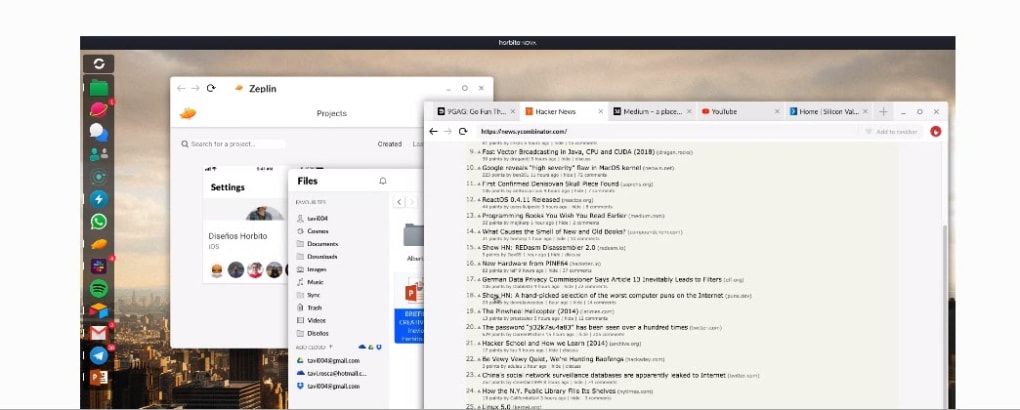
The core selling point of NOVA lies in its innovative method of organizing and accessing online resources. Instead of the familiar tabbed interface, NOVA presents a user’s frequently accessed websites as individual icons, reminiscent of a desktop application launcher. These icons are neatly arranged on the left-hand side of the browser window. Clicking an icon launches the corresponding website in a new window, maintaining the integrity and functionality of the full desktop version, rather than opening it as a tab within the main browser window.
This approach offers several key advantages. First, it dramatically reduces the clutter associated with numerous open tabs. The clean, uncluttered interface allows users to focus on individual tasks without the visual distraction of multiple tabs vying for attention. Second, it accelerates access to frequently used websites. Instead of typing URLs or searching through bookmarks, users simply click an icon, instantly launching the desired site. Third, NOVA extends this streamlined approach to websites that lack dedicated applications. While many popular sites offer dedicated desktop apps, many others do not, forcing users to rely on manual URL input. NOVA effectively bypasses this limitation, treating any website as an app, making it accessible with a single click.
This ease of access contributes significantly to increased productivity. By eliminating the time-consuming steps of searching, typing URLs, or navigating through numerous tabs, NOVA allows users to switch between tasks more quickly and efficiently, thereby significantly boosting their overall productivity.
Strengths and Limitations: Weighing the Pros and Cons
While NOVA’s innovative approach offers considerable advantages, it is crucial to acknowledge its limitations. Unlike established browsers such as Chrome and Firefox, which have extensive extension support and a wealth of integrated features built up over years of development, NOVA’s functionality is currently more limited. The current version offers a more basic browser experience, focusing primarily on simplifying access to frequently used websites rather than encompassing a comprehensive suite of features.
The most significant drawback is the relatively limited support for browser extensions. The lack of extensive extension compatibility may restrict the functionality and customization options available to users accustomed to the extensive plugin ecosystems of more established browsers. This constraint could limit the ability to tailor the browsing experience to individual preferences or add functionalities that are not built into the core browser.
Furthermore, some advanced features found in other browsers may be absent or less developed in NOVA. Users accustomed to the advanced feature sets of established browsers might find NOVA’s functionality somewhat restricted. While NOVA successfully achieves its core objective of providing a streamlined and efficient browsing experience, those seeking a browser with a broad range of advanced features and customization options might find it lacking in comparison to its more established competitors.
Pros:
-
Clean and intuitive interface: NOVA’s straightforward design simplifies navigation and minimizes visual clutter, making it particularly user-friendly for those who prefer a minimalist approach. The absence of numerous tabs creates a sense of order and clarity, conducive to focused work.
-
Enhanced browsing speed and efficiency: The immediate access to frequently visited websites, achieved through the app-like icon system, significantly speeds up the browsing process. This speed improvement contributes directly to enhanced productivity, allowing users to accomplish tasks more quickly.
-
Easy to use: The minimalist design and straightforward approach make NOVA exceptionally easy to learn and use, even for users unfamiliar with advanced browser functionalities. The simple, intuitive interface ensures a smooth and hassle-free browsing experience.
- Website-to-app conversion: NOVA’s ability to convert any website into an app-like icon addresses a significant need for users who frequently access websites without dedicated applications. This simplifies access and organization, enhancing the overall user experience.
Cons:
-
Limited extension support: The lack of broad extension compatibility is a major drawback for users accustomed to the flexibility and customization offered by browser extensions in other browsers. This restriction reduces the potential for personalization and the addition of specialized functionalities.
-
Absence of advanced browser features: NOVA’s focus on streamlining the browsing experience has resulted in a relatively basic feature set compared to more established browsers. Users seeking advanced features such as extensive customization options or sophisticated security tools might find NOVA lacking.
-
Potential for compatibility issues: As a relatively newer browser, NOVA might encounter compatibility issues with certain websites or web applications that are optimized for more established browsers. This could lead to occasional glitches or unexpected behavior.
NOVA’s Target Audience: Who Would Benefit Most?
NOVA is ideally suited for users who prioritize speed, efficiency, and a clean, uncluttered browsing environment. Individuals who frequently multitask and switch between various websites will find NOVA particularly beneficial. Its minimalist interface and quick access to favorite websites contribute to a streamlined workflow, reducing the time spent navigating between different online resources.
Individuals who appreciate a simplified, less complex user interface will also appreciate NOVA’s straightforward design. Users who find the numerous tabs and features of more established browsers overwhelming will find NOVA’s minimalist approach refreshing and intuitive.
Moreover, NOVA is particularly beneficial for users who frequently access websites without dedicated apps. The ability to turn any website into an app-like icon streamlines access to these frequently-used online resources, adding to the overall efficiency.
Conclusion: A Worthy Contender in the Browser Market
NOVA offers a refreshing alternative to traditional web browsers, particularly for those prioritizing efficiency and a clean, uncluttered interface. Its unique approach of transforming websites into app-like icons provides a streamlined browsing experience, accelerating access to frequently used websites and reducing the time spent on navigational tasks. While its limited extension support and less comprehensive feature set compared to established browsers may limit its appeal to some users, NOVA’s focus on simplicity and efficiency makes it a worthy contender in the browser market, especially for users who value a straightforward and productive browsing experience. Its suitability hinges on individual needs and preferences; users prioritizing extensive customization and advanced features may prefer more established browsers, while those seeking a streamlined and efficient approach will likely find NOVA a valuable addition to their digital toolkit.
File Information
- License: “Free”
- Version: “1.0”
- Latest update: “September 3, 2020”
- Platform: “Windows”
- OS: “Windows 8”
- Language: “English”
- Downloads: “4.3K”
- Size: “60.67 MB”


