
NVIDIA Canvas is a free beta graphic design program leveraging the power of artificial intelligence (AI) to elevate digital painting to a new level. It allows users to transform basic brushstrokes into realistic landscape images, offering a unique and innovative approach to the creative process. Instead of painstakingly detailing every element, Canvas’s AI engine interprets the artist’s intent, intelligently rendering lifelike textures and details from simple shapes and lines. This innovative tool significantly speeds up the initial stages of artwork creation, freeing artists to focus on composition and artistic vision.
Real-Time Painting and Material Creation
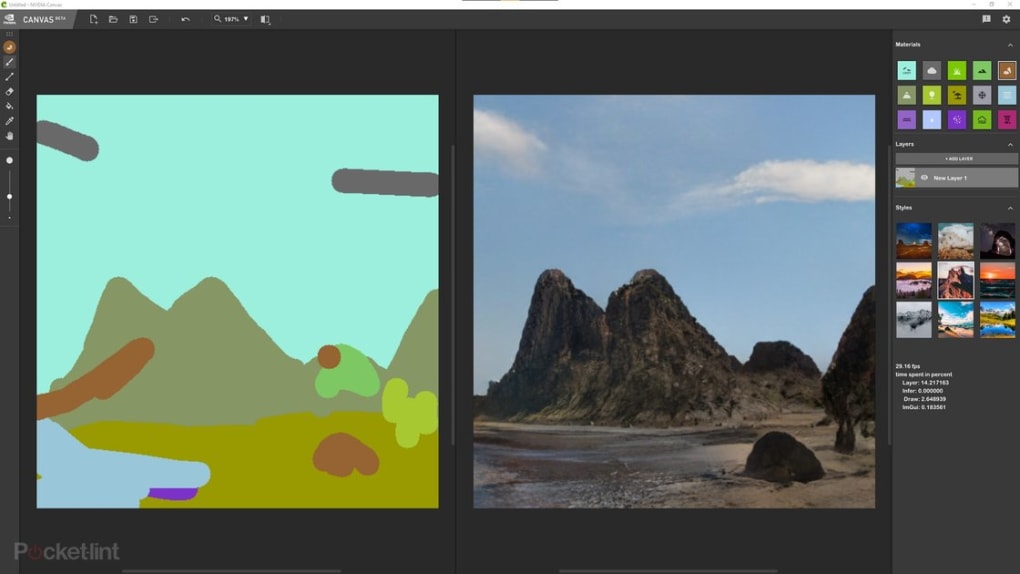
NVIDIA Canvas operates as a real-time painting tool, providing immediate visual feedback as the user works. The program offers a curated palette of lifelike materials, including various types of grass, clouds, trees, rocks, water, and more. These materials aren’t simply textures applied to a surface; they react dynamically to brushstrokes, mimicking the natural variations and complexities found in the real world. A simple stroke of the brush representing a mountain range might instantly transform into a detailed, three-dimensional landscape with nuanced textures, shadows, and highlights—all thanks to the underlying AI. This process allows for rapid experimentation and iterative refinement, accelerating the creative workflow.
The real-time feedback loop inherent in Canvas’s design is a crucial aspect of its usability. The immediate visual response to each brushstroke minimizes the guesswork involved in traditional digital painting. Artists can instantly see the effect of their choices, allowing for more fluid and intuitive creation. This real-time rendering also streamlines the process of adjusting color palettes, brush sizes, and material choices, contributing to a more efficient and enjoyable painting experience. The program avoids the lag often associated with high-resolution rendering, ensuring a seamless and responsive interaction. This responsive nature is a testament to the power and efficiency of the underlying AI algorithms.
Diverse Styles and Seamless Workflow Integration
Beyond its material library, NVIDIA Canvas offers a range of artistic styles that can be applied to the generated imagery. These styles influence the overall mood, atmosphere, and visual character of the artwork, enabling artists to explore different aesthetic approaches without needing to significantly alter their brushstrokes. This feature adds a layer of versatility, allowing users to quickly experiment with various artistic directions. Whether aiming for a photorealistic rendition or a more painterly interpretation, Canvas provides the tools to achieve the desired effect.
The program also seamlessly integrates with other industry-standard software, specifically Adobe Photoshop. Once a piece is completed or sufficiently developed within Canvas, users can export their artwork and import it into Photoshop. This allows for detailed refinement, further manipulation, and seamless integration with a more comprehensive suite of editing tools. This interoperability extends the possibilities of Canvas, making it a valuable asset within a larger creative workflow. Artists can utilize Canvas for the rapid generation of initial concepts and detailed elements, then leverage the advanced tools in Photoshop for more precise adjustments and fine-tuning. This blend of speed and precision represents a significant workflow advantage.
The Power of AI in Artistic Creation
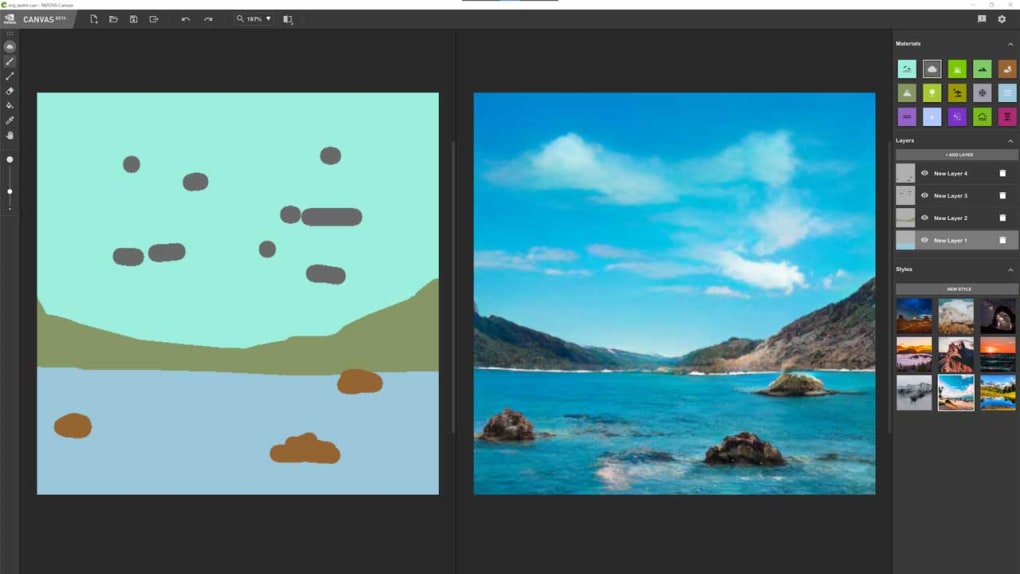
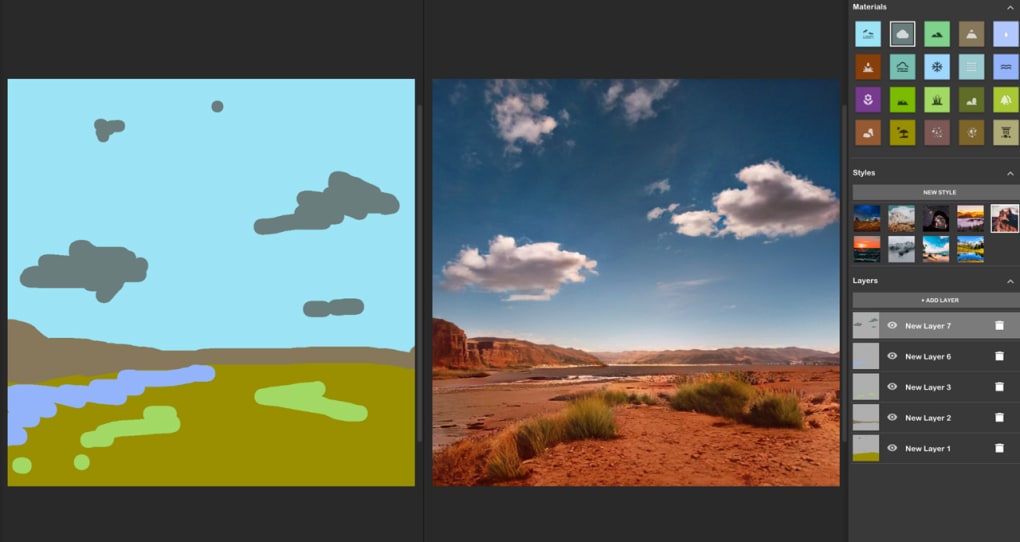
The core of NVIDIA Canvas’s functionality lies in its advanced AI model. This AI is responsible for interpreting the artist’s brushstrokes and translating them into photorealistic details. The system analyzes the shape, color, and texture of each stroke to generate a corresponding image with a high degree of accuracy and detail. This isn’t merely a simple texture mapping; the AI understands context and creates realistic transitions between different materials and elements within the scene. For instance, the transition between a grassy field and a rocky mountain will be seamlessly rendered with realistic shadows, lighting, and depth.
The sophistication of the AI allows Canvas to handle a wide range of artistic styles and complexities. From delicate floral patterns to expansive mountain landscapes, the AI consistently delivers high-quality results. This capability is a testament to the years of research and development that have gone into creating this powerful AI engine. The intelligent rendering capabilities significantly reduce the time and effort required to achieve realistic results, allowing artists to focus on the creative aspects of their work. The AI’s ability to understand artistic intent is a key factor in the program’s efficiency and ease of use.
System Requirements and Limitations
While NVIDIA Canvas offers a powerful and innovative approach to digital painting, it’s essential to acknowledge its system requirements. The program requires an NVIDIA GeForce RTX, NVIDIA RTX, or TITAN RTX GPU. This requirement stems from the computationally intensive nature of the AI model. The real-time rendering and detailed image generation demand significant processing power, capabilities readily provided by NVIDIA’s high-end GPUs. Users without compatible hardware will be unable to utilize the application. This limitation, while significant, highlights the technological demands of the AI-powered rendering at the heart of Canvas’s functionality.
Furthermore, while Canvas excels at generating realistic textures and details, it’s not intended as a complete replacement for more traditional digital painting programs. Its strengths lie in the initial stages of artwork creation, generating realistic base layers and environments upon which further details can be added. The program lacks the extensive feature set of professional-grade software like Adobe Photoshop, lacking tools for intricate manipulation, advanced layering, or fine-detail editing. This limitation emphasizes Canvas’s role as a powerful tool within a larger creative workflow, complementing rather than replacing established design software. Artists should view Canvas as an asset for rapid prototyping and concept development rather than a standalone solution for all their artistic needs.
NVIDIA Canvas: A Revolutionary Tool for Digital Artists
In conclusion, NVIDIA Canvas represents a significant advancement in digital painting technology. By harnessing the power of AI, it streamlines the creative process, allowing artists to quickly generate realistic landscapes and environments from simple brushstrokes. Its intuitive interface, real-time feedback, and seamless integration with other design programs make it a valuable addition to any digital artist’s toolkit. While limitations exist regarding compatible hardware and the breadth of features compared to comprehensive suites, NVIDIA Canvas uniquely bridges the gap between conceptual sketching and realistic rendering, providing a truly innovative approach to digital art creation. Its strengths lie in its ability to rapidly generate compelling base layers, freeing artists to focus their energies on the artistic refinements and details that give each piece its unique character. The future of digital art is undoubtedly being shaped by AI-powered tools such as NVIDIA Canvas, promising a more efficient and expressive creative experience for artists of all skill levels.
File Information
- License: “Free”
- Version: “1.2.138”
- Latest update: “June 24, 2022”
- Platform: “Windows”
- OS: “Windows 11”
- Language: “English”
- Downloads: “11.1K”
- Size: “1.15 GB”


