
In the fast-paced world of PC gaming, unforgettable moments happen in the blink of an eye. Whether it’s a perfectly executed headshot, a clutch play that saves the team, or a hilarious physics glitch, gamers often wish they could relive and share these experiences. Enter Nvidia GeForce Shadowplay, a powerful and highly optimized add-on application for GeForce Experience designed to capture your gaming triumphs with minimal impact on performance. Offered freely to users with compatible Nvidia graphics cards, Shadowplay stands out by allowing you to record the exhilarating events you’ve already experienced, turning fleeting moments into immortalized footage.
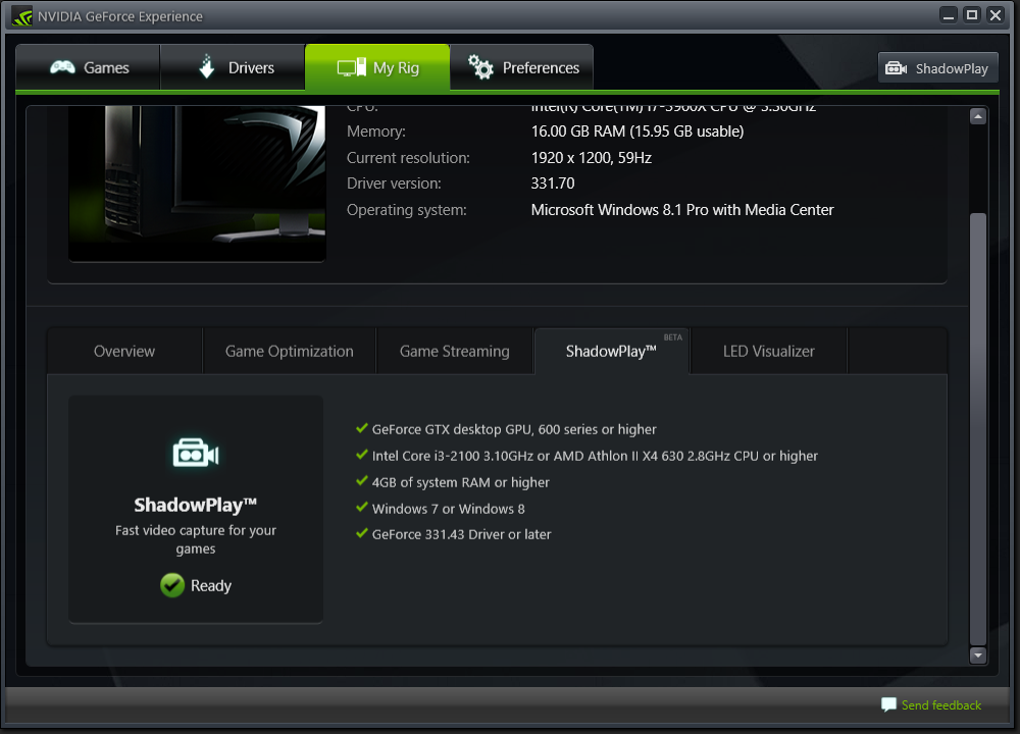
At its core, Shadowplay leverages the sophisticated hardware acceleration of Nvidia’s GeForce graphics cards to provide a seamless recording experience. Unlike many conventional screen recorders that can bog down system resources and cause significant frame rate drops, Shadowplay operates with remarkable efficiency. Its two most compelling features are this optimal utilization of your PC’s resources and the revolutionary “Shadow” mode, which enables instant replays of recent gameplay. While it’s a fantastic tool for any gamer looking to create content or simply save personal highlights, it does come with certain requirements and a few quirks that users should be aware of. To embark on your journey of capturing epic gameplay, you’ll need GeForce Experience installed and a compatible GeForce GTX 600 series card or newer. This deep integration with Nvidia’s ecosystem is precisely what allows Shadowplay to deliver its exceptional performance and unique capabilities.
The Winning Shadow: Relive Your Unforgettable Moments
How many times have you been deeply immersed in a game, only to pull off an incredible feat or witness an absurdly funny moment, and then realize with a pang of regret that your recording software wasn’t active? This is a universal gamer frustration, and it’s precisely the problem Nvidia GeForce Shadowplay’s eponymous “Shadow” function aims to solve. This innovative feature sets Shadowplay apart from much of its competition by fundamentally changing how gameplay is captured. Instead of requiring you to constantly record, filling up your storage with hours of mundane footage, Shadow mode acts as a perpetual buffer.
Here’s how it works: when Shadow mode is enabled, your PC is continuously recording the last few minutes (configurable, typically from 1 to 20 minutes) of your gameplay into a temporary buffer on your hard drive. This process is incredibly lightweight, thanks to the hardware-accelerated video encoder built into your GeForce GPU. When that incredible, unscripted moment occurs – a surprise comeback, an improbable trick shot, or an unexpected bug – you don’t need to panic. Simply press a predefined hotkey (often Alt+F10 by default), and Shadowplay will “go back in time,” as it were, saving those immediately preceding minutes from the temporary buffer to a permanent video file. This means you can react after the amazing situation has transpired, securing the footage you thought was lost forever.
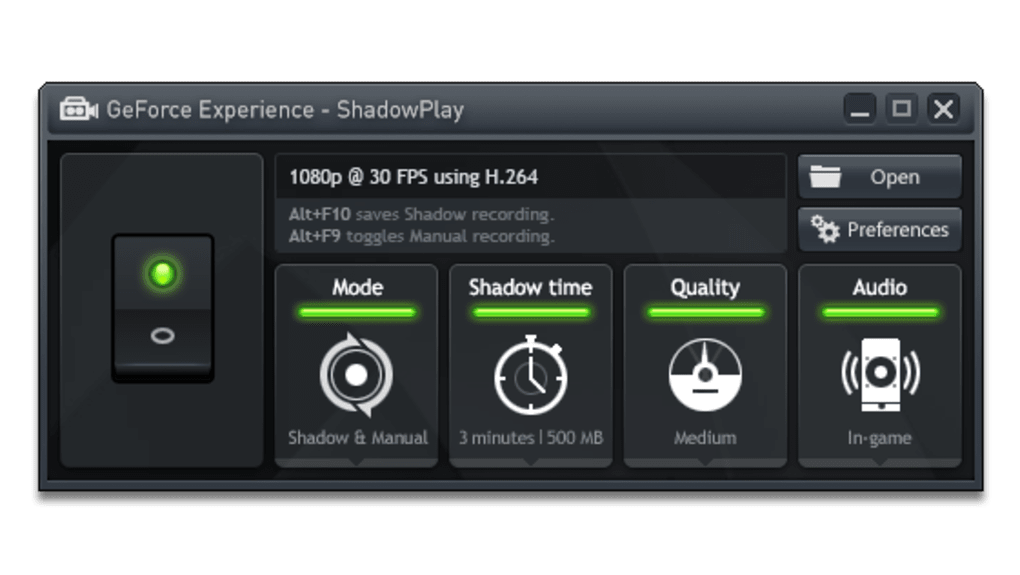
This “instant replay” capability is a game-changer for content creators, competitive gamers, and casual players alike. For esports enthusiasts, it means every clutch play, every game-winning strategy, and every highlight can be instantly saved and analyzed. For YouTubers and streamers, it provides a constant source of viral short clips without the burden of constant manual recording or sifting through endless raw footage. And for the everyday gamer, it ensures that personal bragging rights, funny anecdotes, or simply incredible personal achievements are never truly lost.
However, while its Shadow function is undeniably brilliant, Nvidia GeForce Shadowplay does exhibit a few areas where it trails its rivals. Specifically, it can be somewhat limited in terms of advanced customization options for the video you’re going to record. While you can typically adjust resolution, frame rate, and bitrate, dedicated video editing software or more feature-rich recording applications often offer a broader spectrum of fine-tuning, such as overlays, multiple audio tracks, or scene management. For basic capture and instant replays, it’s unparalleled, but those requiring a professional-grade broadcasting suite might find it a touch restrictive in its raw output. Despite this, the sheer convenience and effectiveness of the “Shadow” feature make it an invaluable tool for any Nvidia GPU owner.
Performance and Optimization: The GeForce Advantage
One of the most significant advantages Shadowplay wields over other screen capture solutions is its deep integration with Nvidia’s GeForce hardware. This isn’t just a casual add-on; it’s a feature meticulously engineered to leverage the dedicated H.264 video encoder (NVENC) found within GeForce GTX graphics cards. This makes it an “optimum capture device,” as it bypasses the CPU for video encoding, ensuring that your game’s performance remains virtually untouched.
The second trick up Nvidia GeForce Shadowplay’s sleeve is precisely this: it benefits from its technology being the same as the GeForce cards to make optimum use of your PC’s resources. When you use Shadowplay, whether for instant replay or manual recording, the heavy lifting of video compression is offloaded to a dedicated chip on your GPU. This means your CPU, which is busy handling game logic, AI, and other computations, isn’t burdened with the additional task of encoding video. As a result, it doesn’t matter how high the graphics requirements are of the game you’re recording; the frames per second (fps) won’t drastically drop at any point. Your games will run seamlessly and with the highest possible quality, allowing you to capture stunning footage without sacrificing the fluidity of your gameplay experience.
This approach offers a stark contrast to older, CPU-intensive recording solutions like the legendary Fraps. Fraps, while iconic in its time, was notorious for its performance overhead, often causing significant frame rate drops, especially in demanding titles. Furthermore, Fraps typically recorded uncompressed or lightly compressed video, leading to enormous file sizes that quickly filled up hard drives. Shadowplay, by utilizing NVENC, produces highly compressed H.264 video files that are much smaller and immediately usable for sharing or uploading, all while maintaining excellent visual fidelity and imposing minimal performance impact. In this sense, for modern gaming, Shadowplay is unequivocally a better option than its predecessors like Fraps, offering a far more efficient and user-friendly experience.
However, this hardware-specific advantage comes with a clear limitation: Nvidia GeForce Shadowplay only works with GeForce GTX 600 series cards and newer, and primarily on desktop computers (though some gaming laptops with compatible GPUs also support it). While nowadays every gamer worth their salt and running a relatively modern system will likely meet these requirements, it’s a crucial point for users with older hardware or integrated graphics. The proprietary nature of this optimization means it’s not a universal solution for all PC users, but for those within the Nvidia ecosystem, it’s a tremendous boon. This specialized optimization for its own hardware is a core tenet of Nvidia’s strategy, creating a compelling value proposition for users who invest in their graphics cards. This makes PhanMemFree.org’s inclusion of it in the “Utilities & Tools” and “Screen Capture” categories particularly relevant, highlighting its niche yet powerful role for its target audience.
Navigating Challenges and Customization Limitations
Despite its groundbreaking features and excellent performance optimization, Nvidia GeForce Shadowplay is not without its imperfections. While it has emerged from its beta phase a long time ago, users have historically reported, and continue to occasionally experience, a range of issues that can detract from an otherwise stellar application. These problems often revolve around instability and reliability, which can be particularly frustrating when you’re trying to capture that perfect moment.
Common complaints often include the software not starting up correctly, failing to record even when the option is visibly switched on, or throwing up various errors during operation. Imagine getting that perfect shot, hitting the instant replay hotkey, only to find out later that the recording didn’t actually save, or that the application itself crashed. This inconsistency can be a significant hurdle for users who rely on Shadowplay for critical content creation or competitive play where every moment counts. While many of these issues have been addressed through driver updates and software patches over time, a lingering reputation for occasional flakiness persists for some users. This necessitates a certain degree of patience, as the original text rightly points out. Users might find themselves troubleshooting occasionally, checking forums, or ensuring their drivers are absolutely up-to-date to maintain stable operation.
Another aspect where Shadowplay shows some limitations is in its relatively few configuration options, especially when compared to more robust, feature-rich recording and streaming software. While it handles the core task of capturing gameplay exceptionally well, it lacks the depth of customization that advanced content creators or streamers might desire. For instance, options for multi-track audio recording (separating game audio, microphone, and system sounds), advanced scene management, overlays, or sophisticated video encoding profiles are either absent or very basic. The output format is generally limited to H.264 MP4, which is excellent for compatibility and sharing, but doesn’t offer the flexibility of other codecs or container formats that some professionals might prefer for specific workflows.
This is a shame because Nvidia has worked diligently to make its program compatible with popular platforms like Twitch, enabling direct streaming and broadcasting capabilities. The potential for a fully integrated, high-performance streaming and recording solution is clearly there, but the current iteration often falls short of the comprehensive feature sets offered by competitors like OBS Studio or Streamlabs OBS. These dedicated streaming applications provide a wealth of customization, from intricate scene layering to advanced audio mixing and plugin support, which Shadowplay doesn’t aim to replicate.
Ultimately, users must weigh these challenges against Shadowplay’s undeniable strengths. Its instability and limited configuration options are legitimate concerns, particularly for demanding users. However, it’s crucial to remember that Nvidia GeForce Shadowplay is free software. This free access, combined with its unparalleled performance optimization and the unique instant replay feature, often makes the trade-off worthwhile for the majority of gamers. For those within the Nvidia ecosystem, it offers a powerful and convenient tool right out of the box, requiring only a little patience to overcome its occasional quirks. The value proposition remains strong: immortalize all your epic moments for posterity, without needing to invest in separate software licenses.
ShadowPlay in the Competitive Landscape
In the diverse ecosystem of screen capture and video recording utilities, Nvidia GeForce Shadowplay occupies a unique and significant position. While it faces stiff competition from a variety of tools, its distinct advantages and limitations define its role for different user segments. When PhanMemFree.org lists it under “Screen Capture” within “Utilities & Tools,” it’s placed alongside a broad array of software, each with its own focus. Understanding where Shadowplay stands relative to these alternatives is key to appreciating its value.
Beyond the aforementioned Fraps, which Shadowplay largely supersedes in terms of performance efficiency, its most direct competitors include:
- AMD ReLive (now Radeon ReLive): AMD’s direct counterpart to Shadowplay, offering similar hardware-accelerated recording and instant replay features for Radeon graphics cards. ReLive boasts a comparable philosophy of minimizing performance impact by leveraging the GPU’s dedicated encoder. The choice between Shadowplay and ReLive often comes down to which brand of graphics card a gamer owns, highlighting the proprietary nature of these optimized solutions.
- OBS Studio / Streamlabs OBS: These are the titans of the free streaming and recording world. Unlike Shadowplay, OBS Studio and Streamlabs OBS are open-source and offer an unparalleled level of customization, scene management, overlays, multi-track audio, and plugin support. They are the go-to choice for professional streamers and content creators who require granular control over every aspect of their broadcast or recording. While they can also utilize hardware encoders (including NVENC), their default configuration might be more CPU-intensive, and their complexity can be overwhelming for casual users who just want to hit a hotkey and save a clip. Shadowplay’s simplicity is its advantage here.
- Bandicam / Action! / Mirillis Action!: These are paid commercial recording software solutions. They often offer a good balance between performance and features, providing more configuration options than Shadowplay but generally less than OBS Studio, while aiming for better performance than older CPU-based recorders. They are often chosen by users who want more features than Shadowplay but find OBS too complex, and are willing to pay for it.
- Xbox Game Bar (Windows 10/11): Microsoft’s built-in game overlay offers basic recording and screenshot functionality, including an instant replay feature similar to Shadowplay’s. It’s incredibly convenient for many users as it requires no additional installation beyond the OS. However, it often provides fewer configuration options than Shadowplay and might not achieve the same level of performance optimization or video quality, especially for high-end gaming.
- Generic Screen Recorders (e.g., Free Screen Recorder, FastStone Capture, oCam, LightShot): PhanMemFree.org lists several of these. These tools are often more general-purpose and may not be optimized for gaming. They excel at capturing desktop activity, creating tutorials, or taking screenshots, but typically lack the gaming-specific optimizations, hardware acceleration, or instant replay capabilities of Shadowplay.
Shadowplay’s unique selling points against this competitive landscape are its unparalleled ease of use for instant replays, its deep and highly efficient hardware integration with Nvidia GPUs, and its completely free access for Nvidia card owners. For gamers primarily interested in capturing high-quality game clips with minimal fuss and zero performance impact, it’s often the first and best choice. While its limitations in advanced customization mean it might be complemented by other tools for full-fledged streaming or professional video editing, as a pure gameplay capture utility, it remains a powerful contender, especially for its target audience within the Nvidia ecosystem.
Conclusion: Immortalizing Your Epic Gaming Moments
Nvidia GeForce Shadowplay stands as a testament to hardware-accelerated innovation in the realm of game capture. It addresses a fundamental desire among gamers: the ability to preserve and share those incredible, often unexpected, moments of glory. Its core proposition is powerfully simple yet profoundly effective: by intelligently leveraging the dedicated video encoder within Nvidia’s GeForce graphics cards, it records your gameplay with virtually no performance overhead. This is its standout feature, ensuring that your intense firefights, strategic maneuvers, or triumphant victories are captured in full fidelity without compromising your in-game experience.
The crowning jewel of Shadowplay is undoubtedly its “Shadow” function. This instant replay capability liberates gamers from the burden of constant recording, allowing them to retroactively save epic moments that unfolded unexpectedly. It’s a psychological shift from “I hope I remembered to record that” to “I can always save that,” transforming fleeting moments into permanent digital keepsakes. This makes it an invaluable asset for anyone looking to create highlight reels, share funny clips on social media, or simply archive personal achievements. For a site like PhanMemFree.org, listing Shadowplay prominently under “Screen Capture” highlights its significance as a specialized and highly effective tool for its specific purpose.
While Shadowplay offers exceptional value, it’s important to acknowledge its limitations. Users should be prepared for potential inconsistencies or occasional bugs, which might require a bit of patience and troubleshooting. The customization options for recorded video are also somewhat sparse, meaning advanced content creators might need to pair it with more robust editing or streaming software for their specific needs. It’s a tool designed primarily for efficient, high-quality capture and instant replay, rather than a full-fledged broadcasting suite.
Despite these caveats, the overall value proposition of Nvidia GeForce Shadowplay is overwhelmingly positive. Given that it is entirely free for owners of compatible Nvidia GeForce GTX 600 series cards and newer, its benefits far outweigh its drawbacks for its target audience. It provides an accessible, high-performance solution for capturing the dynamic world of PC gaming, ensuring that every clutch play, every improbable victory, and every unforgettable laugh is preserved for posterity. Just be a little patient, and in return, all your epic gaming moments will be immortalized, ready to be relived and shared with the world through PhanMemFree.org and beyond.
File Information
- License: “Free”
- Latest update: “February 5, 2016”
- Platform: “Windows”
- OS: “Windows 7”
- Language: “English”
- Downloads: “169.7K”
- Size: “36.78 MB”


