
ObjectDock is a popular and highly customizable dock application for Windows operating systems. It offers a compelling alternative to the standard Windows taskbar, providing users with a visually appealing and functionally robust way to organize applications, shortcuts, and system information. This review delves into the features, performance, and overall user experience of ObjectDock, examining its strengths and weaknesses to help you determine if it’s the right dock for your needs.
ObjectDock: A Mac-Style Dock for Windows
ObjectDock’s primary function is to replace the traditional Windows taskbar, offering a visually appealing dock reminiscent of the macOS dock. This familiar layout makes it instantly intuitive for users accustomed to the macOS interface, but its appeal extends beyond mere aesthetics. ObjectDock provides significantly enhanced functionality and customization options compared to the standard Windows taskbar. The drag-and-drop interface allows for easy organization of application shortcuts, making frequently used programs readily accessible with a simple click or hover. This streamlined access significantly improves workflow efficiency, especially for users who frequently switch between various applications. The visual appeal isn’t just about mimicking macOS; it’s about offering a cleaner, more modern look and feel to the Windows desktop, contributing to a more personalized and enjoyable computing experience.
Features and Customization Options: Beyond the Basics
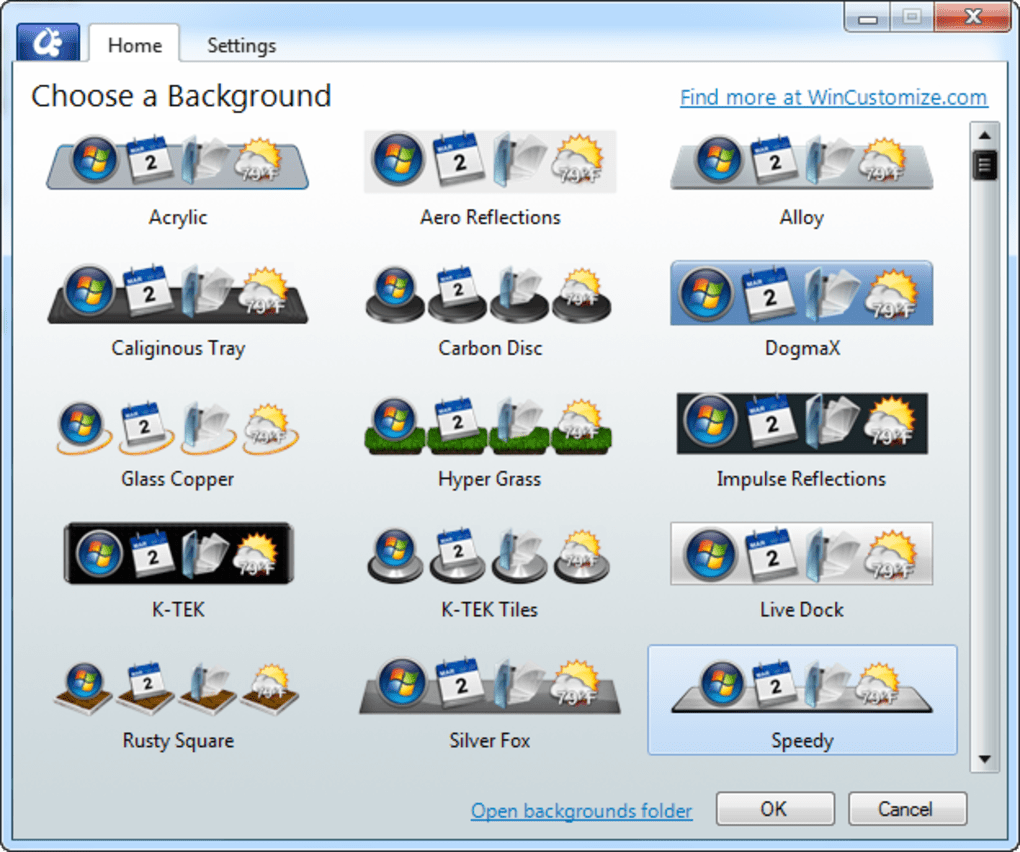
While the core function is simple – providing a visually enhanced application launcher – ObjectDock’s true strength lies in its extensive customization options and additional features. Users can personalize almost every aspect of the dock’s appearance, from the dock’s position and size to the individual icons and animations. The available customization extends to the background, allowing for the use of custom images or colors, seamlessly integrating the dock into the overall desktop theme. The dock’s animations are smooth and visually pleasing, adding a polished touch to the user interface. These animations, customizable in style and speed, are a key differentiator that contributes significantly to ObjectDock’s overall appeal. Beyond just aesthetics, ObjectDock offers a range of functional widgets. These widgets extend the dock’s capabilities beyond simple application launching, providing real-time information and quick access to various system functions.
Widgets and Functionality: Expanding the Dock’s Capabilities
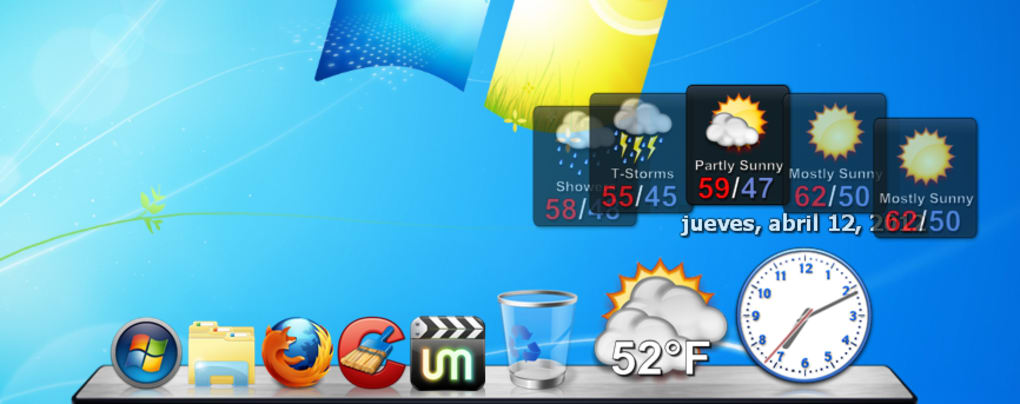
One of ObjectDock’s standout features is its support for widgets. These small, interactive applications provide access to various functionalities directly from the dock, eliminating the need to open separate programs or windows. A prominent example is the weather widget, which provides up-to-date weather information for a specified location, expanding to display a five-day forecast with a smooth, visually appealing animation. This kind of integration of information into the dock streamlines access to important details without disrupting the workflow. Other widgets offer functionalities like clock displays, system monitors, and quick access to frequently used folders or files. The extensibility through widgets is a significant advantage, allowing ObjectDock to adapt and grow with the user’s needs and preferences. This modular approach ensures that ObjectDock remains relevant and useful as users’ software and needs evolve. The availability of third-party widgets further enhances this customization, offering a wider range of options.
Performance and System Resource Usage: A Smooth and Efficient Dock
ObjectDock is designed to be lightweight and efficient, minimizing its impact on system resources. While offering a visually rich and highly animated experience, ObjectDock doesn’t significantly tax the system’s performance, even on older machines. Options are available to fine-tune performance settings to prioritize either speed or memory usage, allowing users to tailor the application to their specific system’s capabilities and preferences. This responsiveness is crucial for a dock application, as it needs to be responsive and instantaneous, avoiding any lag or delays that could disrupt the user’s workflow. The emphasis on efficient resource usage is a significant plus, making ObjectDock accessible to a wider range of users, regardless of their computer’s specifications.
Comparison with Alternative Docks and Taskbar Replacements
Several alternative dock applications are available for Windows, each offering a unique set of features and functionalities. While many offer similar basic functionality—launching applications and displaying running programs—ObjectDock distinguishes itself through its extensive customization options, smooth animations, and widget support. Competitors may focus on minimalist designs or specific functionalities, but ObjectDock’s balanced approach catering to both aesthetics and functionality makes it a strong contender in the market. The ability to seamlessly integrate with existing Windows functionality, while also offering a distinct alternative, is a key advantage. The robust widget ecosystem and active development further solidify its position as a versatile and well-maintained option.
While alternatives exist, ObjectDock’s combination of features, performance, and visual appeal makes it a compelling choice for users seeking a powerful and customizable dock replacement.
ObjectDock’s Strengths and Weaknesses: A Balanced Perspective
ObjectDock possesses several significant strengths. Its highly customizable interface allows users to tailor the dock to perfectly match their preferences and workflow. The smooth animations and visually appealing design enhance the overall user experience, making interacting with the dock a pleasant and efficient process. The extensive widget support extends the dock’s functionality beyond simple application launching, providing access to various system tools and real-time information. Furthermore, its lightweight design ensures minimal impact on system performance.
However, ObjectDock also has some drawbacks. Some advanced features, such as system tray integration and the “Aero peak” feature (introduced with Windows 7), are only available in the paid version. While the free version offers a wealth of functionality, this limitation might deter some users. Although the free version offers comprehensive features, the absence of some advanced functionalities may necessitate the purchase of the full version for some users.
Conclusion: Is ObjectDock the Right Dock for You?
ObjectDock provides a compelling alternative to the standard Windows taskbar, offering a visually attractive and highly customizable dock experience. Its extensive customization options, smooth animations, and useful widgets enhance productivity and create a personalized computing environment. While some advanced features are locked behind a paywall, the free version offers a robust and feature-rich experience that is likely sufficient for most users. If you are looking for a visually appealing and highly customizable dock that doesn’t overly burden your system’s resources, ObjectDock is a strong contender worthy of consideration. The balance between functionality and aesthetics, combined with its performance and customization, makes it a versatile option for a wide range of users, from casual computer users to power users seeking a more refined desktop experience.

File Information
- License: “Free”
- Latest update: “May 24, 2023”
- Platform: “Windows”
- OS: “Windows XP”
- Language: “English”
- Downloads: “308.9K”
- Size: “20.85 MB”


