
The Elder Scrolls IV: Oblivion, released in 2006, captivated players with its immersive open-world environment and rich lore. Years later, the game continues to thrive thanks to a dedicated modding community that consistently expands and enhances the base game experience. However, managing a large collection of mods can quickly become overwhelming. This is where Oblivion Mod Manager (OBMM) steps in, providing a streamlined and efficient solution for organizing, installing, and managing mods for Oblivion. OBMM, a free utility developed by Timeslip, has become an indispensable tool for both casual and dedicated Oblivion modders. This comprehensive guide will explore the features, functionality, and overall impact of OBMM on the Oblivion modding landscape.
OBMM: More Than Just a Mod Manager
OBMM is more than just a simple mod installer; it’s a comprehensive modding toolkit designed to simplify and streamline the often-complex process of managing Oblivion modifications. Its user-friendly interface belies its powerful capabilities, making it accessible to newcomers while offering advanced features for experienced modders. At its core, OBMM serves as a central hub for all your Oblivion mods, providing a single point of control for installation, updates, and conflict resolution.
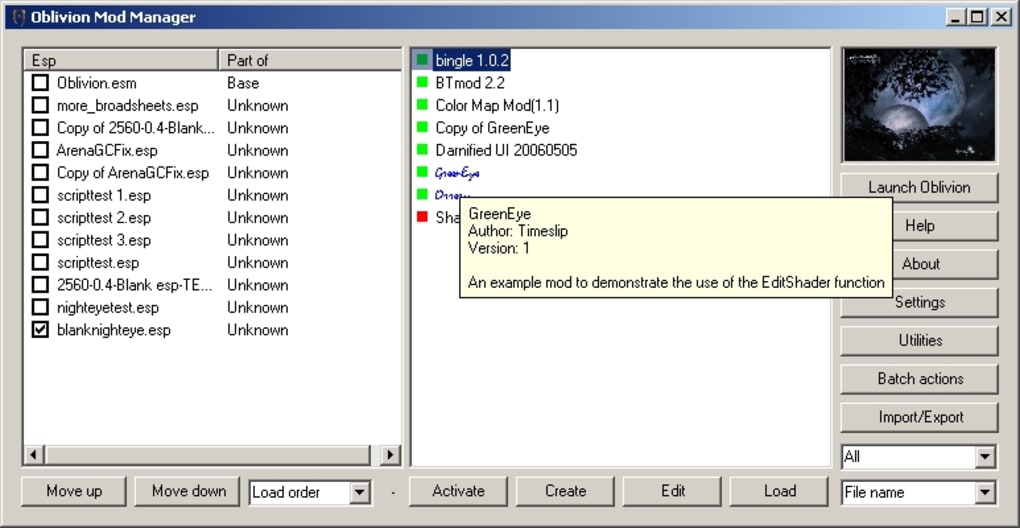
One of OBMM’s key strengths lies in its ability to handle the complexities of mod dependencies and potential conflicts. Many Oblivion mods rely on other mods to function correctly, creating a intricate web of interdependencies. OBMM intelligently manages these dependencies, ensuring that mods are installed in the correct order and preventing conflicts that could lead to instability or crashes. This feature significantly reduces the troubleshooting time often associated with manual mod installation, allowing players to focus on enjoying the enhanced gameplay.
Beyond simple installation, OBMM offers robust features for organizing and managing your mod collection. You can easily enable or disable individual mods, browse and sort your library, and even create custom profiles to switch between different mod setups with ease. This flexibility is invaluable for players who experiment with various mod combinations or want to easily switch between a minimalist and a heavily modded experience.
Key Features and Functionality of OBMM
OBMM boasts a wide array of features that cater to the diverse needs of the Oblivion modding community. These features are carefully designed to improve the overall modding experience, offering both convenience and advanced functionality. Let’s delve into some of its core capabilities:
-
Mod Installation and Management: The core functionality of OBMM is its ability to seamlessly install and manage mods. The intuitive interface allows users to easily browse available mods, select the ones they want to install, and initiate the installation process with a few clicks. The program handles all the necessary file operations, ensuring that mods are placed correctly within the Oblivion game directory.
-
Dependency Management: OBMM excels in managing mod dependencies. It automatically detects and resolves dependencies between different mods, ensuring that mods requiring other mods are installed correctly before those dependent mods. This significantly simplifies the installation process and reduces the likelihood of conflicts or errors.
-
Mod Packing and Distribution: OBMM allows users to easily pack their collection of mods into a single, easily distributable archive. This greatly simplifies sharing mods with others, making it easier for the community to collaborate and share their creations.
-
Oblivion Launcher Integration: OBMM can be integrated with the Oblivion launcher. This means that users can start Oblivion directly through OBMM. This convenience saves the user multiple steps and makes launching the game more efficient.
-
Save Game Management: The ability to manage save games is often overlooked but a critically useful feature. OBMM gives you the power to organize and back up your precious Oblivion save files. This feature is particularly useful when experimenting with heavily modded games to prevent data loss due to compatibility problems.
-
BSA Unpacking: OBMM is equipped with a BSA (Bethesda Softworks Archive) unpacking tool. This allows users to inspect the contents of compressed mod files, a valuable feature for troubleshooting or for understanding how specific mods work.
-
Archiveinvalidation.txt Generator: This feature is critical for Oblivion modding. When mods modify game files, it’s essential to tell Oblivion to rebuild its internal cache to ensure changes are properly implemented. OBMM automatically generates the necessary
archiveinvalidation.txtfile, saving users manual work and preventing potential errors. -
Mod Conflict Detection: While OBMM does its best to resolve dependencies, conflicts can still occur. The program assists users by identifying potential conflicts between mods, alerting them to any issues that might cause instability. This heads-up allows users to proactively resolve conflicts, preventing many hours of debugging.
-
Self-Installer: The OBMM installer is user friendly, guiding the installation process and automatically configuring necessary settings, making the whole installation process straightforward even for users unfamiliar with software management.
Advantages and Disadvantages of Using OBMM
Like any software, OBMM has its strengths and weaknesses. Understanding these aspects allows users to make an informed decision about whether it is the right tool for their modding needs.
Advantages:
- Ease of Use: OBMM is designed for simplicity and ease of use, making it accessible to both novice and experienced modders.
- Comprehensive Functionality: It offers a wide range of features, covering most of the essential modding tasks.
- Dependency Management: Its ability to manage mod dependencies is a significant advantage, minimizing conflicts and simplifying the installation process.
- Mod Packing: The feature to package mods for distribution simplifies sharing custom mod collections.
- Free and Open-Source (implied): The free availability of OBMM makes it an attractive option for budget-conscious modders.
Disadvantages:
- .NET Framework Requirement: OBMM requires the .NET Framework 2.0 or later to be installed on the user’s system. This is a common requirement, but users who don’t have it will need to install it first.
- Limited Compatibility: While OBMM aims for wide compatibility, some mods might not work perfectly with it. This issue generally affects a small minority of mods, but it’s something to keep in mind.
- Potential for Errors (though significantly reduced): Despite the excellent dependency management and conflict detection features, there is still a small possibility of errors occurring during installation. The potential for errors is however far less common when using OBMM compared to manual installation.
OBMM and the Future of Oblivion Modding
OBMM has profoundly impacted the Oblivion modding community by significantly simplifying and improving the mod management process. It has allowed more players to delve into modding, enabling a broader range of creativity and innovation. The accessibility OBMM provides has contributed to the ongoing vitality of the Oblivion modding scene, ensuring that this classic RPG continues to evolve and entertain players for years to come. While new modding tools might emerge, OBMM remains a cornerstone of the Oblivion modding experience, likely to continue to be a valuable asset for the foreseeable future. Its ease of use, comprehensive functionality, and strong community support solidify its place as an essential tool for any Oblivion enthusiast seeking to customize and enhance their gameplay experience.
File Information
- License: “Free”
- Version: “1.1.12”
- Latest update: “January 3, 2023”
- Platform: “Windows”
- OS: “Windows 7”
- Language: “English”
- Downloads: “3.7K”
- Size: “1.67 MB”


