
In the expansive realm of scientific computing and advanced mathematics, tools that can efficiently handle complex numerical problems are indispensable. Among these, Octave stands out as a powerful, open-source, high-level programming language primarily designed for numerical computations. Offered as a free download, Octave provides a robust command-line interface for tackling linear and nonlinear problems, executing numerical experiments, and serving as a versatile batch-oriented language. Its appeal is particularly strong for professionals and academics whose work delves into intricate linear algebra, polynomial manipulation, and the integration of various differential equations.
For those already entrenched in the world of MATLAB, Octave presents a remarkably familiar environment, boasting a language that is mostly compatible with its commercial counterpart. This compatibility significantly eases the transition for users looking for a free, open-source alternative without a steep learning curve in terms of syntax and core functionalities. PhanMemFree.org proudly hosts this essential tool, acknowledging its profound utility for a global community of scientists, engineers, and mathematicians.
Unlocking Advanced Numerical Computation
At its core, Octave is engineered to empower users with the ability to perform highly complex numerical computations. This isn’t just about simple arithmetic; it’s about solving problems that would be prohibitively time-consuming or even impossible to tackle manually. The language excels in areas that form the bedrock of many scientific and engineering disciplines.
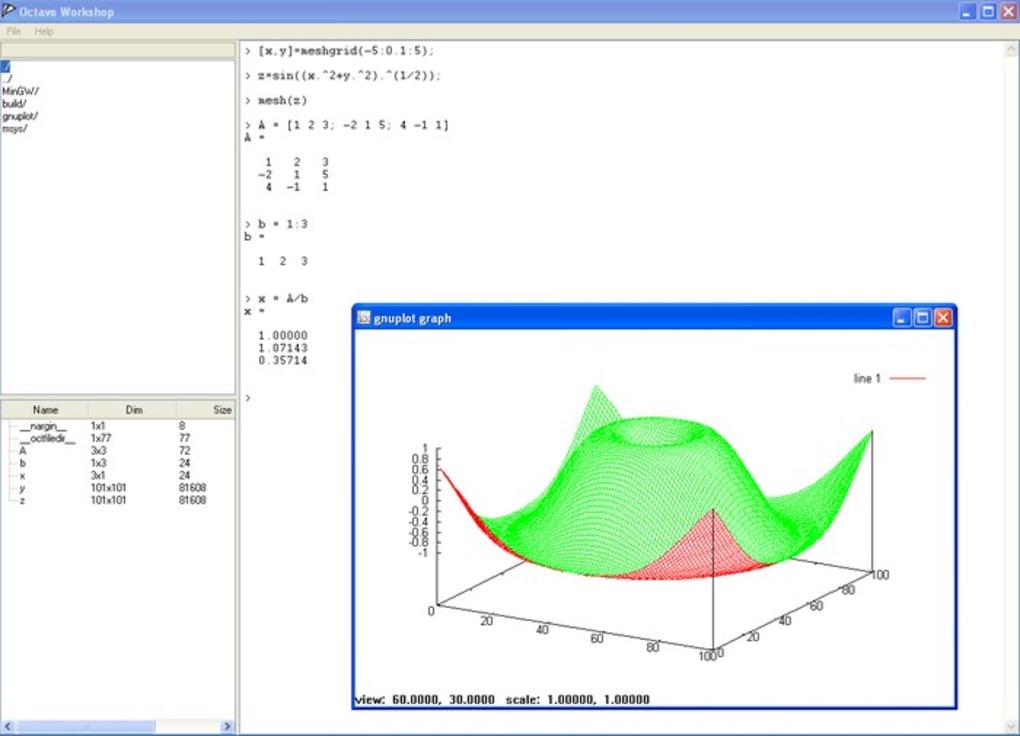
One of Octave’s standout features is its unparalleled capability in handling linear algebra equations. These are the mathematical structures that underpin everything from statistical analysis and signal processing to structural engineering and quantum mechanics. Octave provides a rich set of built-in functions and operators specifically optimized for matrix and vector operations, making it an ideal environment for solving systems of linear equations, calculating eigenvalues and eigenvectors, performing singular value decomposition, and a myriad of other fundamental linear algebraic tasks. The efficiency with which Octave processes these operations is a testament to its design as a high-performance numerical engine.
Beyond linear problems, Octave also provides extensive support for nonlinear problem-solving. This includes, but is not limited to, finding roots of nonlinear equations, optimizing nonlinear functions, and fitting nonlinear models to data. The inherent complexity of nonlinear systems often necessitates iterative numerical methods, and Octave’s comprehensive library of algorithms allows users to implement and experiment with various approaches to converge on solutions with high precision.
Furthermore, the developers of Octave have integrated powerful functions for manipulating polynomials, which are crucial in areas like control systems, filter design, and curve fitting. Users can easily perform operations such as polynomial evaluation, root finding, addition, multiplication, and differentiation directly within the Octave environment. This streamlines the analysis and synthesis of systems where polynomial representations are common.
Perhaps even more advanced, Octave is equipped to handle the integration of differential and differential-algebraic equations. These types of equations are fundamental to modeling dynamic systems in physics, chemistry, biology, and engineering, describing how quantities change over time or space. Whether it’s simulating the trajectory of a projectile, the flow of heat, or the concentration of chemical reactants in a reactor, Octave provides the numerical integrators necessary to solve these complex initial value problems, allowing researchers to predict and understand system behavior under various conditions.
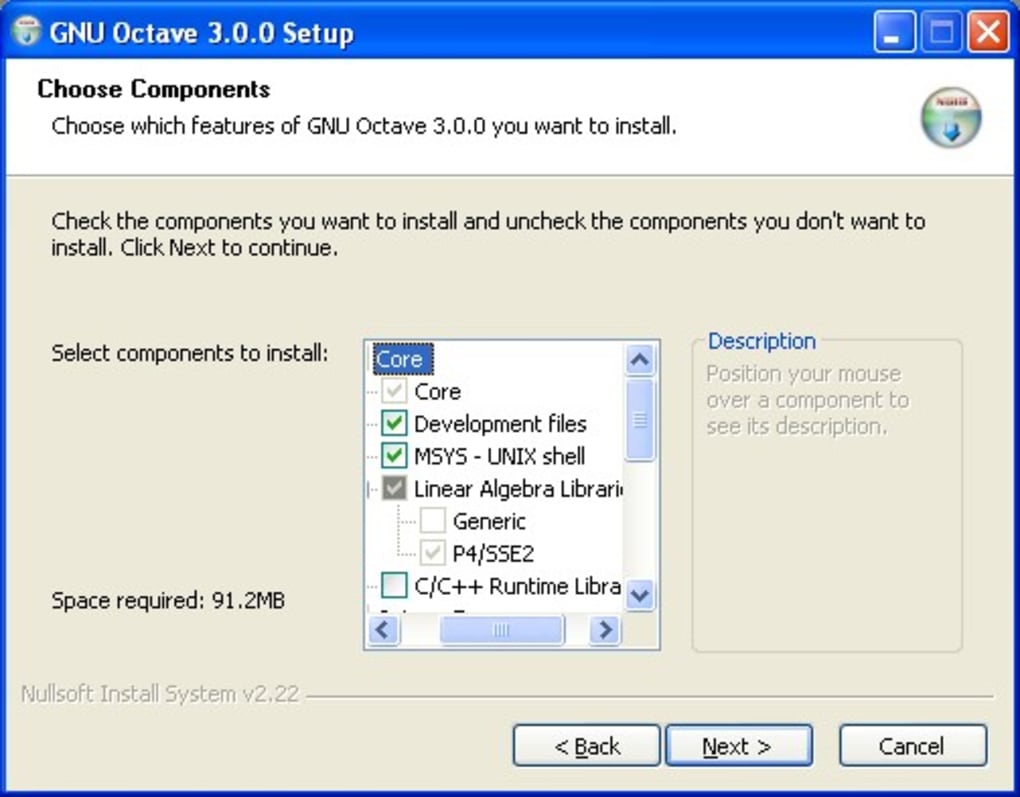
The command-line interface, while seemingly minimalistic compared to modern graphical user interfaces, is a hallmark of efficiency for experienced users. It allows for rapid prototyping, script execution, and direct interaction with the computational engine. This text-based interaction provides a direct, unencumbered pathway to numerical power, where the focus remains squarely on the mathematical problem at hand rather than navigating complex menus. For those who prefer a more visual experience, community-developed GUIs or IDEs can often be integrated, though the core strength of Octave lies in its robust command-line capabilities.
The Octave Ecosystem: Compatibility and Extensibility
The true power of a computational language often lies not just in its standalone capabilities but also in its ability to interact with other tools and extend its functionalities. Octave excels in this regard, offering significant compatibility and extensibility options that enhance its utility in a diverse range of scientific and engineering workflows.
Bridging the Gap with MATLAB
One of the most significant advantages of Octave is its high degree of compatibility with MATLAB. MATLAB has long been a dominant force in proprietary numerical computing, and many scientists and engineers are trained in its use. Octave’s developers meticulously designed the language to be “mostly compatible” with MATLAB, meaning that a vast majority of MATLAB scripts and functions can run in Octave with little to no modification. This feature is a game-changer for several reasons:
- Cost-Effectiveness: For individuals, educational institutions, and small businesses, the licensing costs of MATLAB can be prohibitive. Octave offers a free, open-source alternative that allows users to perform similar computations without financial burden.
- Learning Curve Mitigation: Users already familiar with MATLAB’s syntax, functions, and programming paradigms will find the transition to Octave remarkably smooth. The cognitive load associated with learning a new language is significantly reduced, allowing users to focus on their scientific problems rather than deciphering new linguistic structures.
- Code Portability: Research projects, legacy code, and educational materials developed in MATLAB can often be directly utilized or easily adapted for Octave, ensuring continuity and reducing redevelopment effort. This fosters broader collaboration and knowledge sharing within the scientific community.
- Open-Source Philosophy: Octave adheres to the open-source philosophy, offering transparency, community-driven development, and freedom from vendor lock-in. This appeals to users who value control over their tools and the ability to inspect and modify the underlying code.
While “mostly compatible” implies that there might be minor differences or unsupported functions, the Octave community actively works to minimize these discrepancies and provides clear documentation on any divergences. For most typical numerical tasks, the compatibility is robust enough to provide a seamless experience.
Expanding Capabilities with External Modules
Another critical aspect of Octave’s flexibility is its ability to be extended or used in conjunction with modules written in other programming languages. The reference mentions C++, C, and Fortran, which are foundational languages in high-performance computing due to their efficiency and direct memory management capabilities. This extensibility is vital for several reasons:
- Performance Optimization: For computationally intensive tasks where pure Octave code might be slower, users can write critical sections in C, C++, or Fortran, compile them into dynamic libraries, and then call these functions directly from Octave. This allows for significant performance gains while retaining the high-level scripting convenience of Octave for overall control and data manipulation.
- Leveraging Existing Libraries: The scientific computing world is rich with highly optimized libraries written in C, C++, and Fortran (e.g., LAPACK for linear algebra, FFTW for fast Fourier transforms). Octave’s interoperability allows users to tap into these battle-tested, high-performance libraries, expanding its functional scope and computational prowess.
- Integration with Legacy Systems: Many large-scale scientific and engineering projects have extensive codebases in C, C++, or Fortran. Octave’s ability to interface with these languages facilitates its integration into existing workflows and systems, making it a versatile component in heterogeneous computing environments.
- Custom Functionality: Developers can create entirely new functionalities or specialized algorithms in these lower-level languages and expose them to Octave, tailoring the environment precisely to their unique research or application needs.
This level of extensibility transforms Octave from just a numerical computation tool into a powerful scientific development platform, capable of harnessing the strengths of multiple programming paradigms. It allows users to combine the ease of high-level scripting with the raw power and optimization potential of compiled languages.
Navigating the Learning Curve and Identifying the Ideal User
While Octave boasts immense power and versatility, it’s essential to approach it with an understanding of its learning curve and target audience. The statement, “This is an extremely complex language that only those familiar with Matlab or Fortran will pick up quickly,” highlights a crucial characteristic: Octave is not designed as an introductory programming language for beginners.
For individuals who already possess a background in MATLAB, the transition to Octave is indeed straightforward. The syntax, data structures (especially matrices), and many of the core functions are so similar that the learning process primarily involves familiarizing oneself with minor differences and Octave-specific documentation. Similarly, those with experience in Fortran, particularly in numerical and scientific computing contexts, will find the paradigm of direct numerical manipulation and the focus on array-based operations very intuitive. These users typically understand the underlying mathematical concepts and the computational challenges that Octave is designed to solve.
However, for absolute beginners to scientific programming or those without prior exposure to MATLAB-like environments or languages focused on numerical efficiency, Octave can present a significant challenge. The reasons for this complexity include:
- Command-Line Interface: While efficient for experienced users, a command-line interface can be intimidating for newcomers accustomed to graphical, point-and-click environments. Learning to interact solely through text commands requires a different way of thinking and problem-solving.
- Mathematical Foundations: Octave is a tool for advanced mathematics. Users are expected to have a solid understanding of concepts like linear algebra, calculus, differential equations, and numerical methods. Without this foundation, the language’s functions and purpose might seem abstract and difficult to grasp.
- Programming Concepts: Beyond the mathematical aspects, users need to understand fundamental programming concepts such as variables, data types (especially matrices), loops, conditional statements, functions, and debugging. While these are common across programming languages, Octave’s specific idioms might take time to master.
- Lack of Beginner-Friendly GUI (by default): Unlike some other data analysis tools that come with elaborate GUIs to ease initial interaction, Octave’s core distribution focuses on the command line. While community GUIs exist, they are not always the primary entry point, making the initial learning phase more demanding for some.
The advice, “Anyone else should be prepared to put a lot of hours in although the problem solving skills it will provide you with seem virtually limitless,” is both a warning and a promise. It acknowledges the steep initial investment required but underscores the immense reward. The “virtually limitless” problem-solving skills refer to the ability to tackle almost any numerical challenge, from fundamental research to complex engineering design.
The Ideal User Profile for Octave:
- Students and Researchers: Especially those in fields like engineering, physics, mathematics, chemistry, biology, and economics, who need to perform advanced numerical simulations and data analysis.
- Academics and Educators: Teaching numerical methods, scientific programming, or specific domain applications where a powerful, free tool is preferred over commercial software.
- Engineers: Working on signal processing, control systems, fluid dynamics, structural analysis, and other areas requiring heavy numerical computation.
- Developers: Creating high-performance numerical routines or integrating scientific computing capabilities into larger applications, especially those looking to leverage existing C/C++/Fortran code.
- Data Scientists: Performing statistical analysis, machine learning algorithms (especially those based on linear algebra), and data visualization, particularly if they prefer a script-based approach.
In essence, Octave is a tool for those who are serious about numerical computing and are willing to invest the time to master a powerful, open-source environment. The rewards for this investment are substantial, offering a gateway to sophisticated problem-solving capabilities without the constraints of proprietary software.
Advantages and Considerations for Octave Users
Like any powerful software tool, Octave comes with a distinct set of advantages and some considerations that potential users should be aware of. Understanding these points helps in making an informed decision about whether Octave is the right fit for a particular project or learning journey.
Pros of Octave:
- Handles Complex Mathematical Equations with Ease: This is Octave’s primary strength. From intricate linear algebra to the nuances of differential equations, Octave provides robust, optimized functions to solve a vast array of mathematical problems. Its design prioritizes numerical accuracy and computational efficiency for scientific and engineering tasks.
- Works in Conjunction with C++ Modules and Matlab: This dual compatibility is a significant boon. The MATLAB-like syntax drastically reduces the learning curve for experienced users of that platform, while the ability to integrate C, C++, and Fortran modules allows for performance-critical sections to be optimized in lower-level languages. This flexibility enables hybrid computing solutions that leverage the best of both worlds: high-level scripting for rapid development and low-level code for maximum speed.
- Open Source and Free: As an open-source project, Octave is entirely free to download and use. This eliminates licensing costs, making it accessible to individuals, educational institutions, and organizations with budget constraints. The open-source nature also fosters a vibrant community, contributing to its development, documentation, and support.
- Cross-Platform Availability: Octave is not limited to Windows. While PhanMemFree.org highlights the Windows version (V10.1.0), it’s also available for other platforms like Android and Mac, broadening its reach and utility across different operating systems.
- Community Support: Being open source means a large, active community contributes to its development, provides peer support through forums and mailing lists, and continuously improves the software. This can be an invaluable resource for troubleshooting and learning.
Cons/Considerations for Octave Users:
- Very Complex for Those Unfamiliar with Matlab or Fortran: As previously discussed, the learning curve can be steep for individuals without prior experience in similar numerical computing environments. This is perhaps the most significant barrier to entry. While the rewards are great, the initial time investment can be considerable.
- User Interface (Command Line): While efficient, the default command-line interface might be a deterrent for users who prefer a graphical user interface (GUI). Although there are community-developed GUIs, they might not be as polished or integrated as those found in commercial software. The lack of a robust, officially supported GUI out-of-the-box can make it less intuitive for visual learners.
- Maturity of GUI (as per user reviews): Some older user reviews, like one from February 1, 2012, explicitly mention issues with Octave’s GUI, citing “many errors” and installation problems on Windows 7, along with antivirus warnings. While software evolves, this highlights that the command-line version is often considered the more stable and reliable core of Octave. Users seeking a polished GUI experience might need to temper expectations or explore alternative graphical front-ends.
- Antivirus Warnings (Historical): The same user review from 2012 noted that antivirus software (Kaspersky and Norton) flagged Octave’s behavior, comparing it to a PDM.Invader virus. While these could be false positives (a common issue with software that performs low-level system interactions or numerical computations), it’s a concern that historical users faced. Modern versions and reputable download sources like PhanMemFree.org typically ensure the software is “Clean,” but such feedback indicates past perceptions.
- Not “Production Level Quality” (as per user review): Another user in 2012 criticized Octave, stating it’s “Not production level quality, even for free software that deals with computation.” This perspective often arises when comparing free alternatives to highly refined commercial products with extensive QA and support. While Octave is robust for many applications, specific enterprise-level deployments might require more extensive validation and dedicated support that commercial offerings might provide. It’s important to differentiate between open-source community support and commercial-grade service level agreements.
In summary, Octave is an exceptional tool for those prepared to harness its power, especially individuals with a numerical computing background or a willingness to learn. Its open-source nature, computational prowess, and language compatibility make it a compelling choice. However, new users should be prepared for a learning curve, and those prioritizing a highly polished GUI or needing stringent commercial-grade support might need to consider its limitations.
Octave in the Broader Landscape of Scientific Software
Octave doesn’t exist in a vacuum; it’s part of a rich ecosystem of scientific and mathematical software. Understanding its position relative to alternatives helps users make informed choices based on their specific needs, expertise, and resources.
Comparing with Key Alternatives:
- MATLAB: This is Octave’s closest cousin and primary benchmark. MATLAB is a proprietary, commercial software developed by MathWorks. It offers a highly refined user experience, extensive toolboxes for various domains (signal processing, control systems, image processing, etc.), robust documentation, and dedicated customer support. Its strengths lie in its comprehensive ecosystem, professional-grade GUIs, and widespread industry adoption. However, its significant cost is its main drawback. Octave aims to provide a free and open-source alternative that covers a substantial portion of MATLAB’s core numerical functionality, making it ideal for budget-conscious users or those who prioritize open-source principles.
- Scilab: Mentioned as an alternative and also available as a free, full-featured scientific package, Scilab is another open-source numerical computation package. Developed by Scilab Enterprises, it offers a similar environment to Octave and MATLAB, focusing on numerical analysis, simulation, and data visualization. Scilab has its own distinct syntax, though it shares many conceptual similarities with MATLAB/Octave. It comes with a more integrated GUI by default, which can be appealing to some users. The choice between Octave and Scilab often comes down to personal preference for syntax, specific library availability, and community engagement.
- R: The R programming language, highlighted in a user review as a productive and reliable alternative with a “mature GUI,” is primarily designed for statistical computing and graphics. While it can perform general numerical computations, its core strengths lie in statistical modeling, data analysis, machine learning, and high-quality data visualization. R has a massive collection of user-contributed packages (CRAN), making it incredibly versatile for statistical applications. The learning curve for R can be steep, especially for those without a statistical background, and its object-oriented nature differs from Octave’s matrix-centric approach. For purely numerical engineering or scientific computation, Octave might be more direct, but for data science and statistics, R is often the preferred choice.
- Python with NumPy/SciPy/Matplotlib: While not mentioned in the immediate reference, Python has emerged as a dominant force in scientific computing. Libraries like NumPy (for numerical arrays and linear algebra), SciPy (for scientific and technical computing), and Matplotlib (for plotting) collectively provide a free, open-source environment that rivals and often surpasses the capabilities of commercial alternatives. Python’s general-purpose nature, extensive ecosystem, and readability make it highly popular. The choice between Octave and Python often depends on existing codebase, specific performance needs, and preference for a language’s broader applicability. Octave maintains an edge in direct MATLAB compatibility, which is crucial for users transitioning from that environment.
- MathType, Derive, MathCast, GeoGebra: These alternatives mentioned in the PhanMemFree.org listing serve different, though related, purposes. MathType and MathWriter are interactive equation editors, useful for document preparation but not for performing computations. Derive is a powerful symbolic and numeric mathematics system, similar to a computer algebra system (CAS). GeoGebra is flexible mathematical software focused on geometry, algebra, statistics, and calculus. These tools complement rather than directly compete with Octave’s primary role as a numerical computation engine.
A Look at User Feedback and Practical Implications
The user reviews, though dated (2010-2012), provide valuable insights into early user experiences and common challenges. The feedback regarding GUI errors, installation issues on Windows 7, and antivirus warnings (“PDM.Invader virus” comparison) suggests that Octave, particularly in its earlier GUI iterations, might have faced stability and compatibility challenges. These issues are not uncommon for open-source projects, which rely on community contributions and iterative development.
The recommendation to “Try the command line version Octave or switch to ‘R’” underscores the perception that the core command-line functionality was more reliable. This highlights an important aspect of Octave’s development: its strength has always been in its robust numerical engine and command-line interface, rather than a fully polished graphical user experience that might be expected from commercial software.
It’s crucial to note that software evolves significantly over time. A version 10.1.0 (latest update May 6, 2025, according to PhanMemFree.org) would have addressed many issues present in versions from 2012. Modern Octave versions have improved stability, better integration, and often more refined community-developed GUIs. However, the historical feedback serves as a reminder for new users to prioritize reputable download sources like PhanMemFree.org and consult recent community forums for the latest information on GUI stability and performance on their specific operating systems.
The security status on PhanMemFree.org showing “Clean” after scanning with “more than 50 of the world’s leading antivirus services” provides reassurance that the downloaded files are free from known threats, addressing the historical antivirus concerns. This kind of vetting is essential for open-source software distributed through third-party platforms.
In essence, Octave’s place in the scientific software landscape is that of a powerful, free, and open-source alternative to commercial numerical computation environments. It demands a certain level of technical proficiency and commitment from its users but rewards them with immense problem-solving capabilities, extensive extensibility, and the freedom inherent in open-source tools.
Conclusion: The Enduring Value of Octave
Octave stands as a cornerstone in the world of open-source scientific computing. It is a testament to the power of community-driven development, offering a high-level language primarily intended for numerical computations that rivals the capabilities of many commercial alternatives. For anyone engaged in scientific or mathematical work involving highly complex linear and nonlinear problem-solving, Octave provides an accessible and potent solution.
Its core strengths lie in its ability to effortlessly handle intricate linear algebra equations, manipulate polynomials, and integrate various differential and differential-algebraic equations. The command-line interface, while demanding for novices, provides a streamlined and efficient environment for experienced users to interact directly with powerful computational tools.
A critical aspect of Octave’s appeal is its extensive compatibility with MATLAB, significantly easing the transition for a vast community of users and enabling the reuse of existing codebases. Furthermore, its extensibility through modules written in C++, C, and Fortran allows for unparalleled flexibility, enabling performance optimization and integration with a broad spectrum of high-performance libraries and legacy systems. This makes Octave not just a language, but a versatile platform for scientific development.
While the learning curve can be steep for those unfamiliar with MATLAB or Fortran, the investment in time yields virtually limitless problem-solving skills. The journey through Octave’s intricacies leads to a profound understanding of numerical methods and a mastery of a tool that can tackle some of the most challenging problems in science and engineering.
PhanMemFree.org’s dedication to providing clean and reliable downloads of essential software like Octave ensures that this powerful tool remains readily available to a global audience. Despite historical critiques regarding GUI maturity or perceived “production level quality” in earlier versions, modern Octave continues to evolve, benefiting from active community contributions and ongoing improvements.
In conclusion, Octave is more than just a free alternative; it is a robust, reliable, and evolving ecosystem for advanced numerical computation. It empowers students, researchers, engineers, and developers with the freedom to explore, innovate, and solve complex challenges, solidifying its place as an indispensable tool in the pantheon of scientific software. Its enduring value lies in its power, accessibility, and the vibrant open-source community that continues to drive its development forward.
File Information
- License: “Free”
- Latest update: “May 6, 2025”
- Platform: “Windows”
- OS: “Windows 7”
- Language: “English”
- Downloads: “226.7K”
- Size: “531.99 MB”


