
For users who fondly remember the intuitive interface and familiar layout of Windows 7’s File Explorer, the transition to the updated File Explorer in Windows 8 and 10 could feel jarring. The introduction of the “Ribbon” bar and other UI changes, while aiming for modernization, alienated some users who preferred the simplicity and efficiency of the older version. OldNewExplorer, a free utility developed by Tihiy, offers a solution by allowing users to revert their Windows 8.1 and 10 File Explorer experience to a design reminiscent of the classic Windows 7 style. This detailed review will explore the functionalities, benefits, and overall experience of using OldNewExplorer.
Understanding OldNewExplorer’s Functionality
OldNewExplorer isn’t a full-fledged file manager replacement like Total Commander; instead, it’s a customization tool. It seamlessly integrates with the existing Windows File Explorer, subtly altering its appearance and behavior to mimic the look and feel of the Windows 7 file manager. This is achieved through a simple yet effective approach, focusing on three key areas: Shell Extension, Behavior, and Appearance.
The Shell Extension component manages the installation and uninstallation of OldNewExplorer. This ensures a clean and straightforward process, allowing users to easily revert to the default Windows File Explorer settings if needed. The installation process itself is typically straightforward and requires minimal technical expertise. The program’s small size ensures a quick download and installation without impacting system resources.
The Behavior section is where users can fine-tune the functionality of their file explorer. A key feature here is the option to restore the traditional drive grouping and libraries prevalent in Windows 7. This restoration simplifies navigation, particularly for users accustomed to the hierarchical organization of previous Windows versions. The ability to reintroduce these familiar elements significantly improves the usability for those who found the changes in later Windows versions disorienting.
The Appearance section allows users to dramatically alter the visual presentation of the File Explorer. The most significant change here is the replacement of the modern “Ribbon” bar with a more streamlined command bar, echoing the classic Windows 7 style. Additionally, users can re-enable the details pane and status bar, features that enhance information display and overall user experience. These visual adjustments are designed not just for aesthetic appeal but also for improved functionality and ease of access to frequently used commands.
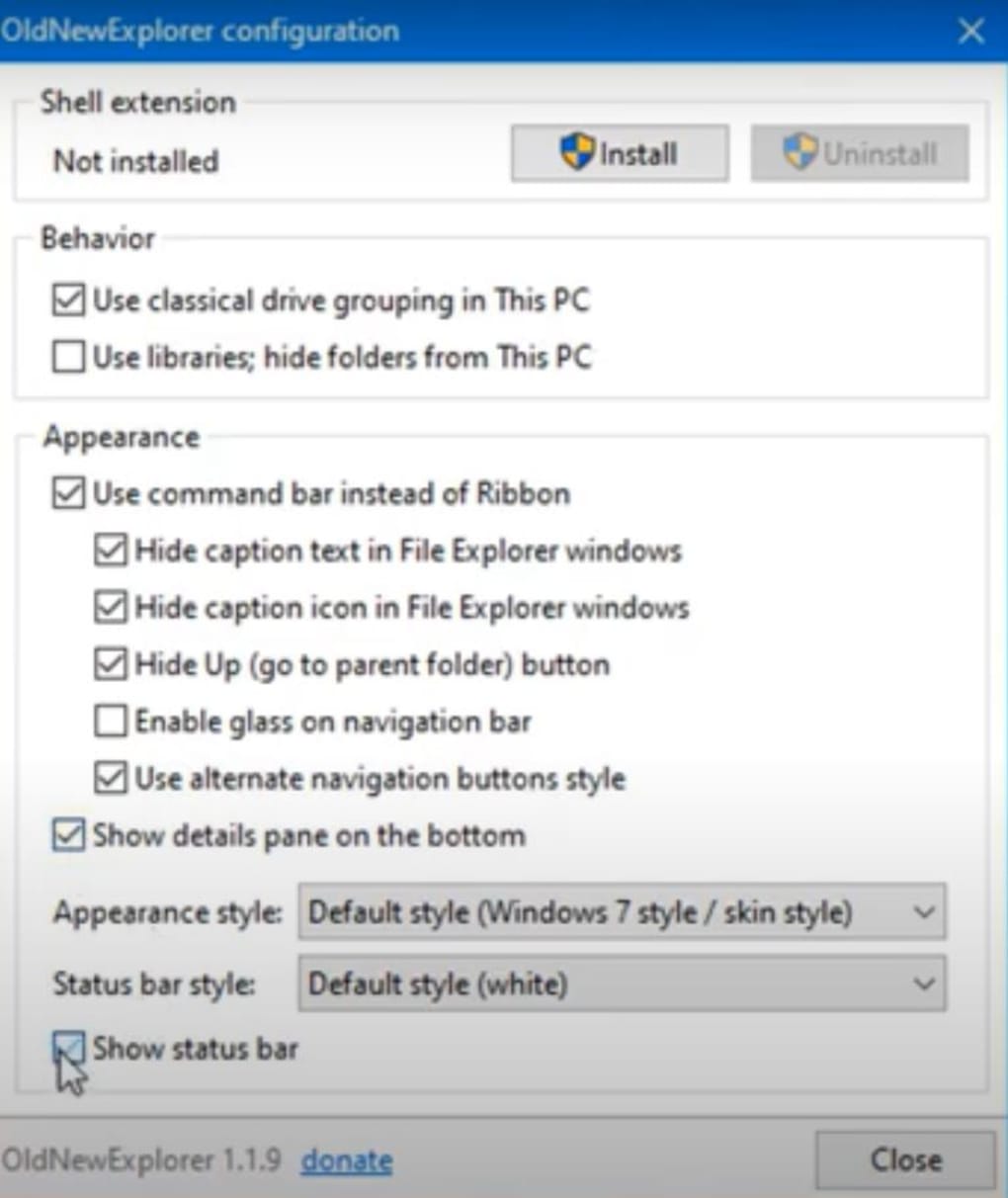
The overall design philosophy behind OldNewExplorer is one of simplicity and ease of use. The program’s interface is intuitive, even for users with limited technical experience. The lack of complex settings or confusing options means users can quickly configure the program to match their preferences without a steep learning curve. This ease of use is a significant advantage, making it accessible to a wide range of users.
Benefits of Using OldNewExplorer
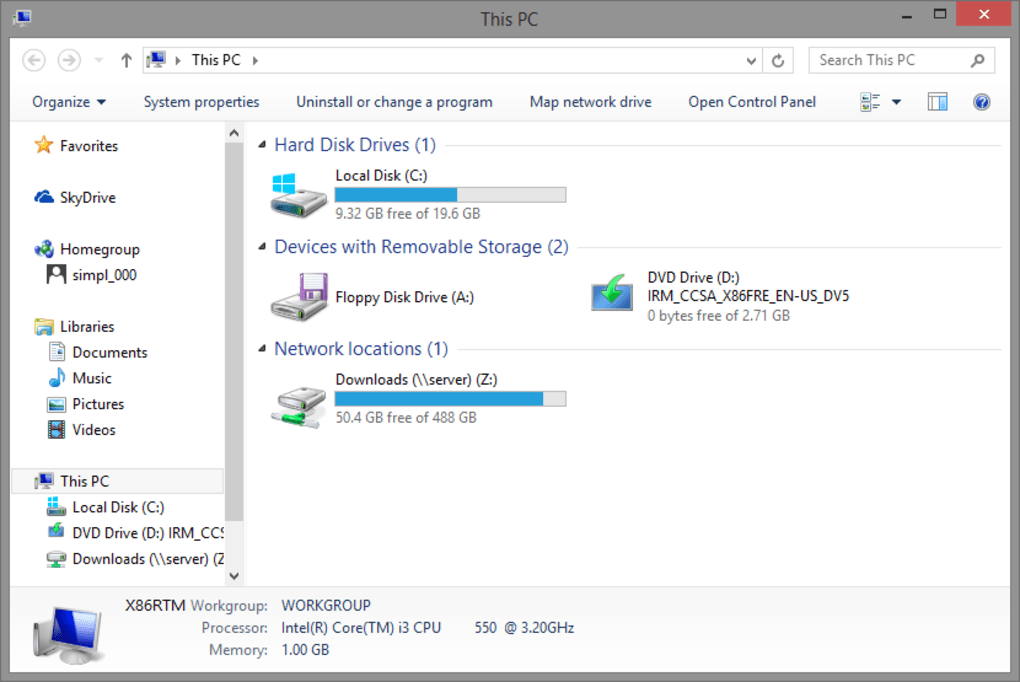
OldNewExplorer offers several key advantages for users who find the modern File Explorer in Windows 8.1 and 10 less efficient or visually unappealing. The primary benefit is its ability to effectively replicate the classic Windows 7 Explorer experience, offering a familiar and comfortable workspace.
-
Nostalgia and Familiarity: For many long-time Windows users, the transition to the new File Explorer involved adapting to a significantly altered workflow. OldNewExplorer bridges this gap, providing a familiar visual and functional interface that reduces the learning curve and potential frustration associated with a redesigned system.
-
Improved Efficiency: While subjective, many users find the simpler layout and readily accessible commands of the classic Windows Explorer more efficient. The streamlined command bar and reintroduction of the details pane in OldNewExplorer can lead to faster file management and quicker navigation.
-
Enhanced Usability: The improved layout and easily accessible commands contribute to a more intuitive user experience. The absence of the sometimes overwhelming “Ribbon” bar can improve focus and reduce distractions during file management tasks.
-
Easy Installation and Uninstallation: The straightforward installation and uninstallation process ensures that users can experiment with OldNewExplorer without any risk of permanent system changes. This ease of use is a crucial factor, encouraging users to try the program without worrying about potential complications.
-
Lightweight and Resource-Efficient: OldNewExplorer is a small program with minimal system resource requirements. This ensures that it runs smoothly without slowing down the computer or affecting the performance of other applications.
Limitations of OldNewExplorer
While OldNewExplorer effectively restores the classic Windows 7 File Explorer experience, it’s crucial to acknowledge that it does not introduce any new features or functionalities. It is strictly a customization tool, focused solely on recreating a previous design. This limitation is intentional, as the program’s focus remains on replicating the past rather than innovating.
- No New Features: Users shouldn’t expect any added functionality or modern improvements beyond the restoration of the classic interface. OldNewExplorer provides a visual and behavioral regression, not a forward-looking enhancement.
-
Limited Scope: The program’s influence is strictly confined to the File Explorer. Other aspects of the Windows user interface remain unaffected by OldNewExplorer.
-
Potential Incompatibility: Although generally well-received, potential compatibility issues with specific Windows versions or third-party applications cannot be entirely ruled out. Regular updates from the developer aim to mitigate such issues.
Conclusion: A Worthwhile Tool for Nostalgia and Efficiency
OldNewExplorer effectively addresses the needs of users who prefer the classic Windows 7 File Explorer interface. Its simple yet powerful functionality, coupled with an easy-to-use interface, makes it a valuable tool for improving user experience and restoring a sense of familiarity for those who miss the older design. While it doesn’t introduce any new features, its ability to seamlessly replicate a preferred interface makes it a worthwhile addition for users who prioritize a comfortable and efficient file management experience. The ease of installation and uninstallation allows for risk-free experimentation, making OldNewExplorer a convenient and beneficial solution for users seeking a nostalgic and efficient approach to file management in more modern versions of Windows. The program’s small size and low resource consumption make it a convenient option for any user who wants to revert to the familiar and efficient design of the classic Windows 7 File Explorer without significant system overhead. For those users who found the newer interface cumbersome or visually displeasing, OldNewExplorer provides a straightforward and effective solution to regain a preferred working environment.
File Information
- License: “Free”
- Version: “1.1.9”
- Latest update: “July 15, 2022”
- Platform: “Windows”
- OS: “Windows 10”
- Language: “English”
- Downloads: “6.8K”
- Size: “278.77 KB”


