
In an increasingly digital world, the keyboard remains one of our primary interfaces with computing devices. Whether composing emails, writing documents, or navigating the web, a reliable input method is indispensable. But what happens when your physical keyboard fails, or you find yourself needing to type on a shared computer where installing software is restricted? This is where virtual keyboards step in, offering a vital lifeline for continued interaction. Among the myriad of options available, On-Screen Keyboard Portable distinguishes itself as a robust, lightweight, and incredibly versatile solution designed to be carried and used anywhere. This article delves deep into its features, benefits, and the underlying philosophy that makes it an indispensable tool for a wide range of users.
Virtual keyboards, by their very nature, are niche products. They cater to specific needs, such as accessibility for users with physical impairments, enhanced security against hardware keyloggers, or simply serving as an emergency backup when a physical keyboard malfunctions. While many operating systems offer basic on-screen keyboards, they often lack advanced features, configuration options, or the crucial element of portability. On-Screen Keyboard Portable, developed by PortableApps, addresses these shortcomings by providing a full-featured virtual keyboard that lives up to its name: it’s entirely portable, requiring no installation, and can be run directly from a USB flash drive or any removable storage device.
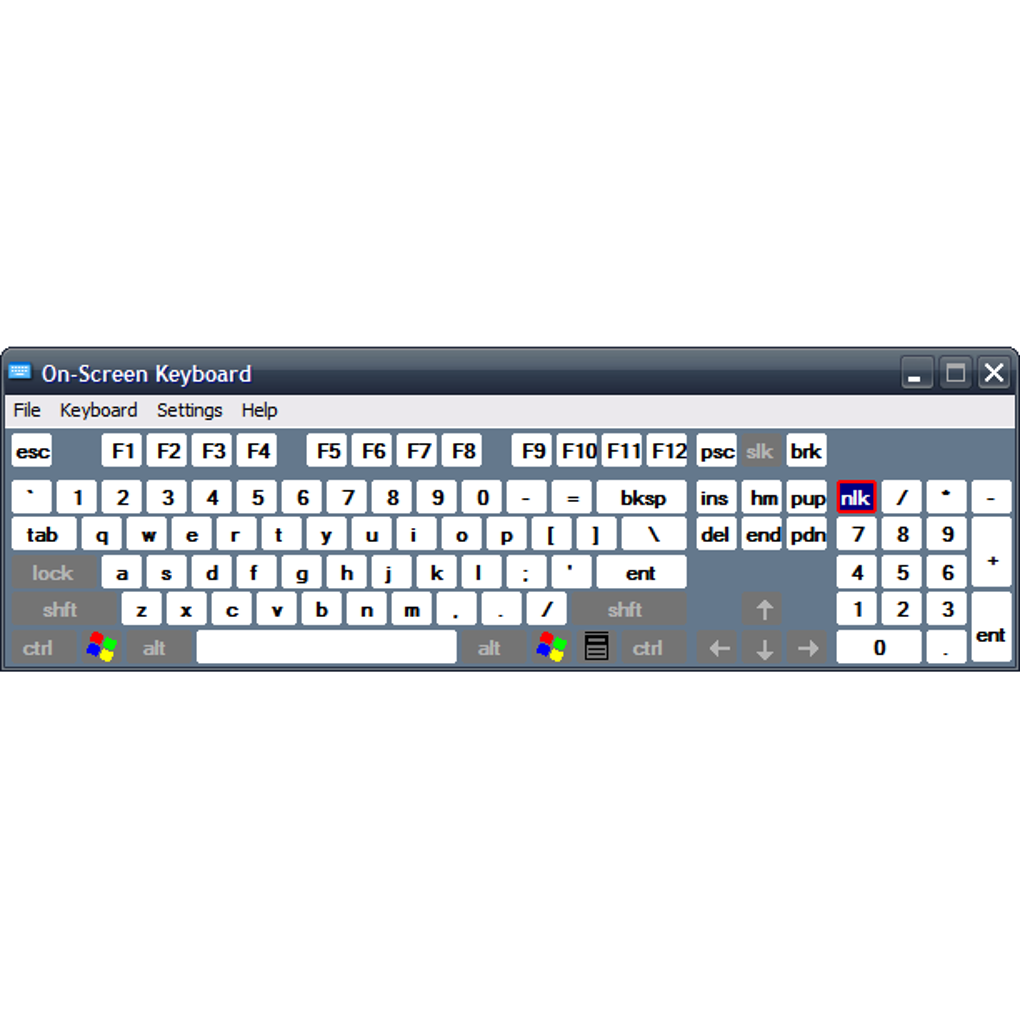
This unique portability means that your personalized typing solution is always with you, ready to be deployed on any compatible Windows machine. Imagine being at a public library, an internet café, or a client’s office, and needing to perform sensitive data entry or simply continue your work, but a physical keyboard is unresponsive or absent. Instead of being stranded, you can plug in your USB drive, launch On-Screen Keyboard Portable, and resume typing with ease. This convenience, combined with its comprehensive feature set and minimal system footprint, positions it as a premier choice for anyone seeking a flexible and reliable virtual typing utility.
The Power of Portability: A Keyboard in Your Pocket
The defining characteristic of On-Screen Keyboard Portable is its exceptional portability, a feature that significantly broadens its utility and appeal. Unlike traditional software applications that require a dedicated installation process, often writing files to system directories and modifying registry entries, On-Screen Keyboard Portable operates entirely self-contained. This means the entire application, along with its configuration files, can reside on a removable storage device such as a USB flash drive, an external hard drive, or even a cloud-synced folder.
The implications of this design choice are profound. For individuals who frequently work across multiple computers – perhaps a desktop at home, a laptop for travel, and various workstations at different offices – the ability to carry their preferred virtual keyboard in their pocket is invaluable. There’s no need to install software on each machine, saving time and circumventing potential administrative restrictions that often prevent users from installing applications on shared or corporate computers. This makes it an ideal tool for IT support staff, field technicians, or simply anyone who needs consistent access to a reliable typing interface regardless of the host system’s setup.
Furthermore, the portability extends beyond mere convenience; it also offers a layer of resilience. Should your primary physical keyboard fail unexpectedly – a spilled drink, a broken key, or a sudden hardware malfunction – On-Screen Keyboard Portable acts as an immediate and readily available backup. Instead of being sidelined by hardware issues, you can quickly launch the virtual keyboard from your portable drive and continue working without significant interruption. This is particularly crucial for critical tasks or tight deadlines where even a temporary keyboard outage can lead to costly delays.
Beyond emergency situations, the portable nature of this application supports a “clean desk” or “zero footprint” computing philosophy. For users who prefer to leave no traces of their software usage on a host machine, running applications directly from a portable drive ensures that no residual files or settings are left behind after the drive is removed. This can be beneficial for security-conscious users or those working in environments with strict data privacy policies.
The lightweight nature of On-Screen Keyboard Portable further enhances its portability. With a compact file size, it consumes minimal space on a USB drive and launches quickly, even on older or less powerful systems. This efficiency ensures that the application doesn’t become a burden on system resources, maintaining smooth performance while in use. In an era where software often demands increasing system resources, On-Screen Keyboard Portable stands out for its lean and efficient design, truly embodying the spirit of a “keyboard in your pocket.”
Exploring the Interface and Comprehensive Key Set
Upon launching On-Screen Keyboard Portable, users are greeted with an interface that prioritizes familiarity and functionality. Designed to mimic the layout of a standard physical keyboard, the application ensures a minimal learning curve, allowing users to start typing almost immediately. The visual representation includes keys for all standard alphanumeric characters, numbers, and symbols, arranged in a conventional QWERTY layout, or potentially other regional layouts depending on system settings. This adherence to a widely recognized format makes the transition from physical to virtual typing seamless and intuitive.
However, On-Screen Keyboard Portable goes beyond the bare essentials offered by many default operating system virtual keyboards. It incorporates a more comprehensive array of keys that are crucial for efficient navigation and text manipulation. Beyond the basic letters, numbers, and symbols, users will find essential modifier keys such as Shift, Ctrl, Alt, and Windows key, enabling complex keyboard shortcuts just as they would on a physical keyboard. Furthermore, the inclusion of helpful navigation and function keys significantly enhances its utility:
- Arrow Keys: Essential for moving the cursor within text, navigating menus, and scrolling through documents without relying on a mouse.
- Insert, Home, End, Page Up, Page Down: These keys provide robust text editing capabilities, allowing users to quickly jump to the beginning or end of lines or documents, and efficiently scroll through content.
- Print Screen (PrtSc): A valuable key for capturing screenshots, a function often overlooked in simpler virtual keyboard implementations.
- Scroll Lock: Interestingly, On-Screen Keyboard Portable includes a Scroll Lock key, a feature that has largely faded from modern physical keyboards but can still be useful in specific legacy applications or spreadsheets. Its presence underscores the application’s commitment to offering a full spectrum of keyboard functionality.
To enhance usability and screen management, On-Screen Keyboard Portable features a “dock key.” When activated, this key positions the virtual keyboard securely at the bottom of the screen, preventing it from obscuring crucial content or being accidentally moved. This “docked” state can also expand the keyboard horizontally to fill the entire width of the screen, maximizing the size of the keys for easier clicking and reducing the chances of input errors. Should the user need to move or resize the keyboard, pressing the dock key again releases it from its fixed position, allowing for flexible placement anywhere on the desktop.
The primary method of input for On-Screen Keyboard Portable is straightforward: users simply click on the desired keys with their mouse or trackpad. The visual feedback, typically a subtle change in key appearance upon click, confirms the input. While the interface is described as “basic” in terms of its aesthetic, this simplicity is a deliberate design choice that prioritizes functionality and low resource consumption over elaborate visual effects. There are no fancy animations or complex graphical elements, ensuring that the application remains lightweight, responsive, and compatible with a wide range of system specifications, including older workstations. This focus on core functionality ensures that users can launch the app and begin typing immediately, without distractions or performance bottlenecks.
Beyond Basic Typing: Configuration and Advanced Input Methods
While On-Screen Keyboard Portable might present a basic visual facade, its true depth is revealed in its configuration options and versatile input methods. This seemingly simple application hides a thoughtful array of settings designed to enhance user experience, improve accessibility, and cater to diverse typing preferences. The presence of a dedicated settings menu allows users to tailor the virtual keyboard to their specific needs, transforming it from a mere clickable interface into a powerful and adaptable input tool.
Among the fundamental adjustments available are:
- Click Sound: Users can enable a subtle click sound for each key press. This auditory feedback can be particularly helpful for confirming input, especially for those who rely on sensory cues or are accustomed to the tactile response of a physical keyboard.
- Numeric Pad: For users who frequently work with numbers, the option to add a dedicated numeric pad (numpad) to the keyboard layout is a significant advantage. This streamlines data entry for financial applications, calculators, or any task requiring extensive numerical input, making the virtual keyboard even more efficient.
However, On-Screen Keyboard Portable truly shines in its provision of alternative input methods, moving beyond simple mouse-clicking to accommodate users with varying motor skills and preferences:
- Hover-to-Type: This innovative feature allows users to type by simply hovering their mouse cursor over a key for a specified duration, without needing to physically click. This is an invaluable accessibility feature for individuals who may have difficulty with precise mouse clicks or repetitive motion. The settings menu provides options to adjust the hover duration, allowing users to set a comfortable delay that prevents accidental key presses while ensuring efficient typing.
- Scan-to-Type: For users with even more limited motor control, the scan-to-type method offers a systematic way to select keys. In this mode, the keyboard automatically scans through keys or groups of keys, highlighting them sequentially. The user then triggers the selection (often with a single click, a switch, or a gaming device) when the desired key is highlighted. Similar to hover-to-type, users can adjust the scanning speed to match their reaction time, making the process as comfortable and efficient as possible. This method is particularly beneficial for those who rely on assistive technologies or specialized input devices.
Beyond these input methods, On-Screen Keyboard Portable incorporates a text prediction feature, a common staple in modern mobile keyboards but a welcome addition to a desktop virtual keyboard. As users type, the keyboard analyzes the input and suggests common words or phrases, which can then be selected with a click. This significantly speeds up typing, reduces errors, and is especially useful for long texts or individuals with slower input speeds. The added option to automatically insert a space after every predicted word further streamlines the writing process, enhancing efficiency and reducing the need for additional key presses.
Another testament to its versatility is the fact that On-Screen Keyboard Portable can be accessed and controlled using various gaming devices. This means that users can utilize a joystick, a gamepad, or other specialized gaming peripherals as alternative input methods. This functionality opens up a world of possibilities for accessibility, allowing individuals with unique input requirements to interact with their computer in a way that is most comfortable and effective for them.
Finally, the application’s ability to remember user settings upon exit is a small but significant convenience. This ensures that all personalized configurations – whether it’s the click sound, numeric pad presence, hover duration, or scanning speed – are retained for future sessions, eliminating the need to reconfigure the keyboard every time it’s launched. This attention to user persistence underscores the thoughtful design that makes On-Screen Keyboard Portable more than just a basic virtual keyboard.
Practical Applications and System Compatibility
The utility of On-Screen Keyboard Portable extends far beyond simply replacing a broken physical keyboard. Its design and feature set lend themselves to a myriad of practical applications, making it an invaluable tool for various user groups and scenarios. Understanding these diverse uses highlights the broad appeal and necessity of such a robust portable virtual keyboard.
One of the most obvious and critical applications is as a reliable backup solution. Physical keyboards, like any hardware component, are susceptible to failure. A key can stop responding, a liquid spill can render it unusable, or a cable might simply fray. In such situations, having On-Screen Keyboard Portable readily available on a USB drive means uninterrupted workflow. Professionals, students, and casual users alike can avoid costly downtime or delays by quickly switching to the virtual keyboard. This makes it an essential part of any digital emergency toolkit.
For accessibility, On-Screen Keyboard Portable is a game-changer. Individuals with various physical disabilities, such as limited motor control, repetitive strain injuries, or conditions that prevent them from using a traditional keyboard, can greatly benefit from its alternative input methods. The hover-to-type and scan-to-type features, combined with adjustable timings, allow these users to interact with their computer effectively and comfortably. The ability to control the keyboard with a joystick, gamepad, or other gaming devices further expands its accessibility, providing flexible input solutions for a broader spectrum of needs. This commitment to inclusivity makes On-Screen Keyboard Portable a powerful assistive technology.
In shared computing environments like public libraries, internet cafes, or educational institutions, On-Screen Keyboard Portable offers multiple advantages. Firstly, it ensures that users can always type, even if the physical keyboards are worn out, missing keys, or malfunctioning. Secondly, and perhaps more importantly, it can provide a perceived security benefit. While not foolproof, using a virtual keyboard can mitigate risks from certain types of hardware keyloggers that physically intercept keystrokes from a physical keyboard. For users concerned about privacy when entering sensitive information on public machines, a virtual keyboard adds a layer of reassurance. Furthermore, its portability means no software installation is needed on these shared systems, respecting IT policies and leaving no trace behind.
On-Screen Keyboard Portable also finds its niche in specialized setups such as kiosks, touch-screen displays, or embedded systems where a physical keyboard is impractical or undesirable. Its stable docking feature and comprehensive key set make it suitable for these applications, providing a consistent and reliable input method for interactive displays or dedicated terminals.
Regarding system compatibility, On-Screen Keyboard Portable boasts impressive flexibility. It is explicitly designed to be lightweight and efficient, consuming minimal system resources. This optimization means it does not hamper system performance, even when running on older workstations or machines with limited RAM and processing power. The reference content mentions compatibility with “Windows 2000,” which underscores its backward compatibility and efficient design. This broad compatibility ensures that a wide array of Windows users, regardless of their hardware’s age or specifications, can leverage the benefits of this virtual keyboard. Its low footprint also contributes to faster launch times and a smoother overall experience, making it a truly universal tool for the Windows ecosystem.
The Verdict: Is On-Screen Keyboard Portable the Right Choice for You?
Having explored its myriad features, from its core portability to its advanced input methods and broad compatibility, it’s clear that On-Screen Keyboard Portable is a highly specialized yet incredibly effective utility. For those in search of a reliable virtual keyboard solution, it presents a compelling case, striking a fine balance between simplicity, functionality, and crucial accessibility features.
Let’s summarize its most significant strengths, or “pros,” that position it as a strong contender in its category:
- Lightweight and Portable: This is its standout feature. The ability to run directly from a USB drive without installation makes it exceptionally convenient for on-the-go professionals, students, and anyone needing a reliable typing interface across different machines. Its minimal resource consumption further enhances this portability, ensuring quick launch times and smooth operation.
- Works on Older Workstations: The application’s efficient design ensures compatibility and smooth performance even on legacy systems, extending its utility to a broader user base that might not have the latest hardware.
- Remembers Your Settings Upon Exit: This seemingly small detail significantly improves the user experience. All personalized configurations, from click sounds to preferred input methods, are retained, eliminating the need for repetitive setup.
- Versatile Input Methods: Beyond standard clicking, the inclusion of hover-to-type and scan-to-type with adjustable durations and speeds caters to diverse user needs, particularly enhancing accessibility for individuals with motor impairments.
- Accessibility via Gaming Devices: The unique ability to control the keyboard with joysticks or gamepads further broadens its appeal as an assistive technology, offering flexible control options.
- Text Prediction: A feature commonly found on mobile devices, its inclusion in a desktop virtual keyboard significantly boosts typing efficiency and reduces errors.
However, like any software, On-Screen Keyboard Portable is not without its limitations, which, while minor, are worth considering:
- Basic Keyboard Look: The interface is functional and clean, but it lacks modern aesthetic customization options like themes, skins, or fancy animations. For users who prioritize visual flair, this might be a minor drawback.
- No “Special” Features (Beyond Core Functionality): While it excels at being a virtual keyboard, it doesn’t delve into additional functionalities like complex macros, multi-language input (beyond system settings), or highly advanced text manipulation tools found in some more feature-rich, albeit heavier, alternatives.
- Does Not Resize (as per some user reviews): While the article describes the dock key expanding the keyboard, some user feedback points to a lack of flexible resizing. This could be a consideration for users who need very specific keyboard dimensions for their screen setup or touch interface. This might be a trade-off for its lightweight and simple design.
When comparing On-Screen Keyboard Portable to other virtual keyboard solutions, it often stands out for its balance. While alternatives like Free Virtual Keyboard or Hot Virtual Keyboard might offer more visual customization or slightly different feature sets, On-Screen Keyboard Portable’s core strength lies in its uncompromised portability and robust, no-frills functionality. It doesn’t try to be everything to everyone; instead, it focuses on doing one job exceptionally well: providing a reliable, accessible, and portable virtual typing solution.
In conclusion, if you are looking for a virtual keyboard that serves as an excellent backup, an invaluable accessibility tool, or simply a convenient input method you can carry anywhere, On-Screen Keyboard Portable is an outstanding choice. Its lightweight nature, installation-free operation, and thoughtful inclusion of features like text prediction and alternative input methods make it highly practical for a wide array of users. It embodies efficiency and reliability, making it a truly indispensable utility for navigating the digital landscape, especially when a physical keyboard isn’t an option. For straightforward, dependable virtual typing on the go, On-Screen Keyboard Portable is indeed an ideal and highly recommended solution available through PhanMemFree.
File Information
- License: “Free”
- Latest update: “July 11, 2023”
- Platform: “Windows”
- OS: “Windows 2000”
- Language: “English”
- Downloads: “1.2M”
- Size: “550.64 KB”


