
One Photo Viewer, a free photo viewing application developed by Elliptic Phenomena, offers a streamlined and customizable experience for managing and viewing images on Windows 10 and 11. This review delves into its features, usability, and overall performance, comparing it to other photo viewers available in the market.
Feature Highlights: Beyond Basic Viewing
One Photo Viewer transcends the limitations of basic photo viewers, providing a robust set of features designed to enhance the user experience. It goes beyond simple image display, incorporating powerful editing tools and convenient functionalities. Users can navigate their image collection effortlessly using arrow keys or mouse clicks, fostering a smooth and intuitive workflow. The application’s versatility extends to various image formats, including RAW files, HEIC, and WEBP, ensuring compatibility with a broad spectrum of digital photography needs. For users requiring specific file types, the software offers seamless conversion to JPEG, PNG, TIFF, or BMP formats. Moreover, One Photo Viewer enables the creation of GIF animations, adding a dynamic element to image manipulation.
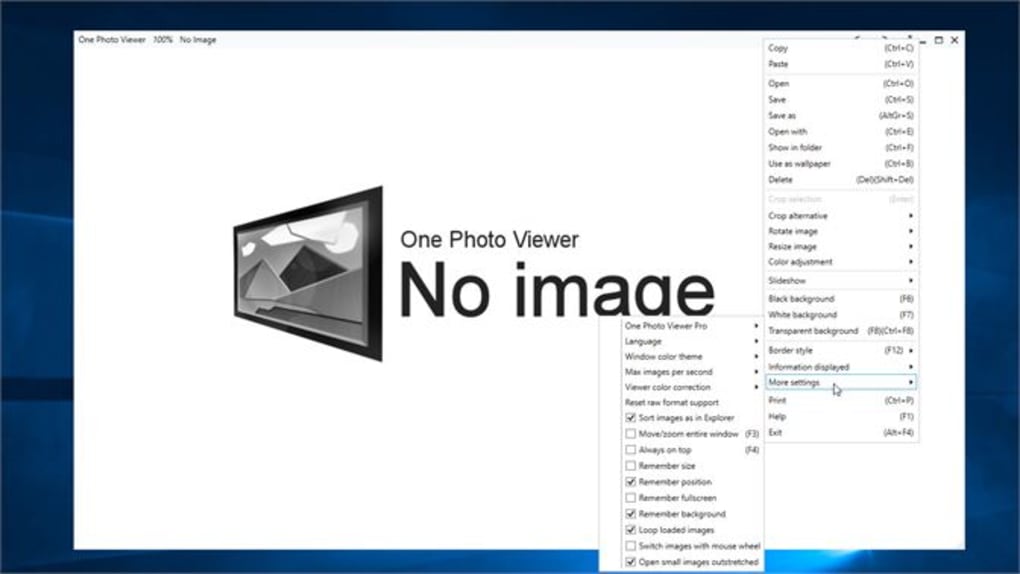
The customizable interface caters to individual preferences, allowing users to personalize their viewing environment. Options for window border styles (Solid, Minimal, Auto hide) and background colors (black, white, or transparent) allow for a tailored visual experience. The intuitive zoom and pan functionalities, compatible with both mouse and touch controls, provide effortless navigation through large or detailed images. This flexibility extends to slideshow capabilities, where users can initiate slideshows directly from folders or by dragging and dropping files. Furthermore, the software supports pasting images from sources like the printscreen function or other applications, streamlining the image importing process.
User-Friendliness and Intuitive Design
One Photo Viewer prioritizes ease of use, evident in its intuitive interface and straightforward functionality. The clean and uncluttered design minimizes distractions, allowing users to focus on their images. The simple navigation, with its responsiveness to both keyboard and mouse inputs, makes browsing large image collections a breeze. The customizable aspects of the software, from border styles to background colors, enable users to tailor the viewing experience to their specific preferences and enhance overall usability. The support for touchscreen devices further extends accessibility, making it a versatile option for various user setups.
The ability to initiate slideshows directly from folders or by dragging and dropping files simplifies the viewing process, eliminating the need for tedious manual selection. The inclusion of pasting images from printscreen or other applications further contributes to streamlined workflow. These features demonstrate a focus on user-friendliness, reducing the time and effort required to access and view images. The application’s straightforward design and intuitive controls significantly reduce the learning curve, making it accessible to users of all technical skill levels.
Performance and Compatibility
One Photo Viewer demonstrates efficient performance, handling large image files and collections smoothly without significant lag or delays. The application’s compatibility with various image formats, including RAW, HEIC, and WEBP (with additional information available on the developer’s website), ensures broad support for a wide range of digital image types. The seamless conversion capabilities to commonly used formats like JPEG, PNG, TIFF, and BMP further enhance its versatility. The creation of GIF animations adds another layer of functionality, enabling the generation of dynamic image sequences.
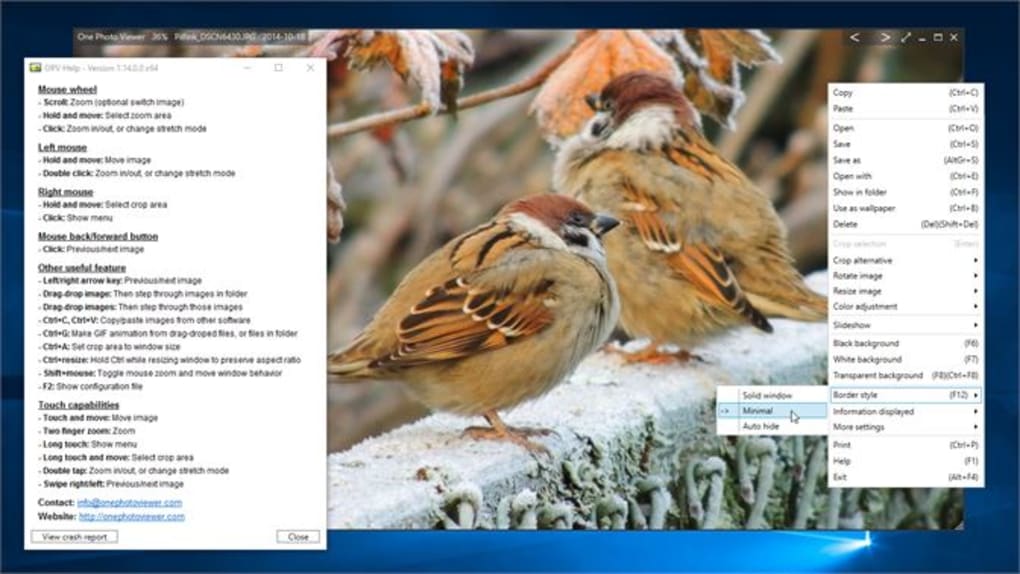
The software’s compatibility with touchscreen devices demonstrates its adaptability to modern computing environments. The responsive design ensures optimal functionality across different input methods, including keyboard, mouse, and touchscreen controls. The efficient handling of large files and diverse formats ensures that the application can cater to users with extensive digital image collections. The developers’ commitment to providing information and support regarding less common file formats on their website showcases an engagement with user needs and technical support.
Comparison with Alternative Photo Viewers
Compared to other photo viewers available in the market, One Photo Viewer distinguishes itself through its combination of features, customizability, and user-friendliness. While some basic viewers might offer simple image display, One Photo Viewer expands on this functionality by providing editing tools, format conversion capabilities, GIF animation creation, and extensive customization options. Alternatives might specialize in particular features, such as RAW image processing or advanced editing tools, but One Photo Viewer provides a balanced approach, offering a comprehensive suite of features within a user-friendly interface. The ease of use and intuitive design surpasses many competitive options which may prioritize feature complexity over accessibility. Its efficient performance and broad compatibility further enhance its appeal compared to similar applications.
The inclusion of features like the ability to initiate slideshows directly from folders or through drag-and-drop functionality, and the option to paste images from various sources are unique advantages not always found in competing software. This level of integration streamlines workflows, saving users time and effort. The customizability options for window borders, background color, and overall interface, further distinguish One Photo Viewer as a flexible and adaptive solution.
Conclusion: A Strong Contender in the Photo Viewer Market
One Photo Viewer presents a compelling alternative to other photo viewers, offering a potent blend of features, intuitive design, and efficient performance. Its extensive customization options allow users to personalize the viewing experience, catering to diverse needs and preferences. The broad compatibility with different image formats, including RAW, HEIC, and WEBP, combined with seamless conversion capabilities, ensures its versatility. The ability to create GIF animations adds an extra layer of functionality, setting it apart from basic viewers. The application’s user-friendly interface and efficient handling of large image collections make it an excellent choice for both casual users and individuals with extensive photo libraries. Its focus on both functionality and ease of use establishes One Photo Viewer as a strong contender in the photo viewer market. While specialized applications might offer advanced features in specific areas, One Photo Viewer provides a comprehensive and accessible solution for a wide range of photo viewing and management needs.
File Information
- License: “Free”
- Version: “1.16.1.0”
- Latest update: “February 9, 2024”
- Platform: “Windows”
- OS: “Windows 10”
- Language: “English”
- Downloads: “4.7K”


