
OneLaunch is a free browser software designed to streamline access to apps and tools without disrupting your workflow. Developed by OneLaunch Technologies Inc., this desktop search and dock application serves as a central hub for frequently used applications and files, enhancing productivity by providing quick access to essential resources. This review delves into its features, functionalities, and overall user experience.
OneLaunch: Functionality and Features
At its core, OneLaunch functions as both an app hub and a dock, placing numerous tools within easy reach. Its primary interface is a customizable toolbar, persistently situated at the top of the desktop screen. While its position is fixed, its sleek black design ensures it remains unobtrusive. The dock’s drop-down menu offers seamless program launching; simply click to reveal and access its contents.
OneLaunch’s search bar, however, focuses solely on web results, unlike some operating systems that search both online and local files. By defaulting to your preferred browser, it instantly opens search results within that browser, even launching a new tab if the browser window is already active. Powered by Chromium, its web searches are remarkably fast, allowing for a swift return to your current task. While the supported search engines are limited to Bing, Google, and Yahoo, it accommodates links from most modern browsers. Furthermore, it can automatically import bookmarks, browsing history, and cookies, simplifying the setup process.
%20(1).png)
Installation is straightforward. The initial setup process doesn’t immediately prompt for dock customization, allowing users to avoid the potential hassle of disabling unwanted add-ons. This customization can be initiated later by clicking the plus icon next to the search bar. The resulting pop-up menu offers a vast selection of widgets and tools to add to the dock.
The OneLaunch Toolbar: A Customizable Dashboard
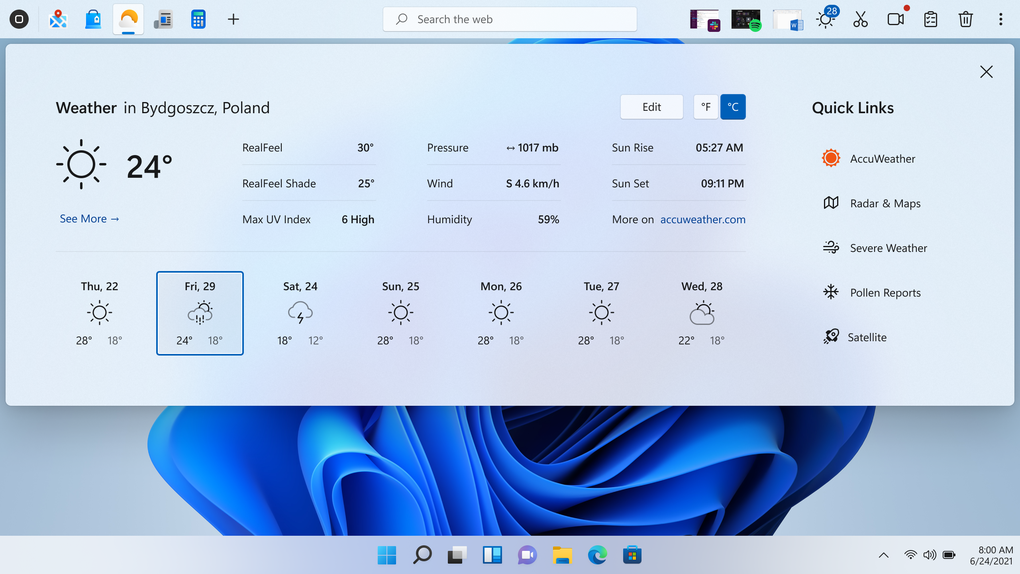
The OneLaunch toolbar, acting as a custom dashboard, comes pre-loaded with default widgets. These include a search bar, a browser launch icon, and a set of default tools on the far right. Clicking the OneLaunch icon on the far left opens a drop-down menu categorized into four sections:
- Popular Apps: A selection of frequently used applications that can be added to the dock for quick access.
- Bookmarks: A list of your saved website bookmarks for rapid navigation.
- Weather: A display of the current weather forecast.
- News: A feed of current news, filterable by category.
The app marketplace offers a wide array of tools beyond mere productivity applications. The default tools on the right side of the dock are readily accessible and can be toggled on or off. These seven tools include:
- Weather: Displays current weather information.
- Snipping Tool: A built-in screenshot utility offering both rectangular and freeform captures.
- Mic: Provides access to microphone functionality, with potential privacy implications.
- Camera: Allows access to the computer’s camera, again with associated privacy considerations.
- File Explorer: Displays recently accessed files.
- Clipboard History: Shows a history of copied items.
- Recycle Bin: Directly opens the system’s Recycle Bin.
The ability to customize the dock with a wide range of widgets, including utilities, social media platforms, email clients, streaming services, and classic games like Solitaire, allows users to tailor OneLaunch to their specific needs and preferences.
OneLaunch: Pros and Cons
OneLaunch offers several significant advantages:
-
Ease of Installation and Data Importing: Setting up OneLaunch is quick and straightforward, and it efficiently imports data from existing browsers, facilitating a smooth transition.
-
User-Friendly Interface: The intuitive design ensures a seamless and enjoyable user experience, even for those unfamiliar with similar applications.
-
High Degree of Customization: Users can extensively personalize the dock, choosing which widgets and tools are displayed.
-
Fast Web Searches: The Chromium-powered search functionality ensures rapid results, minimizing wait times.
However, certain aspects could be improved:
- Delayed Customization Prompt: The delayed prompt for customizing the dock, although potentially beneficial for some users, might be inconvenient for those who want immediate control over the interface.
OneLaunch: System Requirements and Availability
OneLaunch is currently available for Windows operating systems, with the latest version (5.8.0 as of this writing) offering support for Windows 8.1 and later versions. The application is free to download and use. Its small file size (2.75 MB) makes installation quick and resource-efficient. The developer, OneLaunch Technologies Inc., continues to update the software with new features and bug fixes, ensuring a positive user experience. The application’s primary language is English, though translations into other languages might be available through third-party sources or future updates from the developers.
OneLaunch: A Verdict
OneLaunch presents a compelling solution for users seeking quick access to their favorite apps and tools. Its user-friendly interface, customizable dashboard, and efficient search capabilities contribute to a positive user experience. While the delayed customization prompt is a minor drawback, it’s easily outweighed by the numerous benefits it offers. Overall, OneLaunch is a valuable tool for enhancing desktop productivity, offering a convenient and streamlined approach to accessing frequently used applications and online resources. Its simplicity and extensive customization options make it a worthy contender in the realm of desktop utility software. For users looking to improve their workflow and gain quick access to essential programs and online services, OneLaunch deserves serious consideration.
File Information
- License: “Free”
- Latest update: “July 10, 2023”
- Platform: “Windows”
- OS: “Windows 8.1”
- Language: “English”
- Downloads: “4.6K”
- Size: “2.75 MB”


