
OneNote, the versatile note-taking application from Microsoft, stands as a formidable competitor in the digital note-taking arena. While Evernote often holds the title of king in this realm, OneNote offers a compelling alternative, seamlessly integrating with the Microsoft ecosystem while boasting a robust feature set that caters to diverse user needs. This in-depth review explores OneNote’s strengths and weaknesses, providing a comprehensive understanding of its capabilities and suitability for various users.
OneNote’s Core Functionality: A Digital Notebook Reimagined
At its heart, OneNote functions as a digital notebook, offering a flexible and intuitive platform for capturing and organizing information. Unlike traditional notebooks, OneNote transcends physical limitations, allowing users to effortlessly create, store, and access notes across multiple devices. This seamless synchronization, powered by OneDrive cloud storage, ensures consistent access to notes regardless of location or device. While this reliance on OneDrive means your notes share storage space with other Microsoft Office products and personal files, the advantage lies in the convenience of centralized storage and effortless synchronization. Furthermore, OneNote offers a generous allowance for notebook creation, surpassing limitations found in other applications like Evernote, which typically restricts the number of notebooks a user can create. This freedom allows users to organize their notes into distinct projects, subjects, or any other logical grouping, facilitating a more organized and structured workflow.
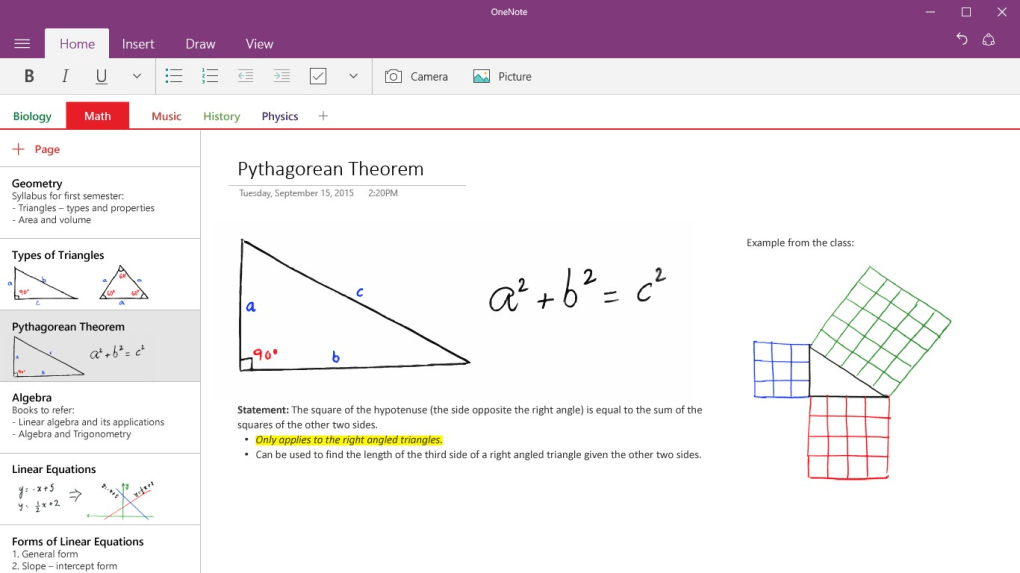
The organizational capabilities extend beyond simple notebook creation. OneNote enables users to further subdivide their notebooks into color-coded sections and pages, enhancing visual organization and facilitating rapid identification of specific notes. This layered approach allows for a high degree of granularity in note organization, catering to users with complex note-taking requirements.
Beyond Text: Multimedia Integration and Enhanced Note-Taking
OneNote’s functionality extends far beyond simple text entry. Its rich multimedia support allows users to seamlessly integrate various content types into their notes, transforming it into a dynamic and multifaceted information hub. The built-in video recorder permits the capture of audio and video annotations, ideal for lectures, meetings, or spontaneous idea capture. This feature adds a powerful dimension to note-taking, allowing for the preservation of not just textual information but also audio and visual context, providing a richer, more comprehensive record of information.
OneNote’s integration with online sources facilitates the easy incorporation of external information into notes. Users can readily insert web links, images, and other online content directly into their notes, consolidating related information into a single, easily accessible location. This feature is particularly beneficial for research or project-based note-taking, streamlining the process of information gathering and organization.
Intuitive Design and User Experience
OneNote distinguishes itself through its intuitive interface and ease of use. The application adopts a familiar design reminiscent of Microsoft Word, eliminating the need for a steep learning curve. This user-friendly design, combined with its straightforward functionality, makes OneNote accessible to users of all technical skill levels. The clean workspace ensures a distraction-free environment, optimizing focus and allowing users to concentrate on capturing and organizing information without being overwhelmed by complex interfaces or unnecessary features. Essential tools are readily available with just a click or two, maintaining the flow of thought and ensuring a streamlined note-taking experience.
Advanced Features: Enhancing Productivity and Collaboration
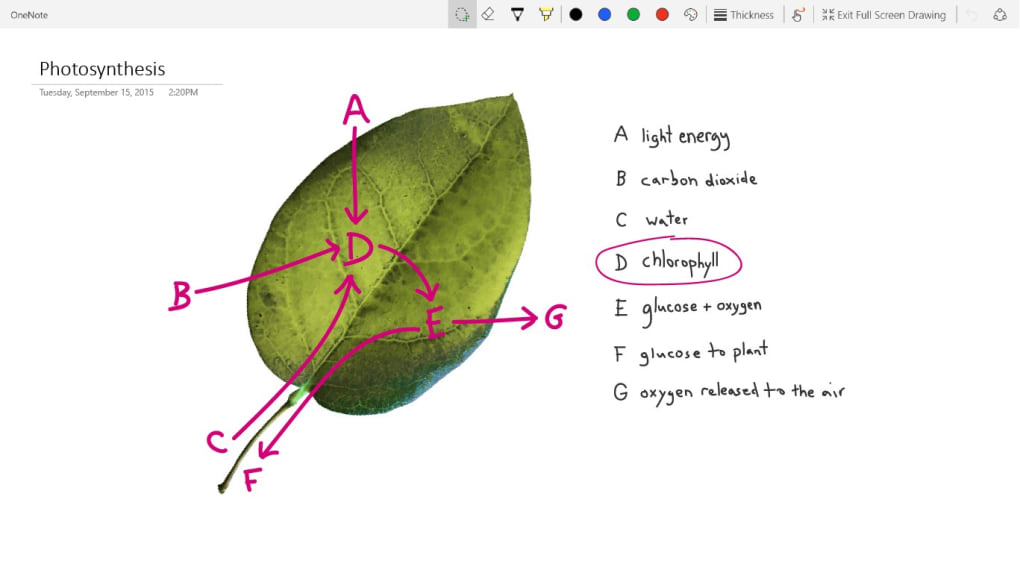
OneNote goes beyond basic note-taking, incorporating several advanced features designed to enhance productivity and collaboration. Its robust drawing tools provide a canvas for sketching diagrams, brainstorming ideas, or annotating documents, adding a visual dimension to the note-taking process. Text formatting tools, comparable to those found in word processors, allow for the enhancement of textual notes, ensuring readability and clarity. Furthermore, OneNote’s ability to convert freehand notes into typed text streamlines the workflow, transforming hastily scribbled notes into neatly organized digital text.
The sharing capabilities of OneNote facilitate collaboration and information exchange. While note sharing is limited to the notebook level, this still provides a valuable tool for teamwork and collaborative projects. Users can share entire notebooks with others, allowing for joint note-taking, brainstorming, or collaborative project management. This feature is especially useful in team settings or educational contexts, where shared access to notes can significantly improve communication and coordination.
Addressing OneNote’s Limitations
Despite its numerous strengths, OneNote is not without its limitations. One notable drawback is its reliance on OneDrive for certain management features. This dependency necessitates an active internet connection for seamless access to certain functions and synchronization of notes across devices. While cloud storage offers considerable benefits, it also introduces a potential point of failure and dependence on internet connectivity.
Another limitation lies in the somewhat restricted drag-and-drop functionality. While OneNote allows for the incorporation of multimedia content, the drag-and-drop functionality isn’t as seamless or intuitive as in some competing applications. This can occasionally disrupt workflow and slow down the note-taking process.
Furthermore, the sharing limitations, restricted to the notebook level, can sometimes hinder collaborative efforts requiring more granular control over access permissions. While sharing entire notebooks remains a valuable feature, the lack of fine-grained control over individual note sharing can prove limiting in certain situations.
Finally, the absence of private encryption raises concerns about data security, particularly for users with highly sensitive information. While Microsoft implements security measures to protect user data, the lack of end-to-end encryption could be a significant drawback for those requiring higher levels of data protection.

OneNote: A Verdict
OneNote offers a powerful and versatile note-taking experience, seamlessly integrating with the Microsoft ecosystem while providing a rich feature set. Its intuitive interface, extensive multimedia support, and strong organizational capabilities make it an excellent choice for various users, from students and professionals to casual note-takers. The ability to capture, organize, and share notes across multiple devices adds a significant layer of convenience and flexibility.
However, potential users should consider the reliance on OneDrive, the limitations in drag-and-drop functionality, and the absence of private encryption. These limitations may not be significant for all users, but they should be factored into the decision-making process. Overall, OneNote remains a compelling note-taking application, offering a robust and user-friendly experience for a wide range of users. Its strengths in organization, multimedia integration, and collaborative features often outweigh its limitations, making it a valuable tool for managing information and enhancing productivity.
File Information
- License: “Free”
- Version: “varies-with-device”
- Latest update: “March 6, 2020”
- Platform: “Windows”
- OS: “Windows 10”
- Language: “English”
- Downloads: “58.4K”


