
OnyX is a free, powerful utility designed to maintain and optimize your Mac’s performance. While this specific version is tailored for OS X Mountain Lion (10.8), the application boasts a history of support for various older OS X versions, including 10.2, 10.3, 10.4, 10.5, and 10.7. Each OS X version requires a corresponding OnyX build, ensuring compatibility and optimal functionality. This detailed review explores the app’s features, strengths, weaknesses, and user experiences.
OnyX: A Deep Dive into Mac Maintenance
OnyX provides a straightforward yet remarkably effective approach to Mac maintenance. Its core functions revolve around cleaning system files, optimizing performance, and proactively preventing potential issues. Upon first launch, OnyX initiates a SMART (Self-Monitoring, Analysis and Reporting Technology) status check of your hard drive. This proactive measure helps identify potential disk failures early, preventing data loss and system crashes. It also analyzes your volume’s structure, ensuring its integrity.
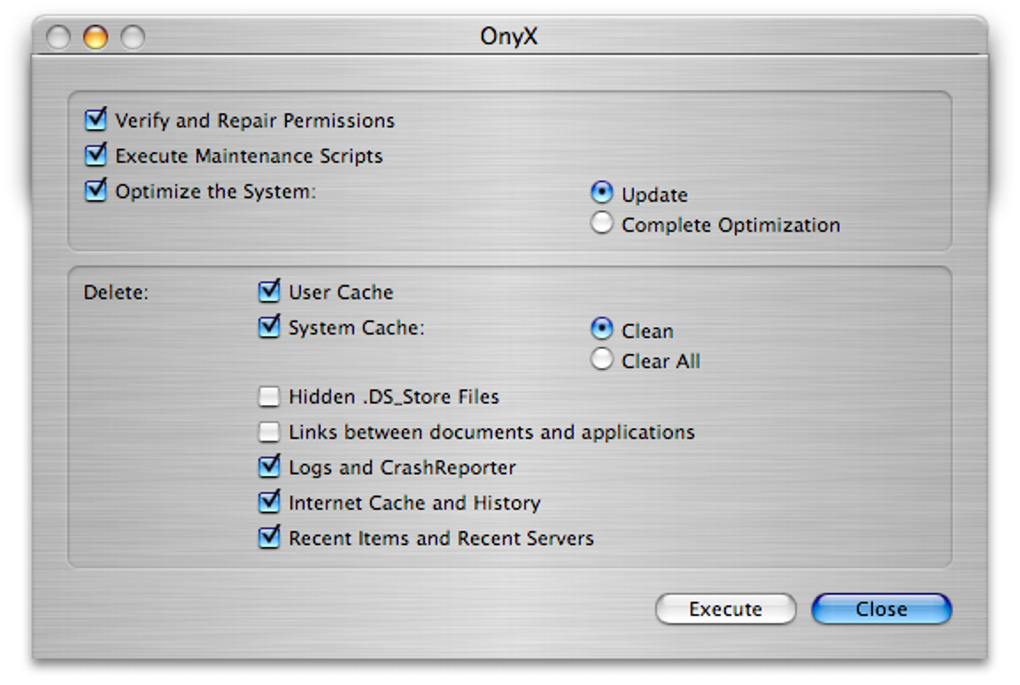
The application excels at meticulously cleaning your Mac, targeting system files, user data, and fonts. This deep cleaning process removes unnecessary temporary files and caches, freeing up valuable disk space and enhancing overall system responsiveness. It’s crucial to ensure all other applications are closed before running OnyX to guarantee a complete and thorough cleaning process. The detailed explanations accompanying each action, coupled with a comprehensive help guide, make OnyX accessible even to novice users.
OnyX goes beyond simple cleaning. It allows for fine-grained control over various system parameters, affecting components like the Dock, Exposé (a feature for managing windows and applications), iTunes, and Spotlight (Mac’s search functionality). This level of customization empowers users to tailor their Mac experience to their specific preferences and workflow.
The automation section within OnyX is a particularly useful feature. This section enables automated maintenance, rebuilding, and cleaning of your hard drive. While these processes may take time to complete, the resulting performance improvements are often substantial, leading to a noticeably smoother and more efficient Mac experience.
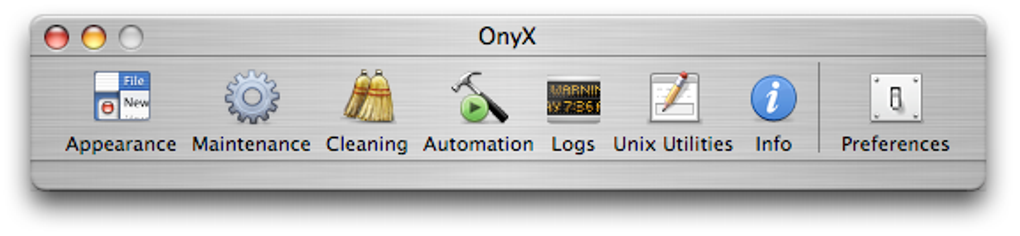
App Features and Functionality
OnyX is more than just a system cleaner; it’s a multifaceted tool with a range of capabilities:
-
Disk Health Monitoring: The integrated SMART status check proactively identifies potential hard drive issues before they escalate into major problems. This early warning system is crucial for preventing data loss and ensuring system stability.
-
Deep Cleaning: OnyX’s cleaning capabilities extend beyond superficial tasks. It meticulously removes temporary files, caches, and other unnecessary data accumulated over time, freeing up significant disk space and enhancing system performance. This thorough cleaning process targets system, user, and font files.
-
Parameter Customization: Users can adjust a variety of system parameters, affecting how the Dock, Exposé, iTunes, and Spotlight function. This granular control empowers users to personalize their Mac experience.
-
Automated Maintenance: The automation features allow for scheduled maintenance tasks, including drive cleaning, rebuilding, and optimization. While these automated processes can be time-consuming, they contribute significantly to maintaining a healthy and efficient system.
-
Comprehensive Help Guide: OnyX includes a detailed help guide to assist users in understanding the application’s functionalities and troubleshooting any issues. This makes the application user-friendly even for users unfamiliar with system maintenance tools.
-
SMART Status Verification: Regularly checking the SMART status of your hard drive is crucial for preventing potential data loss. OnyX incorporates this feature to give users peace of mind regarding their data integrity.
User Experience and Reviews
While OnyX’s functionality is largely praised, the user interface has received some criticism. Many users describe it as “basic,” lacking the visual appeal and intuitive design of some modern applications. However, this simplicity can also be seen as a benefit for users who prioritize functionality over aesthetics.
User reviews on the app are mixed. Some users report overwhelmingly positive experiences, praising OnyX for its effectiveness in cleaning and optimizing their Macs. Others have reported issues, primarily related to the time some operations can take, and the lack of clear progress indicators during longer processes. Several users mentioned instances where the application appeared to “hang” during permission repair tasks, necessitating a forced reboot. These negative experiences frequently highlighted the absence of a detailed progress bar or status dialog during lengthy processes, leading to user frustration.
It’s important to note that many of the negative reviews highlight user error. Using the incorrect OnyX version for their OS X installation is a common cause of reported issues. Downloading the appropriate version is crucial to avoid compatibility problems and ensure optimal performance. In instances where permission repair operations took an extended period, the possibility of a significant number of damaged permissions was suggested as a factor influencing the duration.
OnyX for Business: Maintaining a Fleet of Macs
OnyX can prove beneficial in business environments with multiple Macs. Its ability to automate maintenance tasks and thoroughly clean systems can streamline IT administration. By ensuring consistent maintenance across all machines, businesses can improve overall system performance, minimize downtime, and proactively prevent potential problems. The cost-effectiveness of a free tool like OnyX is also a significant advantage for businesses managing a large number of devices.
Conclusion: A Powerful Tool with Minor Drawbacks
OnyX, despite its basic interface, remains a valuable tool for maintaining the health and performance of your Mac. Its comprehensive cleaning capabilities, proactive disk health monitoring, and automated maintenance features are significant strengths. The application’s free availability further enhances its appeal. While some users may find the interface unpolished or find certain processes time-consuming, the overall benefits of using OnyX often outweigh its minor drawbacks. Remembering to download the correct version for your OS X installation is crucial for avoiding potential compatibility issues and maximizing the positive impact of using this powerful utility. For users of OS X Mountain Lion, this version of OnyX provides a dependable solution for maintaining a clean and efficient system.
File Information
- License: “Free”
- Latest update: “May 7, 2025”
- Platform: “Mac”
- OS: “Mac OS X”
- Language: “English”
- Downloads: “177K”
- Size: “7.07 MB”


