
In the dynamic world of digital communication, applications rise and fall with remarkable speed. While platforms like Zoom, Microsoft Teams, and WhatsApp dominate today’s landscape, there was a time when other contenders vied for supremacy. Among them was ooVoo, a name that might evoke a sense of nostalgia for those who navigated the early 2010s digital sphere. Originally known for its robust group video calling capabilities, ooVoo carved out a niche for itself, offering a free avenue for users to connect through video, text, and voice. This article delves into ooVoo’s features, its user experience on Windows, its place within the ever-evolving market, and ultimately, its legacy in an era now dominated by more sophisticated and integrated communication suites.
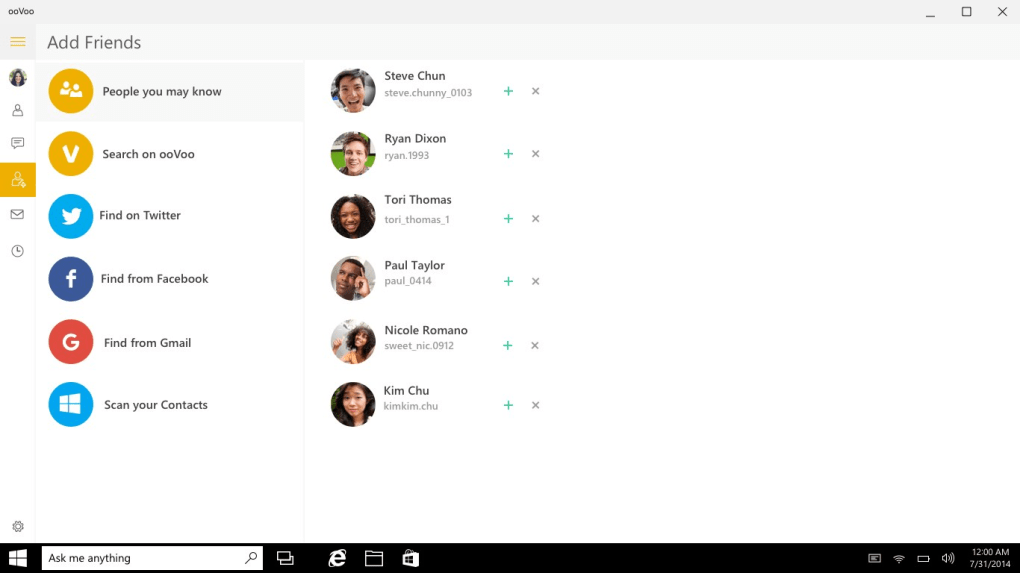
At its core, ooVoo Video Call, Text and Voice was designed to be a comprehensive communication solution. It promised seamless connections, whether you were chatting with a single friend or orchestrating a large group video conference. For Windows users, particularly those who might have transitioned from earlier versions to Windows 10, the application represented a particular blend of functionality and convenience. PhanMemFree (formerly Softonic) archives indicate its last update as February 12, 2019, with a modest size of 15.01 MB, suggesting a relatively lightweight footprint. However, the communication landscape shifted dramatically around and after this period, leading to questions about ooVoo’s continued relevance and how it stacked up against the giants that emerged.
This deep dive aims to provide a thorough overview of ooVoo, moving beyond mere feature lists. We will explore the specifics of its free offerings—group video calls and text messaging—while also scrutinizing its less appealing aspects, such as the high cost of traditional phone calls and a user interface often described as bland or confusing. By examining these elements, we can better understand ooVoo’s strengths and weaknesses, and appreciate the challenges it faced in a market where user expectations for intuitive design, cost-effectiveness, and seamless integration grew exponentially. For those looking back or curious about the platforms that paved the way for modern communication, ooVoo’s story offers valuable insights into the competitive nature of software development and user adoption.
Understanding ooVoo’s Core Functionality on Windows
ooVoo’s primary appeal lay in its ability to facilitate multifaceted communication without breaking the bank, at least for its core features. When it launched, and throughout its more prominent years, the concept of free, high-quality video conferencing was still a significant draw. The application bundled several communication methods into one package, attempting to cater to diverse user needs on the Windows platform.
Group Video Calls: A Pioneer in Its Time
One of ooVoo’s most celebrated features was its capacity for group video calls, allowing up to twelve participants to join simultaneously. In an era predating the widespread dominance of Zoom or even the more polished versions of Skype’s group calls, this was a considerable technological feat for a free consumer application. This capability positioned ooVoo not just as a casual chat tool but also as a viable option for small-scale video conferencing, whether for remote teams, study groups, or simply large families and circles of friends wanting to connect visually.
The significance of the 12-participant limit cannot be overstated for its time. Many competing platforms offered more limited group sizes or charged a premium for larger conferences. ooVoo democratized access to multi-person video communication, making it accessible to a broader audience. This fostered a sense of community and allowed users to share experiences in a way that text or single-person video calls could not. Users could host virtual gatherings, conduct informal meetings, or simply maintain visual contact with distant loved ones. The ease of setting up these calls, combined with the “free” aspect, contributed significantly to its initial popularity.

While specific details on video quality and stability might vary based on individual user experiences and internet connections, ooVoo generally aimed for a decent standard. The platform relied on the user’s webcam and microphone, providing an immersive experience that was crucial for effective group interaction. The ability to see and hear multiple people simultaneously, reacting in real-time, created a more engaging and personal communication dynamic, which was particularly appealing in a world increasingly moving towards digital connectivity. For a period, ooVoo was genuinely considered a strong contender for those needing robust group video chat without a subscription fee, especially on a Windows PC.
Text and Voice Messaging: Beyond Video
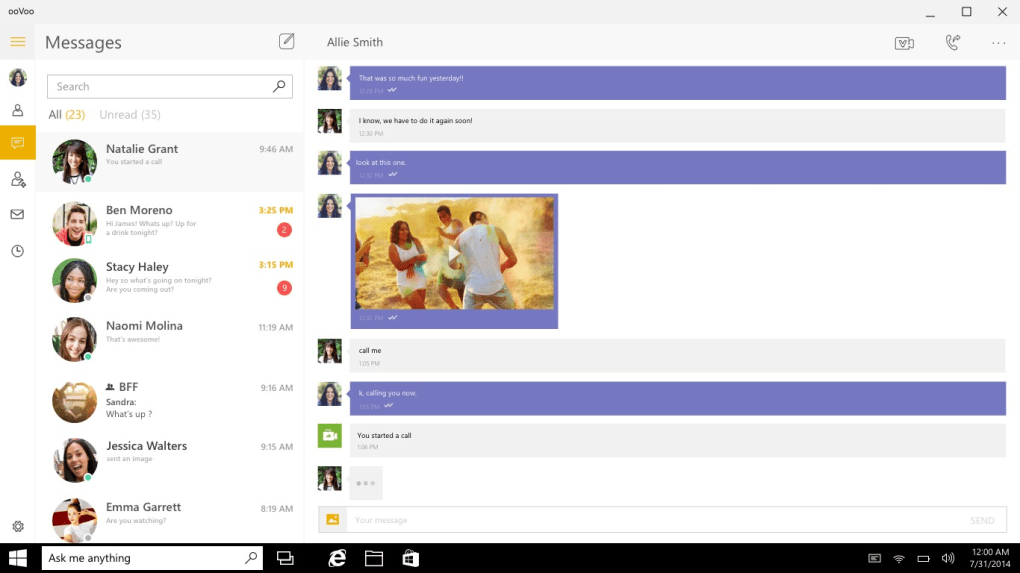
Beyond its standout group video capabilities, ooVoo also offered free text messaging, serving as a comprehensive communication hub. This feature allowed users to send instant messages to individuals or groups, providing a convenient way to communicate asynchronously or to supplement live video and voice calls. The integration of text chat within the same application meant users didn’t have to switch between different programs for different communication needs, contributing to a streamlined user experience. This was especially useful for sharing quick updates, links, or coordinating schedules before or after a video call. The ability to send pictures and video clips further enhanced this functionality, turning ooVoo into a mini social sharing platform, much like early versions of popular messaging apps. Users could easily share moments from their day, visual anecdotes, or important documents, making conversations richer and more interactive.
However, ooVoo’s approach to voice calls revealed a significant drawback that would eventually contribute to its waning appeal. While video calls and text messages within the ooVoo network were free, making traditional phone calls (to landlines or mobile numbers outside the ooVoo ecosystem) was not only a paid service but often came with a rather high cost compared to other options available at the time. This pricing model created a peculiar dichotomy: users could enjoy free video calls with multiple participants, but a simple voice call to a non-ooVoo number could incur substantial charges. This aspect often caught users by surprise and led to dissatisfaction, especially as competitors began offering more competitive rates or even free voice calls to traditional networks as part of broader plans.
The high cost of outgoing phone calls contrasted sharply with the “free” allure of its other features and proved to be a major hurdle for widespread adoption. In an increasingly competitive market where free or very low-cost international calls became standard through VoIP services, ooVoo’s expensive traditional calling service became a significant deterrent. This discrepancy meant that while ooVoo excelled in fostering on-platform connections, its utility as a holistic telecommunications tool was hampered, pushing users to other applications for external calls and thus fragmenting their communication habits across multiple platforms. This economic drawback highlighted a key lesson for communication app developers: user convenience and cost-effectiveness across all desired features are paramount.
Navigating the User Experience: Interface and Performance
The success of any software application, especially in the consumer market, hinges significantly on its user experience (UX) – how easy and pleasant it is to use. ooVoo, despite its groundbreaking features, faced considerable challenges in this domain, which ultimately affected its adoption and retention rates, particularly as users migrated to newer operating systems like Windows 10.
Interface Design: A Double-Edged Sword
The interface of ooVoo Video Call, Text and Voice was frequently described by users and reviewers as “rather bland” and, at times, “confusing.” While design preferences are subjective, a common thread in feedback suggested that ooVoo’s visual presentation lacked the polish and intuitive navigation that users came to expect from modern communication applications. In an era where apps like Skype were refining their aesthetics and giants like Facebook Messenger were becoming ubiquitous with their clean, accessible designs, ooVoo’s interface struggled to keep pace.
The “bland” criticism likely stemmed from a lack of visual flair, perhaps favoring functionality over aesthetics. This could translate into a somewhat generic layout, understated color schemes, and less engaging iconography. While a minimalist design can be effective, in ooVoo’s case, it might have contributed to a perception of being outdated or less appealing than its more visually dynamic competitors. The “confusing” aspect, however, is a more critical flaw. It suggests that users might have struggled to find specific features, navigate through menus, or understand the workflow of the application. This could have been due to inconsistent UI patterns, an overly complex menu structure, or a lack of clear visual cues for important functions. For a communication tool, where instantaneous and effortless interaction is key, a confusing interface can quickly lead to frustration and abandonment.
Consider the user journey: installing the app, signing up, adding contacts, initiating calls or messages. If any of these steps felt cumbersome or unintuitive, it created friction. For Windows 10 users, who were accustomed to a sleek, modern operating system, ooVoo’s interface might have felt out of place or simply not up to par with the contemporary design principles embraced by other popular applications. This mismatch in user experience between the OS and the application could have further accentuated its perceived shortcomings, making users more inclined to seek alternatives that offered a more seamless and aesthetically pleasing interaction. Ultimately, while ooVoo delivered robust features, its interface design proved to be a significant barrier to its long-term success and widespread acceptance.
Installation and System Requirements on Windows 10
For users considering ooVoo on their Windows 10 machines, understanding the installation process and system requirements is crucial. According to information available on PhanMemFree, ooVoo Video Call, Text and Voice has a modest download size of 15.01 MB, indicating that it is a relatively lightweight application. This is a positive attribute, as it means the software wouldn’t consume excessive disk space or require a high-bandwidth connection for download, making it accessible even for users with limited resources. The last recorded update date of February 12, 2019, suggests that while the application was maintained for a period, its development might have slowed or ceased around that time, raising questions about its compatibility and performance with the most recent Windows 10 updates.
Despite the source mentioning “Windows 8” as the OS, for an article titled “oovoo-windows-10,” it implies at least forward compatibility or a period where it was used on Windows 10. Generally, applications designed for Windows 8 often run on Windows 10 without significant issues due to Microsoft’s backward compatibility efforts. The installation process for ooVoo would likely involve downloading the executable file from a reliable source like PhanMemFree.org, running the installer, and following a series of on-screen prompts. Users would typically be guided through choosing an installation directory, agreeing to terms and conditions, and optionally configuring startup preferences. Once installed, users would need to create an ooVoo account or log in with existing credentials to begin using the service.
From a performance perspective, a 15 MB application is unlikely to be a significant drain on system resources for a modern Windows 10 PC. However, the actual performance during video calls could depend on several factors: the user’s internet connection speed, the quality of their webcam and microphone, and the number of participants in a group call. While the base application itself might be lightweight, the real-time demands of streaming and receiving video and audio for up to twelve participants could still challenge older or lower-spec machines. Users might experience issues like lag, dropped frames, or audio distortion if their hardware or network infrastructure isn’t robust enough. Furthermore, an application that hasn’t received updates in several years might not be optimized for the latest Windows 10 builds, potentially leading to minor compatibility glitches or security vulnerabilities that newer, actively developed communication apps would address. This aspect is particularly important in today’s environment, where operating systems are constantly evolving and security threats are ever-present.
The Competitive Landscape and ooVoo’s Position
The digital communication arena is notoriously competitive, characterized by rapid innovation and constant shifts in user preference. ooVoo, despite its early innovations, eventually found itself struggling to maintain relevance against a wave of powerful and well-funded competitors.
A Market Saturated with Alternatives
By the mid-to-late 2010s, the market for communication applications had become incredibly saturated. ooVoo’s core offerings – video calls, text messaging, and voice calls – were no longer unique selling propositions. Instead, they became standard features offered by a multitude of platforms, many of which had superior resources, larger user bases, and more aggressive development cycles.
Skype, a veteran in the VoIP space, offered similar features, often with better call quality and a more polished interface, especially after its acquisition by Microsoft. It benefited from being integrated or easily accessible within the Microsoft ecosystem, which was a significant advantage for Windows users.
WhatsApp emerged as a dominant force in mobile messaging, later extending its reach to desktop with a web and dedicated desktop client. Its end-to-end encryption, massive user base, and free calling (voice and video) to other WhatsApp users made it an indispensable tool for many, virtually eliminating the need for paid traditional phone calls that plagued ooVoo.
Telegram, another secure messaging app, appealed to users prioritizing privacy and offering a vast array of features, including large group chats and channels.
For professional and larger-scale group video conferencing, Zoom Meetings rose to unprecedented prominence, especially during the global shift to remote work and learning. Zoom excelled in stability, scalability for large meetings, and a plethora of business-focused features, setting a new benchmark for video conferencing that ooVoo simply couldn’t match.
Microsoft Teams leveraged its enterprise roots, offering a comprehensive suite for collaboration that included chat, video calls, file sharing, and project management, becoming a cornerstone for many businesses and educational institutions.
Even less ubiquitous alternatives like Tango and EyeBall Chat (also listed on PhanMemFree) presented choices, though they too would face similar competitive pressures. The sheer volume of alternatives meant that users had ample choice, and their decisions were often influenced by factors where ooVoo showed weaknesses: cost of traditional calls, user interface, and overall ecosystem integration. The high cost of making calls outside the ooVoo network, coupled with a user interface that many found confusing or bland, pushed users towards platforms that offered better value, more intuitive designs, and a more integrated communication experience. This fierce competition, where others offered similar or superior services often for free or at a lower cost, made it exceedingly difficult for ooVoo to retain its user base or attract new users. The market rewarded comprehensive, user-friendly, and cost-effective solutions, and ooVoo, unfortunately, fell short on several of these critical fronts.
ooVoo’s Decline and Legacy
The rapid evolution of the communication app market, combined with its internal challenges, ultimately led to ooVoo’s decline in prominence. While it once enjoyed a period of significant popularity, particularly among younger demographics and those seeking free group video chat, it struggled to adapt and compete against the technological might and aggressive strategies of its rivals. The last recorded update in February 2019 is a strong indicator of this trajectory; applications that cease receiving regular updates in such a fast-paced sector quickly become obsolete, both in terms of features and security.
ooVoo’s journey is a classic example of a “first-mover” advantage that couldn’t be sustained. It innovated by offering robust group video calls when others were still catching up, but it failed to evolve its business model or user experience sufficiently. The decision to charge high rates for traditional phone calls proved to be a critical misstep, alienating a segment of users who expected a fully free or at least competitively priced communication tool. Furthermore, the persistent feedback regarding its bland and confusing interface suggested that user experience design was not prioritized enough to compete with platforms that invested heavily in intuitive and aesthetically pleasing UIs.
Despite its ultimate fading from the mainstream, ooVoo leaves behind a notable legacy. It undeniably contributed to the popularization of group video conferencing, demonstrating the feasibility and demand for such a service at a time when internet bandwidth and device capabilities were still maturing. It helped shape user expectations for what a communication app could offer, paving the way for the innovations seen in today’s leading platforms. For a period, it was a go-to for many, facilitating countless conversations, meetings, and shared moments across distances.
The story of ooVoo also serves as a crucial case study in the tech industry: innovation alone is not enough. Sustained success requires continuous adaptation, a keen understanding of user needs, a competitive pricing strategy, and an unwavering commitment to user experience and design. Platforms that fail to meet these evolving demands, irrespective of their initial brilliance, risk being overshadowed by newer, more agile competitors. As we look at the current dominance of apps like Zoom and Teams, we can see the refined versions of features that ooVoo helped pioneer, illustrating its indirect but definite impact on how we communicate digitally today.
Conclusion
ooVoo Video Call, Text and Voice for Windows emerged as a significant player in the digital communication landscape, particularly noted for its pioneering efforts in offering free group video calls to a broad audience. Its ability to connect up to twelve participants simultaneously was a standout feature that democratized video conferencing long before many of today’s dominant platforms existed. Coupled with free text messaging and the capacity to share photos and video clips, ooVoo provided a comprehensive, albeit somewhat imperfect, communication suite for Windows users.
However, ooVoo’s journey was ultimately hampered by critical weaknesses that became increasingly apparent as the market matured. The most significant drawback was the high cost associated with making traditional phone calls, which stood in stark contrast to its free video and text offerings. This pricing model created an inconsistent user experience and pushed users towards competitors that offered more cost-effective solutions for all types of voice communication. Furthermore, the application’s interface, often described as bland and confusing, failed to keep pace with evolving design standards and user expectations for intuitive navigation and aesthetic appeal.
In an increasingly saturated market, ooVoo found itself outmaneuvered by giants like Skype, WhatsApp, Zoom, and Microsoft Teams, which offered similar or superior functionalities, more refined user experiences, and often more attractive pricing structures. These competitors leveraged greater resources, aggressive development cycles, and a stronger focus on user-centric design to capture and retain market share. The last update to ooVoo in early 2019 marks a point where its active development likely ceased, leading to its gradual fade from the mainstream consciousness.
Despite its eventual decline, ooVoo holds a notable place in the history of digital communication. It was an innovator, proving the viability and demand for accessible group video chat. Its legacy underscores the brutal realities of the tech industry: that even groundbreaking features must be complemented by a solid business model, continuous innovation, and an unwavering commitment to user experience to ensure long-term success. For users looking for a modern communication tool on Windows 10 today, numerous alternatives now offer a far more integrated, cost-effective, and user-friendly experience. Nonetheless, ooVoo’s story remains a fascinating chapter in the evolution of how we connect in the digital age.
File Information
- License: “Free”
- Version: “varies-by-device”
- Latest update: “February 12, 2019”
- Platform: “Windows”
- OS: “Windows 8”
- Language: “English”
- Downloads: “35.9K”
- Size: “15.01 MB”


