
In an increasingly interconnected world, managing personal and professional contacts has evolved from a simple address book task into a complex digital challenge. Between mobile devices, email clients, social media platforms, and various external databases, the sheer volume of contact information can be overwhelming. Enter Open Contacts, a dedicated contact management software designed for Windows that bravely attempts to consolidate and organize this scattered data. Positioned as a flexible address book with integrated CRM (Customer Relationship Management) features, Open Contacts offers a unified and intuitive interface for managing the details of individuals and organizations. While its initial appearance might not win any design awards, its underlying functionality and deep customization options present a powerful tool for those willing to look beyond the surface. This article delves into the nuances of Open Contacts, exploring its features, strengths, areas for improvement, and ideal user base, as reviewed and hosted on PhanMemFree.
Navigating the Interface: First Impressions and Functionality
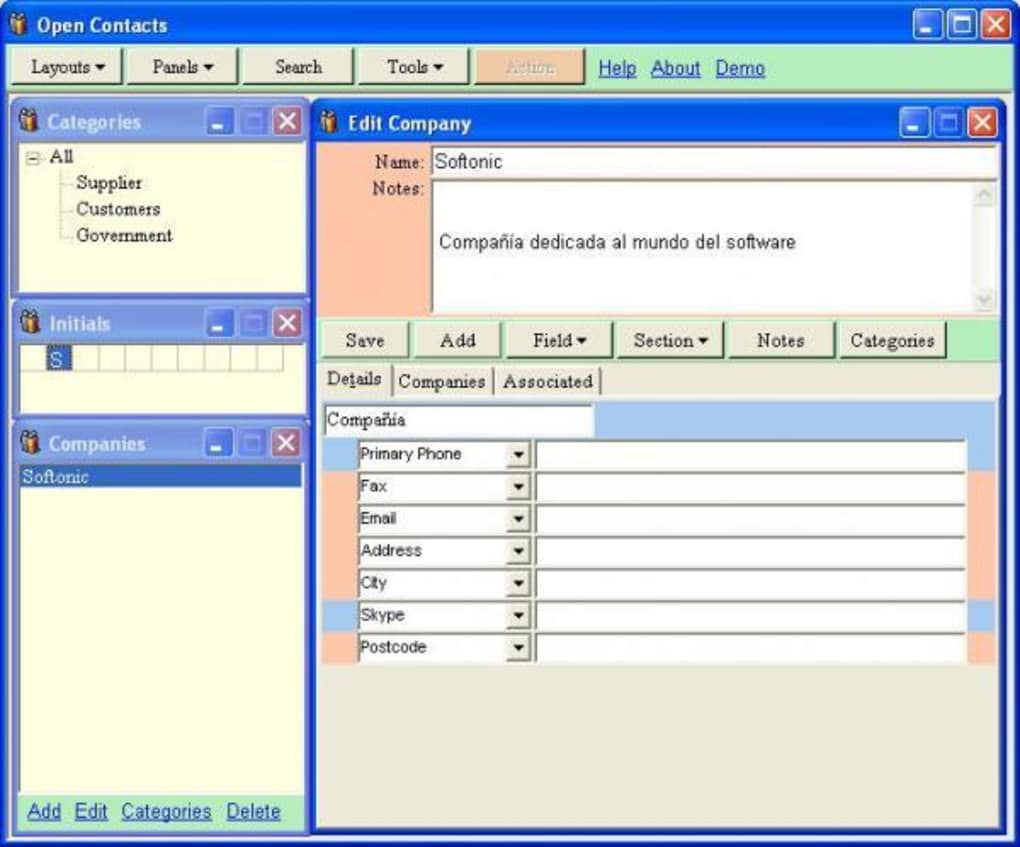
Upon first launching Open Contacts, users might find themselves transported back to an earlier era of software design. The program’s interface, described as being more akin to an Excel spreadsheet punctuated by “tasteless looking pink fields,” certainly doesn’t adhere to modern aesthetic sensibilities. However, for a tool focused purely on data organization and functionality, its unpretentious exterior belies a robust and highly customizable core.
The Visuals: Function Over Form?
The initial impression of Open Contacts is that it prioritizes utility above all else. In an age where sleek, minimalist, and visually appealing interfaces dominate software design, Open Contacts stands out with its rather utilitarian look. The description comparing it to an Excel spreadsheet is apt, suggesting a grid-based, data-heavy presentation that might intimidate or deter users accustomed to more graphically rich applications. The “pink fields” further emphasize a design choice that might be perceived as dated or even jarring by contemporary standards.
However, this visual simplicity can also be interpreted as a deliberate choice to reduce visual clutter and focus solely on information entry and retrieval. For users who value raw functionality and comprehensive data management over aesthetic polish, this design might not be a hindrance at all. In fact, some might appreciate a straightforward layout that doesn’t overwhelm with animations or complex graphical elements. It’s a classic case of function triumphing over form, where the program’s primary goal is to efficiently store and present contact information, not to be a visual spectacle. The initial hurdle for many will be to move past these first impressions and explore the depth of what Open Contacts has to offer beneath its unassuming veneer. Once users begin to interact with its capabilities, the visual shortcomings often recede into the background, replaced by an appreciation for its organizational prowess.
Core Structure: People and Companies
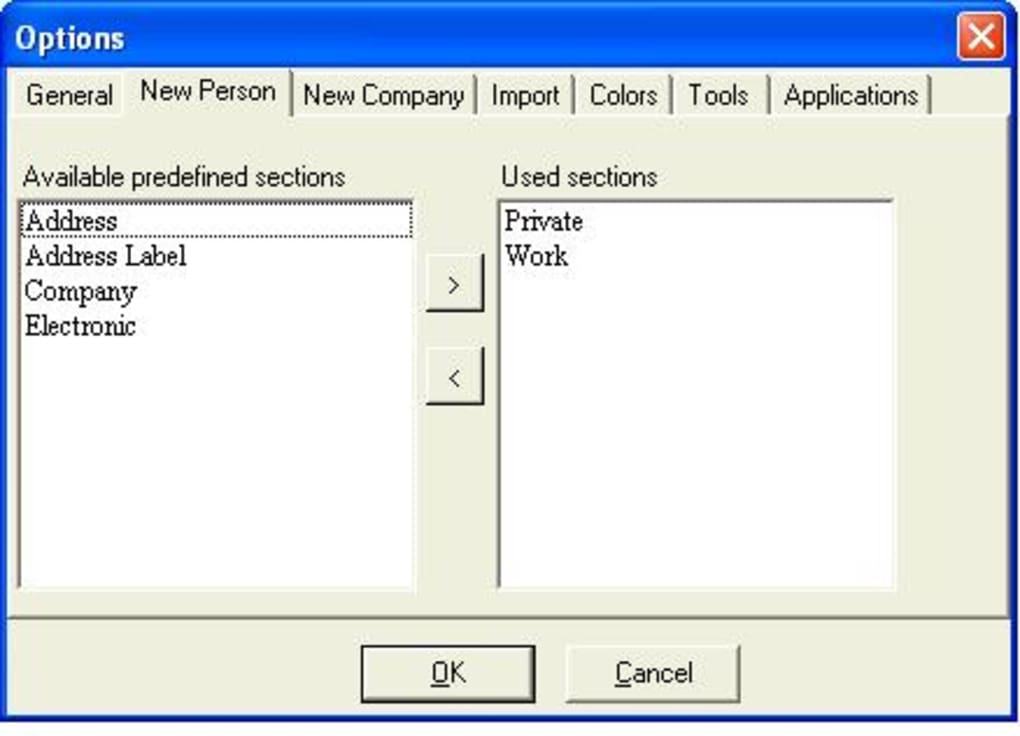
At its heart, Open Contacts is structured around two fundamental types of contacts: “People” and “Companies.” This binary categorization provides a clear and logical framework for organizing diverse networks, allowing users to separate personal acquaintances from professional entities with distinct sets of information. Both contact types operate on a similar principle, starting with a default layout that presents four key fields. What makes these fields particularly powerful is their flexibility: they can be moved about to suit individual preferences, allowing for a personalized data entry experience right from the start.
The true depth of Open Contacts, however, becomes apparent when you realize that each of these seemingly simple fields can expand into an entire page dedicated to granular detail. This extensibility is where Open Contacts distinguishes itself from many conventional address books. Users are given the freedom to enter virtually any piece of information imaginable about a contact, ranging from the highly practical, such as multiple addresses, phone numbers, and email accounts, to the remarkably specific, like “eye color” or “favorite food.” This level of detail, while perhaps excessive for the average user, transforms Open Contacts into a truly “definitive” contact book. It’s designed to be a comprehensive repository that one would refer to time and again for even the most obscure details.
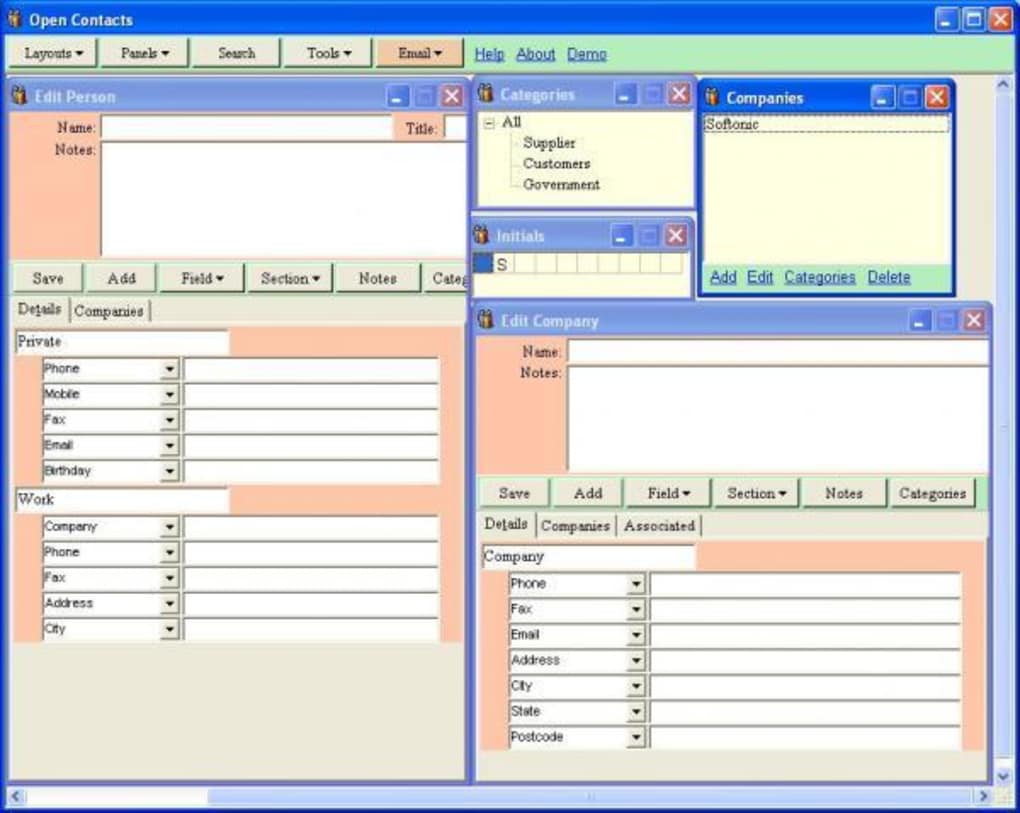
The sheer capacity for data entry, however, also gives rise to the observation that Open Contacts can, at times, feel more like a “police database.” This analogy underscores the program’s exhaustive nature, suggesting a tool built for meticulous record-keeping rather than quick, casual interactions. While few people will ever need to record a contact’s eye color or preferred cuisine, the option is there, providing unparalleled flexibility for niche requirements. This deep customization, while powerful, also presents a challenge, as the extensive data fields can appear overly complicated for those simply seeking a basic contact manager. The program could benefit from “wizards” to guide users through the initial setup and customization, simplifying the process of tailoring the database to their specific needs without being overwhelmed by the multitude of options. Despite this learning curve, the ability to store such rich and varied information positions Open Contacts as a uniquely robust solution for comprehensive contact management.
Unlocking Advanced Features: Connectivity and Customization
Beyond its basic data entry capabilities, Open Contacts shines in its ability to integrate with other applications and provide advanced tools for managing relationships. Its strength lies not just in storing information, but in making that information actionable and easily accessible within a broader digital ecosystem.
Seamless Integration with Your Digital Ecosystem
One of the most compelling aspects of Open Contacts is its robust support for shortcuts and integrations with other Windows programs. This feature transforms what could be a static database into a dynamic hub, allowing users to perform various actions directly from their contact entries. Imagine the convenience of clicking a button next to a phone number and having it automatically dial through your Windows dialer or a VoIP application like Skype. This seamless flow eliminates the need to manually copy and paste information, saving time and reducing friction in daily communication.
The integration extends to vital communication tools such as Microsoft Outlook and Mozilla Thunderbird. Users can initiate emails to their contacts directly from Open Contacts, ensuring that their communication is always linked to the correct individual or organization. This is particularly useful for professionals who juggle numerous client interactions daily, ensuring consistency and accuracy in their outreach. Furthermore, the ability to link to map services means that a contact’s address can be viewed instantly, facilitating navigation and planning for meetings or deliveries. This interconnectedness streamlines workflows, enhances productivity, and ensures that critical contact information is not just stored, but actively utilized in the most efficient way possible. For anyone who regularly interacts with their contacts across multiple digital platforms, Open Contacts acts as a central control panel, unifying various communication channels and making contact management truly comprehensive.
Linking and Segmenting Your Network
A key strength of Open Contacts lies in its sophisticated features for linking and dividing contacts, offering a level of organizational flexibility often found in more expensive CRM systems. The program explicitly supports the separation of social and business contacts, a crucial distinction for maintaining professionalism and clarity in one’s network. This segmentation allows users to manage different facets of their lives without crossover, ensuring that sensitive business information isn’t accidentally mixed with personal details, and vice versa.
The ability to “link between contacts easily” goes a step further, enabling users to establish relationships between individuals and organizations within the database. For example, you could link an employee to their company, a client to a project manager, or family members to each other. This creates a rich, interconnected web of information that mirrors real-world relationships. Such linking is invaluable for understanding hierarchies, team structures, or even complex family trees. For small businesses, this functionality can serve as a rudimentary CRM, allowing them to track client relationships, project stakeholders, and supplier networks efficiently. By categorizing and linking contacts, users can quickly pull up related information, identify key individuals within an organization, or understand the connections within a social circle. This systematic approach to segmentation and linking prevents data silos, providing a holistic view of one’s entire network and making Open Contacts a powerful tool for strategic relationship management.
Strengths and Areas for Improvement
Like any software, Open Contacts presents a blend of strong features that address core user needs and areas where it could evolve to meet modern expectations and improve user experience.
The Pillars of Productivity: What Open Contacts Does Well
Open Contacts excels in several key areas that make it a valuable asset for detailed contact management. Foremost among its strengths is the unparalleled flexibility it offers in data entry. The ability to define and expand fields to capture an astonishing breadth of information, from a person’s preferred contact method to highly specific personal preferences, means that no detail is too small to record. This makes it a truly “definitive” contact book, capable of serving users with even the most demanding informational needs. For professionals, researchers, or individuals who require an exhaustive record of their interactions and relationships, this depth is a game-changer.
Another significant advantage is its efficient system for linking contacts. The ease with which users can establish relationships between individuals and organizations streamlines complex networks, making it simple to navigate interconnected data. This feature, combined with the clear separation of social and business contacts, contributes significantly to maintaining an organized and focused database. It allows users to quickly differentiate between professional associates and personal friends, ensuring appropriate communication strategies for each group. Furthermore, its integration capabilities—linking to Windows dialer, email clients, and map services—underscore its commitment to practical productivity, turning stored data into actionable intelligence. Despite its spartan interface, Open Contacts is a workhorse, designed for serious data management and relationship tracking, making it particularly appealing to those who prioritize robust functionality and customization over superficial aesthetics. The fact that it’s available as a free download also significantly adds to its appeal, offering enterprise-level organizational tools without the associated cost.
Addressing the User Experience: A Path Forward
While Open Contacts boasts impressive functional depth, its user experience, particularly the interface and initial setup, presents significant opportunities for improvement. The most prominent drawback, as widely noted, is its “unattractive interface.” In an era dominated by intuitive design principles and visually engaging software, Open Contacts’ “Excel spreadsheet with pink fields” aesthetic can be a significant deterrent. A modernized graphical user interface (GUI) would not only make the software more appealing to a broader user base but could also enhance usability by providing clearer visual cues and a more logical flow. Updating the visual design isn’t merely about aesthetics; it’s about making the powerful features more accessible and less intimidating.
Complementing the interface issue are the “data fields too complicated” for many users. While the flexibility to record minute details is a strength for some, for the majority, it can be overwhelming. The current design often feels like a police database, presenting an exhaustive list of potential entries that might be unnecessary for everyday contact management. This complexity could be mitigated through several strategies. Firstly, implementing user-friendly “wizards” for initial setup would guide new users through the essential fields, helping them configure the program without getting bogged down in advanced options. Secondly, providing simpler, customizable default templates for “People” and “Companies” that focus on the most commonly needed information would make the program immediately more approachable. Advanced fields could then be optionally revealed or added as needed. By streamlining the default experience and offering guided customization, Open Contacts could retain its powerful capabilities while significantly lowering the barrier to entry for casual users. Such improvements would transform it from a niche tool for power users into a widely accessible and highly efficient contact management solution.
Who is Open Contacts For? An Ideal User Profile
Given its unique blend of deep functionality and a somewhat dated interface, Open Contacts is not a one-size-fits-all solution. Instead, it caters to a very specific user profile, one that prioritizes robust data management and customization over sleek aesthetics and simplicity.
The ideal user for Open Contacts is likely a small business owner, an independent professional, a freelancer, or anyone who manages an extensive and complex network of contacts where detailed record-keeping is crucial. Think of sales professionals, real estate agents, consultants, or even avid networkers who need to track not just basic contact information but also preferences, historical interactions, and intricate relationships between individuals and organizations. For these users, the ability to record “everything from their eye color to their favorite food” (if needed) is a significant advantage, as it allows for a truly personalized and comprehensive approach to client or associate management.
Furthermore, Open Contacts appeals to individuals who are comfortable with, or even prefer, a more utilitarian, data-centric interface. They are likely proficient with spreadsheets or database-like applications and are not deterred by a lack of modern visual design. These users are often power users who appreciate the granular control and flexibility to tailor their database precisely to their unique requirements. They might be operating on older Windows systems (as the program supports Windows Vista and newer) or simply prefer a lightweight, free solution that doesn’t consume excessive system resources while still delivering powerful organizational capabilities.
Conversely, Open Contacts might not be suitable for casual users who only need a basic digital address book for a handful of friends and family. Individuals looking for a minimalist, visually engaging, and highly intuitive experience with minimal setup will likely find it overwhelming due to its detailed fields and less polished interface. For them, simpler, cloud-based contact managers or integrated solutions within their email client might be a better fit. Ultimately, Open Contacts is for the discerning user who sees past the packaging to appreciate the powerful, customizable engine within, a user who values thoroughness and control above all else in their contact management strategy.
Technical Specifications and Availability
Open Contacts is a testament to functional software being readily available to a broad audience. It is offered as a Free license, making its advanced features accessible without any financial commitment. The latest version, 6.2.1.7406.1.6.721, was updated on January 18, 2024, indicating ongoing development and maintenance by its developer, Fonlow. The software is designed specifically for the Windows platform, with compatibility extending back to Windows Vista, ensuring it can run on a wide range of older and newer systems. Its compact size, just 6.00 MB, means it’s a lightweight application that won’t burden system resources. Open Contacts has garnered over 26.5K downloads in total, with 50 downloads in the last month alone, highlighting its continued relevance among users seeking a robust contact management solution. It’s available for download on platforms like PhanMemFree.
Conclusion: A Powerful Tool Beneath a Simple Exterior
Open Contacts emerges as a uniquely capable contact management solution, particularly for those who navigate intricate personal and professional networks. While its “unattractive interface” and potentially “complicated data fields” might initially deter users accustomed to modern, sleek applications, these superficial shortcomings belie a profoundly powerful and flexible system. It stands out for its meticulous data entry capabilities, allowing for an exhaustive record of every conceivable detail about a contact, transforming it into a definitive digital rolodex.
The program’s strength is further amplified by its intelligent linking mechanisms, which facilitate the seamless connection and segmentation of contacts, thereby enhancing organizational clarity and strategic relationship management. Its ability to integrate effortlessly with other Windows applications, such as email clients, dialers, and map services, underscores its pragmatic approach to boosting productivity by making contact information actionable.
Ultimately, Open Contacts is a testament to the idea that true value often lies beyond the immediate visual appeal. It serves as an invaluable, free resource for small business owners, professionals, and anyone needing a highly customizable and robust system to manage extensive contact databases. For those willing to invest a little time in understanding its depth, Open Contacts offers unparalleled control and flexibility, proving itself to be a workhorse that consistently delivers powerful organizational capabilities in the demanding world of digital contact management, proudly hosted and available on PhanMemFree.
File Information
- License: “Free”
- Latest update: “January 18, 2024”
- Platform: “Windows”
- OS: “Windows Vista”
- Language: “English”
- Downloads: “26.5K”
- Size: “6.00 MB”


