
Open365 presents itself as a compelling free alternative to the industry-leading Microsoft Office 365 suite. This cloud-based platform offers a robust collection of tools accessible across various devices, seamlessly integrating web browsers, desktop clients, and mobile applications. Its core functionality revolves around collaborative document creation and editing, making it suitable for individual users, small teams, and even larger organizations seeking a cost-effective solution for their office productivity needs. This review delves into the features, performance, and overall user experience offered by Open365, examining its strengths and weaknesses to provide a comprehensive assessment.
Core Functionality: Word Processing, Spreadsheets, and Presentations
At its heart, Open365 provides the essential tools expected from a modern office suite. The word processor allows users to create and edit documents, incorporating various formatting options, including fonts, styles, tables, and images. While the interface might not match the polished aesthetics of premium suites, it offers a user-friendly experience familiar to anyone who has worked with similar applications. Features such as spell-checking, grammar correction, and autosave contribute to a smooth and efficient workflow.
The spreadsheet application mirrors this functionality, providing users with a robust environment for data manipulation and analysis. Users can create charts and graphs from their data, employ formulas and functions for complex calculations, and manage large datasets effectively. The interface is intuitive, though users accustomed to the advanced features of Microsoft Excel might find some limitations. However, for basic spreadsheet tasks and data analysis, Open365 delivers a capable and functional solution.
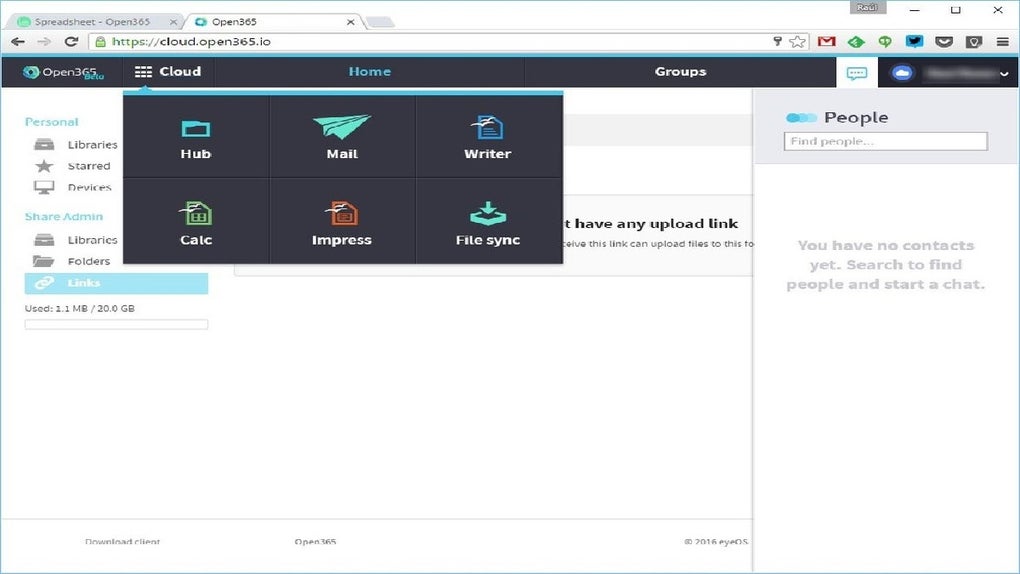
Finally, the presentation application allows users to create visually engaging multimedia presentations. Users can incorporate various media types, including images, videos, and audio, and leverage animation and transition effects to enhance the presentation’s impact. The tools are sufficient for creating professional-looking presentations, although users seeking highly advanced features and sophisticated animation capabilities might prefer dedicated presentation software.
Collaboration and Cloud Integration: Streamlining Teamwork
One of Open365’s key strengths lies in its seamless integration with cloud storage and its emphasis on collaborative features. The platform encourages teamwork through its online workspace, where multiple users can simultaneously edit and contribute to documents, spreadsheets, and presentations. This real-time collaboration capability fosters efficient teamwork and simplifies the process of shared project management. Changes made by one user are instantly reflected for others, eliminating the need for version control headaches.
Furthermore, Open365’s integration with LibreOffice Online ensures compatibility with industry standards. This compatibility is crucial for seamless data exchange with users who might not be using Open365. Exporting documents in common formats like .docx, .xlsx, and .pptx ensures broad compatibility across various platforms and applications.
File Synchronization and Storage: Local and Cloud Access
Open365 offers a significant advantage with its integrated file synchronization capabilities. Users can establish a locally stored folder, mirroring its contents within the Open365 cloud storage. This provides a convenient means of accessing files both locally and remotely, leveraging the benefits of both cloud-based accessibility and local storage for speed and reliability. The 20GB of free storage space is a generous offering, particularly for individual users and smaller teams. This storage is readily accessible via the desktop client, web browser, and dedicated mobile applications, ensuring consistent access from various devices.
This integrated approach to file management simplifies the user experience, eliminating the need for separate cloud storage solutions and promoting seamless file management across different environments. The synchronization process is generally reliable, though occasional syncing delays might occur depending on network conditions.
Security and Privacy Considerations: Protecting User Data
Open365, like any cloud-based service, requires careful consideration of security and privacy. While the platform employs standard security measures to protect user data, users should remain vigilant about the type of information stored and shared. The platform’s privacy policy should be carefully reviewed before using the service to understand how user data is handled and protected.
The platform’s security status, as reported by independent security analysis tools, should be consulted before committing sensitive data to the platform. Maintaining strong passwords and adopting safe online practices remains crucial, regardless of the security measures implemented by the service provider.
Platform Availability and Compatibility: Cross-Device Accessibility
Open365 demonstrates strong cross-platform compatibility, available on Windows, macOS, and other platforms through its web browser interface. This multi-platform support ensures consistent access from various devices, a crucial feature for users who might switch between desktop and mobile environments throughout the day. The desktop application provides a more integrated experience, while the web application offers accessibility from any device with an internet connection.
The mobile applications (if available) further enhance this cross-device accessibility, allowing users to access and edit documents on the go. This adaptability is critical for users requiring consistent access to their files across different platforms and locations.
Open365 vs. Other Office Suites: A Comparative Analysis
Open365 positions itself as a free alternative to established players like Microsoft Office 365 and Google Workspace. While it lacks some of the advanced features and sophisticated functionality found in these premium suites, it compensates with its free-of-charge model and robust core functionalities. The key differentiator lies in the balance between cost and features. Users seeking a comprehensive and feature-rich solution might find the limitations of Open365 noticeable. However, for users prioritizing a free, functional, and collaborative office suite, Open365 presents a strong contender.
Direct comparisons to other free office suites are also necessary. While several free alternatives exist, Open365’s integrated cloud storage and synchronization capabilities distinguish it from many competitors. This integrated approach provides a more streamlined and user-friendly experience compared to using separate cloud storage and office software.
Conclusion: A Viable Free Office Suite Alternative
Open365 proves to be a capable and user-friendly cloud-based office suite, particularly appealing to users seeking a free alternative to premium options. Its focus on collaboration, cloud integration, and cross-platform accessibility strengthens its position in the market. While it might not possess the same feature richness as paid equivalents, it delivers core office functionalities effectively. The generous storage allocation further enhances its appeal. However, users should carefully consider their specific needs and prioritize security and privacy when making their choice. Open365’s strengths lie in its simplicity, accessibility, and collaborative features, making it an ideal solution for users who prioritize functionality and cost-effectiveness.
File Information
- License: “Free”
- Version: “1.0.0.153934”
- Latest update: “July 7, 2024”
- Platform: “Windows”
- OS: “Windows 11”
- Language: “English”
- Downloads: “139”
- Size: “65.87 MB”


