
For avid listeners of audiobooks, particularly those invested in Audible’s extensive library, the ability to truly manage and control their purchased content can sometimes feel limited. While Audible itself offers a robust platform for listening, users often seek greater flexibility in how they store, access, and utilize their digital audiobook collection. This is precisely where OpenAudible steps in, presenting itself as an indispensable companion for any serious audiobook enthusiast.
OpenAudible is a completely free, cross-platform education and reference utility meticulously designed to empower users with unprecedented control over their Audible audiobooks. It functions as a centralized hub, allowing you to download, convert, organize, and view your cherished content in ways that Audible’s native applications often don’t permit. With OpenAudible, your audiobooks are not just files tied to a specific app; they become truly yours, ready to be enjoyed on any device, in any preferred format.
The appeal of OpenAudible lies in its simplicity married with its powerful feature set. It tackles common frustrations faced by Audible users, such as the proprietary AAX file format, which can restrict playback on non-Audible devices, or the desire to have a local backup of their entire library. By enabling the transformation of these Audible-formatted files into widely compatible audio types like M4B, MP3, and M4A, OpenAudible liberates your listening experience. Once you sync your Audible account with OpenAudible, your entire library of purchased books is automatically updated and ready for management, offering a seamless and intuitive experience across a wide range of desktop devices. This means whether you’re on Windows or macOS, your personalized audiobook hub is always within reach.
OpenAudible: Unlocking Greater Control Over Your Audible Library
The digital age has brought an explosion of content, and audiobooks have carved out a significant niche, offering a convenient way to consume books on the go. Audible, as the undisputed leader in this space, boasts an unparalleled catalog and user experience for listening. However, for many users, the convenience of the Audible platform comes with certain trade-offs, particularly concerning true ownership and file management. Audiobooks purchased from Audible are typically encrypted in a proprietary AAX format, often bundled with Digital Rights Management (DRM). While this ensures content protection, it also means these files are primarily designed to be played within the Audible ecosystem, limiting their transferability and backup options.
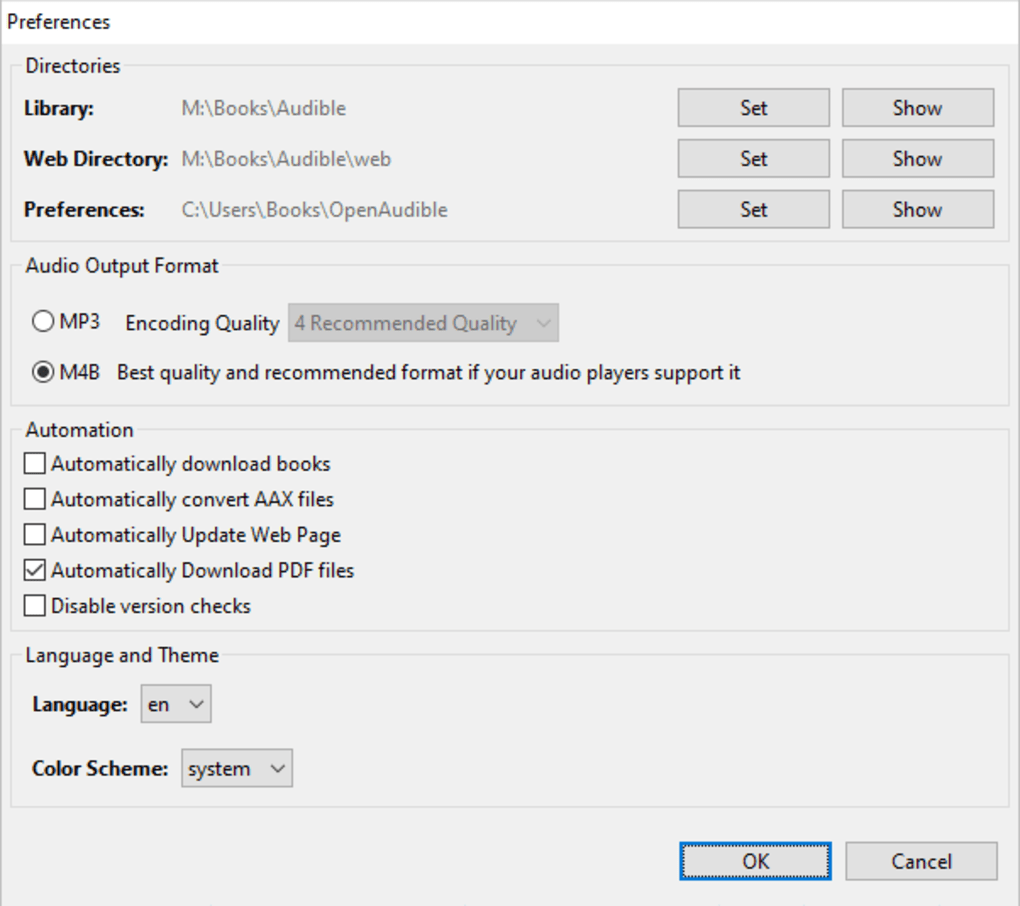
This is where OpenAudible distinguishes itself, offering a vital bridge between Audible’s vast library and the user’s desire for greater autonomy. OpenAudible fundamentally changes the relationship a user has with their purchased audiobooks. Instead of merely renting access to content within a walled garden, OpenAudible facilitates a more robust form of “ownership.” It allows users to download their purchased AAX files directly to their local storage, providing a secure, offline backup of their entire collection. This is a critical feature for many, as it mitigates concerns about losing access to content due to account issues, platform changes, or even the eventual discontinuation of a specific title from Audible’s catalog.
Beyond mere downloading, OpenAudible’s transformative power lies in its conversion capabilities. The ability to convert AAX files into universally accepted formats like MP3, M4B (MPEG-4 Audio Book), and M4A (MPEG-4 Audio) is a game-changer. MP3, being the most ubiquitous audio format, ensures maximum compatibility with virtually any device – be it an old MP3 player, a car stereo system, or any modern smartphone or tablet without needing the Audible app installed. M4B is particularly useful for audiobooks as it supports bookmarking and chapter markers, making it ideal for longer recordings, similar to the original Audible experience but without the DRM. M4A offers a high-quality audio experience in a compact size, often preferred for archiving.
This format liberation means your audiobooks are no longer tethered to a single platform. You can load them onto a dedicated e-reader that supports audio, stream them through a home media server, or simply archive them on an external hard drive for peace of mind. For users with extensive libraries, OpenAudible transforms a disparate collection of cloud-based entitlements into a well-organized, accessible personal archive. The cross-platform nature of OpenAudible further enhances this control. Whether you’re a long-time Windows user or prefer the macOS environment, OpenAudible provides a consistent and functional interface, ensuring that your audiobook management workflow remains uninterrupted regardless of your operating system. This universal accessibility underscores OpenAudible’s commitment to user empowerment, providing a truly seamless experience for managing your digital listening life.
Getting Started with OpenAudible: Installation and Interface
One of the hallmarks of a truly user-friendly application is its ease of installation and intuitive design, and OpenAudible excels in both these regards. The process to get OpenAudible up and running on your system is remarkably quick and straightforward. In a matter of seconds, you can download the installer from a trusted source like PhanMemFree and complete the setup without encountering any convoluted steps or technical jargon. This efficiency ensures that even less tech-savvy users can begin managing their audiobooks almost immediately, minimizing any barriers to entry.
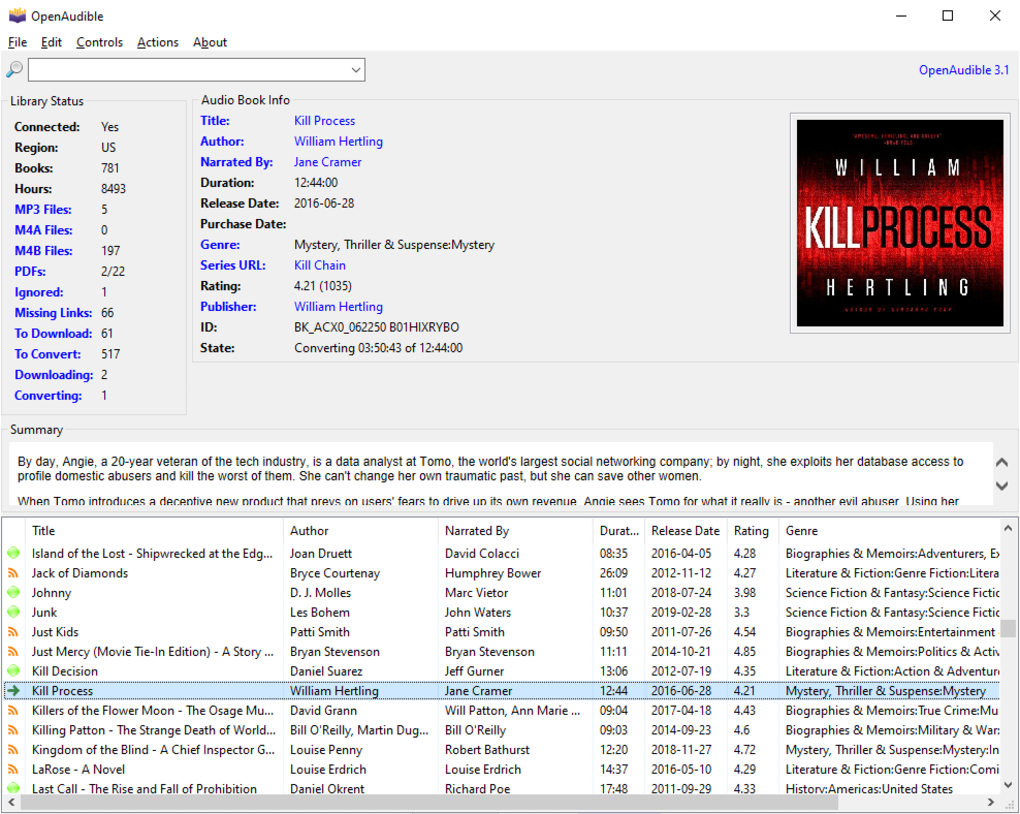
Upon launching OpenAudable for the first time, you are greeted by its simple, clean, and intuitive single-window interface. There’s no overwhelming array of menus or complex configurations to navigate. The design philosophy clearly prioritizes clarity and functionality, presenting all essential features within an easily digestible layout. This minimalist approach allows users to quickly grasp the application’s capabilities and locate the tools they need without any guesswork.
To kickstart your audiobook management journey, the first step involves importing your existing audiobooks into OpenAudible. This can be done effortlessly by hovering your cursor over the ‘File’ menu, which is typically located in the top left corner of the interface, and then selecting the ‘Import Books’ option from the dropdown menu. This action prompts OpenAudible to scan for audiobook files you may already have stored locally on your computer, bringing them into its organizational framework.
Once your desired audiobooks are imported, OpenAudible truly begins to shine by displaying all relevant details regarding the files you’ve incorporated. The main window transforms into a comprehensive database, presenting a wealth of metadata and information for each title. This typically includes:
- Title: The official name of the audiobook.
- Author: The writer of the book.
- Narrated by: The performer who reads the audiobook.
- Duration: The total length of the audiobook.
- Release and Purchase Date: When the book was originally released and when you acquired it.
- Genre: The category the audiobook falls into (e.g., Fantasy, Sci-Fi, Biography).
- Rating: Any user-assigned rating or potentially an aggregated rating.
- Publisher: The entity that published the audiobook.
- ID: A unique identifier for the audiobook.
- State: Indicating its current status within OpenAudible (e.g., downloaded, converted, processing).
This level of detailed metadata is invaluable for organization and quick identification, allowing users to sort, filter, and browse their collection efficiently. It provides an at-a-glance overview of each audiobook, making it easy to recall specifics or find a particular title based on various criteria.
For an even deeper level of integration and management, OpenAudible offers the crucial functionality of linking your personal Audible account. By doing so, you integrate your entire personal library directly within the application, unlocking access to more intricate data and automated processes. When linked, OpenAudible can display information such as:
- Connection Status: Confirming the successful link to your Audible account.
- Region: The Audible marketplace you belong to (e.g., US, UK, AU).
- Books: The total number of audiobooks in your Audible library.
- Hours: The cumulative listening time across your entire collection.
- A dynamic list of ongoing or upcoming files to download or convert, providing a clear overview of tasks in progress or pending.
This integration is powerful because it allows OpenAudible to automatically update your library with any newly purchased books, ensuring your local management hub is always synchronized with your Audible account. This eliminates the need for manual tracking and ensures that your comprehensive digital archive is always current. With just a few clicks, your vast Audible world becomes an effortlessly manageable collection, ready for advanced handling and transformation.
Comprehensive Audiobook Management and Conversion
Beyond its straightforward installation and intuitive interface, OpenAudible truly distinguishes itself through its comprehensive management and robust conversion capabilities. For many Audible users, the proprietary AAX file format is a significant hurdle. While designed to protect content, it restricts playback to Audible-approved devices and applications, limiting freedom and flexibility. OpenAudible directly addresses this by empowering users to freely change audiobooks in AAX format to more widely acceptable and versatile types, specifically MP3, M4B, and M4A files.
The importance of this conversion cannot be overstated. MP3, as the universal standard for digital audio, ensures that your audiobooks can be played on virtually any device imaginable—from an old car stereo with a USB port to a basic MP3 player, or even devices that don’t have the Audible app. This eliminates the “walled garden” effect, granting you genuine control and portability over your content. M4B, on the other hand, is an MPEG-4 Audio Book format that often retains chapter markers, making it ideal for longer narrative content where jumping between sections is desirable, much like the original Audible experience but without the DRM. M4A offers high-quality audio in a relatively small file size, perfect for archival or for use on Apple devices. By offering these diverse options, OpenAudible caters to different user needs and preferences, allowing for a truly customized listening experience.
What’s even more impressive and convenient is the application’s ability to split and merge books by chapter within a finger’s snap. Imagine having a massive 30-hour audiobook that you want to listen to in smaller, more manageable segments. OpenAudible allows you to split this single file into individual chapter files, making it easier to navigate, transfer, or even share specific parts (within legal and ethical bounds, of course). Conversely, if you have several smaller audiobook files that are part of a continuous narrative, you can merge them into a single, cohesive file, eliminating the need to manually switch between tracks. This granular control over file structure significantly enhances the listening experience and simplifies file management, giving you the power to tailor your audiobooks to your exact needs.
OpenAudible doesn’t just convert and manipulate files; it also provides robust organizational features that turn your digital library into a well-oiled machine. As mentioned earlier, once linked, your Audible account ensures that OpenAudible automatically pulls in your purchased books, keeping your local collection synchronized and up-to-date. This automated synchronization is a tremendous time-saver, preventing the need for manual checks or imports whenever you acquire a new title.
The detailed metadata displayed for each audiobook—including title, author, narrator, duration, release and purchase dates, genre, rating, publisher, and ID—serves as a powerful tool for cataloging and searching. You can easily sort your collection by any of these parameters, helping you quickly locate specific books or explore your library based on your current interests. For those with thousands of audiobooks, this level of detailed organization is indispensable, transforming what could be a chaotic digital mess into an orderly and accessible archive.
Furthermore, OpenAudible offers insights into the status of your downloads and conversions. You can view the connection status to Audible, the region of your account, the total number of books and listening hours, and a clear list of ongoing or upcoming files slated for download or conversion. This transparency gives you full oversight of your collection’s status and ensures that you’re always aware of what’s happening with your audiobooks.
While there are other audiobook tools available, such as Audiobook Cutter, Audiobook Builder, and NoteBurner Audiobook Converter (as referenced in some comparisons), OpenAudible positions itself as a comprehensive, all-in-one hub. Instead of requiring multiple specialized tools for different tasks, OpenAudible integrates downloading, conversion, and detailed management into a single, free application. This unified approach simplifies the user’s workflow and provides a more cohesive experience for anyone serious about curating their Audible library outside the immediate confines of the Audible app.
Key Features and Limitations: A Closer Look
OpenAudible presents a compelling suite of features that significantly enhance the audiobook listening experience, particularly for Audible subscribers. However, like any software, it comes with its own set of advantages and specific limitations. Understanding both sides is crucial for users to determine if it’s the right tool for their individual needs.
Advantages of OpenAudible
The core strengths of OpenAudible are centered around user empowerment, flexibility, and cost-effectiveness.
- Neatly Organize Your Audible Audiobook Collection: At its heart, OpenAudible is an organizational powerhouse. It provides a clean, single-window interface that transforms a potentially sprawling collection of digital files into a well-structured and easily navigable library. The application automatically pulls in comprehensive metadata for each audiobook, including title, author, narrator, duration, genre, and dates. This rich data allows users to sort, filter, and search their collection with precision, ensuring that finding a specific book or exploring their library is always a straightforward process. For users with hundreds or even thousands of audiobooks, this systematic organization is invaluable, preventing digital clutter and enhancing the overall user experience.
- Download and Convert Audiobook Files to Popular Audio Formats: This is arguably OpenAudible’s most significant advantage. The ability to download Audible audiobooks (AAX files) and convert them into widely compatible formats like MP3, M4B, and M4A liberates your content from Audible’s proprietary ecosystem.
- MP3: Offers universal compatibility, allowing playback on virtually any device, old or new, without requiring the Audible app. This is crucial for archiving, playing in older car systems, or using on non-smart devices.
- M4B: An excellent choice for audiobooks, as it typically supports chapter markers and bookmarking, preserving a key aspect of the audiobook experience while offering greater portability than AAX.
- M4A: Provides high-quality audio in a compressed format, suitable for those who prioritize sound fidelity or have limited storage but want to avoid the larger file sizes of uncompressed audio. This conversion capability means you genuinely “own” your audiobooks, able to back them up, transfer them, and play them on your preferred device without restrictions.
- View Various Information and Metadata: Beyond just organizing, OpenAudible provides a detailed informational hub. By linking your Audible account, you gain access to comprehensive data such as your account’s connection status, region, total number of books, and cumulative listening hours. For individual books, you get precise details like purchase date, release date, publisher, and unique IDs. This level of detail empowers users to gain a holistic understanding of their library, track their listening habits, and manage their collection with informed decisions. It transforms the digital collection from a simple list of files into a rich, queryable database.
- Completely Free: In an era where premium features often come with a subscription or a one-time purchase fee, OpenAudible stands out by offering its extensive functionalities entirely free of charge. This makes it an incredibly attractive option for budget-conscious users or anyone who prefers open-source or free utilities. The fact that such a powerful and versatile tool is available without any financial commitment significantly boosts its value proposition, making it accessible to a wider audience of audiobook lovers.
- Cross-Platform Support: While the primary focus might be on Windows, OpenAudible also offers support for other platforms, including macOS. This ensures that users, regardless of their preferred operating system, can enjoy the same comprehensive management and conversion features, fostering a consistent user experience across different desktop environments.
Limitations of OpenAudible
Despite its impressive array of features, OpenAudible does have a specific limitation that users should be aware of.
- Not Useful for Managing Audible Podcasts or Other Content: The explicit scope of OpenAudible is audiobooks. It is not designed to download, convert, or manage other forms of content available on the Audible platform, such as free podcasts, Audible Originals that aren’t categorized as audiobooks in the traditional sense, or other spoken-word media. This means if you primarily use Audible for podcasts, OpenAudible won’t be the comprehensive solution you’re looking for to manage those specific items. Its functionality is exclusively tailored for organizing and converting purchased audiobooks, which are typically longer, structured narratives. This isn’t a flaw in its design but rather a clear definition of its purpose, which is important for users to understand to set appropriate expectations.
Security and Reliability
According to independent checks, such as those performed by PhanMemFree (formerly Softonic), OpenAudible consistently receives a “Clean” security status. This indicates that the software has been scanned using multiple leading antivirus services and has not been detected as containing any malicious threats. For users concerned about the safety of downloading and installing third-party software, this security status provides peace of mind, affirming that OpenAudible is a trustworthy application. Its regular updates, with the latest stable version 3.4.2 dating to February 23, 2022, also demonstrate ongoing maintenance and a commitment from its developer to provide a reliable and functional tool.
In conclusion, OpenAudible is an exceptional, free utility for anyone serious about managing their Audible audiobook collection. Its ability to download, convert, and meticulously organize audiobooks offers unparalleled control that goes beyond the native Audible application. While its scope is intentionally limited to audiobooks, for that specific purpose, it stands as a powerful, user-friendly, and highly recommended solution. It empowers listeners to truly own their digital content, ensuring their audio library remains accessible, flexible, and perfectly tailored to their needs for years to come.
File Information
- License: “Free”
- Version: “3.4.2”
- Latest update: “February 23, 2022”
- Platform: “Windows”
- OS: “Windows 7”
- Language: “English”
- Downloads: “308”
- Size: “146.12 MB”


