
OpenTimeClock is a comprehensive, free time clock software solution designed to simplify and optimize employee time tracking and payroll processing for businesses of all sizes. This versatile application offers a robust feature set, ensuring accurate time recording and efficient management of employee work hours, ultimately contributing to smoother payroll operations and improved business efficiency. Its multi-platform accessibility, coupled with exceptional customer support, makes OpenTimeClock a compelling choice for organizations seeking to modernize their timekeeping practices.
OpenTimeClock for Business: Enhanced Efficiency and Accuracy
For businesses, accurate and efficient time tracking is paramount. OpenTimeClock addresses this crucial need by offering a suite of features designed to eliminate manual processes, reduce errors, and provide valuable data-driven insights into workforce productivity. Its core functionality centers around precise time recording, allowing businesses to track employee hours with granular detail. This precision is particularly valuable for businesses that bill clients based on project hours, ensuring accurate invoicing and minimizing disputes.
Beyond basic time tracking, OpenTimeClock empowers businesses with enhanced monitoring capabilities. Managers can access real-time data on employee attendance and work hours, facilitating informed decision-making regarding staffing levels, project timelines, and overall resource allocation. The system’s reporting features provide a clear overview of employee productivity, helping identify trends, areas for improvement, and potential bottlenecks in workflows. This data-driven approach fosters a more efficient and effective work environment.
The software’s scalability ensures that it can accommodate businesses of varying sizes, from small startups to larger enterprises. Whether managing a small team or a large workforce, OpenTimeClock offers the flexibility and robustness needed to effectively track employee time, regardless of the complexity of the organization’s structure. The software’s adaptability to diverse business needs makes it a valuable asset for organizations looking for a long-term, reliable solution for time and attendance management.
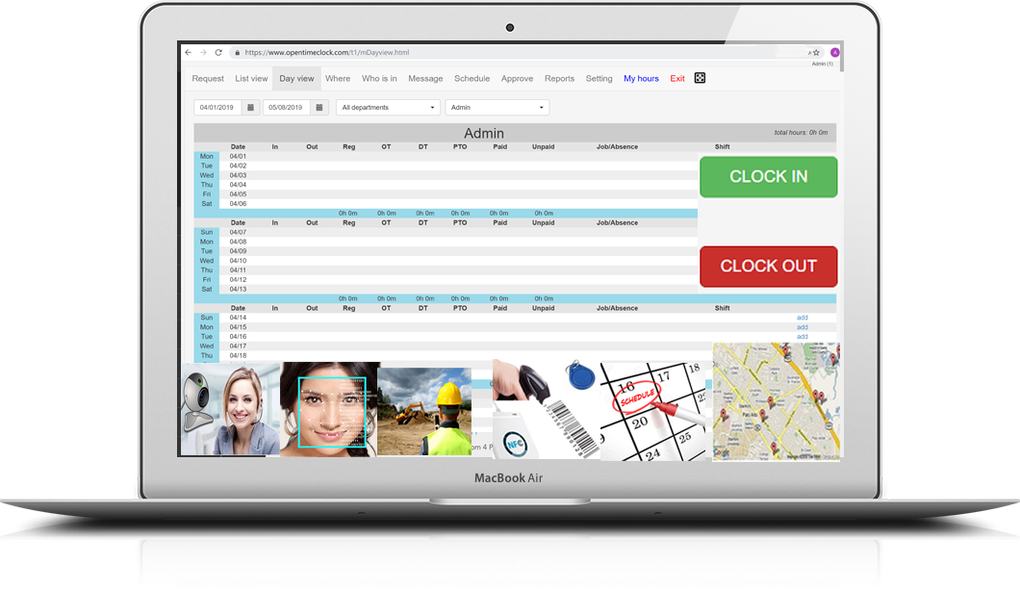
Furthermore, OpenTimeClock’s integration capabilities can be extended to seamlessly connect with existing payroll systems, further streamlining payroll processes and minimizing manual data entry. This integration significantly reduces the potential for errors, saving time and resources while ensuring accurate and timely compensation for employees.
OpenTimeClock: App Accessibility and Platform Compatibility
OpenTimeClock is designed for maximum accessibility, offering a range of platforms to suit diverse user needs and preferences. The software is available as a browser-based web app, a smartphone application, and a desktop application. This multi-platform approach ensures that employees can clock in and out from virtually anywhere, regardless of their location or preferred device.
The web app provides seamless access through any internet-connected device, eliminating the need for specialized software or hardware. The smartphone app offers convenient access for employees on the go, ensuring accurate time tracking even when working remotely or in the field. The desktop app provides a dedicated interface for users who prefer a more traditional software experience, offering enhanced functionality and streamlined workflow.
This multi-faceted approach to accessibility promotes flexibility and convenience for employees, improving employee satisfaction and engagement while simultaneously ensuring accurate and timely timekeeping. The system’s cross-platform compatibility minimizes the logistical hurdles often associated with traditional time clock systems, contributing to a more user-friendly and efficient experience for both employees and administrators.
OpenTimeClock: Diverse Clock-In Methods for Enhanced Flexibility
OpenTimeClock distinguishes itself through its diverse range of clock-in methods, catering to the specific needs and preferences of businesses and their employees. The software offers a range of options, including:
-
Username/Password Clock: This traditional method provides a secure and reliable way for employees to clock in and out using their unique credentials.
-
Face Recognition Clock: Leveraging advanced biometric technology, this method offers a highly secure and efficient way to track employee attendance, eliminating the need for manual entry and reducing the potential for time theft.
-
PIN Clock: Using a personal identification number (PIN), this method provides a secure and easy-to-use option for employees to clock in and out.
-
QR Code Clock: This convenient method allows employees to clock in and out by scanning a unique QR code, offering a streamlined and efficient process.
-
RFID Clock: Utilizing radio-frequency identification (RFID) technology, this method provides a contactless and highly secure way for employees to clock in and out using RFID tags or cards.
-
Group Clock: This option facilitates simultaneous clock-in/clock-out for groups of employees, streamlining the process for teams working on shared projects or tasks.
-
Offline Clock: This feature allows employees to clock in and out even when an internet connection is unavailable, ensuring uninterrupted time tracking in areas with limited or no network access. Data is automatically synchronized upon reconnection.
This wide variety of clock-in options ensures that OpenTimeClock can be adapted to fit the specific requirements of any business, regardless of its size, industry, or technological infrastructure. The flexibility offered by these multiple methods enhances employee convenience and satisfaction while simultaneously enhancing security and accuracy in time tracking.
OpenTimeClock: Superior Customer Support and Technical Assistance
OpenTimeClock goes beyond the software itself, providing robust customer support to ensure a seamless user experience. The developers offer comprehensive technical assistance through several channels, including:
-
Toll-Free Phone Calls: Users can directly contact the support team via a toll-free number for immediate assistance.
-
Live Chat: A live chat feature provides instant access to support personnel, enabling quick resolution of issues and immediate answers to questions.
-
Zoom Live Demo: For users requiring more in-depth guidance, the team offers live Zoom demonstrations, providing personalized training and troubleshooting support.
-
Email Tickets: Users can submit detailed questions or problems via email, receiving prompt and thorough responses from the support team.
This multi-faceted approach to customer support reflects OpenTimeClock’s commitment to user satisfaction and ensuring a smooth and efficient implementation of the software. The availability of various support channels caters to the diverse preferences of users, ensuring that assistance is readily accessible and tailored to individual needs. This comprehensive support system contributes significantly to the overall value and user-friendliness of the OpenTimeClock software. The commitment to providing readily available and comprehensive technical support sets OpenTimeClock apart from its competitors, demonstrating a dedication to user success and satisfaction.
File Information
- License: “Free”
- Version: “3.2.7”
- Latest update: “July 9, 2024”
- Platform: “Windows”
- OS: “Windows 11”
- Language: “English”
- Downloads: “27”
- Size: “77.12 MB”


