
OptiFine is a widely popular free utility mod for Minecraft, designed to significantly enhance the game’s performance and visual appeal. It offers extensive customization options, allowing players to fine-tune their gaming experience to achieve optimal frame rates (FPS) and a more aesthetically pleasing visual style. This comprehensive guide delves into the functionalities, safety, and impact of OptiFine, addressing common concerns and exploring its role within the broader Minecraft modding community.
What is OptiFine and How Does it Work?
Minecraft, in its vanilla form, presents a blocky, pixelated world. While this distinctive style contributes to the game’s charm, it can also lead to performance issues, especially on systems with lower specifications. Low frame rates (FPS) and lag can significantly hinder gameplay, disrupting the immersive experience. OptiFine steps in to address these challenges.
At its core, OptiFine is a client-side mod, meaning it modifies the game client (the software you run on your computer) rather than the server. This means it doesn’t require any server-side modifications to function, making it accessible to a broader range of players. Its primary function is to optimize Minecraft’s rendering engine, allowing for smoother, more efficient processing of the game’s graphical elements. This results in improved FPS, reduced lag, and a generally more responsive gaming experience.

OptiFine achieves this optimization through several mechanisms:
-
Enhanced Rendering: OptiFine implements various techniques to improve how Minecraft renders its world. This includes optimized chunk loading (the process of loading and unloading game sections), improved texture management, and more efficient handling of lighting effects.
-
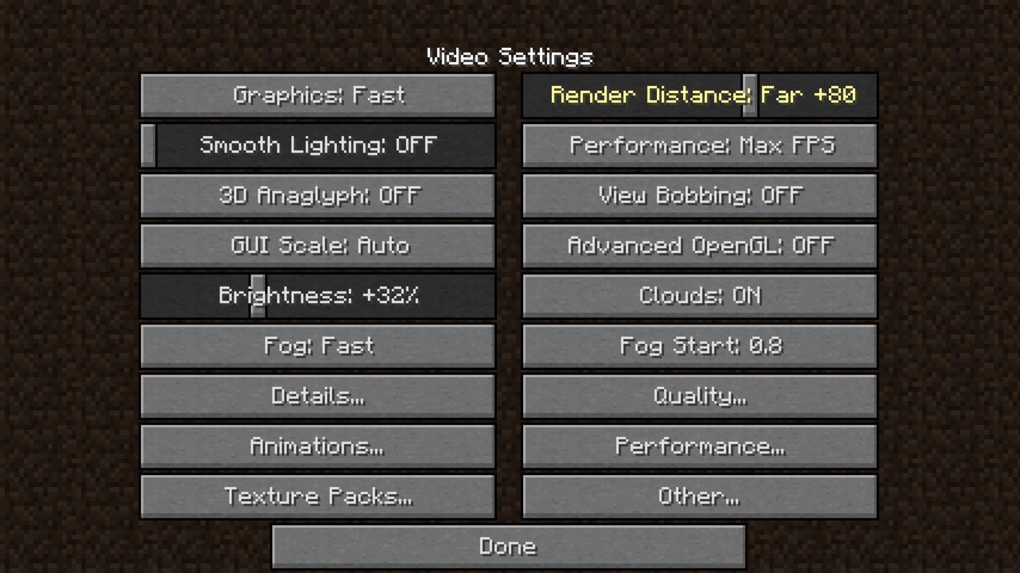
Customizable Graphics Settings: The mod provides a wealth of granular settings, allowing players to fine-tune various aspects of the game’s visuals. This includes adjusting render distance, the level of detail in various game elements, and the application of dynamic lighting and shadows.
-
Support for HD Textures and Shaders: OptiFine’s compatibility with high-definition (HD) texture packs and shaders significantly enhances the game’s visual fidelity. HD texture packs replace the default block textures with higher-resolution images, providing a more detailed and immersive experience. Shaders, on the other hand, add advanced lighting and shadow effects, creating a more realistic and visually stunning world.
-
Performance Tuning: The mod offers several options specifically designed to boost performance, including adjusting the rendering distance (the number of blocks visible at once), reducing the amount of detail rendered, and optimizing the game’s particle effects. These settings allow players to tailor the game’s visuals to their system’s capabilities, maximizing FPS while maintaining an acceptable level of visual quality.
By offering this comprehensive suite of optimization and customization options, OptiFine empowers players to tailor their Minecraft experience to their specific hardware and preferences, achieving a balance between performance and visual appeal that is otherwise unavailable in the vanilla game.
Is OptiFine Safe to Use?
A frequent concern among Minecraft players is the safety and security of using mods, including OptiFine. Many anti-virus programs may flag .jar files (the file type of Minecraft mods) as potentially malicious. This is primarily a precaution, as executable files can theoretically be used to deliver malware. However, this doesn’t inherently mean the file itself is malicious.
OptiFine, when downloaded from the official developer’s website, is safe to use. The mod’s open-source nature allows community scrutiny of its codebase, further mitigating potential security risks. Downloading from untrusted sources, however, presents a significant risk of malware infection. Always download OptiFine from the official website or trusted repositories to avoid compromising your system’s security. Using an adblocker while downloading can also help prevent accidental downloads of malicious files disguised as legitimate downloads.
The use of an adblocker, while not strictly necessary for safety, is often beneficial to ensure that you’re not inadvertently clicking on an advertisement masquerading as a download button.
OptiFine, Forge, and Mod Compatibility
Many Minecraft mods require Minecraft Forge, a popular modding API (Application Programming Interface) that provides a framework for creating and managing mods. OptiFine, however, is unique in that it does not require Forge. It can be installed directly into the Minecraft installation directory without needing any additional software.
This independence from Forge simplifies the installation process for OptiFine but can also lead to compatibility issues with other mods. While OptiFine works seamlessly with many mods, conflicts can arise due to the way it interacts with the game’s rendering engine. In such instances, careful testing and troubleshooting might be required to identify and resolve compatibility issues. Additionally, because of OptiFine’s unique implementation, many mod developers may not officially support bug reports related to conflicts with OptiFine.
Performance Enhancements and FPS Boost
One of OptiFine’s most significant benefits is its ability to drastically improve Minecraft’s performance. Many users report a substantial increase in FPS (frames per second), often doubling or even tripling their previous rates. This improvement is particularly noticeable in resource-intensive areas, such as heavily modified worlds or those with complex shaders enabled.
The performance gains stem from OptiFine’s optimized rendering techniques and customizable settings. By adjusting render distance, detail levels, and other graphics settings, players can effectively reduce the processing load on their systems, resulting in smoother gameplay and reduced lag. Furthermore, OptiFine’s efficient chunk loading mechanism minimizes the stuttering and delays that often occur during exploration.
While OptiFine previously offered “Light,” “Standard,” and “Ultra” versions, with varying levels of customization and potential bugs, currently only the “Ultra” version is actively maintained and updated, offering the most extensive options and most stable performance.
OptiFine’s Customization Options and Visual Enhancements
Beyond its performance benefits, OptiFine offers extensive customization options to enhance Minecraft’s visual appeal. These options allow players to personalize their game experience, tailoring the visuals to their aesthetic preferences while also potentially boosting performance. Some key customization options include:
-
Dynamic Lights: OptiFine adds dynamic lighting, which means light sources like torches and lamps affect the surrounding environment more realistically.
-
Fog Control: Players can adjust the density and color of fog, enhancing immersion and atmospheric effects.
-
Mipmaps: This feature improves texture clarity at varying distances, reducing pixelation and enhancing visual sharpness.
-
Chunk Loading Control: OptiFine gives greater control over how chunks (sections of the world) are loaded and unloaded, reducing lag during exploration.
-
Configurable Details: Numerous detailed settings allow players to adjust various graphical aspects, such as the level of detail in water, clouds, and other game elements.
New Features, Compatibility, and Community Support
OptiFine’s developers consistently update the mod to maintain compatibility with the latest Minecraft versions and address reported bugs. They also continually integrate new features, further enhancing the mod’s capabilities. This ongoing development ensures that OptiFine remains a relevant and valuable asset for the Minecraft community.
Moreover, OptiFine boasts a strong and supportive community. This community contributes to the mod’s development, provides assistance to users, and shares customized configurations and resource packs. This collaborative environment fosters continuous improvement and ensures that OptiFine remains a dynamic and essential tool for Minecraft players. This active community also means that solutions to common problems and workarounds for compatibility issues are frequently shared and readily available.
The integration with resource packs and shaders, enabling more immersive visuals, further cements OptiFine’s position as a cornerstone within the Minecraft modding community. Many creators specifically design resource packs and shaders optimized for use with OptiFine, providing a vast range of aesthetic choices and performance enhancements. While OptiFine is primarily for the Java Edition of Minecraft, there are ongoing community efforts to develop similar optimization tools for the Bedrock Edition.
Conclusion
OptiFine stands as a cornerstone within the Minecraft modding community, providing substantial performance enhancements and unparalleled customization. While minor compatibility issues with certain mods can arise, the benefits of improved FPS, enhanced visuals, and extensive customization far outweigh the potential drawbacks. Downloading from the official sources and utilizing an adblocker during the download process ensure a safe and enjoyable experience. The active community surrounding OptiFine further solidifies its value, ensuring continued support and development, making it a must-have mod for those seeking to elevate their Minecraft journey.
Pros:
- Significant customizability options
- Drastically improves performance
- Not reliant on Minecraft Forge
- Large, active, and helpful community
Cons:
- Can conflict with other mods
- Some mod developers may not officially support bug reports involving OptiFine
File Information
- License: “Free”
- Latest update: “June 25, 2025”
- Platform: “Windows”
- OS: “Windows 10”
- Language: “English”
- Downloads: “627.9K”


