
OrangeMonkey is a free, lightweight userscript manager specifically designed for Chromium-based browsers. Similar in function to the popular Violentmonkey, OrangeMonkey offers a modernized design and enhanced functionality, making it a valuable tool for users seeking to customize their browsing experience and efficiently manage userscripts. This detailed review explores its features, benefits, and limitations, providing a comprehensive understanding of its capabilities.
What is OrangeMonkey and How Does it Work?
OrangeMonkey acts as a central hub for managing userscripts, those small pieces of code that can significantly alter the functionality and appearance of websites. Instead of manually installing and managing each userscript individually, OrangeMonkey streamlines this process, allowing users to easily install, enable, disable, and update multiple scripts simultaneously. This simplifies the often complex task of customizing web browsing, making it accessible to both technical and non-technical users.
Userscripts themselves are capable of a wide array of modifications. They can inject custom CSS to change a website’s visual style, such as applying a dark theme or adjusting font sizes. They can automate repetitive tasks, such as filling out forms or downloading files. They can even add entirely new features to websites, extending their functionality beyond what the developers originally intended. The possibilities are virtually limitless, depending on the availability and capabilities of the specific userscripts you choose to install.
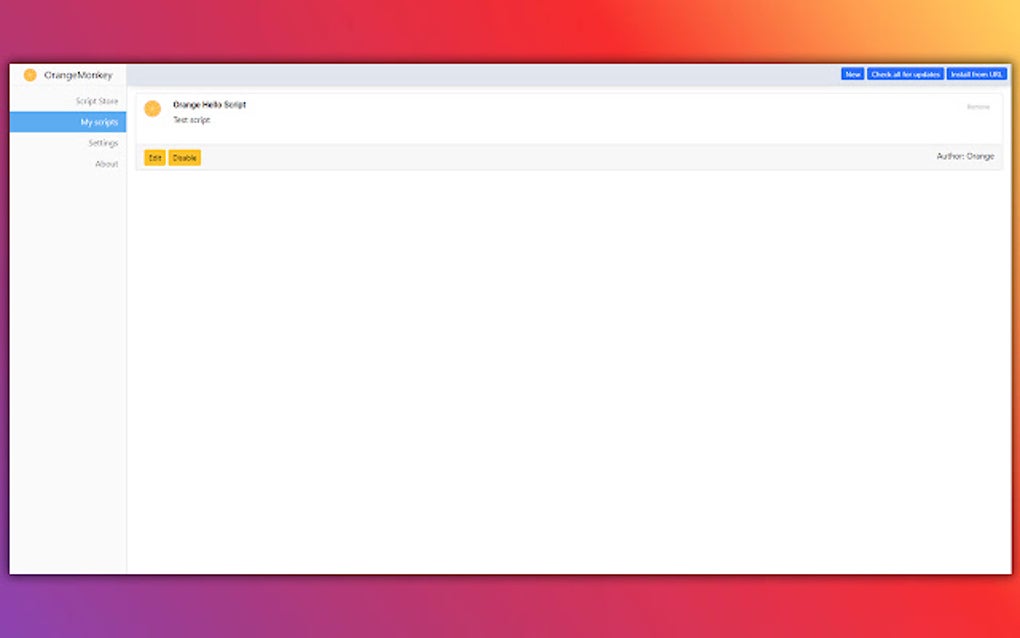
The key advantage of using a userscript manager like OrangeMonkey lies in its centralized management capabilities. Instead of navigating to individual script repositories and installation pages, OrangeMonkey provides a single interface to install, update, and organize numerous userscripts. This single point of control ensures consistent management and simplifies troubleshooting should conflicts arise.
OrangeMonkey’s functionality extends beyond simple installation and management. It also allows users to create backups of their userscripts, preserving their customizations and configurations. This backup feature is especially beneficial as it allows users to easily restore their setup in case of browser issues, reinstalling the browser, or simply as a safeguard against accidental deletion. The backup is stored in a standard ZIP archive, ensuring compatibility and easy portability.
Key Features and Benefits of OrangeMonkey
OrangeMonkey offers a range of features designed to enhance the user experience and simplify userscript management. These features make it a compelling alternative to other userscript managers available:
-
One-Click Script Switching: OrangeMonkey allows for quick and easy activation or deactivation of individual userscripts. This is crucial for managing scripts that may conflict or those only needed under specific circumstances. This simple on/off toggle ensures that users can quickly customize their browsing environment without needing to uninstall and reinstall scripts.
-
Simplified Script Installation: The intuitive interface simplifies the installation process, making it accessible to users of all technical levels. This user-friendly approach reduces the technical barrier to entry for those unfamiliar with userscript management. OrangeMonkey handles the complexities behind the scenes, presenting a straightforward and streamlined method for adding new scripts.
-
Backup Capabilities: The ability to back up all installed userscripts into a single ZIP file is a valuable security measure. This backup process safeguards against data loss due to accidental deletions or browser malfunctions, ensuring the continuity of users’ customizations. The ease of restoration from a backup significantly reduces the potential inconvenience of losing customized settings.
-
Lightweight and Efficient: OrangeMonkey is designed to be lightweight, minimizing its impact on system resources. This ensures that the browser remains responsive and efficient, even with numerous userscripts installed and active. This efficiency is particularly important for users with older or less powerful computers.
- Modernized Design: The user interface is modern and intuitive, making it easy to navigate and manage userscripts. The clean layout and clear functionality contribute to a positive user experience, facilitating efficient script management without unnecessary complexity.
Limitations of OrangeMonkey
Despite its numerous advantages, OrangeMonkey does have some limitations:
-
Lack of Multiple Profile Support: A notable limitation is the absence of support for multiple profiles. This means users cannot maintain separate configurations for different user accounts or browsing contexts. Users must manage all their userscripts within a single profile, limiting the flexibility for those who require distinct settings for various scenarios. This can be a significant drawback for users who require separate script configurations for work, personal use, or other distinct contexts.
-
Limited Advanced Features: Compared to some more advanced userscript managers, OrangeMonkey may lack some advanced features such as script synchronization across multiple devices or detailed script debugging tools. While it offers comprehensive functionality for the majority of users, those who require advanced management capabilities may find it somewhat limiting. This point is noteworthy for users who need sophisticated tools for managing complex scripts or integrating them across multiple platforms.
Comparison with Other Userscript Managers
OrangeMonkey directly competes with other popular userscript managers, primarily Violentmonkey. While both achieve similar objectives, their approaches and features differ slightly. Violentmonkey, for instance, is known for its extensive community support and broader adoption, leading to a larger repository of available userscripts. OrangeMonkey, on the other hand, distinguishes itself with its modern interface and streamlined user experience. The choice between these managers ultimately comes down to individual preferences and priorities. Users prioritizing an intuitive interface might prefer OrangeMonkey, while those needing extensive community support and script availability might find Violentmonkey more suitable.
Conclusion: Is OrangeMonkey Right for You?
OrangeMonkey presents a compelling option for users seeking a user-friendly and efficient userscript manager for Chromium-based browsers. Its streamlined installation process, one-click script switching, and backup capabilities make it a valuable tool for users of all technical levels. However, the lack of multiple profile support might be a significant drawback for some. If you value ease of use and a clean interface above all else, OrangeMonkey’s merits are clear. If you prioritize advanced features or extensive community support, a comparison with other userscript managers is recommended. Ultimately, the best userscript manager is the one that best fits your individual needs and workflow. Consider your specific requirements and priorities before making a decision. The availability of a free, lightweight, and relatively user-friendly manager like OrangeMonkey is a valuable asset for Chromium users seeking greater control and customization over their browsing experience.
File Information
- License: “Free”
- Version: “2.0.8”
- Latest update: “March 6, 2025”
- Platform: “chrome”
- Downloads: “24.4K”


