
OSForensics is a powerful and versatile digital forensics toolkit designed for investigating computer usage and analyzing stored files. Its functionality extends beyond simple file recovery, offering a robust suite of tools for various investigative needs, from parental monitoring to complex law enforcement inquiries. This comprehensive review delves into the features, usability, strengths, and weaknesses of OSForensics, providing a detailed assessment of its capabilities and suitability for different users.
A Multifaceted Approach to Digital Investigation
OSForensics distinguishes itself by organizing its tasks within a “case” structure, mirroring the approach of professional investigations. This organizational framework allows users to manage multiple investigations concurrently, keeping evidence and findings neatly separated for each case. This is particularly beneficial for users undertaking multiple investigations simultaneously, ensuring clarity and preventing data contamination or confusion. The software’s versatility extends to various scenarios, including:
-
Parental Monitoring: Parents can leverage OSForensics to monitor their children’s online activities, identify potentially harmful content, and track computer usage patterns. This proactive approach offers peace of mind and allows for timely intervention if necessary.
-
Law Enforcement Investigations: Law enforcement agencies can employ OSForensics as a valuable tool in digital forensics investigations, analyzing hard drives for evidence, recovering deleted files, and reconstructing timelines of events. The software’s comprehensive capabilities make it suitable for a wide range of criminal investigations.
-
Corporate Investigations: Businesses can use OSForensics to investigate internal security breaches, recover lost data, and analyze employee computer activity. The ability to create detailed reports provides valuable insights for addressing security vulnerabilities and preventing future incidents.
-
Data Recovery: Beyond its forensic capabilities, OSForensics excels at recovering deleted files. This functionality is crucial for individuals who have accidentally deleted important files or have experienced data loss due to hardware failure or software malfunctions. The software’s efficient search algorithms make the recovery process relatively quick, saving valuable time and effort.
Intuitive Interface and User Experience
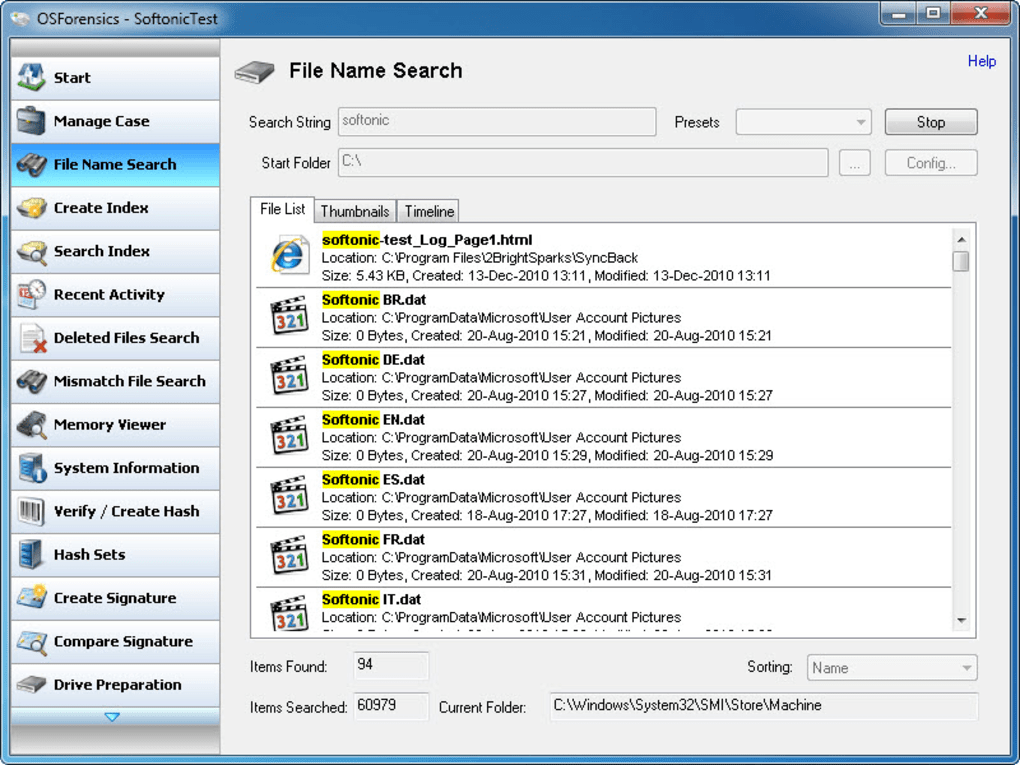
OSForensics boasts a clean and user-friendly interface. The left-hand menu bar provides easy access to the various tools categorized logically, making navigation intuitive and straightforward even for users unfamiliar with digital forensics software. This well-organized layout contrasts with some forensic tools that present an overwhelming array of options and functionalities, potentially confusing novice users. The simplicity of the interface contributes significantly to the overall user experience, allowing users to focus on their investigations rather than navigating complex menus.
While OSForensics prioritizes ease of use, it is important to note that a lack of comprehensive documentation could pose a challenge for users seeking detailed explanations of specific functionalities or advanced techniques. The software’s intuitive nature largely mitigates this limitation, but supplementary resources would significantly enhance the user experience and facilitate more in-depth analyses.
Core Functionalities and Features
OSForensics packs a wide array of digital forensic tools into its streamlined interface. Some key functionalities include:
-
File Search: The software allows users to conduct targeted searches for specific files based on criteria such as file name, extension, date modified, and content. This powerful search functionality is crucial for quickly locating relevant evidence within large datasets.
-
Deleted File Recovery: OSForensics efficiently recovers deleted files, even those that have been overwritten or fragmented. This capability is invaluable in recovering critical information that might otherwise be lost permanently.
-
Recent Activity Tracking: The software effectively tracks recent computer activity, providing insights into user actions, applications used, and websites visited. This feature is particularly useful for identifying suspicious activity or reconstructing timelines of events.
-
Report Generation: OSForensics generates comprehensive reports summarizing findings, including technical details about the computer and the investigation’s key insights. These reports are valuable for documenting evidence and presenting findings in a clear and organized manner, facilitating further investigation or legal proceedings.
-
USB Device Support: The software supports the installation and operation from a USB drive, making it highly portable and suitable for on-site investigations. This portability is particularly crucial for fieldwork, allowing investigators to access and analyze data remotely.
Performance and Stability
While OSForensics generally performs well, particularly in file searches and data recovery, some users have reported instability in certain tools. This inconsistency suggests potential areas for improvement in future versions. Such issues, though not pervasive, highlight the importance of software updates and ongoing development to address these sporadic problems and enhance overall stability and reliability. Regular updates addressing identified bugs and optimizing performance are crucial for maintaining user trust and ensuring the software remains a reliable tool for digital investigations.
Strengths and Weaknesses
Strengths:
- Comprehensive Toolset: OSForensics offers a diverse range of tools suitable for a wide spectrum of digital forensic investigations.
- User-Friendly Interface: The software’s intuitive interface simplifies the investigation process, especially for users lacking extensive digital forensics expertise.
- Portability: The ability to install and run the software from a USB drive enhances its flexibility and suitability for on-site investigations.
- Effective File Recovery: OSForensics demonstrates proficiency in recovering deleted files, a crucial functionality in many investigations.
- Report Generation: The software’s report generation capabilities aid in documenting and presenting findings clearly.
Weaknesses:
- Lack of Documentation: The absence of comprehensive documentation could prove challenging for users seeking detailed explanations of the software’s functionalities.
- Inconsistent Tool Stability: Some users have reported instability issues with certain tools within the software.
- Potential for False Positives: While not unique to OSForensics, the possibility of misidentifying benign files as malicious should be considered when interpreting results.
Conclusion
OSForensics presents a compelling solution for both novice and experienced users seeking a comprehensive digital forensics toolkit. Its strengths lie in its user-friendly interface, comprehensive range of tools, and effective file recovery capabilities. However, the lack of detailed documentation and reported inconsistencies in tool stability represent areas requiring attention. Despite these minor shortcomings, OSForensics remains a valuable tool for various investigative needs, providing a user-friendly yet powerful approach to digital forensics. Regular updates addressing reported bugs and enhancing the software’s stability would further solidify OSForensics’ position as a leading tool in the field of digital forensics.
File Information
- License: “Free”
- Latest update: “May 24, 2023”
- Platform: “Windows”
- OS: “Windows 11”
- Language: “English”
- Downloads: “8.5K”
- Size: “246.24 MB”


