
Oxelon Media Converter is a free Windows-based application designed for converting audio and video files between a wide range of formats. While it may not boast a visually stunning interface or a plethora of advanced features, its core strength lies in its speed, efficiency, and broad format support. This review delves into the strengths and weaknesses of Oxelon Media Converter, providing a comprehensive assessment for potential users.
Speed and Efficiency: A Core Strength
One of the most striking aspects of Oxelon Media Converter is its speed. The application consistently demonstrates rapid conversion times, even when handling multiple files simultaneously. This efficiency is a significant advantage over some competitors that struggle with large batches or complex conversions. This speed is not at the expense of quality, either. The output quality of the converted files is generally very good, making it a practical choice for users who need quick and reliable conversions without compromising on the fidelity of their media. The ability to process several files concurrently significantly enhances workflow, particularly beneficial for users dealing with substantial media libraries or regular batch conversions.
Format Support: Extensive Compatibility
Oxelon Media Converter supports a vast array of audio and video formats. While requiring the installation of additional plug-ins upon initial launch, this process ensures compatibility with almost any common media format. This broad compatibility eliminates the frustration of encountering unsupported files. The converter’s ability to handle both common and less-frequently used formats sets it apart from some competitors, providing users with a robust tool capable of converting files they may struggle with in other applications. This wide format compatibility is a cornerstone of Oxelon Media Converter’s appeal, significantly broadening its usability and making it a versatile tool for diverse media handling needs.
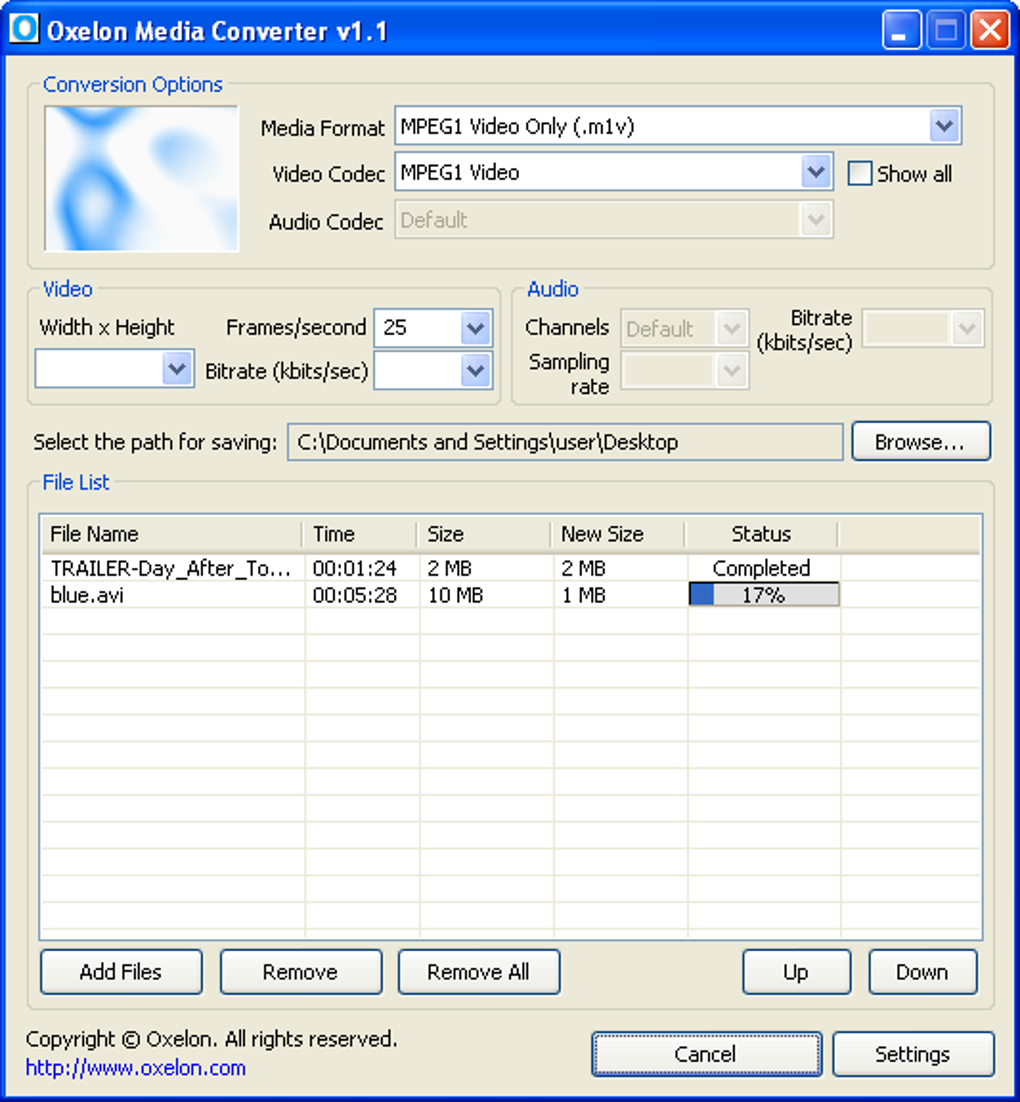
User Interface and Usability: Simplicity and Integration
The user interface of Oxelon Media Converter is deliberately simple. The straightforward design prioritizes ease of use, making it accessible even to users unfamiliar with media conversion software. The lack of extraneous features and options reduces complexity, allowing users to focus on the core functionality without being overwhelmed by intricate settings. Further enhancing its usability is its seamless integration with Windows Explorer. This allows users to initiate conversions simply by right-clicking on files and selecting the desired output format from a context menu. This streamlined workflow eliminates the need for navigating separate applications, significantly enhancing the overall convenience of the program.
Advanced Settings and Customization: Fine-tuning Conversions
While the interface is minimalistic, Oxelon Media Converter offers customization options for finer control over the conversion process. Users can adjust parameters such as resolution, bitrate, and frame rate for videos, and channels, sampling rate, and bitrate for audio. This degree of control is crucial for users who require specific output characteristics, ensuring they can tailor the conversions to their precise needs. Although the settings are not as extensive as those found in some professional-grade converters, they offer sufficient flexibility for most users. The availability of these adjustments ensures that the output files meet user expectations in terms of quality and file size.
Installation and Plugin Management: A Minor Inconvenience
The initial installation of Oxelon Media Converter necessitates the installation of several plug-ins to achieve its extensive format support. This minor inconvenience is a trade-off for the extensive compatibility that follows. Once the initial plug-ins are installed, the process is largely smooth and the added functionality is considerable. This requirement may be perceived as a slight drawback by some users, but the resulting comprehensive format support often outweighs this minor initial hurdle. Clear and concise instructions for plug-in installation would mitigate this concern further.
Potential Drawbacks and Considerations: Minor Issues
Despite its considerable strengths, Oxelon Media Converter has a few minor drawbacks. One criticism is that it opens the developer’s website upon closing the application. While this can be disabled within the program’s settings, it remains a minor annoyance for users who prefer a cleaner exit process. Another point of consideration is that some antivirus software may flag the program as potentially dangerous. This is often a false positive, but users should be aware of this possibility.
Comparison with Alternative Media Converters: A Competitive Landscape
The market offers several alternative media converters, each with its own set of features and strengths. Some notable competitors include Format Factory, Quick Media Converter, and aTube Catcher. These alternatives may offer additional features, such as built-in editing tools or more advanced conversion settings. However, Oxelon Media Converter often surpasses them in terms of sheer speed and efficiency. The choice between Oxelon and its competitors hinges on individual user needs and priorities. Users requiring advanced editing capabilities or a greater number of built-in features may favor alternatives, while those prioritizing speed and wide format compatibility might find Oxelon Media Converter a more effective solution.
User Reviews and Feedback: A Mixed Bag
User reviews of Oxelon Media Converter reveal a mixed bag of experiences. While many users praise its speed, ease of use, and comprehensive format support, some criticisms focus on the need for separate plug-ins and the appearance of the developer’s website upon closing. This disparity in feedback underscores the importance of considering individual needs and preferences when choosing a media converter. The feedback highlights the need for continuous development and improvements to the program, addressing some of the minor inconveniences reported by users.
Conclusion: A Solid Choice for Many Users
Oxelon Media Converter, despite its minor shortcomings, provides a solid and effective solution for users requiring a fast, efficient, and versatile media conversion tool. Its broad format support and simple interface make it an excellent choice for users of all technical skill levels. While it may lack some of the bells and whistles found in more sophisticated converters, its core strength lies in its speed and reliability. Users seeking a straightforward, fast, and highly compatible media converter will find Oxelon Media Converter a valuable asset. The program’s ease of use, coupled with its robust performance, makes it a strong contender in a crowded market. Its simplicity combined with its effectiveness positions it well for users seeking a practical and efficient solution to their media conversion needs. The occasional minor inconveniences are generally outweighed by its overall performance and usability, confirming its value as a dependable tool for efficient media conversion.
File Information
- License: “Free”
- Version: “1.1”
- Latest update: “October 30, 2009”
- Platform: “Windows”
- OS: “Windows 2000”
- Language: “English”
- Downloads: “206.8K”
- Size: “3.27 MB”


