
In the realm of digital document creation, crafting visually appealing and professionally structured materials often demands more than the basic functionalities offered by standard word processors like Microsoft Word. While graphic design powerhouses such as Adobe Photoshop or Illustrator excel in visual artistry, they aren’t inherently optimized for page layout and publication design, leading to a cumbersome workflow when integrating text, images, and complex layouts. This is where dedicated desktop publishing (DTP) software shines, providing a specialized environment for creating everything from brochures and flyers to magazines and books. Among the pioneers in this field, Serif PagePlus has long offered a robust solution, and its Starter Edition presents an intriguing, lightweight alternative for those dipping their toes into the world of professional document design.
The Serif PagePlus Starter Edition, specifically version 2.0.2, positions itself as a free entry point into desktop publishing, aiming to equip users with the fundamental tools needed to produce high-quality documents without the steep learning curve or significant investment often associated with premium software. While often compared to the industry juggernaut, Microsoft Publisher, the Starter Edition strives to deliver a user-friendly experience, making professional-looking documents accessible to a broader audience. This article delves into the nuances of Serif PagePlus Starter Edition, exploring its features, usability, strengths, and limitations, and ultimately helps determine if it’s the right tool for your document publishing needs.
Understanding Serif PagePlus Starter Edition
Serif PagePlus Starter Edition is designed to bridge the gap between simple word processing and complex graphic design. It’s built for individuals and small organizations who need to create polished documents that stand out, without requiring an in-depth understanding of professional design principles or a hefty budget for software. The application is a testament to the idea that effective communication often relies on well-presented content, and DTP software empowers users to control every aspect of their page layout.
The Core Promise of Desktop Publishing
Desktop publishing software fundamentally changes how documents are created. Instead of focusing solely on text content, DTP tools allow users to treat each page as a canvas, where text, images, shapes, and other graphical elements can be precisely placed, resized, and manipulated. This granular control is essential for creating:
- Marketing Materials: Brochures, flyers, advertisements, business cards, posters.
- Informational Documents: Newsletters, reports, manuals, annual reports.
- Personal Projects: Invitations, greeting cards, résumés, calendars.
- Educational Content: Worksheets, handouts, presentations.
Serif PagePlus Starter Edition aims to provide these capabilities in a streamlined package. It offers a structured environment where users can start with a blank page or leverage pre-designed templates to jumpstart their creative process. The emphasis is on ease of use, making complex layout tasks manageable for beginners, while still offering enough control to achieve a professional aesthetic. However, it’s important to remember that as a “Starter Edition,” it provides a taste of the full PagePlus experience, with certain advanced functionalities reserved for the paid versions.
Navigating the Initial Experience: Installation and Interface
The journey with any new software begins with its installation and first encounter with its user interface. Serif PagePlus Starter Edition has a relatively straightforward setup, but its interface, while familiar to some, can initially seem a bit daunting for newcomers to DTP.
Streamlined Setup with Minor Hurdles
The installation process for Serif PagePlus Starter Edition is generally user-friendly. Users simply download the installer file, typically a compact 93.48 MB, and execute it on their Windows system (it’s specifically designed for Windows, including Windows 7 and later). The steps are guided, leading you through the necessary configurations.
One minor point of friction noted by users is the reminder during installation that a system restart might be required. Interestingly, for a first-time installation, this restart is often not necessary; users can opt to proceed without it and experience no issues. This small detail can save valuable time and prevent unnecessary interruptions.
A more significant hurdle, however, is the registration process. Before full access is granted, users are prompted to input a registration number. While registration is a common practice for many software titles, the necessity to obtain a specific number from a website merely adds an extra, seemingly unnecessary step to the initial setup. This can feel like an artificial barrier, especially for a “free” Starter Edition, and might deter some users from immediately diving into the program. Despite this, once these initial steps are completed, the program launches without further major installation-related issues.
A Familiar Yet Potentially Intimidating Workspace
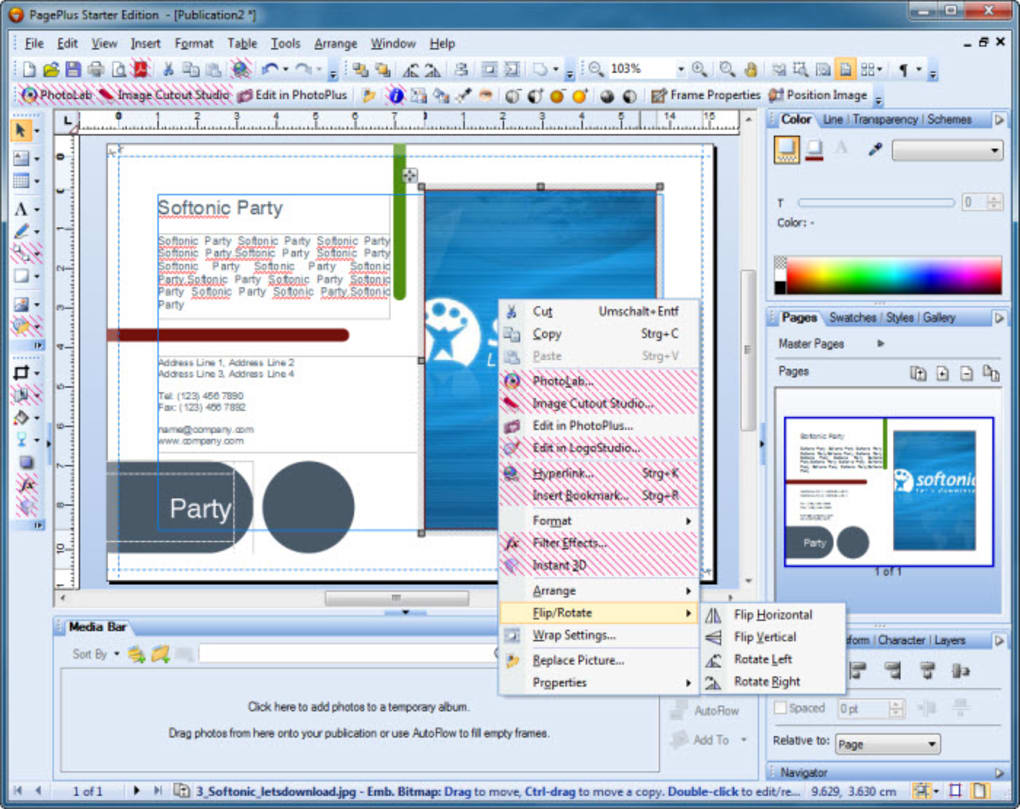
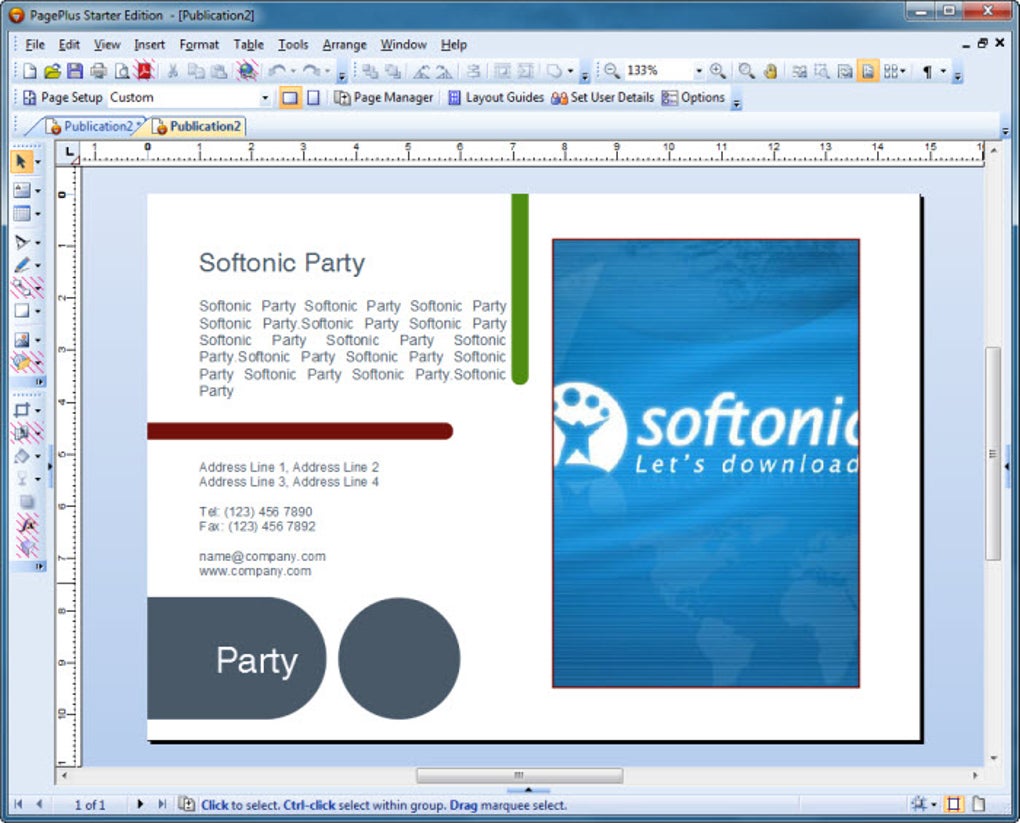
Upon opening Serif PagePlus Starter Edition, users are greeted with an interface that strikes a balance between functionality and a professional aesthetic. For those accustomed to graphic design software like Adobe Photoshop, the layout will feel remarkably familiar, which is a significant advantage. This familiarity extends to the overall arrangement of tools and panels, reducing the initial learning curve for a segment of the user base.
The central part of the workspace is dominated by the blank document, clearly displaying the bleed area with distinct blue lines – a crucial feature for professional printing, indicating where the design extends beyond the trim edge to prevent white margins after cutting. Ruler bars are prominently featured along the top and left sides, enabling precise measurement and alignment of elements, which is fundamental to good page layout.
On the left side of the screen, a vertical toolbar houses the primary creation and manipulation tools, echoing the arrangement found in many image editing applications. This consistent placement makes it intuitive to locate common functions. The right-hand side of the interface features a dynamic panel, which is context-sensitive, displaying various properties and options that users can configure as they create and edit their documents. This panel acts as a control center, allowing for granular adjustments to selected elements.
While the interface is intuitive for those with prior design software experience, it can still appear “intimidating and difficult to understand at first” for absolute beginners. The sheer number of icons, menus, and panels can be overwhelming without proper guidance or tooltips (a notable absence in the Starter Edition). However, with a bit of exploration and experimentation, the logical organization of the workspace gradually becomes apparent, revealing a powerful environment for desktop publishing.
A Closer Look at Tools and Capabilities
The true value of any DTP software lies in its toolkit – the array of features it provides for content creation, layout, and refinement. Serif PagePlus Starter Edition, despite being a free version, offers a respectable set of tools and property controls that cover the essentials of desktop publishing.
Essential Tools for Creative Control
The left-hand toolbar of PagePlus Starter Edition houses the fundamental instruments necessary for document design. These include:
- Selection Tool: The ubiquitous arrow icon, indispensable for selecting, moving, resizing, and rotating objects on the page. It’s the primary means of interacting with elements.
- Crop Tool: Allows users to precisely trim images or other graphical elements, focusing on specific parts and enhancing visual composition.
- Text Tool: Essential for adding and editing text. This tool activates text frames, enabling users to type, format, and flow text within defined boundaries.
- Fill Tool: Used to apply colors, gradients, or patterns to shapes and objects, bringing visual vibrancy to the design.
Beyond these absolute essentials, PagePlus Starter Edition introduces tools that are particularly relevant and necessary for effective publishing:
- Text Frames: A cornerstone of DTP, text frames allow text to be contained, linked, and flowed across multiple columns or pages. This provides immense control over typography and layout, ensuring text reflows correctly when changes are made.
- Transparency: A powerful visual effect, this tool enables objects to be made partially see-through, allowing underlying elements to show through. This can be used to create depth, subtle overlays, or stylistic visual effects.
- Shadow: Used to add drop shadows or other shadow effects to text or objects, giving them a sense of depth and making them stand out from the background. This can greatly enhance the perceived professionalism of a document.
- Tables: For organizing data clearly, the table tool allows users to create structured grids of rows and columns, essential for presenting numerical information, schedules, or comparisons in an orderly fashion.
While the Starter Edition provides these core tools, it’s worth noting that the full, paid version of PagePlus typically offers a much broader array of advanced features, including more sophisticated drawing tools, image editing capabilities, and pre-press controls. However, for fundamental document creation, the Starter Edition’s suite is quite capable.
Comprehensive Property Management
Complementing the creation tools, the right-hand panel in PagePlus Starter Edition serves as a comprehensive control center for fine-tuning the properties of selected elements. This panel is dynamically updated based on what the user has selected, offering relevant configuration options:
- Color, Line, Transparency, and Schemes: Users can adjust the fill color of shapes, the stroke color and thickness of lines, and the overall transparency of objects. The “Schemes” option might allow for quick application of predefined color palettes, ensuring consistency throughout the document.
- Navigation Window: This is particularly useful for multi-page documents, allowing users to quickly jump between pages, manage page order, and view thumbnails of their entire publication.
- Swatch Window: Provides a palette of colors, often including document-specific colors, allowing for easy and consistent application of hues across the design.
- Styles Window: A critical feature for maintaining consistency in typography and object formatting. Users can define and apply paragraph styles (e.g., Heading 1, Body Text) and object styles, ensuring uniform appearance and making global changes effortless.
- Gallery Window: Likely contains pre-designed elements, graphics, or layout snippets that users can drag and drop into their documents, accelerating the design process and offering inspiration.
- Alignment, Characters, and Layers Windows: These granular controls are vital for precision:
- Alignment: Tools for aligning selected objects relative to each other or to the page (e.g., align left, center, distribute evenly).
- Characters: Detailed typographic controls, including font selection, size, leading (line spacing), kerning (space between specific letter pairs), tracking (overall character spacing), and other text attributes.
- Layers: A powerful feature, familiar from graphic design software, allowing users to organize elements into different layers. This helps manage complex layouts, making it easier to select, edit, and hide groups of objects without affecting others.
The combination of these tools and property controls empowers users to move beyond simple text entry to sophisticated page layout, allowing for the creation of documents with a high degree of visual polish and structural integrity. For a free application, this level of control is commendable and enables users to grasp the core concepts of professional desktop publishing.
Serif PagePlus Starter Edition vs. Microsoft Publisher: A Comparative Analysis
When discussing desktop publishing software, Microsoft Publisher inevitably enters the conversation as a dominant force. Serif PagePlus Starter Edition, while a valiant effort, stands in its shadow. The key question is: can a free starter edition truly compete with a mature, widely adopted paid solution?
The Starter Edition’s Position in the DTP Landscape
The direct assessment from the reference content is quite clear: “Is PagePlus a good alternative to Microsoft Publisher? Well, it is AN alternative, but not a very good one.” This frank evaluation highlights the fundamental limitation of the Starter Edition – its feature set is intentionally curtailed to encourage an upgrade to the full paid version of PagePlus.
Microsoft Publisher, as part of the Microsoft Office suite, benefits from deep integration with other Microsoft products and a long history of development, offering a comprehensive array of templates, advanced layout features, mail merge capabilities, and robust pre-press options. It’s designed for users who frequently and professionally engage in document design, demanding a full-fledged solution.
The Starter Edition, on the other hand, serves as an introductory product. It allows users to perform basic DTP tasks, create decent-looking documents, and familiarize themselves with the workflow. However, when faced with more complex projects, specific design requirements, or the need for advanced functionalities (which are “limited to the paid version” or “disabled” in the Starter Edition), its limitations become apparent. For instance, the inability to open files other than PagePlus’s native format could be a significant drawback in a collaborative environment or when working with external designers.
Weighing the Pros and Cons
To provide a balanced perspective, let’s elaborate on the identified pros and cons of Serif PagePlus Starter Edition:
Pros:
- Lightweight: At just 93.48 MB, the installer is small, and the program itself runs efficiently without being a “resource hog.” This makes it suitable for older machines or systems with limited resources, a definite advantage over more demanding design software.
- Familiar Interface: As noted, users of Photoshop or similar graphic design applications will find the interface intuitive. This significantly reduces the learning curve for those with prior experience in visual software, allowing them to quickly adapt to PagePlus’s layout.
- Easy Installation: Beyond the minor registration step, the installation process is quick and straightforward, getting users up and running with minimal fuss.
- Provides Templates at Startup: Offering templates right from the start is an excellent feature for beginners. It provides a starting point, inspiration, and demonstrates the program’s capabilities, making it easier for users to begin their projects without having to design from scratch.
- Free to Use: The most compelling advantage is its cost. As a free program, it provides a valuable entry point into desktop publishing without financial commitment, allowing users to explore and learn without risk. A user review on PhanMemFree.org highlights this: “Great free program even if the advanced features are hobbled.. You get a more-than-decent desktop publishing program for free. What more could you ask?”
Cons:
- Difficult to Learn (for absolute beginners): Despite the “familiar interface” for some, absolute novices to design software might find the array of tools and panels overwhelming, especially in the absence of comprehensive in-app tutorials or tooltips.
- No Tooltips: This is a significant drawback. Tooltips (small pop-up descriptions that appear when hovering over an icon) are crucial for helping new users understand the function of each button and feature. Their absence increases the learning curve and can lead to frustration.
- Must Register Before Use: The mandatory registration step, requiring users to obtain a specific number from a website, is an unnecessary friction point that complicates the initial user experience.
- Can Only Open PagePlus Files: This limitation means the Starter Edition cannot open or work with files from other DTP software (like Microsoft Publisher or Adobe InDesign), nor can it typically handle more universal formats like PDF for editing. This restricts its utility in collaborative workflows or when needing to revise documents created elsewhere.
- Limited Features / “Hobbled” Advanced Features: As a Starter Edition, many powerful functionalities are either disabled or absent, making it unsuitable for professional, high-end publishing tasks. This restriction is the primary reason it’s deemed “not a very good alternative” to full-featured DTP suites. The user review aptly calls it a “teaser.”
Considering these points, the advice from PhanMemFree.org rings true: if document design and publishing are frequent and professional requirements, investing in Microsoft Publisher (or the full version of Serif PagePlus) would be a more prudent choice. The cost of Publisher is offset by its robust capabilities, extensive feature set, and broader compatibility. However, for less demanding, occasional, or budget-constrained use cases, the Starter Edition holds its own.
Who is Serif PagePlus Starter Edition For?
Understanding the target audience for Serif PagePlus Starter Edition is crucial for making an informed decision about its suitability. It’s not a one-size-fits-all solution, but rather a specialized tool for specific user demographics and scenarios.
Ideal Users and Practical Applications
The limitations of the Starter Edition, particularly its “hobbled” advanced features and the “teaser” nature mentioned by users, define its ideal user base. It’s primarily suited for:
- Non-profits and Small Businesses on a Budget: For organizations with limited financial resources, the ability to create professional-looking documents at no cost is a huge advantage. They might need to design flyers for events, simple newsletters, or basic reports without the funds for expensive software licenses. As one PhanMemFree.org reviewer noted, “Give it a try for non-profits or small business; you’ll be glad you did.”
- Students and Educators: For academic projects, club advertisements, or classroom materials, the Starter Edition offers sufficient tools to create visually engaging content without needing to purchase costly software.
- Individuals with Occasional DTP Needs: If you only need to create a brochure a few times a year, design a personal invitation, or craft a custom calendar, the Starter Edition provides the necessary functionalities without overcomplicating things or demanding a financial outlay.
- Beginners Exploring Desktop Publishing: For anyone curious about DTP and wanting to learn the basics of page layout, typography, and graphic integration, the Starter Edition serves as an excellent, risk-free learning platform. It allows users to experiment and understand the workflow before committing to more advanced or paid solutions.
- Users with Resource-Limited Systems: Its lightweight nature means it can run effectively on older computers or those with less RAM, making it accessible where heavier software might struggle.
In these contexts, the “more-than-decent” capabilities of the Starter Edition are often sufficient. Users can still produce “very nice looking document[s] at no cost,” which is a significant payoff for those willing to invest a little time in learning the interface.
Beyond the Starter Edition: The Path to Professional Publishing
One of the clever aspects of the Serif PagePlus Starter Edition, as highlighted by a user review, is its role as a “teaser.” It’s designed to give users a taste of what’s possible, familiarizing them with the Serif PagePlus ecosystem. “Once you see how easy it is to learn and use, you’ll want to pay for it, especially for non-profits or small business.” This suggests a natural upgrade path.
If a user finds themselves frequently pushing the boundaries of the Starter Edition, needing more advanced features like sophisticated color management, pre-press checks, broader file format compatibility, or professional-grade templates, then upgrading to the full version of Serif PagePlus (or considering other professional DTP software like Microsoft Publisher or Adobe InDesign) becomes a logical next step. The investment in learning the Starter Edition is not wasted, as the core interface and workflow principles carry over to the more advanced versions. This strategy allows users to grow with the software, making an informed decision about investment only when their needs surpass the free offering.
Technical Details and Ecosystem
Beyond its features and usability, understanding the technical specifications and how Serif PagePlus Starter Edition fits into the broader software landscape is important.
System Requirements and Support
The Serif PagePlus Starter Edition (version 2.0.2) was last updated on November 2, 2020. It is specifically designed for the Windows platform, supporting Windows 7 and subsequent versions. The application is available in English, with installers also available for various other languages, indicating its global reach. Its relatively small size of 93.48 MB makes it a quick download and easy on system resources, reinforcing its “lightweight” advantage. Developed by Serif, a company known for its suite of creative software, it benefits from a lineage of design-focused applications. On PhanMemFree.org, it has garnered over 60.9K downloads, with 91 downloads in the last month alone, indicating continued, albeit niche, interest.
Exploring Alternatives in Desktop Publishing
While Serif PagePlus Starter Edition carves out its niche, the desktop publishing landscape is populated by numerous alternatives, both free and paid, which users might consider depending on their specific needs:
- Scribus (3.5 Free): Often touted as the best open-source desktop publishing application, Scribus offers a professional-grade feature set, including CMYK color, robust PDF export, and extensive layout tools. It has a steeper learning curve than PagePlus Starter Edition but provides far more power and flexibility without cost.
- Serif DrawPlus Starter Edition (3.1 Free): From the same developer, DrawPlus is a free graphics and design application. While not a DTP tool itself, its vector drawing capabilities can complement PagePlus for creating custom graphics.
- Serif CraftArtist Compact (2.9 Free): Another Serif offering, focusing on digital paper crafts. It caters to a more niche, creative DIY audience, rather than traditional document publishing.
- Microsoft Publisher (Paid): The benchmark for entry-level DTP for many Windows users, offering a comprehensive set of features, ease of use (especially for Office users), and broad template support.
- Adobe InDesign (Paid): The professional industry standard for DTP, offering unparalleled power, precision, and integration with the Adobe Creative Cloud ecosystem. Best for advanced users and large-scale projects.
The availability of these alternatives means users have choices depending on their budget, desired feature set, and willingness to learn. Serif PagePlus Starter Edition serves as an excellent starting point, but exploring these other options might be necessary as design requirements evolve.
Conclusion: Making an Informed Choice
Serif PagePlus Starter Edition 2.0.2 presents a compelling proposition for individuals and small entities seeking a free, lightweight solution for desktop publishing. It skillfully balances accessibility with a respectable feature set, enabling users to create visually appealing documents without a financial investment. Its familiar interface, quick installation, and availability of templates make it an attractive option for beginners and those with occasional DTP needs.
However, its limitations are equally clear. The mandatory registration, absence of tooltips, restricted file compatibility, and the intentional hobbling of advanced features position it as a “teaser” for the full Serif PagePlus product, rather than a direct competitor to robust solutions like Microsoft Publisher for professional, frequent use. For users who envision a future of extensive and complex document design, investing in a more powerful, paid DTP application from the outset might prove more efficient in the long run.
Ultimately, the decision to use Serif PagePlus Starter Edition hinges on your specific requirements. If you’re a non-profit, a small business with budget constraints, a student, or simply someone looking to dip your toes into desktop publishing without commitment, this free software from PhanMemFree.org is an excellent starting point. It offers a valuable opportunity to learn the ropes of page layout and create respectable documents. But if your ambitions stretch to professional-grade publications, intricate layouts, and seamless collaboration, it’s a solid foundation that will likely lead you to explore the full version of Serif PagePlus or other industry-standard tools. It’s a capable tool for what it offers, and for the price of free, it’s hard to argue with its value as an introduction to the world of digital publishing.
File Information
- License: “Free”
- Version: “2.0.2”
- Latest update: “November 2, 2020”
- Platform: “Windows”
- OS: “Windows 7”
- Language: “English”
- Downloads: “60.9K”
- Size: “93.48 MB”


