
PaintStar is a free digital image processing software designed for Windows operating systems. While not as widely known as industry giants like Adobe Photoshop or GIMP, it offers a surprising array of features suitable for a range of image manipulation tasks, making it a compelling option for both casual users and those seeking a lightweight alternative to more demanding professional tools. This review explores PaintStar’s capabilities, limitations, and overall usability, comparing it to similar software and assessing its place in the crowded digital image editing landscape.
Core Features and Functionality
PaintStar distinguishes itself through its versatility. It’s not solely focused on one aspect of image editing, but rather incorporates a diverse toolkit encompassing several key functionalities. These include:
-
Image Retouching: PaintStar provides the essential tools for basic image retouching, allowing users to correct blemishes, adjust brightness and contrast, and remove unwanted elements from photographs. While not possessing the advanced AI-powered features found in more modern software, its tools are adequate for general retouching needs.
-
Image Composition and Authoring: The software facilitates creating composite images by layering multiple images. This feature, combined with the availability of various blending modes and opacity controls, empowers users to create complex and visually interesting compositions. The intuitive layer management system contributes significantly to a smooth workflow.
-
Image Morphing and Warping: A standout feature of PaintStar is its inclusion of image morphing tools. This allows for the creation of seamless transitions between two or more images, resulting in dynamic and often surreal visual effects. This capability elevates PaintStar beyond basic image editing software and into the realm of more specialized applications. The ease of use in this area is particularly noteworthy.
-
Screen Capture: PaintStar integrates a screen capture utility, enabling users to quickly and easily capture screenshots of their desktop or selected windows. This feature proves particularly useful for tutorials, documentation, or simply grabbing a quick image of information displayed onscreen. This streamlined integration enhances the software’s overall utility.
-
Windows Explorer Integration: Perhaps the most unique aspect of PaintStar is its integration with Windows Explorer. Users can view image thumbnails directly within the file explorer context menu, offering a convenient way to preview images without opening the application itself. This enhancement contributes to increased efficiency for users who frequently browse and manage image files.
-
Support for Common Editing Techniques: PaintStar supports fundamental editing techniques such as alpha channels, layers, and paths. This ensures compatibility with standard image editing workflows and allows users to leverage their existing skills and knowledge effectively. The software’s handling of these techniques is straightforward and reliable.
Toolset and Interface
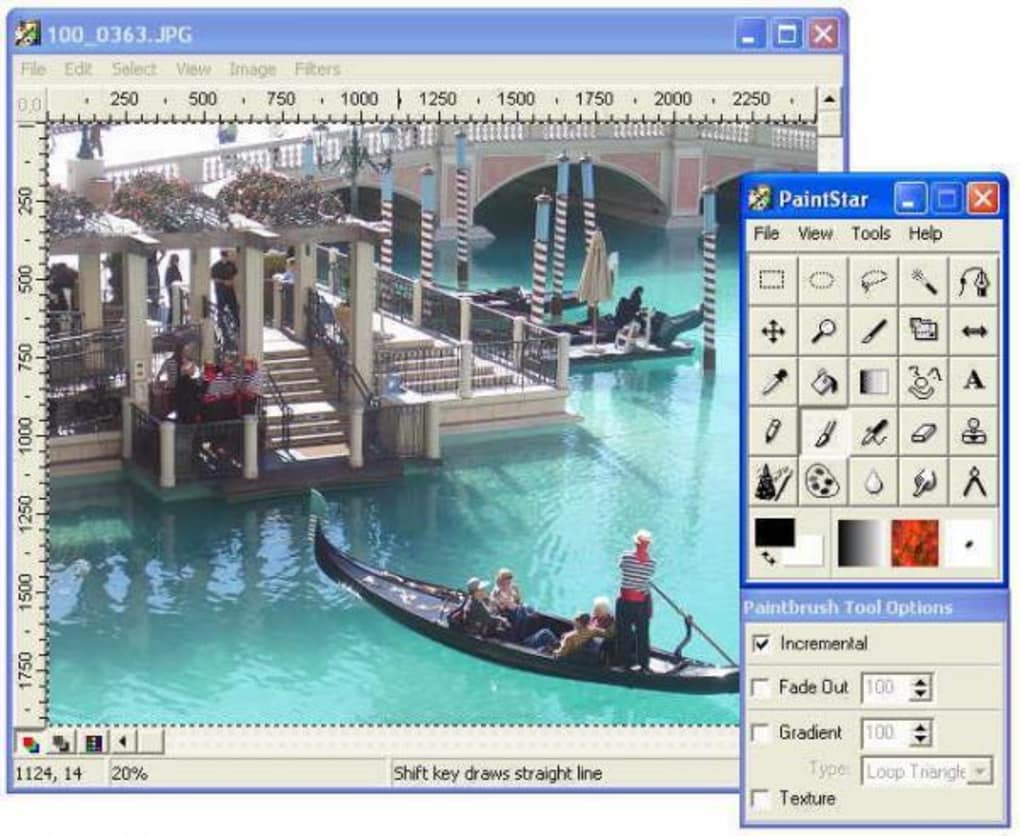
PaintStar’s interface is relatively straightforward and intuitive, despite its age. While it may not boast the sleek, modern design of newer software, its layout is logical and easy to navigate. Users familiar with other image editing applications will quickly adapt to PaintStar’s workflow.
The toolset is comprehensive for a free program, offering a good selection of brushes, selection tools, filters, and adjustment layers. While the selection of advanced filters might be limited when compared to professional-grade software, the included filters provide sufficient functionality for most typical editing tasks. The brush engine is responsive and allows for precise control over line thickness, opacity, and blending modes.
The layer management system, while not as feature-rich as some competitors, operates reliably and efficiently. Users can easily add, delete, rearrange, and adjust the opacity of layers, offering a sufficient level of control for creating complex image compositions. The support for alpha channels further enhances the flexibility for creating intricate layered images.
Performance and System Requirements
PaintStar’s performance is generally good, particularly considering its relatively modest system requirements. It operates smoothly on most Windows systems, even older machines, without significant lag or slowdown, even when working with larger images. This efficiency is a significant advantage for users with less powerful hardware.
The software’s small file size is also a considerable asset, requiring minimal disk space and quick installation. This contrasts favorably with many modern image editing applications, which often demand substantial storage space.
Comparison to Other Image Editors
Compared to other free image editors like GIMP, Paint.NET, or Photopea, PaintStar holds its own in several areas. While it lacks the extensive feature set and advanced functionalities of GIMP, it excels in its ease of use and specific features like image morphing and Windows Explorer integration. Paint.NET, while also user-friendly, lacks the image morphing capabilities, making PaintStar a unique choice for users requiring that specific functionality. Photopea, being a web-based application, may not offer the same level of offline functionality and potentially face performance limitations depending on internet connection speeds.

Compared to commercial software like Adobe Photoshop, PaintStar is obviously more limited in its advanced features. Photoshop provides far superior tools for professional-grade image manipulation and advanced retouching, but comes with a significant cost. PaintStar offers a valuable, free alternative for those who don’t need the full power of professional-level software.
Limitations and Areas for Improvement
Despite its strengths, PaintStar has limitations. Its interface, while functional, shows its age and could benefit from a visual refresh. The lack of support for newer image formats might pose a minor inconvenience for users working with less common file types. The absence of more advanced features, such as advanced selection tools, cloning, or more sophisticated filters, limits its potential for highly complex image editing tasks.
Furthermore, the lack of recent updates since 2009 suggests the software may not be actively maintained or updated with the latest security patches and performance enhancements. This raises concerns regarding compatibility with modern operating systems and potential security vulnerabilities. The absence of an active community forum or dedicated support resources can be a hurdle for users encountering issues or needing assistance.
Conclusion
PaintStar offers a compelling blend of versatility and user-friendliness within the realm of free image editing software. Its unique features like image morphing and Windows Explorer integration set it apart. However, its age and lack of recent updates are significant drawbacks. While suitable for many basic to intermediate image editing tasks and offering a convenient and lightweight option, users seeking professional-level tools or advanced functionalities should consider more contemporary alternatives. Users who appreciate its unique features and are comfortable with its limitations may find PaintStar a valuable tool in their digital image editing workflow. The software’s biggest strength lies in its niche capabilities, making it a viable choice for specific tasks rather than a universal replacement for more powerful and up-to-date options. Its value proposition is primarily its ease of use combined with its unique features, not a comprehensive feature set, making it a perfect tool for users with specific needs rather than a one-size-fits-all solution.
File Information
- License: “Free”
- Version: “2.70”
- Latest update: “February 17, 2009”
- Platform: “Windows”
- OS: “Windows 98”
- Language: “English”
- Downloads: “177.2K”
- Size: “2.70 MB”


