
Panda Free Antivirus is a free, cloud-based antivirus solution designed to protect Windows PCs from various online threats, including malware, spyware, and ransomware. While offering a streamlined and lightweight experience, it packs a surprising number of features beyond basic virus scanning, making it a compelling option for users seeking robust, yet resource-friendly security. This review delves into the software’s key features, performance, ease of use, and overall effectiveness, comparing it to its competitors and exploring its strengths and weaknesses.
Core Features and Functionality
Panda Free Antivirus’s strength lies in its simplicity and effectiveness. It leverages cloud technology to minimize its impact on system resources while maintaining a high level of protection. Key features include:
-
Real-time Scanning: The core of Panda Free Antivirus is its real-time scanning engine. Unlike traditional antivirus programs that rely heavily on local processing, Panda utilizes cloud-based scanning, significantly reducing the burden on the user’s CPU and memory. This constant monitoring detects and removes threats as they emerge, preventing them from infecting the system. This cloud-based approach ensures that the virus definitions are always up-to-date, eliminating the need for frequent manual updates.
-
Malware and Spyware Protection: Panda Free Antivirus effectively tackles a wide range of malware and spyware. Its robust engine combines signature-based detection with heuristic analysis and behavioral monitoring to identify and neutralize both known and unknown threats. The software’s proactive approach helps prevent infections even from emerging malware variants.
-
USB Protection: A crucial feature often overlooked in free antivirus solutions, Panda Free Antivirus includes automatic scanning of USB drives upon connection. This simple yet effective precaution prevents the introduction of malware via removable media, a common infection vector. The software checks the contents of the drive before allowing access, ensuring that any potential threats are neutralized before they can compromise the system.
-
Customizable Security Settings: While designed for ease of use, Panda Free Antivirus allows users to customize their security settings to match their specific needs and preferences. This flexibility caters to both casual users who prefer a hands-off approach and more technically inclined individuals who want more granular control over the software’s behavior. Users can schedule scans, adjust notification settings, and fine-tune the gaming mode for optimal performance.
-
Integrated VPN: A notable differentiator among free antivirus programs, Panda Free Antivirus includes a built-in VPN with a daily data allowance of 150 MB. While this is a limited amount compared to premium VPN services, it’s sufficient for occasional use, providing an added layer of privacy when browsing sensitive information online. This inclusion adds value to the package, enhancing the user experience beyond basic antivirus functionality.
-
Process Monitor: For more advanced users, the process monitor provides real-time visibility into the behavior of active processes on the PC. This functionality helps identify potentially suspicious activities and allows users to proactively investigate and address any concerns about malicious processes running in the background. This tool is particularly useful for identifying resource-intensive or unexpected processes that could indicate a malware infection.
-
Dark Web Scanner: Panda Free Antivirus offers a unique feature that scans the dark web for instances of the user’s email address. While this doesn’t offer direct protection against malicious activity, it provides valuable information regarding potential data breaches, allowing users to take proactive measures to secure their accounts and protect sensitive information. This functionality acts as an early warning system for potential security risks.
Performance and System Impact
A key advantage of Panda Free Antivirus is its minimal impact on system performance. The cloud-based architecture significantly reduces the processing load on the user’s computer, ensuring that the antivirus doesn’t slow down their daily tasks or gaming sessions. Independent tests have shown that Panda Free Antivirus consistently maintains a low resource footprint, making it ideal for older or lower-spec PCs that might struggle with more resource-intensive antivirus solutions. This low overhead doesn’t compromise the software’s detection capabilities, demonstrating the efficiency of its cloud-based approach. The lightweight nature makes it an excellent choice for users who prioritize system performance without sacrificing security.
Ease of Use and User Interface
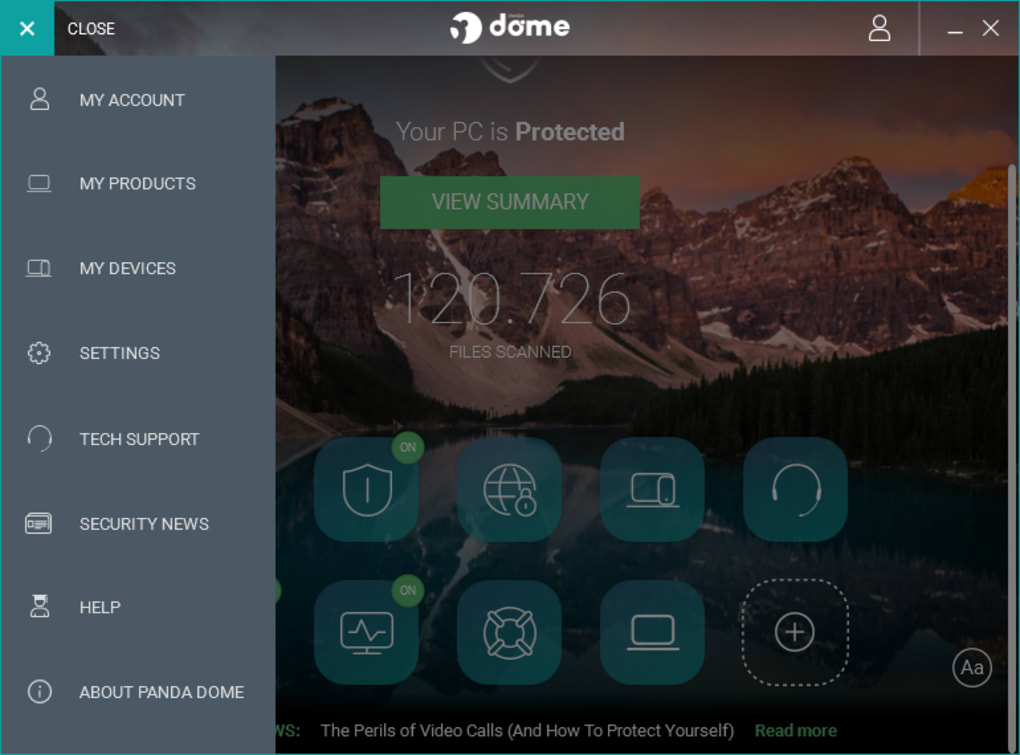
Panda Free Antivirus boasts a remarkably intuitive and user-friendly interface. Even users with minimal technical experience will find the software easy to navigate and configure. The streamlined design avoids overwhelming users with complex settings, providing a clear and straightforward experience. Installation is straightforward, and the primary functionalities are easily accessible, allowing users to quickly initiate scans and manage settings with minimal effort. The clean design and simple navigation contribute significantly to the user experience, making Panda Free Antivirus an accessible choice for a wide range of users.
Comparison with Alternatives
Compared to other free antivirus solutions such as Avast Free Antivirus and AVG AntiVirus Free, Panda Free Antivirus holds its own. While Avast and AVG offer similar features like real-time protection and malware scanning, Panda distinguishes itself with its integrated VPN and lighter system footprint. This makes it an appealing option for users prioritizing minimal system resource usage and a degree of online privacy. The included VPN, while limited in data, adds a layer of functionality not commonly found in comparable free antivirus programs.
Panda Dome Essential, a subscription-based version of the software, provides enhanced features and increased data limits for the VPN. However, Panda Free Antivirus stands as a worthy contender within the realm of free antivirus software, offering a balanced combination of protection and ease of use. The strategic use of cloud technology enhances its efficiency, positioning it favorably against similar offerings in the market.
Conclusion: Is Panda Free Antivirus Worth It?
Panda Free Antivirus provides a solid foundation of antivirus protection for Windows users seeking a reliable, lightweight, and free solution. Its cloud-based architecture minimizes its impact on system performance while maintaining robust detection capabilities. The inclusion of extra features such as the free VPN, USB protection, and process monitor adds substantial value, exceeding the basic expectations of free antivirus software. While it might not offer the breadth of features found in premium antivirus suites, Panda Free Antivirus successfully balances security, performance, and usability, proving to be a worthy and effective choice for users seeking a reliable, no-cost security solution. Its simplicity and effectiveness make it a strong recommendation for those seeking uncomplicated protection without sacrificing their system’s resources.
File Information
- License: “Free”
- Latest update: “April 11, 2025”
- Platform: “Windows”
- OS: “Windows 8.1”
- Language: “English”
- Downloads: “1.6M”
- Size: “3.37 MB”


