PaperScan Free Edition is a versatile and user-friendly document scanning utility designed for Windows operating systems. This free software offers a surprising array of features, making it a compelling option for users who need a straightforward and efficient way to digitize paper documents without the cost of a premium scanning application. While lacking some of the advanced capabilities of its paid counterparts, the free edition provides a solid foundation for basic scanning, editing, and OCR (Optical Character Recognition) needs. This review will delve into its functionality, advantages, disadvantages, and overall user experience.
Key Features and Functionality
PaperScan Free Edition stands out for its broad compatibility with various scanners. Unlike many scanning applications that are tailored to specific scanner models or communication protocols (TWAIN or WIA), PaperScan boasts compatibility with a wide range of devices, including flatbed scanners, document feeders, network scanners, and even cameras equipped with image acquisition capabilities. This universal compatibility makes it an ideal solution for users with older scanners or those who need to manage multiple scanners under a single software umbrella.
The software provides a user-friendly interface that simplifies the scanning process. Users can easily initiate scans, adjust settings (such as resolution, color mode, and file type), and preview the scanned image before saving. The batch scanning feature is particularly helpful for handling multiple documents efficiently, streamlining the workflow for high-volume digitization tasks.
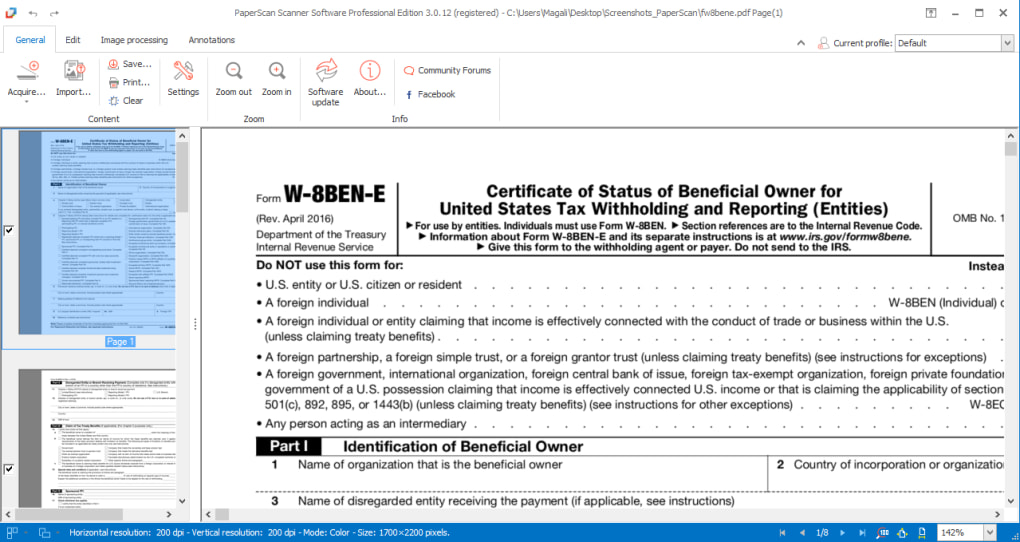
One of the most valuable features of PaperScan Free Edition is its built-in Optical Character Recognition (OCR) functionality. This allows users to convert scanned documents into editable text files, eliminating the need for manual transcription. While OCR accuracy can vary depending on the quality of the scan and the complexity of the document, PaperScan’s OCR engine generally provides satisfactory results for standard documents. This text conversion capability expands the utility of the software beyond mere image capture, transforming it into a tool for document management and data extraction.
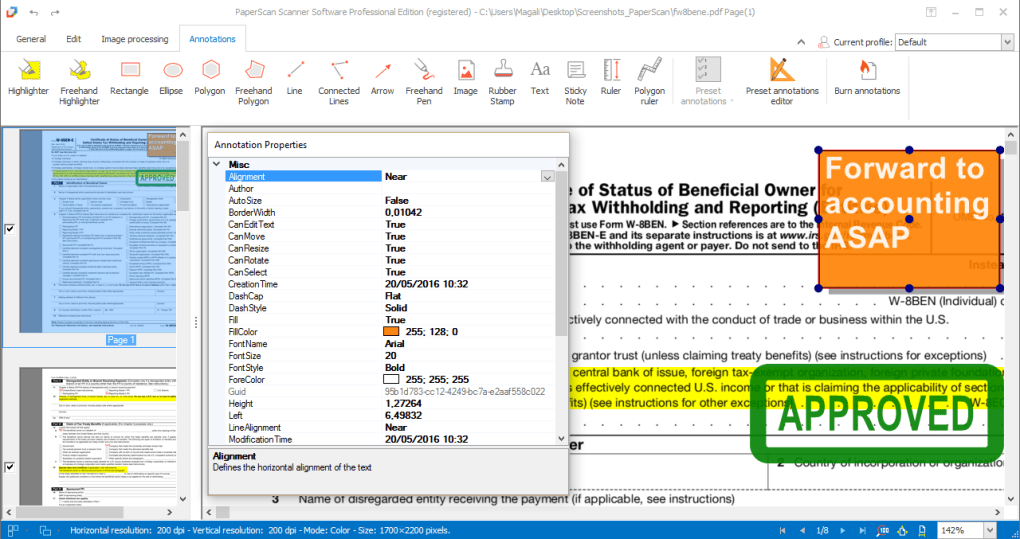
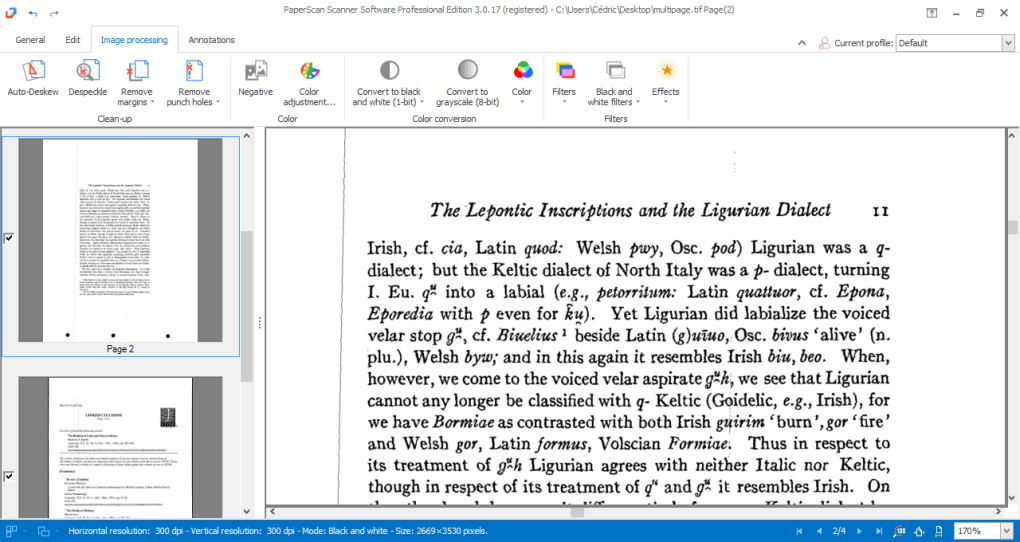
Beyond the core scanning and OCR functionality, PaperScan Free Edition provides a suite of basic image editing tools. These tools allow users to perform essential image adjustments such as cropping, rotating, and color correction. While not as comprehensive as dedicated image editing software, these features suffice for minor adjustments to scanned documents before saving them in the desired format. The ability to save documents as encrypted PDFs is another significant security feature, protecting sensitive information from unauthorized access.
Ease of Use and User Interface
PaperScan Free Edition prioritizes user-friendliness. The intuitive interface requires minimal technical expertise, making it accessible to users of all skill levels. The software’s straightforward design avoids overwhelming users with complex settings and options, ensuring a smooth and efficient scanning experience. The clearly labeled buttons and menus are easy to navigate, reducing the learning curve often associated with similar software.
The software’s workflow is streamlined, guiding users through the scanning process with clear prompts and visual feedback. The preview function allows users to review the scanned image before saving, minimizing errors and ensuring satisfactory results. This attention to user experience contributes to its overall appeal, particularly for those seeking a simple and efficient scanning solution without the complexities of more advanced software.
Comparing PaperScan Free Edition with Paid Versions
While PaperScan Free Edition offers a robust set of features for a free application, it naturally lacks some of the advanced capabilities included in the paid Home and Pro editions. These paid versions generally include enhanced features such as more sophisticated image processing tools, automated document workflows, advanced OCR capabilities, and support for a wider range of file formats. The paid editions are designed for users who require more professional-grade scanning and document management features, such as those working in business or archival environments.
The decision of whether to opt for the free edition or invest in a paid version depends entirely on the user’s specific needs and usage scenario. For users with basic scanning and OCR requirements, the free edition provides more than sufficient functionality. However, users with more demanding needs, particularly those who require enhanced productivity, advanced image processing, or specialized file format support, may find it beneficial to upgrade to one of the paid versions.
System Requirements and Compatibility
PaperScan Free Edition is compatible with a range of Windows operating systems, ensuring broad accessibility across different computer configurations. The system requirements are generally modest, making it compatible with most modern Windows PCs. Specific system requirements may vary depending on the version of the software and the complexity of the tasks being performed; however, the application is designed to be lightweight and efficient, minimizing its impact on system resources.
Pros and Cons
Pros:
- Wide Scanner Compatibility: Works with various scanners, including older models and network scanners.
- Free to Use: Offers a comprehensive suite of features without any cost.
- Intuitive Interface: Easy to learn and use, even for novice users.
- Built-in OCR: Enables conversion of scanned documents into editable text.
- Basic Image Editing: Provides essential tools for cropping, rotating, and color adjustments.
- Encrypted PDF Saving: Enhances security by allowing saving of documents as encrypted PDFs.
- Batch Scanning: Streamlines the workflow for handling multiple documents.
Cons:
- Limited Features Compared to Paid Versions: Lacks advanced features available in the Home and Pro editions.
- OCR Accuracy Limitations: OCR performance may vary depending on document quality and complexity.
- Basic Image Editing Tools: The editing capabilities are less extensive than dedicated image editors.
Alternatives to PaperScan Free Edition
Several alternative scanning applications are available, both free and paid. The optimal alternative depends on the user’s specific needs and preferences. Some popular alternatives include:
-
WinScan2PDF: A free, open-source application that focuses specifically on converting scanned documents into PDF files.
-
PaperPort: A paid application that offers advanced document management features, including searchable PDFs and cloud integration.
Conclusion
PaperScan Free Edition is a well-designed and highly accessible document scanning application. Its broad scanner compatibility, user-friendly interface, and built-in OCR capabilities make it a strong contender for users seeking a free and efficient solution for digitizing paper documents. While it lacks the advanced features of its paid counterparts, the free edition caters well to the needs of users with basic scanning and OCR requirements. Its ease of use and versatility make it a valuable tool for home users, students, and small businesses alike, offering a straightforward path to a paperless workflow.
File Information
- License: “Free”
- Latest update: “July 27, 2024”
- Platform: “Windows”
- OS: “Windows XP”
- Language: “English”
- Downloads: “193K”
- Size: “42.49 MB”