
Paragon Partition Manager Free Edition (64-bit) is a disk partitioning utility for Windows operating systems, developed by Paragon Software Group. This freeware tool aims to simplify common hard drive management tasks, such as creating, resizing, reformatting, and deleting partitions. While marketed towards ease of use with its automated processes, its limitations may prove frustrating for advanced users seeking finer control over their disk operations. This review delves into its features, strengths, weaknesses, and overall usability to determine its suitability for various user needs.
Key Features and Functionality
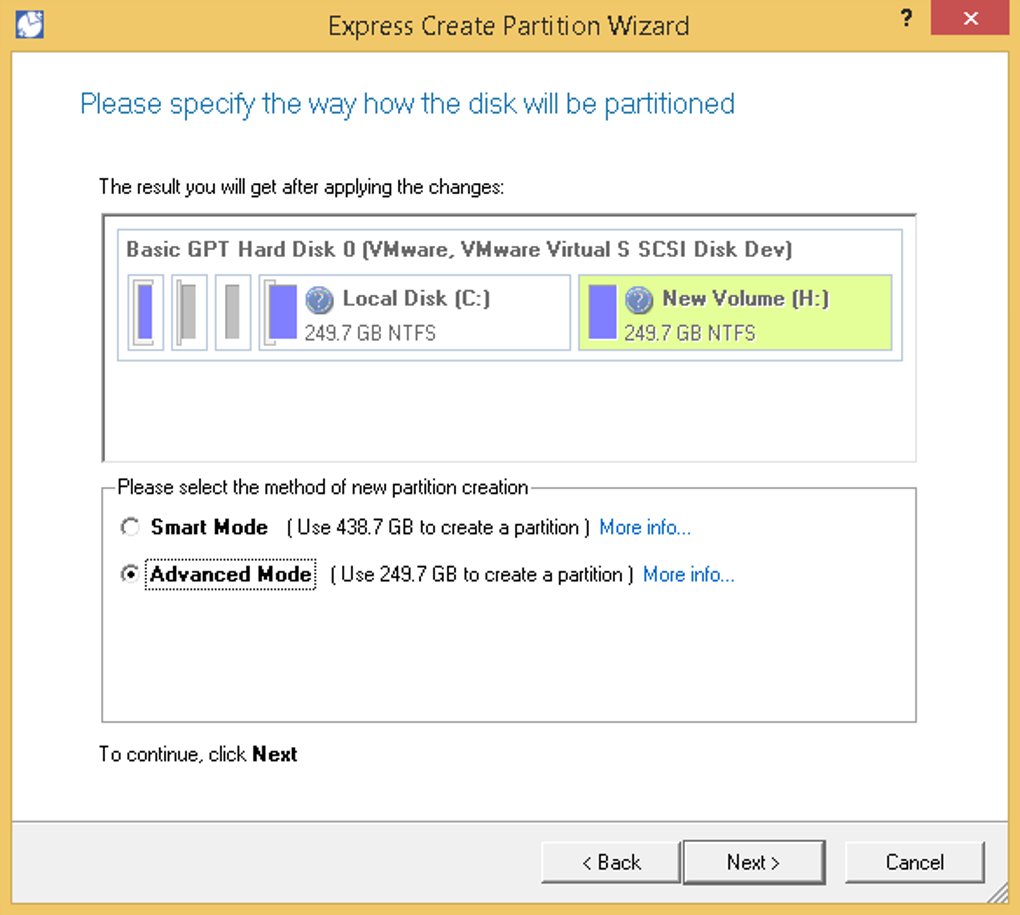
Paragon Partition Manager Free Edition (64-bit) presents a user-friendly interface designed to streamline the partitioning process. Its core functionality revolves around automating many of the complex steps involved in hard drive management. Upon launching the application, it automatically scans the connected drives, identifying existing partitions and available free space. This allows users to quickly visualize their disk layout and easily select the desired partitions for manipulation.
The software’s strengths lie in its simplified approach to basic partitioning tasks. Users can create new partitions with minimal input, resizing existing ones with a simple drag-and-drop interface. Reformatting is equally straightforward, allowing users to select from various file systems. Deleting partitions is equally simple, although users should exercise caution to avoid accidental data loss. The inclusion of a built-in disk scanner adds an extra layer of security, allowing users to identify potential issues and bad sectors before making any changes to the drive.
One of the notable features is the inclusion of an NTFS/HFS+ Conversion Wizard. This allows users to convert partitions between these two common file systems, improving cross-platform compatibility between Windows and macOS systems. This functionality is particularly beneficial for users needing to share data between different operating systems. The ability to easily switch between file systems eliminates the need for complex workarounds or third-party tools.
Furthermore, the software incorporates more advanced features such as the ability to undelete, merge, move, and resize partitions offering a degree of flexibility beyond the very basic creation and deletion capabilities. A hex editor allows for low-level sector editing, providing access for more technical users to handle complex drive issues. The inclusion of partition conversion tools and surface testing capabilities for bad sectors enhances the overall functionality, addressing advanced users’ needs. A notable feature is the disk cloning functionality enabling a complete system migration, although this aspect is likely more beneficial to advanced users.
Ease of Use and User Interface
Paragon Partition Manager Free Edition (64-bit) is designed with user-friendliness in mind. The interface is intuitive and straightforward, even for users with limited technical experience. The automated scanning process simplifies the initial assessment of the hard drive, removing the need for manual configuration. The drag-and-drop functionality for resizing partitions further enhances the ease of use, allowing users to visually adjust partition sizes without complex commands.
However, while the simplified interface is beneficial for beginners, it may also be a limitation for more experienced users. Advanced users often require more granular control over the partitioning process, and this software may not offer the level of customization and flexibility they desire. The lack of detailed options and configuration settings could be a significant drawback for individuals accustomed to more powerful partitioning tools. The streamlined nature may lead to less flexibility in managing more complex scenarios.
The documentation accompanying the software plays a crucial role in user experience. Unfortunately, the documentation provided may not be as comprehensive as some users would prefer. While the basic operations are easily understood, more complex features or troubleshooting scenarios might require additional research or external resources. Improved and more accessible documentation would significantly benefit the user experience, particularly for users attempting more advanced tasks.
Comparison with Alternative Software
Paragon Partition Manager Free Edition (64-bit) competes with a range of other disk partitioning software, both free and commercial. Compared to commercial solutions offering extensive features and technical support, the free edition naturally lacks some advanced options and the guarantee of dedicated technical assistance. However, the free edition provides a useful alternative for users primarily requiring basic partitioning operations.
Compared to other freeware alternatives, Paragon Partition Manager Free Edition holds its own with its user-friendly interface and automated processes. However, certain free alternatives may offer a broader range of advanced features, potentially surpassing Paragon in terms of capabilities for power users. The choice depends heavily on the user’s specific needs and technical expertise. A power user may prefer a tool with more manual control while a novice user might appreciate the simplicity of Paragon’s automated processes.
Limitations and Potential Drawbacks
Despite its strengths, Paragon Partition Manager Free Edition (64-bit) has several limitations. While automation simplifies basic tasks, it can also restrict flexibility. The lack of extensive manual controls can be frustrating for advanced users accustomed to fine-grained control over partitioning parameters. The comparatively limited documentation further hinders the user experience when dealing with non-standard situations or troubleshooting complex issues.
Another potential drawback is the absence of readily available customer support for the free edition. While the software is generally user-friendly, encountering unexpected issues or needing guidance on advanced operations could be challenging without dedicated support channels. This lack of direct support might increase the reliance on community forums or online resources, which can be time-consuming and may not always provide reliable solutions.
Conclusion
Paragon Partition Manager Free Edition (64-bit) is a valuable tool for users requiring basic hard drive partitioning functionalities. Its intuitive interface and automated processes make it accessible to those with limited technical skills. The inclusion of the NTFS/HFS+ Conversion Wizard adds considerable value, particularly for cross-platform users. However, its limitations in terms of advanced features, granular control, and comprehensive documentation might hinder the experience for more technically inclined users. For basic partitioning tasks, it offers a simple and effective solution. For more advanced users requiring flexibility, customization, and extensive support, exploring alternative options might be more suitable. The choice ultimately depends on the user’s specific needs and technical proficiency. The free nature of the software makes it a worthwhile trial for users unsure of their partitioning tool needs.
File Information
- License: “Free”
- Version: “17.9.1”
- Latest update: “August 5, 2025”
- Platform: “Windows”
- OS: “Windows Vista”
- Downloads: “917”
- Size: “177.76 MB”


