
PartitionGuru Free, a data recovery and partition management utility developed by Eassos, offers a compelling blend of functionality and accessibility. This review delves into its features, performance, and limitations, comparing it to its paid counterpart and exploring its position within the crowded market of data recovery and disk management software. While a free offering naturally involves compromises, PartitionGuru Free proves to be a surprisingly robust and effective tool for many users.
Core Features and Functionality
PartitionGuru Free’s strength lies in its all-in-one approach. It consolidates several essential functions into a single, user-friendly package, making it an attractive option for both novice and experienced users. The software’s core functionalities can be categorized as follows:
1. Data Recovery: This is arguably PartitionGuru Free’s most significant feature. The data recovery process is designed to be intuitive, employing a straightforward three-step approach:
-
Partition Selection: Users first select the partition or drive from which they wish to recover data. This could be a hard drive partition, an external drive, or even a USB flash drive. The software presents a clear visualization of connected drives, allowing for easy identification.
-
Scanning: Once the target partition is selected, PartitionGuru Free initiates a scan to locate lost or deleted files. The scanning process can be time-consuming depending on the size of the drive and the extent of data loss. Progress indicators provide feedback during the scan, keeping the user informed about its progress.
-
Preview and Recovery: After the scan completes, PartitionGuru Free presents a list of recoverable files. Users can preview files before recovery, ensuring they are retrieving the desired data. This preview function is crucial, allowing users to verify the integrity of the recovered files and avoid recovering unwanted or corrupted data. Users can then select the files they wish to recover and specify a recovery location.
PartitionGuru Free’s data recovery capabilities extend beyond simple file deletion. It can recover data from formatted partitions, damaged drives, and even lost or corrupted partitions. This makes it a versatile tool for addressing various data loss scenarios. The software’s compatibility with various file systems, including FAT32, NTFS, and EXT4, further enhances its usability and appeal to a wider audience.
2. Partition Management: Beyond data recovery, PartitionGuru Free provides a suite of partition management tools, enabling users to:
- Create Partitions: Users can create new partitions on their hard drives, effectively dividing storage space into logical units. This allows for better organization and management of data.
-
Resize Partitions: The ability to resize partitions is invaluable for optimizing disk space usage. Users can expand or shrink partitions to meet their evolving storage needs.
-
Format Partitions: Partition formatting allows users to prepare partitions for use. This often involves deleting existing data, so caution is advised. PartitionGuru Free supports various file systems, allowing users to format partitions with the appropriate system for their needs.
-
Delete Partitions: This function allows users to completely remove partitions, freeing up disk space or preparing the drive for other configurations.
-
Wipe Partitions: This provides a secure way to delete data, making recovery significantly more difficult. This function is crucial for those needing to securely erase sensitive data.
3. Backup and Restore: This feature offers a layer of data protection. While PartitionGuru Free’s backup functionality may not be as comprehensive as dedicated backup software, it provides a convenient method for creating backups of partitions or the entire disk. This backup can then be used to restore the system to a previous state in case of data loss or system failure.
4. Disk Utilities: A range of disk utilities complements the core functionalities. These include:
-
Bad Sector Check: This allows users to scan for and identify bad sectors on their hard drives. Knowing the location of bad sectors can help prevent further data loss and improve overall disk health.
-
4K Sector Alignment: The ability to align partitions to 4K sectors can improve performance, particularly on modern drives.
-
Hex Editor: This advanced feature allows for low-level editing of disk sectors, useful for advanced users troubleshooting complex issues or recovering data from severely damaged drives.
Free vs. Standard: A Comparison
PartitionGuru Free is the free version of the more feature-rich PartitionGuru Standard. While the free version incorporates most of the crucial functions, certain limitations distinguish it from its paid counterpart. These limitations include:
-
Batch USB Formatting: PartitionGuru Free lacks the ability to format multiple USB drives in a batch process. This can be inconvenient for users needing to format a large number of USB drives simultaneously.
-
Dynamic Disk Support: The free version doesn’t support Dynamic Disks, a disk management feature available in Windows. This limits its applicability to certain disk configurations.
-
Sector or File System Cloning: PartitionGuru Free does not offer the option to clone disks at the sector or file system level. This functionality, available in the Standard version, provides more flexibility and control over the cloning process.
-
Permanent File Deletion: While PartitionGuru Free allows for data deletion, it may not provide the same level of secure deletion as the Standard version, making it potentially easier for advanced users to recover deleted files.
Despite these omissions, the features present in the free version are sufficient for many users. The core data recovery, partition management, and essential disk utilities provide a valuable toolkit for addressing common data loss and disk management scenarios. The decision to opt for the Standard version depends largely on the user’s specific needs and budget.
User Experience and Interface
PartitionGuru Free is designed with user-friendliness in mind. The interface is intuitive and straightforward, making it accessible even to users with limited technical experience. The software provides clear instructions and visual cues throughout the process, guiding users through each step. The logical organization of menus and functions minimizes the learning curve, allowing users to quickly become familiar with the software’s capabilities.
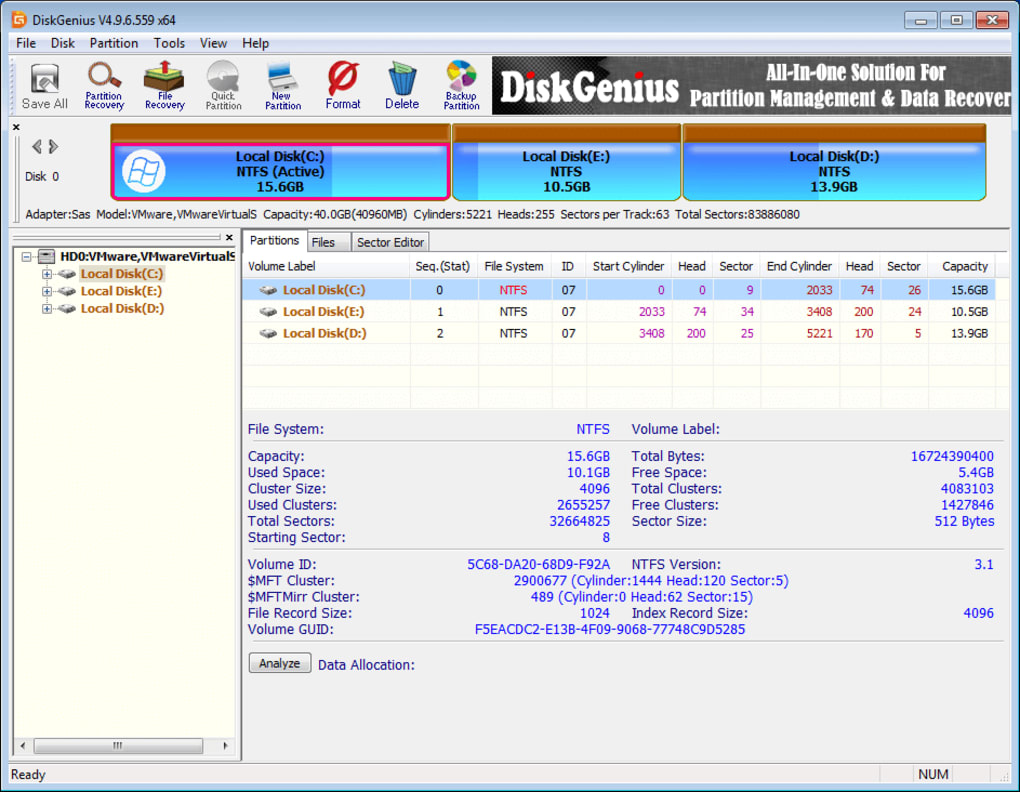
While the interface isn’t visually stunning, it’s functional and effective. Information is presented clearly, and the software avoids unnecessary complexities, ensuring a smooth user experience. The focus on ease of use makes PartitionGuru Free a compelling choice for users who prioritize simplicity and ease of access.
Performance and Reliability
PartitionGuru Free has demonstrated reliable performance in various testing scenarios. Its data recovery capabilities are particularly impressive, successfully recovering data from a range of simulated data loss scenarios. The partition management tools also functioned as advertised, allowing for the creation, resizing, formatting, and deletion of partitions without any significant issues.
The speed of the scanning process can vary depending on the size of the drive and the complexity of the data loss scenario. While the software provides progress indicators, users should be prepared for potential delays, especially when dealing with larger drives.
Conclusion: A Powerful Free Tool
PartitionGuru Free, despite its free status, presents a remarkably powerful and versatile toolkit for data recovery and partition management. Its intuitive interface, robust functionality, and compatibility with various file systems make it a strong contender in a competitive market. While the absence of certain advanced features found in the Standard version is notable, those limitations do not significantly detract from its overall utility for many users.
For individuals seeking a free, yet capable, solution for recovering lost data or managing their disk partitions, PartitionGuru Free stands as a highly recommended option. Its ease of use and impressive functionality make it a valuable tool for both casual users and those with more technical expertise. If advanced features such as batch USB formatting, dynamic disk support, or advanced cloning capabilities are essential, the upgrade to the Standard version is a worthy consideration. However, for the majority of users, PartitionGuru Free effectively addresses many common data recovery and disk management needs.
File Information
- License: “Free”
- Latest update: “June 27, 2025”
- Platform: “Windows”
- OS: “Windows 2000”
- Language: “English”
- Downloads: “17.5K”
- Size: “63.40 MB”


