
PassFab Android Unlocker is a software tool designed to help users regain access to their Android devices when faced with forgotten passwords, PINs, patterns, or biometric lock issues. It also offers a solution for bypassing the Google Factory Reset Protection (FRP) lock, a security feature that prevents unauthorized access after a factory reset. This comprehensive guide will explore the functionality, compatibility, system requirements, and overall reliability of PassFab Android Unlocker for Windows. We will also briefly examine some alternative unlocking tools available on the market.
Unlocking Your Android Device with PassFab Android Unlocker
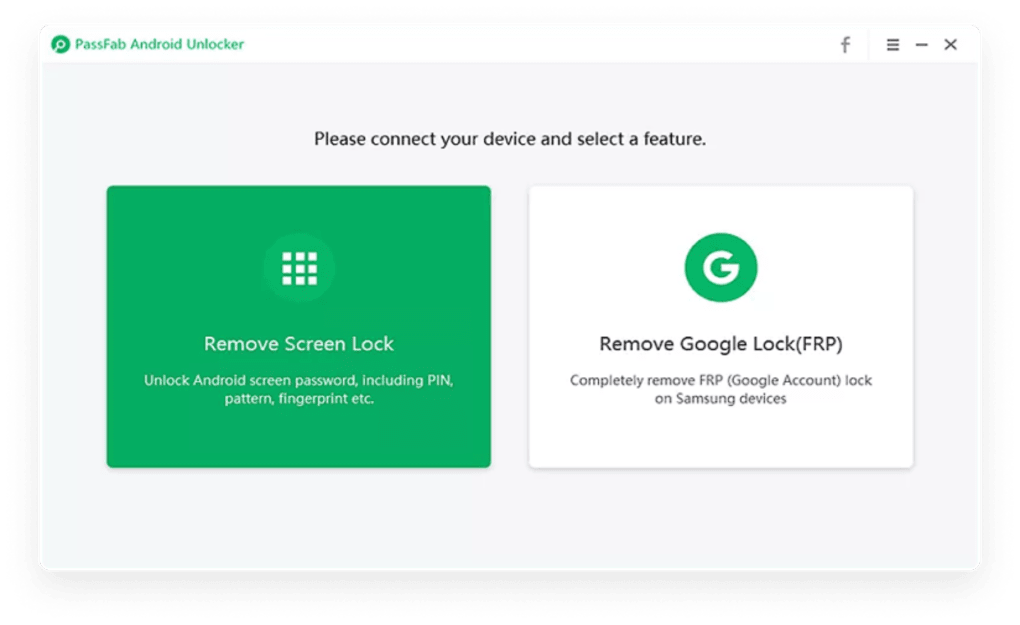
Locked out of your Android phone or tablet? PassFab Android Unlocker provides a user-friendly solution to regain control without needing advanced technical skills. The software guides you through a straightforward process, enabling you to bypass various screen locks quickly and efficiently. Whether it’s a forgotten PIN, a complex password, a challenging pattern, or even a malfunctioning fingerprint sensor, PassFab Android Unlocker aims to provide a quick resolution. Its intuitive interface minimizes the learning curve, making it accessible to both tech-savvy users and those with limited computer experience.
The process generally involves connecting your Android device to your Windows PC via a USB cable. PassFab Android Unlocker then employs proprietary algorithms to analyze the device’s security settings and bypass the lock. The software provides real-time progress updates, keeping you informed throughout the process. Troubleshooting tips are also integrated to assist users who may encounter unexpected issues during the unlocking procedure.
The software’s efficiency is a key selling point. Instead of resorting to potentially data-destructive factory resets or complicated ADB (Android Debug Bridge) commands that require a deep understanding of Android’s inner workings, PassFab Android Unlocker aims to provide a fast and secure solution. This significantly reduces the time and effort needed to regain access to your locked Android device.
Removing Google FRP Lock: A Crucial Feature
One of the most significant benefits of PassFab Android Unlocker is its capability to remove the Google Factory Reset Protection (FRP) lock. This lock is a critical security measure implemented by Google to prevent unauthorized access to Android devices after a factory reset. If you’ve purchased a used Android device or performed a factory reset without remembering your Google account credentials, FRP can effectively lock you out.
PassFab Android Unlocker offers a method to circumvent this lock, particularly useful for Samsung devices running Android 6.0 and higher. This feature empowers users to fully utilize their acquired devices without being hindered by previous account restrictions. The ability to bypass FRP distinguishes PassFab Android Unlocker from many other simpler unlocking tools, making it a highly valuable asset for users dealing with second-hand devices or situations where factory reset has been unintentionally performed. This FRP bypass feature significantly expands the usability and appeal of the software.
Broad Device and Operating System Compatibility
PassFab Android Unlocker boasts compatibility with a wide range of Android devices and brands. The software is designed to work with various models from leading manufacturers such as Samsung, LG, Huawei, Xiaomi, and Motorola, among others. The developers actively update the software to maintain compatibility with the latest Android versions and newly released devices. This ensures that users can rely on PassFab Android Unlocker even as the Android ecosystem evolves.
Furthermore, the software supports both smartphones and tablets, enhancing its versatility. The compatibility extends beyond device brands and models to encompass diverse screen sizes and hardware configurations. The developers’ commitment to regular updates further underscores their dedication to maintaining broad support, ensuring that the software remains relevant and functional for a wide user base. This commitment to constant improvement and compatibility differentiates PassFab Android Unlocker from competitors who may lag in supporting the latest devices.
User Interface, Ease of Use, and System Requirements
PassFab Android Unlocker is designed with user-friendliness in mind. The interface is intuitive and visually clear, guiding users through each step of the unlocking process with clear instructions and visual aids. Even those unfamiliar with technical software will find the process relatively straightforward and easy to navigate. Real-time progress indicators provide reassurance and transparency throughout the unlocking procedure.
To ensure smooth operation, PassFab Android Unlocker has specific system requirements. It requires a Windows operating system, with compatibility extending from Windows 7 to Windows 11. The software is optimized for Windows and offers optimal performance on this platform. Minimum system requirements include a 1 GHz Intel/AMD processor, 512 MB of RAM (though 1 GB or more is recommended), 200 MB of free hard drive space, and a USB connection for device connection. A display resolution of 1024x768 or higher is also advised for optimal visualization. A stable internet connection is also necessary for downloading firmware packages and software updates, ensuring the software remains up-to-date and functional.
Pricing, Availability, and Customer Support
PassFab Android Unlocker is a paid application, offering users a trial version to preview its functionality before committing to a purchase. The full unlock functionality and FRP removal capabilities require a license purchase. Different subscription options are available, including monthly, yearly, and lifetime plans, catering to users’ varying needs and usage patterns.
The developers provide customer support through their official website, offering a range of resources including FAQs, detailed user guides, and technical assistance to address any challenges encountered during the unlocking process. This commitment to customer support demonstrates a proactive approach towards user satisfaction and problem-solving. The availability of multiple subscription options allows for flexibility in choosing a pricing plan that best suits individual needs and budget constraints.
Why Choose PassFab Android Unlocker? A Reliability Assessment
PassFab Android Unlocker distinguishes itself as a reliable tool for bypassing Android locks and FRP restrictions due to several key factors. Its user-friendly interface and intuitive design make the process accessible to a wide range of users, regardless of their technical expertise. The software’s broad compatibility with various Android devices and brands, coupled with regular updates to maintain compatibility with the latest Android versions, ensures its ongoing relevance and effectiveness. The inclusion of FRP bypass functionality further enhances its utility, especially for users dealing with second-hand devices or unintentional factory resets.
The software’s efficiency, compared to alternative methods like factory resets or complex ADB commands, offers a considerable time-saving advantage. The provision of customer support and troubleshooting resources contributes to user confidence and problem resolution. The structured process guided by the software and its real-time progress indicators enhance the user experience and minimize frustration.
Alternative Android Unlocking Tools: A Brief Overview
While PassFab Android Unlocker presents a strong solution, several alternative Android unlocking tools exist. Each tool offers its own strengths and weaknesses, catering to different user needs and technical expertise. A brief overview of some popular alternatives is provided below:
- UltFone Activation Unlocker: This versatile utility focuses on bypassing both Apple ID and screen locks on both iOS and Android devices. Its broad device compatibility makes it suitable for users with a mix of Apple and Android devices.
-
iMyFone LockWiper Android: This tool is specifically designed for unlocking Android devices, offering a dedicated solution for bypassing various lock types. It is often compared to PassFab Android Unlocker in terms of functionality and ease of use.
-
Tenorshare 4uKey for Android: Similar to the above options, this tool aims to unlock Android devices efficiently and reliably. The specific features and ease of use often vary between these competing software solutions, necessitating a comparison based on individual user needs and preferences.
The choice of unlocking tool ultimately depends on specific requirements. While PassFab Android Unlocker emphasizes ease of use and broad compatibility, others might offer specialized features or advantages for particular devices or lock types.
Conclusion: Reclaiming Your Android Device with Confidence
PassFab Android Unlocker provides a comprehensive and user-friendly solution for bypassing Android screen locks and FRP restrictions. Its intuitive interface, wide device compatibility, and efficient process make it a valuable tool for both individual users and professionals. While alternative unlocking tools exist, PassFab Android Unlocker’s strength lies in its combination of user-friendliness, broad compatibility, and reliable functionality. By providing a clear, step-by-step process and dedicated customer support, PassFab Android Unlocker empowers users to regain access to their Android devices quickly and confidently. Consider downloading it today if you’re facing an Android lockout situation.
File Information
- License: “Trial version”
- Version: “2.6.0.5”
- Latest update: “April 10, 2025”
- Platform: “Windows”
- OS: “Windows 11”
- Language: “English”
- Downloads: “18.6K”
- Size: “2.15 MB”


