
PasswdFinder is a free password recovery tool designed for Windows operating systems. It aims to recover lost or forgotten passwords stored within various applications on a user’s system. While touted as a simple and effective solution, its efficacy and limitations warrant a closer examination. This review will delve into PasswdFinder’s capabilities, pros and cons, and offer alternative solutions for users seeking password recovery functionality.
Functionality and Features
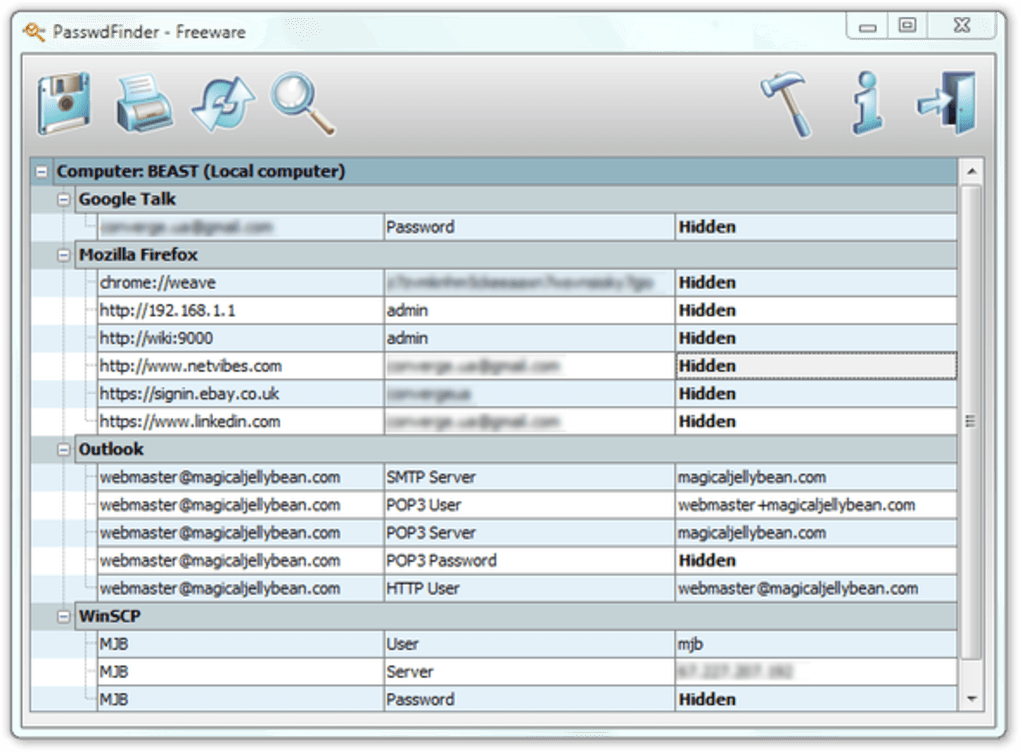
PasswdFinder operates by scanning the user’s system for stored passwords within supported applications. It utilizes decryption techniques to access these keys, aiming to provide users with a list of their recovered passwords. The software claims to be particularly effective at recovering passwords from web browsers, email clients, FTP clients, and instant messaging applications. However, a critical limitation lies in its database of supported applications. The program’s effectiveness is directly tied to the software it recognizes, meaning that many modern applications and more recently developed software may not be included in its database, rendering PasswdFinder ineffective in those instances.
The program’s interface is described as intuitive and user-friendly, requiring minimal technical expertise to operate. Once the scan is complete, users can export the recovered passwords in several formats, including HTML, TXT, CSV, XML, XLS, DOC, RTF, and PDF. This variety of export options offers users flexibility in how they manage and utilize the recovered passwords. The ability to export to common spreadsheet and document formats is particularly useful for organizing and sharing the information.
Pros and Cons of PasswdFinder
While PasswdFinder offers a degree of functionality in password recovery, it’s crucial to weigh its advantages and disadvantages before utilizing the software.
Pros:
- Free of Charge: PasswdFinder is available at no cost, making it an accessible option for users who may only need a single instance of password recovery. This affordability is a significant advantage, especially for users on a tight budget.
- Ease of Use: The intuitive interface contributes to the software’s user-friendliness. The straightforward design minimizes the learning curve, allowing even users with limited technical knowledge to operate the software effectively. The simplicity of its operation reduces the potential for user error during the password recovery process.
- Multiple Export Formats: The diverse range of export options provides users with the flexibility to choose the format that best suits their needs. This adaptability enhances the program’s utility and integration with various data management systems. The availability of common formats like CSV and XLS is particularly beneficial for importing the data into spreadsheets for further analysis or organization.
- Fast Scan Times (for supported applications): For applications within its supported database, PasswdFinder boasts fast scan times, quickly providing users with the recovered password information. The speed of recovery is a key factor contributing to the software’s user-friendly experience.
Cons:
- Limited Application Support: The most significant drawback is the limited database of supported applications. This severely restricts its overall effectiveness, as many modern and widely used applications are not included in the supported list. This limitation renders the software useless in many scenarios, undermining its intended purpose.
- No Updates Mentioned: The lack of information about updates raises concerns about the software’s ability to keep up with the constantly evolving landscape of software applications. Without regular updates, the database of supported applications will likely remain stagnant, further limiting its usefulness over time. This lack of development suggests a potential lack of ongoing support for the software.
- Security Concerns (Implicit): While the software is presented as a solution for recovering lost passwords, its core function revolves around accessing encrypted data. The security implications of using such software need to be considered carefully, as unauthorized access to passwords poses significant risks. The use of such tools should be undertaken with caution and an understanding of the potential security risks involved.
- Potential for False Positives: As with many password recovery tools, there’s a possibility of false positives or inaccurate recovery results. This can lead to frustration and wasted time if the user relies on the results without verification. The lack of inherent verification mechanisms within the software reinforces the need for careful review of the recovered passwords.
Alternatives to PasswdFinder
Given PasswdFinder’s limitations, it is beneficial to explore alternative solutions for password recovery. Several options exist, each with its strengths and weaknesses:
- Browser-Specific Password Managers: Most modern web browsers incorporate built-in password managers. These managers often offer features to recover passwords if they are forgotten. These built-in tools often integrate seamlessly with the browser and may provide a more secure and reliable solution for password retrieval within that browser’s context.
- Dedicated Password Managers (e.g., LastPass, Bitwarden, 1Password): These applications offer secure password storage and recovery mechanisms. They often include robust security features such as encryption and multi-factor authentication, which are absent from PasswdFinder. The investment in a dedicated password manager provides a more secure and comprehensively featured solution compared to relying on individual software-specific recovery attempts.
- Operating System Recovery Tools: Certain operating systems provide built-in tools to recover user data, potentially including password information. The specific tools and procedures will vary depending on the operating system being used. However, these tools offer a built-in solution that may avoid external software dependencies and possible security risks.
- Professional Data Recovery Services: For critical data recovery scenarios, hiring a professional data recovery service may be necessary. These services employ sophisticated tools and techniques to recover data, including passwords, which may have been lost due to system failures or other data loss events. These services are more expensive, but their expertise may be necessary in complex recovery situations.
Conclusion
PasswdFinder offers a basic, free approach to password recovery for a limited selection of applications. Its ease of use is a notable advantage, but the significant limitations in application support and lack of information regarding updates severely restrict its practical value. Users should carefully weigh the potential risks and limitations before employing this software. Alternatives such as browser-integrated password managers, dedicated password managers, operating system tools, or professional data recovery services offer more robust, secure, and reliable solutions for password management and recovery. Choosing a more comprehensive solution is often a better investment in terms of security and overall effectiveness, offsetting the initial cost compared to the potential losses associated with lost access to critical data and accounts. Remember that the use of password recovery tools should always be approached with caution and a full understanding of the associated security considerations.
File Information
- License: “Free”
- Version: “1.0.0.25”
- Latest update: “June 17, 2025”
- Platform: “Windows”
- OS: “Windows Vista”
- Language: “English”
- Downloads: “14.1K”
- Size: “5.46 MB”


